
Design used to be… slow. Thoughtful, yes. But also painfully manual. You’d sit for hours tweaking colors, adjusting layouts, second-guessing typography choices. And honestly, sometimes you’d still end up with something that felt slightly off.
Now? Things are shifting. Fast.
With the rise of AI Graphic Design Tools, creativity is no longer limited by time, skill level, or even imagination to some extent. These tools don’t replace designers, not really. They amplify them. They remove friction. They help you get from idea to execution much faster, sometimes almost instantly.
I’ve been exploring a bunch of these tools lately, and it’s kind of wild how far they’ve come. Some feel like having a junior designer sitting beside you. Others feel more like a creative director who throws unexpected ideas your way.
In this guide, we’ll break down the 10 best tools that are actually worth your time in 2026. Not just hype. Not just “top lists.” Real, practical tools you can start using today.
Why AI is Redefining Graphic Design
Before we jump into the tools, it’s worth understanding what’s actually happening here.
AI in design isn’t just about automation. It’s about augmentation.
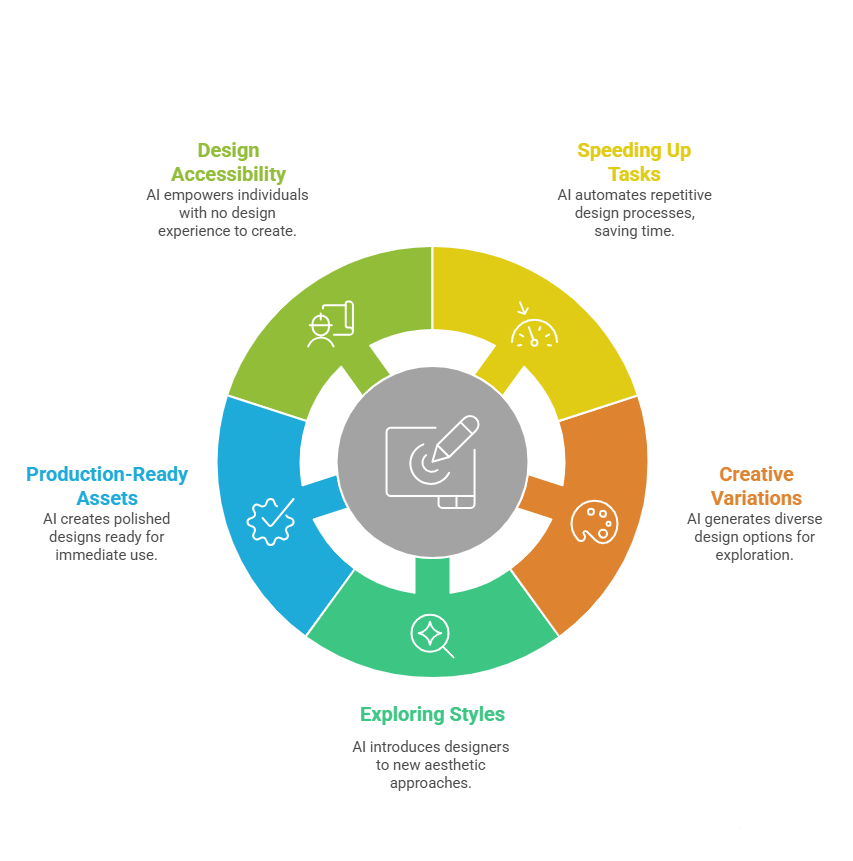
Designers today are using AI Graphic Design Tools to:
- Speed up repetitive tasks
- Generate creative variations
- Explore styles they might not have considered
- Create production-ready assets in minutes
And maybe more importantly, these tools are making design accessible. Someone with zero design background can now create something decent. Not perfect, but good enough to publish, test, or validate an idea.
That changes things.
1. Canva
The Everyday Designer’s AI Companion
Let’s start with something familiar. Canva has evolved massively.
What used to be a simple drag-and-drop design tool is now powered by AI features like Magic Design, text-to-image, and automated layout suggestions.
You type a prompt, and it generates full design concepts. Social posts, presentations, ads, you name it.
What I personally like is how approachable it feels. You don’t need to “learn” it. You just… start.
In the world of AI Graphic Design Tools, Canva sits at that perfect intersection of simplicity and power.
2. Adobe Firefly
AI Meets Professional Design Workflows
If Canva is beginner-friendly, Adobe Firefly is for professionals who want control.
Built into the Adobe ecosystem, Firefly allows you to generate images, text effects, and even vectors using prompts. It integrates with tools like Adobe Photoshop and Adobe Illustrator.
That means you can generate something with AI and refine it with precision tools.
It’s powerful, but also slightly intimidating at first. Still, once you get comfortable, it becomes one of the most versatile AI Graphic Design Tools available.
3. Midjourney
Where Creativity Gets Wild
Midjourney is different.
It doesn’t try to be practical. It tries to be creative. Sometimes weirdly so.
You input a prompt, and it generates stunning, often surreal visuals. The kind that makes you pause and think, “I wouldn’t have come up with that.”
Designers use it for concept art, branding inspiration, mood boards, and even final assets.
It’s not perfect for structured design tasks, but as one of the more experimental AI Graphic Design Tools, it’s unmatched in artistic output.
4. DALL·E
Precision Meets Creativity
DALL·E feels more controlled compared to Midjourney.
You can describe very specific scenes, styles, and compositions, and it usually delivers something close to what you imagined.
That makes it incredibly useful for marketing creatives. Need a specific product shot? A conceptual illustration? A themed campaign visual?
DALL·E is one of those AI Graphic Design Tools that balances creativity with usability.
5. Runway ML
Beyond Static Design
Runway ML goes beyond images.
It allows you to create videos, animations, and motion graphics using AI. You can remove backgrounds, generate scenes, and even edit videos using text prompts.
This is where design starts blending into content creation.
If you’re working on social media, ads, or storytelling formats, this is one of the most forward-thinking AI Graphic Design Tools you can explore.
6. Looka
Branding Made Simple
Branding used to require a designer. Or at least some design knowledge.
Looka simplifies that.
You enter your brand name, choose a few styles, and it generates logo options, color palettes, and brand kits.
Is it perfect? Not always. But it’s a great starting point.
Among AI Graphic Design Tools, Looka is particularly useful for startups and small businesses that need something quick and decent.
7. Khroma
Smarter Color Selection
Color theory is tricky.
Khroma uses AI to learn your preferences and generate color combinations that match your style.
It’s surprisingly helpful. Especially when you’re stuck choosing palettes.
While it’s more niche compared to other AI Graphic Design Tools, it solves a very specific problem really well.
8. Uizard
From Idea to Interface
Uizard is built for UI/UX design.
You can sketch a wireframe, and it converts it into a digital design. Or describe an app idea, and it generates layouts.
It’s fast. Almost shockingly fast.
For product teams, this is one of those AI Graphic Design Tools that can dramatically speed up prototyping.
9. Designs.ai
All-in-One Creative Suite
Designs.ai bundles multiple tools into one platform.
Logo maker, video creator, design generator, and more.
It’s not the best at everything, but it’s convenient.
If you’re someone who wants a single tool for multiple tasks, this is one of the more practical AI Graphic Design Tools to consider.
10. Remove.bg
Small Tool, Big Impact
Sometimes, the simplest tools are the most useful.
Remove.bg does one thing. Removes backgrounds.
And it does it incredibly well.
No manual masking. No complex editing.
Among all AI Graphic Design Tools, this is probably the quickest win you can add to your workflow.
How to Choose the Right Tool for Your Needs
This is where things get a bit… subjective.
Not every tool will work for you.
If you’re a beginner, Canva or Looka might be enough.
If you’re a professional designer, you’ll probably lean toward Adobe Firefly or Midjourney.
If you’re working in marketing, DALL·E and Runway ML might be more relevant.
The point is, the best AI Graphic Design Tools are the ones that fit your workflow, not the ones that look impressive on a list.
Real-World Use Cases of AI in Graphic Design
Let’s make this practical.
Brands today are using these tools to:
- Create ad creatives at scale
- Generate social media content faster
- Test multiple design variations quickly
- Build brand assets without large teams
And honestly, this is just the beginning.
The way AI Graphic Design Tools are evolving, it’s likely that design workflows will look completely different in the next few years.
Limitations You Should Be Aware Of
AI isn’t perfect.
It can generate generic designs. Sometimes repetitive. Occasionally inaccurate.
There’s also the question of originality. If everyone uses the same tools, will everything start to look the same?
That’s a valid concern.
The key is to use these tools as assistants, not replacements.
Even the best AI Graphic Design Tools still need human judgment.
The Future of AI in Graphic Design
This is where things get interesting.
We’re moving toward a world where design becomes more conversational.
You describe what you want, and the tool creates it.
Iterate. Refine. Adjust.
Almost like talking to a designer.
The line between idea and execution is getting thinner.
And honestly, that’s exciting.
Final Thoughts
If you’ve been hesitant about trying AI in design, now might be the time.
Start small. Experiment. Play around.
You don’t need to master everything.
Even using one or two AI Graphic Design Tools can significantly improve your workflow.
And who knows… you might actually enjoy the process more.
Because at the end of the day, that’s what design should feel like. Creative. Fluid. A little unpredictable.
And maybe, just a little fun.