
Video is everywhere right now. Scroll any feed and you’ll see it dominating attention. But what’s quietly changed over the last couple of years is not just how much video we consume, but how it’s created. Editing, which used to be slow, technical, and honestly a bit intimidating, has become surprisingly accessible.
That shift is largely thanks to AI.
If you’ve ever tried trimming clips manually, syncing audio, adding subtitles, or creating social media cuts, you know it can eat up hours. I’ve been there too, staring at timelines and wondering if there’s a faster way. Turns out, there is.
In this article, we’ll break down everything you need to know about AI Video Editing Tools, how they work, why they matter, and which platforms are actually worth your time in 2026.
What Are AI Video Editing Tools?
At a basic level, AI-powered video editors use machine learning to automate parts of the editing process that would normally require manual effort. But that description feels a bit too simple.
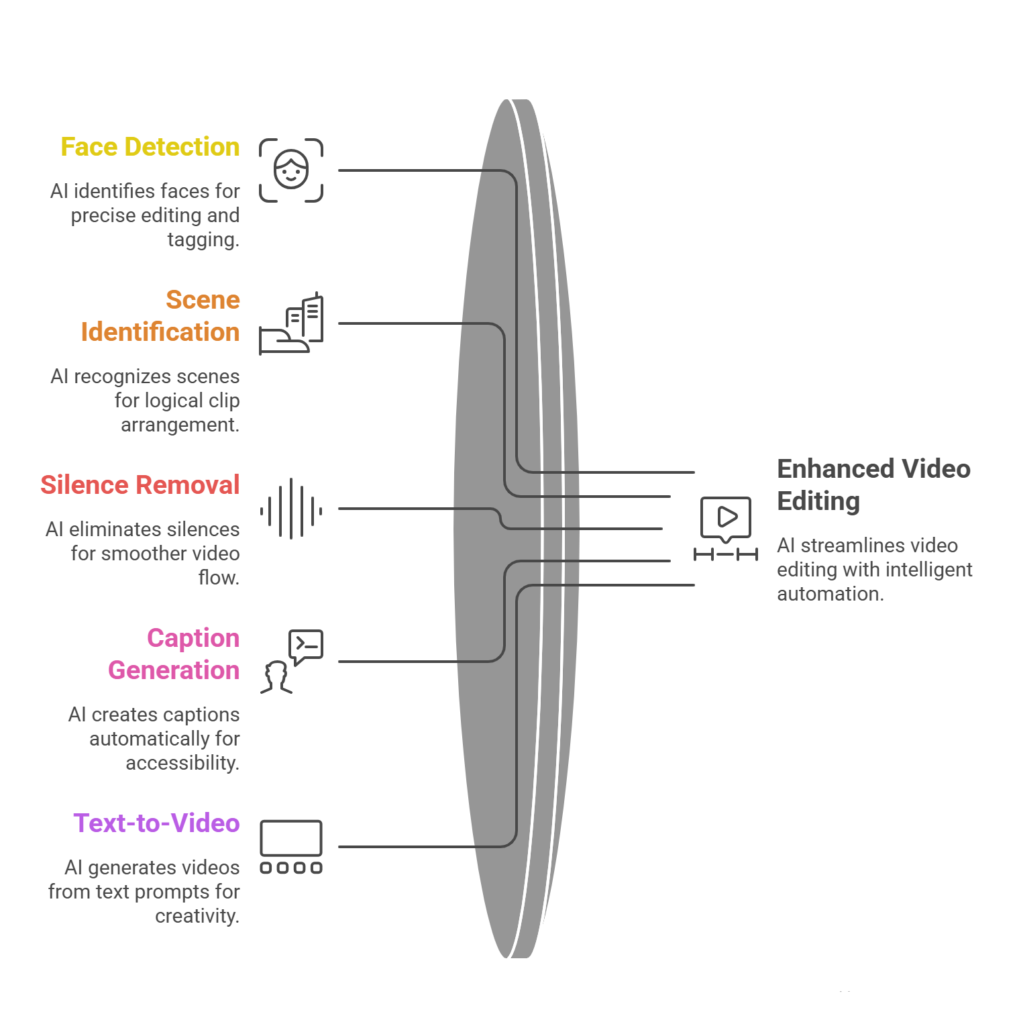
These tools don’t just “edit faster.” They understand video in a way traditional software never did. They can detect faces, identify scenes, remove silences, generate captions, and even create entire videos from text prompts.
So instead of dragging clips around a timeline for hours, you might just upload footage and let the software suggest cuts, transitions, and highlights automatically.
And that’s where things get interesting.
Why AI Video Editing Is Exploding in 2026
There’s a reason creators, marketers, and businesses are rushing toward AI-driven editing workflows.
First, content demand has exploded. Brands need short-form videos daily, sometimes multiple times a day. Doing that manually? Not realistic.
Second, AI has become genuinely good. Earlier tools felt gimmicky. Now, they’re actually usable in professional workflows.
Third, the rise of platforms like TikTok, Reels, and YouTube Shorts has changed editing priorities. Speed matters more than perfection in many cases.
This is exactly why AI Video Editing Tools are no longer optional for many creators. They’re becoming the default.
Key Features of Modern AI Video Editors
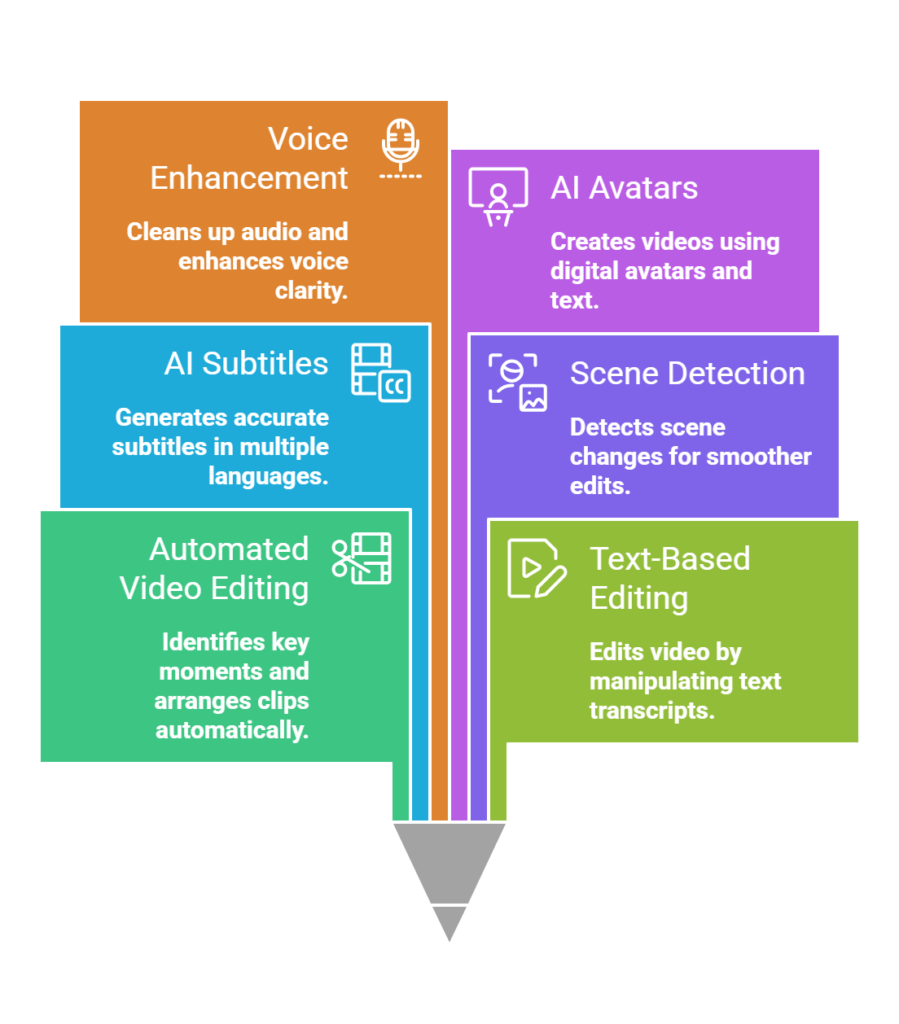
Automated Video Editing
This is usually the first thing people notice. Upload your raw footage, and the tool identifies key moments, cuts out dead space, and arranges clips into a coherent sequence.
It’s not always perfect, but it gets you 70–80% of the way there, which is honestly a huge time saver.
Text-Based Editing
Instead of editing on a timeline, you edit a transcript. Delete a sentence, and the corresponding video segment disappears.
This feature alone has changed how many people approach video editing.
AI Subtitles and Transcriptions
Captions are essential now, especially for social media. AI tools generate accurate subtitles automatically, often in multiple languages.
And yes, you can still tweak them if needed.
Scene Detection and Smart Cuts
The software can detect scene changes, speaker switches, and emotional cues. It uses this to create smoother edits and more engaging pacing.
Voice Enhancement and Noise Removal
Bad audio can ruin a good video. AI tools clean up background noise, enhance voice clarity, and sometimes even recreate missing audio segments.
AI Avatars and Synthetic Media
Some platforms go a step further and let you create videos without filming anything at all. You just input text, and a digital avatar presents it.
It feels a bit futuristic, but it’s already widely used in marketing and training videos.
Benefits of Using AI Video Editing Tools
Let’s be honest, the biggest benefit is time.
Editing that used to take hours can now take minutes. But beyond speed, there are a few deeper advantages.
One thing I’ve noticed is consistency. AI tools apply similar styles, pacing, and formatting across videos, which helps maintain brand identity.
Another benefit is accessibility. You don’t need to be a professional editor anymore. Even beginners can create decent-looking videos without a steep learning curve.
And then there’s scalability. If you’re producing content regularly, especially for marketing, AI Video Editing Tools allow you to scale output without scaling your workload.
How AI Is Changing Video Marketing
Video marketing has always been powerful, but AI is making it more efficient and personalized.
Marketers can now generate multiple versions of the same video tailored to different audiences. For example, slightly different messaging for different regions or demographics.
Also, A/B testing video content has become much easier. You can quickly create variations and see what performs best.
This is one of the reasons why AI Video Editing Tools are becoming central to performance marketing strategies.
15 Best AI Video Editing Tools in 2026 (Explained in Detail)
Choosing the right tool isn’t just about features. It’s about how well it fits into your workflow, your skill level, and honestly, how much time you want to spend editing.
I’ve spent quite a bit of time exploring these platforms, and while many promise similar things, they feel very different when you actually use them. Some are incredibly intuitive, others not so much.
Let’s break down the top 15 tools in detail so you can figure out what might actually work for you.
1. Runway
Runway feels like the future of video editing. It’s not just an editor, it’s more like a creative AI lab.
What makes it stand out is its generative AI capabilities. You can literally create or modify videos using text prompts. Want to remove a background? Done. Replace an object? Also possible. Generate entirely new visuals? That’s where it gets really interesting.
It also offers motion tracking, green screen removal without an actual green screen, and frame interpolation for smoother videos.
That said, it can feel overwhelming at first. It’s powerful, but there’s a slight learning curve. If you’re into creative experimentation or visual storytelling, this is probably one of the most exciting tools out there right now.
2. Descript
Descript completely changes how you edit videos.
Instead of working on a timeline, you edit a transcript. Delete a sentence from the text, and that part disappears from the video. It sounds simple, but it’s kind of mind-blowing when you first try it.
It also includes features like:
- Overdub (AI voice cloning)
- Screen recording
- Multitrack editing
- Automatic filler word removal
This makes it especially useful for podcasters, educators, and YouTubers who work with talking-head content.
Sometimes the transcription isn’t perfect, especially with accents or noisy audio, but it’s usually accurate enough to save a ton of time.
3. Pictory
Pictory is built for marketers. If you’ve ever wanted to turn a blog post into a video without much effort, this tool does that surprisingly well.
You paste your script or article, and it automatically:
- Breaks it into scenes
- Adds relevant visuals from stock libraries
- Generates captions
- Suggests music
It’s not super customizable compared to traditional editors, but that’s kind of the point. It’s designed for speed, not perfection.
It works best for content repurposing. Think social media videos, explainer clips, or quick educational content.
4. Synthesia
Synthesia is all about AI avatars.
Instead of recording yourself, you type a script and choose a virtual presenter. The AI generates a video of that avatar speaking your script in a very natural way.
This is widely used for:
- Corporate training videos
- Product demos
- Internal communications
- E-learning
It supports multiple languages and accents, which is a big advantage for global teams.
That said, it can feel slightly unnatural in emotional or highly expressive content. But for professional, informational videos, it works really well.
5. Veed.io
Veed is one of those tools that strikes a balance between simplicity and functionality.
It’s browser-based, which makes it accessible, and it includes:
- Auto subtitles
- Text-to-speech
- Video translation
- Background noise removal
It’s especially popular for social media creators because you can quickly format videos for different platforms.
The interface is clean and beginner-friendly, though it may feel limited if you’re used to advanced editing software.
6. Lumen5
Lumen5 is very similar to Pictory but leans more toward visual storytelling.
You input text, and it transforms it into a video with:
- Animated scenes
- Stock footage
- Branded templates
It’s particularly useful for businesses that want to create consistent branded content without hiring a full video team.
One thing I’ve noticed is that the output can sometimes feel a bit “template-like.” So you might need to tweak it to make it feel more unique.
7. InVideo
InVideo is a versatile platform that combines templates with AI assistance.
It offers:
- AI script generation
- Text-to-video conversion
- Thousands of templates
- Stock media integration
It’s a good middle-ground tool. Not too basic, not too complex.
If you’re creating ads, Instagram Reels, or YouTube content regularly, this can be a solid option. It gives you enough control without overwhelming you.
8. Wisecut
Wisecut is designed specifically for talking videos.
It automatically:
- Removes silences
- Adds background music
- Creates subtitles
- Adjusts audio levels
This makes it perfect for YouTubers, educators, or anyone recording monologues.
What’s interesting is how it uses AI to understand pacing. It tries to make your video feel more engaging by tightening pauses.
It’s not ideal for cinematic editing, but for straightforward content, it saves a lot of time.
9. Kapwing
Kapwing is a collaborative video editing platform with built-in AI features.
You get:
- Auto captions
- Smart cut (removes silence)
- Resize for different platforms
- Team collaboration tools
It’s especially useful if you’re working with a team. Multiple people can edit and comment on projects in real time.
The AI features are helpful, but the real strength is collaboration.
10. Magisto
Magisto focuses on automated storytelling.
You upload your clips, choose a style, and the AI creates a polished video with:
- Transitions
- Music
- Effects
It’s very hands-off, which is great if you don’t want to deal with editing at all.
However, this also means you have less control over the final output. It’s more about convenience than precision.
11. FlexClip
FlexClip is a simple, lightweight editor with some AI features built in.
It offers:
- Text-to-video
- Basic timeline editing
- Templates
- Stock media
It’s ideal for beginners or small businesses that need quick videos without a steep learning curve.
It’s not the most powerful tool, but sometimes simplicity is exactly what you need.
12. Filmora (AI Features)
Filmora has been around for a while, but its AI features have made it more relevant again.
It now includes:
- AI smart cutout
- Silence detection
- AI copywriting
- Motion tracking
What’s nice is that it still feels like a traditional editor, but with AI layered on top.
So if you want more control than fully automated tools but still want some assistance, Filmora is a strong option.
13. Adobe Premiere Pro (AI Integration)
Adobe Premiere Pro is still considered an industry-standard tool, but its AI features have significantly improved workflow efficiency.
With Adobe Sensei (its AI engine), you get:
- Auto reframe (for different aspect ratios)
- Scene edit detection
- Speech-to-text
- Color matching
This is more for professionals or serious creators. It’s powerful, but not beginner-friendly.
Still, if you’re already in the Adobe ecosystem, these AI features can save a lot of time.
14. Canva Video AI
Canva has quietly become a strong player in video editing.
Its AI features include:
- Text-to-video
- Magic design suggestions
- Auto resizing
- Voiceovers
What makes Canva stand out is ease of use. You don’t need any prior experience.
It’s perfect for:
- Social media content
- Presentations
- Quick marketing videos
It’s not built for complex editing, but for everyday content, it’s incredibly efficient.
15. HeyGen
HeyGen is another AI avatar-based platform, similar to Synthesia, but with a slightly more flexible interface.
It allows you to:
- Create AI spokesperson videos
- Customize avatars
- Generate multilingual content
- Sync voice and lip movements
It’s widely used in marketing and sales videos, especially for personalized outreach.
One thing I’ve noticed is that it feels a bit more modern and flexible compared to some competitors, though results can still vary depending on the script.
Choosing the Right AI Video Editing Tool
Not every tool is right for everyone.
If you’re a beginner, you might prefer something simple like Canva or Veed. If you’re a marketer, tools like Pictory or Lumen5 can save a lot of time.
For more advanced creators, platforms like Runway or Adobe’s AI features offer deeper control.
The key is understanding your workflow.
Do you need automation, creativity, or control?
Your answer will guide your choice.
Limitations You Should Be Aware Of
AI editing isn’t perfect.
Sometimes cuts feel unnatural. Subtitles may need corrections. And automated edits can miss context or emotional nuance.
Also, over-reliance on automation can make content feel generic.
So while AI Video Editing Tools are powerful, they work best when combined with human creativity.
The Future of AI in Video Editing
This is where things get a bit speculative, but also exciting.
We’re moving toward fully generative video workflows. Instead of editing footage, you might just describe a scene and let AI create it entirely.
Real-time editing is also becoming more common. Imagine recording and having your video edited instantly.
And personalization will go even deeper. Videos tailored to individual viewers could become the norm.
It’s not fully there yet, but we’re close.
Practical Tips for Getting Started
If you’re new to AI editing, don’t try to master everything at once.
Start with one tool. Upload a simple video. Experiment with automated features.
Then gradually layer in more advanced options.
Also, don’t skip manual review. Even the best AI needs a human touch.
Over time, you’ll find a balance between automation and creativity.
Final Thoughts
Video creation is no longer limited to professionals with expensive software and years of experience.
With the rise of AI Video Editing Tools, anyone can create engaging, high-quality content faster than ever before.
That said, tools are just tools.
What still matters is your idea, your message, and your ability to connect with an audience.
AI just helps you get there a little faster. Maybe a lot faster, actually.
And if you’re in marketing or content creation, ignoring this shift would be… well, risky.
Because the people who adopt early? They’re already producing more, testing more, and learning faster.
So it might be worth exploring. Even if just out of curiosity.