
You know that feeling when one more ping drops into your inbox and you sigh because… seriously, not again? Your audience feels exactly the same. Everyone is juggling apps, tabs, kids, clients, deadlines—life. So if your emails don’t land at the right time with a message that actually matters, they disappear into the void.
That’s where email marketing workflows become your secret weapon. Not just for staying organized, but for quietly doing the heavy lifting in the background. When done right, they feel less like automation and more like perfectly timed nudges that make your brand unforgettable.
So whether you’re running a scrappy startup, managing a clinic, leading an online store, or simply trying to escape the “send email → repeat” hamster wheel — this guide is for you.
Let’s build email workflows that actually work.
Introduction to Email Marketing Workflows
A. What Are Email Marketing Workflows?
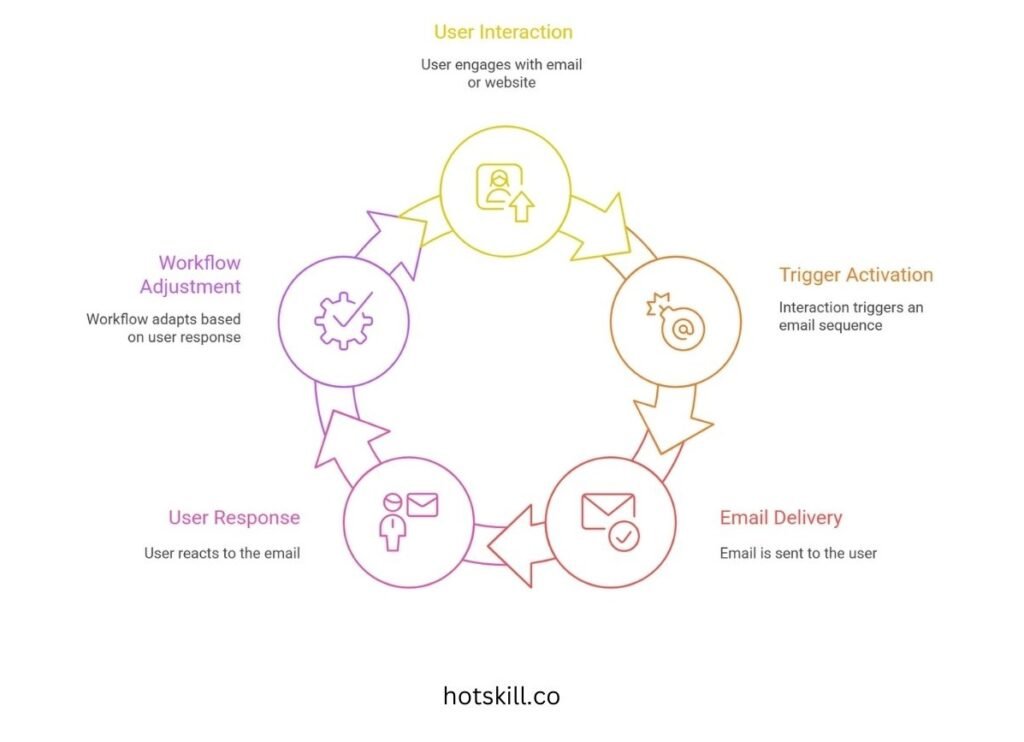
Forget the corporate jargon — an email workflow is simply a preset sequence of emails automatically sent based on what someone does.
They join your list? Trigger.
They leave their cart? Trigger.
They binge one email but skip another? Trigger.
Think of it as a choose-your-own-adventure path where your emails adapt to a user’s behavior.
At their best, workflows don’t just send follow-ups — they make your brand feel like someone who gets it.
B. Why Automation Matters
Manually sending one-off emails works… until it doesn’t. Once your list crosses a few dozen contacts, it becomes chaos.
Automation gives you:
- Consistency
- Better timing
- More personalization
- Less stress
- Zero last-minute scrambling
When set up well, your email system runs quietly in the background while you reclaim hours every week.
C. What You Actually Gain
Solid workflows can:
- Boost open and click-through rates
- Improve conversions
- Deliver personalization at scale
- Keep customers around longer
- Reach the right person at the right moment
- Free you from constant manual work
And honestly? The mental peace alone is worth it.
Types of Email Marketing Workflows
Not all workflows fit every business, but even one or two can dramatically improve your marketing.
A. Welcome Series Workflow
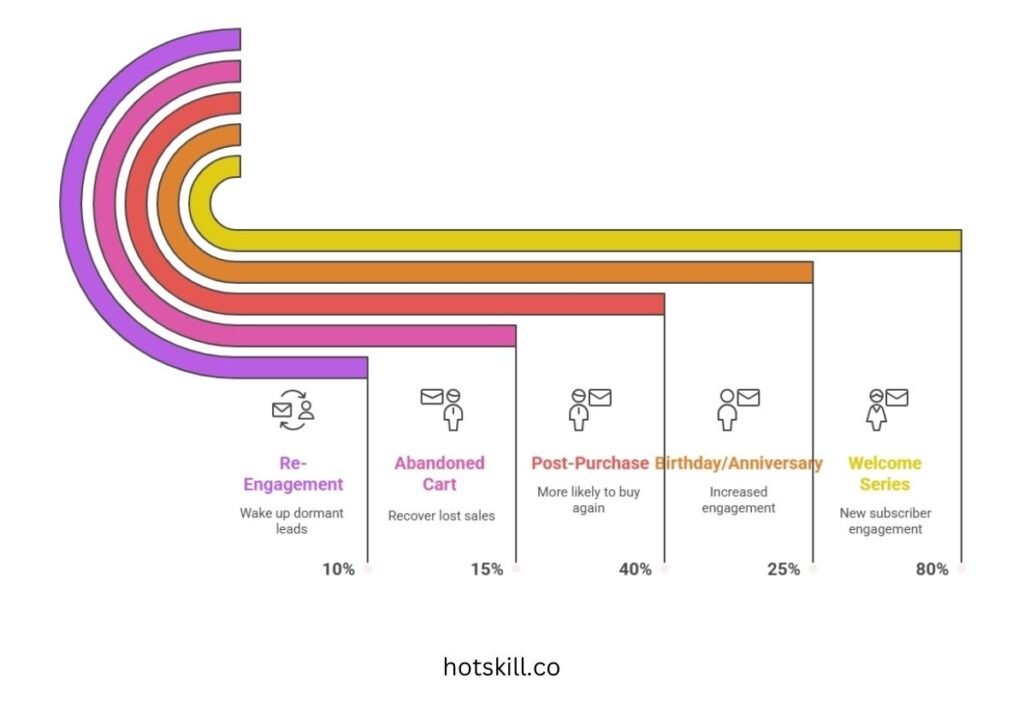
A new subscriber is the warmest lead you’ll ever have. With open rates often hitting 80%, your welcome series is prime time.
Ecommerce brands use coupons + tips.
Clinics send preparation info for first appointments.
Creators share their best resources upfront.
This is your “hello,” “here’s what we do,” and “stick around — you’ll like this.”
B. Abandoned Cart Workflow
Someone reached the finish line and paused. Annoying? Yes. Fixable? Absolutely.
Emails sent within 1 hour can recover 10–15% of lost sales.
Add:
- A photo of the product
- A quick benefit recap
- A testimonial
- A limited-time reminder
Even educators use it for course checkout dropoffs — “Still thinking it over? Here’s what you’ll get.”
Small nudge, big returns.
C. Re-Engagement Workflow
We all ignore emails sometimes. Doesn’t mean we’re no longer interested.
Re-engagement flows help revive cold subscribers.
Examples:
- Nonprofits: impact updates
- SaaS tools: new features
- Coaches: fresh value-packed freebies
Done well, they can wake up 10% of dormant leads.
D. Post-Purchase Workflow
After the sale is where loyalty gets built.
Include:
- “Thank you”
- Setup instructions
- Delivery updates
- Complementary product suggestions
- Review requests
Customers receiving helpful post-purchase emails are up to 40% more likely to buy again.
E. Birthday or Anniversary Workflow
Simple. Personal. High-impact.
“Happy Birthday!” or “You joined us one year ago!” emails can increase engagement by 25%.
Add a perk for good measure.
F. Lead Nurturing Workflow
Some buyers need time.
Lead nurturing helps move prospects from curious → informed → ready.
Perfect for:
- B2B
- Coaching
- Real estate
- Finance
- High-ticket products
You’re building trust one message at a time.
Key Components of Effective Email Workflows
Great workflows share a few things in common.
A. Smart Segmentation & Targeting
A single giant list is like shouting in a crowded room.
Break audiences down by:
- Behavior
- Purchase history
- Interests
- Location
- Sign-up source
Segmented campaigns can generate 760% more revenue. No exaggeration.
B. Personalization & Dynamic Content
Personalization today means more than “Hi {First Name}.”
Use:
- Product recommendations
- Location-specific content
- History-based suggestions
- Tailored images
Dynamic content blocks = highly relevant emails without extra effort.
C. Trigger Events & Timing
Timing isn’t everything — it’s the only thing.
Someone visits your pricing page twice?
Downloads a guide?
Leaves mid-checkout?
Each action is a signal. Act quickly while interest is warm.
D. Clear, Compelling CTAs
One email = one action.
“Book Your Slot”
“See Your Cart”
“Download the Guide”
Multiple CTAs lead to confusion. One targeted CTA wins.
E. A/B Testing & Optimization
Test everything:
- Subject lines
- Layouts
- Imagery
- Send times
- CTAs
Small changes can bring big jumps. Keep evolving.
How to Build an Email Workflow (Step-by-Step)
Here’s a practical setup you can follow.
A. Define the Goal
What are you trying to achieve?
- More conversions?
- More demos?
- More repeat purchases?
- More engagement?
Pick one goal per workflow.
B. Visualize the Customer Journey
Map it on a whiteboard:
Entry → Email 1 → Action? → Yes → Email 2A
Entry → Email 1 → Action? → No → Email 2B
Flowcharts help spot gaps quickly.
C. Choose the Right Email Platform
Pick something that fits your needs.
- Mailchimp — Beginner-friendly
- Klaviyo — Ecommerce powerhouse
- ActiveCampaign — Advanced automation
- HubSpot — All-in-one system
- ConvertKit — Perfect for creators
Make sure it integrates with your CRM or store.
D. Design the Email Templates
Keep them:
- Clean
- Mobile-friendly
- On-brand
- Skimmable
Short paragraphs. Clear headers. Easy CTA.
E. Set Triggers
Triggers make the magic happen.
Examples:
- “User signed up” → Welcome series
- “Viewed pricing page 3 times” → Sales outreach
- “Abandoned cart for 2 hours” → Reminder
- “Completed course” → Upsell
The more precise, the better.
F. Test the Sequence
Send the sequence to yourself.
Check:
- Timing
- Links
- Trigger accuracy
- Formatting
- Mobile view
Fix anything that feels clunky.
G. Monitor, Measure & Improve
Watch metrics:
- Open rates
- Click-through
- Unsubscribes
- Bounce rates
- Conversions
Update every few months to keep things fresh.
Best Practices for Long-Term Result
A. Stay On-Brand
Your emails should sound like your brand. Calm? Bold? Friendly? Expert?
Keep consistency across tone, visuals, and language.
B. Keep It Human
Automation ≠ robotic.
Add:
- Personality
- Stories
- Soft humor
- Real advice
People connect with humans, not systems.
C. Follow the Rules
Respect GDPR.
Honor unsubscribe requests quickly.
Avoid misleading subject lines.
Trust is your strongest currency.
D. Use Data to Decide
Look at what people click.
Which emails convert?
Which topics flop?
Data is your roadmap.
E. Review and Refresh Regularly
Every 90 days:
- Update outdated offers
- Swap weak messages
- Improve CTAs
- Remove inactive contacts
Keep it relevant
Common Challenges — and How to Fix Them
A. Low Open or Click Rates
Try:
- Stronger subject lines
- Personalized content
- Better send times
- Cleaner layouts
B. Landing in Spam
Avoid:
- All caps
- Spammy promises
- Too many links
Authenticate domains (SPF, DKIM, DMARC).
C. Messy, Outdated Lists
Clean lists every 6 months.
Remove:
- Hard bounces
- Unengaged contacts
- Fake or spam emails
D. Email Fatigue
If people feel hammered, they’ll leave.
Reduce frequency. Offer preferences. Balance value with promotion.
Tools and Tech to Know
Top email automation tools:
- Mailchimp
- Klaviyo
- ActiveCampaign
- HubSpot
- ConvertKit
Key features to prioritize:
- Strong automation builder
- Dynamic content
- Segmentation
- Third-party integrations
- Real-time analytics
Real-Life Success Stories
A. Ecommerce
A shoe brand added SMS follow-ups to its abandoned cart workflow — sales rose 23% in a month.
B. SaaS
A cloud accounting tool created a 6-step onboarding workflow — renewal rates jumped 40%.
C. Healthcare
A hospital automated appointment preparation emails — no-show rates dropped 18%.
D. Nonprofit
Personalized donor videos increased donations by 15%.
Wrap-Up: Time to Build Your First Workflow
Email marketing automation isn’t a trick — it’s the backbone of scalable, human-centered communication.
Start with one workflow. Maybe a welcome series. Maybe abandoned cart recovery. Watch how even small automation frees your time and lifts your conversions.
The future? AI-powered personalization, predictive journeys, and smarter segmentation.
But no matter how advanced the tech becomes, the core will always be the same:
Show up with the right message, at the right time, in a way that feels human.
Do that… and your emails won’t just be opened.