

Creating mockups used to feel… slow. You’d open Photoshop, fiddle with layers, struggle with shadows, export versions, redo everything. It was creative, yes, but also exhausting.
Now things are different.
AI has quietly reshaped the entire mockup workflow. What once took 20–30 minutes can now happen in seconds, often with better results. And honestly, that changes how marketers, designers, and even founders operate.
This guide explores the most powerful tools available right now, how they work, and which ones are actually worth your time.
What Are AI Mockup Tools and Why Do They Matter?
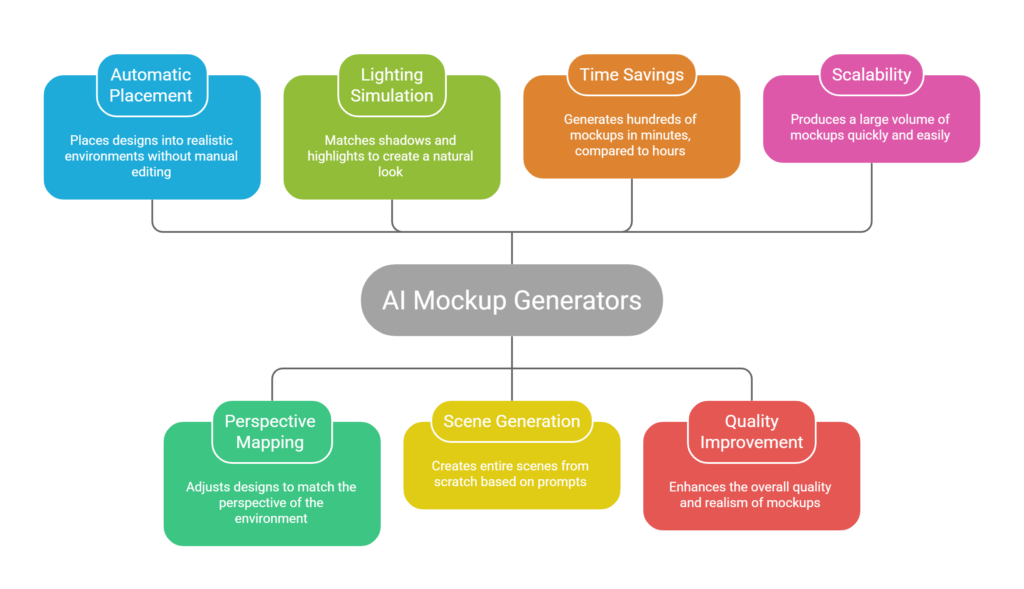
AI mockup generators are tools that automatically place your designs into realistic environments like devices, billboards, packaging, or apparel without manual editing.
Instead of manually adjusting perspective, lighting, and shadows, AI does the heavy lifting. It can even generate entire scenes from scratch based on prompts.
Modern tools don’t just save time. They fundamentally change output quality and scalability. Some platforms can generate hundreds of mockups in minutes, compared to traditional workflows that could take hours .
And if you’re in marketing, eCommerce, or content creation, mockups aren’t optional anymore. They’re your visual proof.
Deep Dive: How These AI Mockup Tools Actually Work in Practice
Before we go tool by tool again, it’s worth slowing down here for a second.
Most people think AI mockup tools are just “upload image → get mockup.”
That’s technically true, but also kind of misleading.
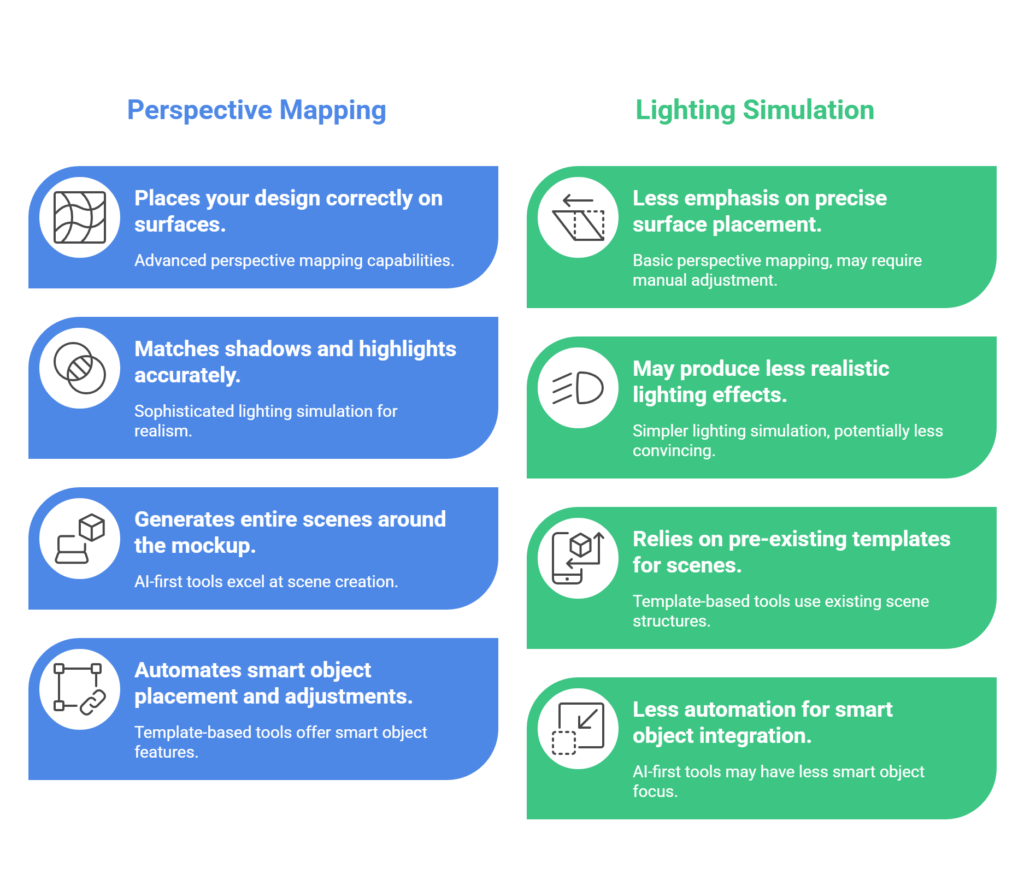
Under the hood, these platforms are doing a mix of:
- Perspective mapping (placing your design correctly on surfaces)
- Lighting simulation (matching shadows and highlights)
- Scene generation (in AI-first tools)
- Smart object automation (in template-based tools)
The difference between a decent mockup and a high-converting one often comes down to how well the tool handles these details.
And honestly, not all tools do it equally well.
Expanded Analysis of the Top AI Mockup Tools
Placeit – Still the King of Volume, But Not Innovation
Placeit is one of those tools that just keeps showing up everywhere. And there’s a reason.
It has an enormous library. Thousands of scenes, across industries. Apparel, tech, packaging, even niche categories like gym merchandise or gaming setups.
In practice, what makes Placeit powerful is consistency.
If you’re running ads or managing a brand, consistency matters more than creativity sometimes. You don’t want 20 wildly different styles. You want recognizable visuals.
That’s where Placeit shines.
But and this is important it’s not really pushing boundaries anymore.
You’re not generating anything new. You’re selecting from what already exists.
So if your goal is differentiation, this might feel limiting after a while.
Mockey.ai – Where AI Starts Feeling “Creative”
Mockey is closer to what people imagine when they hear AI.
Instead of choosing from templates, it tries to generate scenes dynamically.
For example, you upload a hoodie design, and it places it on a model in a lifestyle setting. Sometimes indoors, sometimes outdoors. The variation can actually be useful.
This becomes powerful when you’re testing creatives.
Instead of manually designing 10 variations, you generate them.
But here’s the catch: control is limited.
You don’t always get exactly what you want on the first try. It’s more like collaborating with AI than controlling it.
Still, for speed and idea generation, it’s very effective.
Artboard Studio – For People Who Want Control
Artboard Studio feels like a professional tool.
Not in a complicated way, but in a “you can actually build something unique” way.
You’re not just inserting designs. You’re building scenes.
You can:
- Layer objects
- Adjust lighting
- Create animations
- Work with video mockups
This makes it ideal for ad creatives.
Let’s say you’re running Facebook ads. Static mockups work, but animated ones often perform better.
Artboard lets you do that without needing After Effects.
It does take time to learn though. Not plug-and-play.
Kittl – The “All-in-One Creator” Approach
Kittl is interesting because it’s not just about mockups.
It’s trying to replace multiple tools at once.
You design something, maybe a logo or a poster, and then instantly visualize it in real-world settings.
For creators, this is huge.
Because switching between tools kills momentum.
Kittl keeps everything in one place.
The AI features, like background removal or design generation, make it feel modern. Not groundbreaking, but very usable.
VisualGPT – A Glimpse of the Future
This one feels experimental, but exciting.
Instead of choosing templates, you describe what you want.
That alone changes the workflow.
You’re not browsing anymore. You’re imagining.
And that’s powerful.
Let’s say you’re building a brand and want something very specific. A product on a marble table with warm lighting and a luxury vibe.
Templates might not have that exact setup.
VisualGPT can attempt to create it.
Results aren’t always perfect, but the direction is clear.
This is probably where most tools are heading.
Smartmockups – Realism Over Flashiness
Smartmockups doesn’t try to be flashy.
It focuses on realism.
And that matters more than people think.
Because users can tell when something looks fake.
If you’re selling products online, trust is everything.
A realistic mockup can increase perceived product quality.
Smartmockups is especially strong for:
- Product pages
- Landing pages
- Amazon listings
It’s not the most exciting tool, but it’s reliable.
Canva – Convenience Wins Here
Canva isn’t trying to be the best mockup tool.
It’s trying to be the easiest.
And honestly, it succeeds.
If you’re already using Canva for content, presentations, or ads, adding mockups into that workflow just makes sense.
You don’t think about exporting or switching tools.
You just create.
For beginners or marketers, this is often enough.
Fotor – When You Want AI to Do More Thinking
Fotor leans into AI generation more than most.
You can describe scenes, generate backgrounds, and then integrate your design.
This makes it useful for:
- Social media creatives
- Blog visuals
- Quick marketing assets
Sometimes the output feels slightly artificial, but for many use cases, that’s acceptable.
Speed matters more than perfection.
Recraft – For Unique, Brand-Focused Visuals
Recraft is less about speed and more about uniqueness.
It’s useful when you don’t want your visuals to look like everyone else’s.
Which is honestly becoming a bigger problem.
Because as more people use the same tools, designs start to look similar.
Recraft helps break that pattern.
Pacdora – Packaging Done Right
Packaging mockups are tricky.
They require accurate dimensions, folds, shadows, and angles.
Pacdora handles this really well.
If you’re in D2C or product branding, this tool can replace expensive 3D rendering workflows.
It’s very niche, but very strong in that niche.
Screenhance & Shots.so – Speed Tools
These tools are built for one thing: speed.
You don’t customize much.
You don’t explore options.
You just upload and export.
And sometimes that’s exactly what you need.
Especially in SaaS, where you’re constantly sharing product updates, landing pages, or social posts.
Bulk Mockup – Scale Changes Everything
Bulk Mockup is a different category.
It’s not about creativity.
It’s about scale.
If you’re running a print-on-demand store, you might need hundreds of mockups.
Manually creating them would take hours or days.
This tool reduces that to minutes.
That changes how you test products.
And testing is what drives growth.
Where Most People Go Wrong With AI Mockups
This part is important.
Because tools don’t guarantee good results.
Most people:
- Use generic scenes
- Ignore brand consistency
- Overuse AI-generated visuals
- Skip refinement
And then wonder why their creatives don’t perform.
AI mockups are just the starting point.
You still need:
- Good design
- Clear messaging
- Strategic placement
Otherwise, it’s just decoration.
A Simple Workflow That Actually Works
If you’re trying to use these tools effectively, here’s a rough process that works well:
Start with your goal.
Are you creating:
- Product listings?
- Ads?
- Social media content?
Then choose the tool based on that.
Generate multiple mockups, not just one.
Pick the best ones.
Then refine them.
Add text, branding, or context.
This combination of AI speed and human judgment is where the real advantage is.
Why These Tools Matter More Than Ever
Attention spans are shrinking.
Visual competition is increasing.
And content production is accelerating.
Which means…
If you’re slow, you fall behind.
That’s really what this comes down to.
AI Mockup Generator Tools for Fast and Professional Result are not just about saving time.
They’re about staying competitive.
Because the brands that test faster, iterate faster, and publish faster usually win.
Final Thoughts
AI Mockup Generator Tools for Fast and Professional Result are no longer optional.
They’re becoming essential.
Whether you’re a marketer, designer, or founder, these tools help you move faster, test more ideas, and present your work better.
And honestly, once you start using them, it’s hard to go back.