
Social media data has always been kind of a nightmare to work with. Not because there isn’t enough of it, if anything, there’s too much, but because it doesn’t behave. A post does well. A nearly identical post two weeks later gets nothing. You stare at the numbers, trying to find a reason, and usually come up empty.
Dashboards help, sure, but mostly they just confirm that something happened. You see the spike. You don’t know why. You see the drop. You don’t know what to fix. That uncertainty is where most teams get stuck, and honestly, a lot of marketing decisions get made in that fog.
That’s the part AI is actually changing. These AI tools look for patterns underneath the numbers, subtle stuff that gets missed when you’re skimming charts at the end of the week. Connections across content type, timing, audience habits, sometimes even things happening outside your page entirely.
There’s less of “let’s see what happens” and more “here’s what to try next.” This helps make campaigns feel less reactive.
This guide covers what AI social media analytics actually is in practice, which tools are worth using, what features matter versus what’s just marketing copy, and how to work with it without overcomplicating everything. AI isn’t magic. But it does give a real edge when used with intention.
What AI Social Media Analytics Actually Is
The basic definition of using machine learning to analyze social data is technically accurate, but kind of misses the point. The real shift is in what you’re getting back.
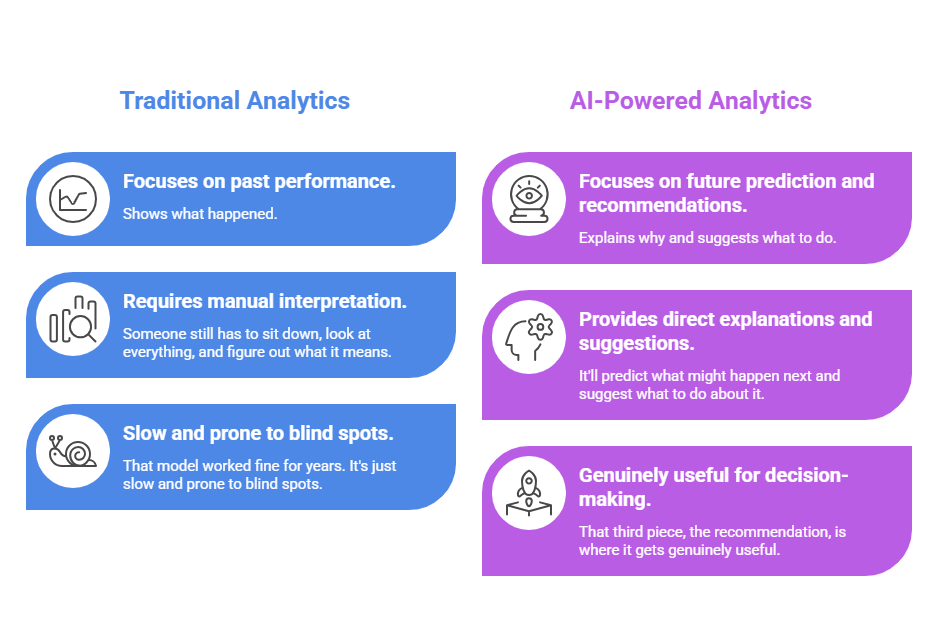
Traditional analytics tools show what happened. They’re built around past performance. Though someone still has to sit down, look at everything, and figure out what it means, that model worked fine for years. It’s just slow and prone to blind spots.
AI-powered analytics tries to explain why something happened, and, depending on the platform, it’ll predict what might happen next and suggest what to do about it. That third piece, the recommendation, is where it gets genuinely useful. Most teams don’t have a data problem anymore. They have a “turning data into a decision” problem.
A few examples that make this concrete:
Content recommendations:
The tool looks at past performance and suggests what to post, not just topics, but also format, timing, and roughly how long the caption should be. It can be wrong sometimes, but still, it cuts down on the guesswork.
Sentiment analysis:
Instead of reading through every comment manually, AI scans tone at scale. It flags whether conversations around a campaign are mostly positive, neutral, or negative. Some tools catch early shifts before they become obvious, which is actually more useful than knowing after the fact.
Predictive insights:
AI tools can guess how well a social media post might do before you even hit “publish.” It’s not spot-on, social media’s way too unpredictable for that, but it does help point you in the right direction. It becomes super handy when you’re stuck picking between two similar ideas and neither screams “winner.”
What Are Social Media Analytics Tools, Then?
These are platforms that collect social data and try to make it useful. Most marketers already use something, even if it’s just the native dashboards inside Meta or LinkedIn.
They generally fall into three types.
Native tools are built into the platforms themselves. Quick, free, and useful for basics. The limit is that they’re segregated: Instagram shows Instagram, LinkedIn shows LinkedIn, and getting a cross-channel view means opening a lot of tabs.
Third-party tools pull from multiple platforms into one place. Better for reporting, and better for anyone managing more than one or two channels.
AI-powered tools go even further. They don’t just display data, they interpret it. It helps with pattern recognition, forecasting, and automated suggestions. Less manual effort, more direction.
One thing worth separating: analytics versus social listening. They get lumped together a lot, but they both solve different problems.
Analytics looks inward. Your posts, your performance, and your metrics.
Social listening looks outward. What people are saying across the internet, even when they don’t tag you, even on accounts you’ve never touched.
Used together, the picture gets a lot more complete.
Core Features That Actually Matter
Not every feature in these tools earns its place on the pricing page. Some are genuinely useful. Others look impressive in a demo and go untouched after the first week. The ones that do genuinely help you are:
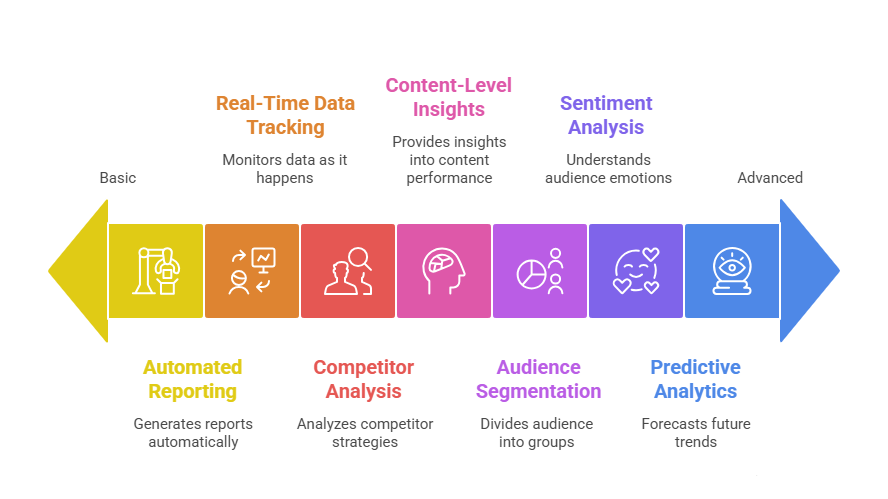
Real-Time Data Tracking
A lot of workflows still run on weekly reports. Which means by the time insights surface, there’s often nothing useful left to do with them.
Real-time dashboards change that calculation. Engagement, reach, and interactions are all updating as they happen. If a post underperforms early, you can adjust before it becomes irrelevant. Timing makes a bigger difference than most teams account for.
Audience Segmentation and Sentiment Analysis
Old-school segmentation was rough. Broad demographic buckets, lots of assumptions, and limited actual insight into audience behavior.
AI groups audiences differently, based on how they engage, what they respond to, and how often they interact. The segments feel more real because they’re based on actual patterns rather than guesses.
Sentiment analysis runs on top of that continuously. It tracks how public perception shifts over a campaign, helps compare tone across different content types, and catches early warning signs before they blow up in the comments.
But things like sarcasm still throw most systems off. A nuanced cultural context can get misread easily. Still directionally, for most use cases, it’s reliable enough to be useful.
Content-Level Insights
This one surprises people who haven’t seen it before. The AI isn’t just analyzing performance numbers; it’s analyzing the content itself. Captions, hashtags, keywords. Some platforms even go into visual elements inside images and videos.
It can predict engagement scores before publishing and provide suggestions on caption length, hashtag mix, and visual composition. Though not every recommendation is worth following, and some of them can be a bit generic, it still speeds up iteration, especially when running several campaigns at once.
Predictive Analytics
The most hyped feature and also the most frequently misunderstood one.
AI looks at historical patterns and estimates future outcomes, likely engagement ranges, better posting windows, and the probability of a piece performing above average. It’s not certain; social media is too volatile for certainty.
What it gives is signals, probabilities, enough to make better bets more often. The teams that use this well don’t follow the predictions blindly. They treat forecasts as one input, and cross-reference them with their own judgment and context. That combination tends to work better than either alone.
Competitor Analysis
Tracking competitors manually is slow and easy to do inconsistently. But things can slip, and the context gets lost easily.
AI automates most of it. Posting frequency, engagement trends, and content and format patterns surface without someone spending hours doing it manually.
The goal isn’t copying anyone’s strategy. It’s understanding the landscape where competitors are strong, where they’re falling flat, and where there might be something worth doing differently.
Automated Reporting
Reporting used to eat up serious time. Export the data, build the slides, reconcile numbers across platforms, and hope nothing shifted while you were formatting everything.
Most good tools handle this automatically now. Key insights highlighted, visual summaries included, recommendations attached. The time savings are real. And that time usually goes somewhere more useful.
What Separates Good Platforms From Mediocre Ones
Some tools look great in a sales demo and fall apart once real data goes in. Others are unglamorous but have been consistently reliable. The difference usually comes down to a handful of things.
Ease of use
Sophisticated features mean nothing if the interface is confusing. If finding a key metric takes more than a few clicks, something’s off. The best dashboards make it really easy to find what you need.
Multi-platform integration
Most brands run across several platforms simultaneously. A tool that pulls everything into one view removes a lot of complications. Jumping between native dashboards every morning is just a waste of time.
Depth of analytics
The platforms that are worth paying for go deeper into the sentiment analyses, predictive scoring, audience segmentation, and content-level insights. The richer the data, the better the decisions.
Actual AI capabilities
“AI-powered” gets applied to a lot of products that are really just scheduling automation with some charts. Real AI tools analyze patterns, forecast outcomes, and suggest specific actions. It’s important to see what the AI actually does before signing up.
Reporting and collaboration
It is especially important for agencies and larger teams. Reports should be exportable, customizable, and legible to people outside marketing. If explaining the data to a client requires a whole separate conversation, the tool isn’t doing enough.
Price versus actual value
Higher cost doesn’t always mean better. But sometimes a pricier platform justifies the pay right from the first month, in all the time you saved, or any opportunity that could have been missed. The calculation isn’t cost per month, it’s cost per useful insight.
Top 10 AI Social Media Analytics Tools Worth Actually Using
Finding an AI analytics tool isn’t the hard part anymore. There are dozens of them. The real challenge, and honestly, the one nobody talks about enough, is figuring out which one slots into your actual workflow without becoming another tab you dread opening.
Here’s a breakdown that skips the marketing copy.
#1 Socialinsider
Agencies managing multiple clients will feel this one immediately. Multi-platform analytics, competitor benchmarking, automated reporting, all solid. But the competitor comparison feature is where it earns its spot. Watching engagement stack up against rivals over time makes content gaps obvious in a way that manual analysis just doesn’t.
#2 Hootsuite
Built for scale, no question. Predictive trend analysis, deep reporting, scheduling recommendations based on historical data, it’s genuinely capable. High-volume campaigns across large organizations are where it thrives. It’s not cheap, and it’s not pretending to be. But the depth justifies the cost if you’re actually operating at that level.
#3 SocialPilot
Good fit for smaller agencies and SMBs. It doesn’t try to impress you with features you’ll never touch. The AI recommendations on timing and engagement are modest, not groundbreaking, but consistently useful. For teams that don’t need enterprise complexity, it’s a sensible starting point and priced accordingly.
#4 Social Status
Specifically built for paid campaigns and influencer work, and that focus shows. ROI calculations are baked in, and the insights on which collaborations actually move the needle are more concrete than most platforms bother to be. If influencer ROI tracking is a regular headache, this one’s worth a proper look.
#5 Keyhole
Niche tool. Genuinely niche. But if your campaigns lean heavily on hashtags or trend cycles, it’s hard to fault. Real-time mention tracking, keyword activity, and, this part is actually impressive, AI predictions on which hashtags are likely to gain traction before they peak. Timing is everything in trend-chasing, and Keyhole understands that.
#6 Buffer Analyze
Clean. Minimal. Refreshingly so. It doesn’t try to do everything, which is exactly the point. Shows what matters, skips what doesn’t, and requires no tutorial to navigate. Solo marketers and small teams who want clarity without the noise will get on fine with it.
#7 Sendible
Campaign-level analytics across platforms, with reporting that’s genuinely customizable. That last part is the real sell; agencies presenting results to clients know how much formatting and clarity matter. Sendible handles the “make this look good for the client deck” problem better than most.
#8 Audiense
Very specific use case: audience intelligence, particularly for X (formerly Twitter). Deep segmentation, niche community identification, and AI-driven insights that surface patterns manual analysis would consistently miss. Not for everyone. But for the right team doing the right kind of audience work, it’s genuinely powerful.
#9 Tailwind
Pinterest-focused. That’s niche, yes, but if visual content strategy is central to what you do, it’s hard to beat. It predicts pin performance, suggests posting windows, and optimizes around how Pinterest’s algorithm actually works rather than how people assume it works. That distinction matters more than it sounds.
#10 Sprout Social
The all-rounder. Analytics, social listening, scheduling, and collaborative reporting it covers a lot of ground without feeling cobbled together. Content scoring, predictive engagement, and sentiment analysis across channels. Best suited for larger teams running complex multi-channel operations where everything needs to live in one place.
Also worth keeping on the radar: Brandwatch, Sprinklr Insights, Brand24, Databox, and Zoho Social. Each has specific strengths depending on the use case; none of them are bad picks if the fit is right.
| Tool | Best For | Pricing | AI Depth |
| Socialinsider | Agencies | Medium | High |
| Hootsuite | Enterprises | High | Medium |
| SocialPilot | SMBs / Small Agencies | Low | Medium |
| Social Status | Ads & Influencer Campaigns | Medium | Medium |
| Keyhole | Hashtag & Trend Campaigns | Medium | Medium |
| Buffer Analyze | Beginners / Small Teams | Low | Medium |
| Sendible | Agencies | Medium | High |
| Audiense | X / Twitter Focused | Medium | High |
| Tailwind | Pinterest / Visual Content | Low-Medium | Medium |
| Sprout Social | Enterprises / Large Teams | High | High |
How to Actually Use AI Analytics Without Overcomplicating It
The tool is only a part of it. A lot of teams set up sophisticated platforms and still make decisions the same way they always did. How you use it matters at least as much as which one you pick.
Setting Up a Dashboard That’s Actually Useful
Start with the KPIs that connect to real business goals. Not every metric deserves a place on the main dashboard. Too many numbers create noise, not clarity.
Engagement rate, reach, click-through rate, conversions. Those are the ones that typically matter. Impressions have context but don’t stand alone well. Set up the dashboard around what actually drives decisions, then customize views for different teams. Content marketing, and leadership each have different priorities and should see different things without having to dig.
Reading Insights and Doing Something With Them
Data is only useful if it leads somewhere.
Look at what’s performing and try to understand why before trying to replicate it blindly. Look at what’s underperforming and test one specific adjustment at a time, timing, format, or copy, rather than changing everything at once and having no idea what actually moved the needle.
AI forecasts are directional, not definitive. A prediction from last Tuesday can be outdated by Friday if something shifts in the cultural conversation. Treat it as one input.
Privacy and Ethics
This part gets less attention than it deserves in most tool comparisons.
Follow GDPR, CCPA, and whatever regional regulations are applicable. Be transparent about data collection. Avoid tracking that crosses the line from insight into surveillance. Compliance keeps things legal, but it also keeps insights trustworthy.
Presenting Analytics to Clients or Teams
Raw numbers on a slide don’t tell anyone much. The goal is to make data something people can actually use.
Reporting Cadence
Weekly reports work well for active campaigns, flag engagement spikes, posts that underperformed, and early signals. Keep them brief. Just what needs attention, not a full recap.
Monthly reports are where patterns start to show. Summarize growth, explain what worked and what didn’t, and suggest a direction for the next month. People start seeing trends rather than just reacting to individual posts.
Quarterly reports are for bigger decisions. Long-term trends, competitive comparisons, strategic shifts. Useful for leadership or board presentations, keep the focus on implications and recommendations, not raw data.
Visualization
Line charts for trends over time. Bar charts for comparing campaigns or content types. Pie charts for audience breakdowns. Heatmaps for optimal posting windows often surface patterns nobody expected.
Visuals aren’t decoration. They’re how most people actually process information.
Telling the Story
Start with the main insight. Support it with data. End with a specific recommendation.
Something like: video posts drove 35% more engagement than static images this month, shorter clips posted in the early evening might push that further. It’s worth testing.
Short, clear, and something to act on. That’s the format that actually gets used.
Where This Is All Heading
The pace of change here is real.
AI content strategy is the direction tools are moving towards, not just showing what performed, but actively suggesting what to post next. Based on historical data, audience behavior, and competitor activity. It is essentially a draft content calendar that still needs human judgment to be good, but it removes a lot of the blank-page problem.
Predictive analytics is getting sharper. Not just backward-looking anymore. Forecasting which topics are gaining traction, where sentiment might shift, and what’s likely to peak before it peaks. Early signals, not certainties but useful ones.
Voice and visual search are changing how content gets discovered. AI will need to track performance in those formats as they become more prominent, with social SEO logic expanding into new contexts.
Hyper-personalization is the longer arc. Instead of broad segments, AI starts suggesting content variations tailored to much smaller groups or individuals. More relevance typically means better engagement. The implementation is still catching up to the idea, but the direction is clear.
The tools of the near future won’t just report. They’ll suggest in real time, flag risks before they escalate, and push campaigns in better directions with less manual intervention.
Conclusion: Picking the Right Tool Without Overthinking It
The decision comes down less to features and more to fit.
Figure out what success actually looks like before evaluating anything. Tracking performance? Monitoring competitors? Optimizing content across channels? Don’t pay for capabilities that won’t get used.
Factor in how the team actually works. Small teams need simplicity and speed. Agencies need client-facing dashboards, collaboration features, and exportable reports. The best tool for a five-person team is usually a bad choice for a fifty-person agency.
Look critically at AI claims. The label gets applied loosely. Can the platform actually forecast trends, recommend content, and analyze sentiment in a useful way? Or is it mostly automating scheduling with some charts attached? Make sure the AI functionality is the kind that helps make better decisions, not just faster clicks.
Balance cost against time saved. A more expensive subscription sometimes pays for itself in the first month because it eliminates hours of manual reporting or surfaces an opportunity that would’ve been missed entirely.
Use the free trial. Always. Real data on a real account for a few weeks is the only reliable way to know if a tool fits the actual workflow.
FAQs
What are social media analytics tools?
Platforms that pull data from social accounts and try to make it useful. The good ones connect performance metrics to actual outcomes. The mediocre ones just display numbers and leave the interpretation to you.
How does AI actually help?
Mostly by finding patterns faster than manual analysis can. Why a post gained traction. Why did engagement dip mid-week? Also, timing recommendations, content suggestions, and trend signals. Not always accurate, but directional and useful.
Best option on a tight budget?
Buffer or SocialPilot covers the basics without overwhelming small teams. Sometimes simpler is better, too many features can slow decision-making more than help it.
Which features are worth paying for?
Predictive insights, sentiment analysis, clean dashboards, competitor benchmarking. If a platform can’t clearly surface what’s working and what isn’t, the advanced features don’t matter.
Which metrics should matter most?
Engagement rate first. Then reach, clicks, conversions. Impressions have context, but don’t mean much alone. The number always needs context to be useful.
Can campaigns be compared across platforms?
Yes, most decent tools support that. But LinkedIn behavior and Instagram behavior aren’t comparable on the same scale. Platform context matters; direct comparisons need some common sense applied.
Analytics versus social listening the same thing?
No. Analytics is inward-facing: your posts, your results. Social listening is outward: what people are saying across the internet, whether or not they tag you. Different problems, both worth solving.
How often should analytics be reviewed?
Weekly for active campaigns. Monthly for pattern recognition. Quarterly for strategic decisions. In practice, it’s never that clean, just often enough that decisions aren’t being made on data that’s weeks stale.
Are free tools usable?
More than people expect. Native dashboards inside Meta and LinkedIn cover a surprising amount of ground. Limits show up when reporting gets complex or cross-platform visibility becomes necessary.
Which tools work for B2B?
Anything with strong LinkedIn analytics. Hootsuite and Sprout Social both handle it reliably and are commonly used in B2B contexts for a reason.
Does Google Analytics cover social media?
Partially. It shows what happens after someone clicks through to a website. What it doesn’t show is how content performed on the platform before anyone clicked anywhere.
Where should someone new start?
Engagement, reach, clicks. Track those consistently for a month before adding anything else. Starting with too many metrics is a common mistake and usually leads to analysis paralysis.
Which metrics can be ignored?
Follower count, on its own, says very little. Looks good in presentations. Doesn’t reliably correlate with actual impact. Engagement and conversions are more honest about whether the content is working.