

Product managers spend a strange share of the week not managing product. Customer calls need summarising, feedback sits in six different inboxes, and a PRD that should take an hour swallows the afternoon. The right AI tools for product managers shrink that admin load so your time goes to the decisions that actually shape a roadmap.
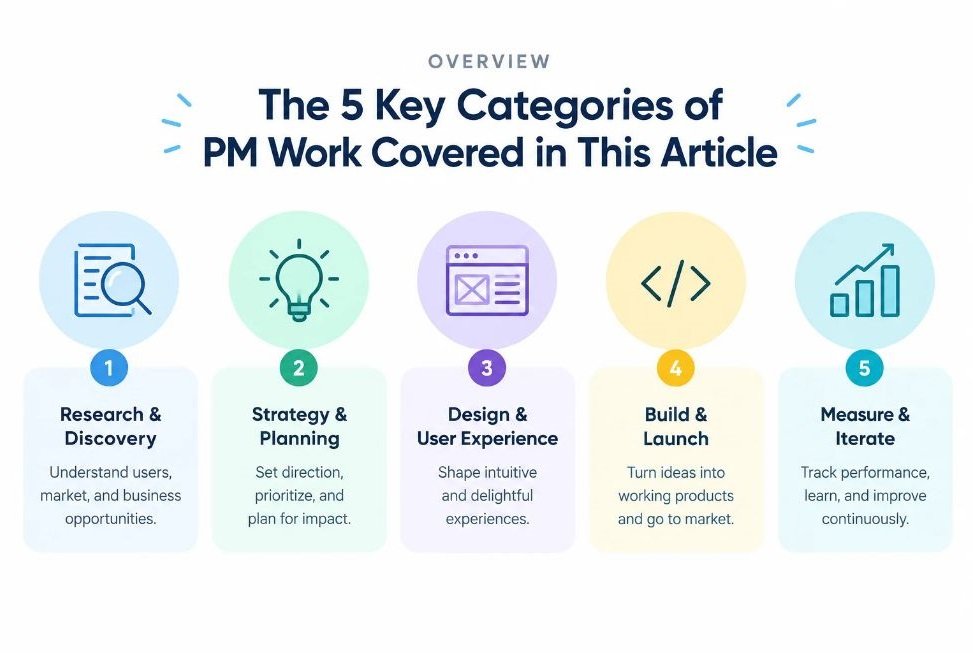
The problem is choice. Every vendor now claims an “AI assistant,” and most lists online are rewritten feature pages. This guide sorts 15 tools by the job they do: thinking and writing, roadmapping and delivery, design and collaboration, customer insight and analytics, and meetings and automation.
For each tool you’ll see what it does, where it earns a place in a PM’s week, and where it falls short. Features and pricing shift quickly in 2026, so check each vendor’s page before you commit budget.
How Should a Product Manager Choose an AI Tool?
Choose by bottleneck, not by hype. Find the task that eats the most hours each week, then pick the tool that removes that task with the least change to how your team already works.
Four filters help.
- Stack fit: Does it plug into Jira, Slack, Notion, or wherever your team already lives? A brilliant tool nobody opens is wasted money.
- Data handling: Customer interviews and roadmap details are sensitive. Check retention policies, admin controls, and whether your inputs train the vendor’s models.
- Verifiability: Can you trace an AI summary back to the original quote or data point? If not, you can’t trust it in a stakeholder review.
- Team adoption: One PM using a tool is a hobby. A whole squad using it changes how you ship.
Picture a PM at a quick-commerce app like Zepto or Swiggy Instamart. Thousands of app-store reviews arrive weekly. Her bottleneck is feedback triage, so a research repository beats a slide generator, no matter how polished the slides look.
The best AI tool for a product manager is the one that removes their biggest weekly time sink without forcing a workflow rewrite. Judge every option on stack fit, data handling, verifiability, and team adoption before looking at features.
Which AI Tools Help With Research, Writing, and Strategy?
General-purpose AI assistants handle the thinking-and-writing layer of PM work: drafting PRDs, stress-testing ideas, scanning markets, and turning messy notes into clean documents. Four tools lead this group in 2026.
1. ChatGPT
ChatGPT, built by OpenAI, is still the default starting point for many PMs. It drafts PRDs, writes user stories with acceptance criteria, rewrites dense updates for executives, and can analyse uploaded spreadsheets or documents. Custom GPTs and Projects let you save your product context, so you stop re-explaining your company every session.
Where it shines is role-play. Ask it to act as a skeptical CFO and attack your business case before the real meeting. You’ll walk in better prepared.
Best for: fast first drafts and rehearsing stakeholder questions.
The catch: it can state wrong facts with total confidence. Never paste its market numbers into a deck without checking the source.
2. Claude
Claude, from Anthropic, handles very long documents well. Drop in a full research report, a 60-page contract, or a quarter’s worth of interview transcripts and ask it to pull out contradictions. Projects keep your product context in one place, and connectors can link it to tools like Jira or Notion so it works with live data rather than pasted text.
Many PMs also use Claude’s Artifacts feature to mock up a working prototype or a small calculator while a discussion is still happening. That turns a vague “what if we…” into something stakeholders can click.
Best for: synthesising large document sets and writing careful, structured specs.
Like every model, it can miss nuance in your internal politics, so treat its output as a draft you own.
3. Perplexity
Perplexity is an answer engine that returns responses with linked sources. That makes it the better pick when you need competitor facts, pricing pages, regulatory changes, or market context and want to check where each claim came from.
Its research mode runs multiple searches and compiles a report, which is handy for a first-pass competitive scan before a planning cycle. A PM entering a new market, say UPI-based lending, can get oriented in an hour instead of a day.
Best for: sourced competitor and market research.
Always open the cited links. Citations make verification easy, but they don’t make every claim correct.
4. Notion AI
If your team documents in Notion, Notion AI is the lowest-friction option on this list. It answers questions across your workspace, so “what did we decide about onboarding in Q2?” returns an answer from real pages. It also auto-fills database properties, summarises long pages, and captures meeting notes.
The value here is retrieval. Most PM knowledge is buried in old docs nobody reads. Searching it conversationally brings it back to life.
Best for: teams already living in Notion who want answers from their own documentation.
Its usefulness depends on how tidy your workspace is. A messy wiki gives messy answers.
Which AI Tools Work Best for Roadmapping and Delivery?
Roadmapping and delivery tools tie customer evidence to what the team builds. They cluster feedback, suggest priorities, and cut the ticket-writing overhead that slows engineering handoffs.
5. Productboard
Productboard collects feedback from support tickets, sales calls, and surveys, then links it to features on your roadmap. Its AI features summarise and group incoming feedback, so you see themes instead of 400 separate comments. Spark, its AI assistant for PMs, supports research and planning tasks inside the same system.
The real benefit is traceability. When an executive asks why a feature is prioritised, you can show the customer evidence behind it in two clicks.
Best for: PMs who need feedback-driven prioritisation they can defend.
It rewards discipline. If your team doesn’t feed it feedback consistently, the insights stay thin.
6. Jira with Atlassian Rovo
Jira is where delivery happens for countless teams, and Atlassian’s Rovo layer adds AI search, chat, and agents across Jira and Confluence. PMs use it to summarise long issue threads, draft tickets from rough notes, and ask questions across connected tools instead of hunting through tabs.
The advantage is that nothing new needs adopting. Your engineers already work there, so AI-written tickets land where the work happens.
Best for: organisations already standardised on the Atlassian suite.
Quality depends on your existing hygiene. Rovo can’t fix a backlog full of stale, duplicate tickets.
7. Linear
Linear is a fast, opinionated issue tracker popular with product-led startups. Its AI features help with triage by suggesting properties and flagging likely duplicates, and it can hand work to coding agents through integrations. For small teams shipping weekly, that keeps the backlog clean without a dedicated triage owner.
Linear also forces good habits. Cycles, projects, and roadmaps are simple enough that people actually keep them updated.
Best for: small to mid-sized product teams that value speed and clean workflows.
Larger enterprises with heavy compliance needs may find it too lightweight.
Roadmapping tools become far more useful when AI links customer feedback directly to backlog items. That traceability lets a PM defend prioritisation with evidence instead of opinion, and it shortens the debate in planning meetings.
Which AI Tools Speed Up Design and Collaboration?
Design and collaboration tools shorten the gap between an idea and something a stakeholder can react to. The goal is faster alignment, not prettier artifacts.
8. Miro AI
Miro is the whiteboard many teams already use for workshops, and its AI features reduce the cleanup after them. It can cluster hundreds of sticky notes into themes, summarise a board, and turn rough brainstorms into diagrams or structured documents.
Anyone who has run a retrospective with 40 people knows the pain of sorting the output. Doing that in seconds leaves more time for the actual discussion.
Best for: workshops, journey mapping, and retros with lots of raw input.
Check the clusters. The model groups by similarity, which isn’t always the grouping that matters for your decision.
9. Figma (including Figma Make)
Figma is the design home for many teams, and its AI features now reach into prototyping. Figma Make can generate a working prototype from a prompt, letting a PM test a flow idea before a designer spends days on it.
Used well, this changes the conversation with design. You arrive with a rough, clickable version of the idea rather than a paragraph describing it. Designers then refine instead of interpreting.
Best for: quick concept prototypes and early flow validation.
Treat output as a sketch, not a spec. Your designers still own quality, accessibility, and consistency.
10. Gamma
Gamma generates presentations from a prompt or outline, with layouts, imagery, and formatting handled for you. For PMs who build roadmap reviews, quarterly updates, and board-prep decks, it removes the hours lost nudging text boxes.
Feed it your real content, whether that’s a PRD or a research summary, and it produces a structured first version. You can export to PowerPoint or PDF when stakeholders expect those formats.
Best for: turning documents into stakeholder-ready decks quickly.
The default styling can look generic. A few minutes of editing keeps your deck from looking like everyone else’s.
Which AI Tools Improve Customer Insight and Analytics?
Customer insight tools turn interviews, reviews, and behaviour data into evidence you can act on. They matter most because bad inputs ruin every downstream decision.
11. Dovetail
Dovetail is a research repository. Upload interview recordings and it transcribes them, tags themes, and generates summaries linked back to the original clips. Instead of digging through folders of old interviews, you can search them for patterns.
That traceability fixes a common problem: a “customers say…” claim nobody can verify. With Dovetail, you can play the exact moment a customer said it.
Best for: teams running regular user interviews and usability tests.
It’s most valuable once you’ve built up a body of research. A single study won’t show you its full power.
12. Amplitude
Amplitude is a product analytics platform, and its AI features help non-analysts get answers. You can ask questions in plain language, get summaries of what’s driving a metric change, and review condensed takes on session behaviour without watching hours of replays.
For a PM, the shift is speed. You can test a hypothesis in the time it used to take to file a request with the data team.
Best for: behaviour analytics and funnel analysis at scale.
AI-generated insights still need sense-checking against your event tracking. Bad instrumentation produces confident but wrong answers.
13. Mixpanel
Mixpanel is another strong analytics option, and its Spark AI lets you build reports by describing what you want in everyday language. Ask for conversion by cohort over the past month and it assembles the chart.
It suits teams that want self-serve analytics without training every PM on a query interface. Setup is generally lighter than heavier enterprise analytics suites.
Best for: startups and growth teams wanting quick, self-serve product metrics.
Pick one analytics platform and commit. Running both Amplitude and Mixpanel splits your data and your team’s attention.
Analytics and research tools earn their keep by making evidence easy to retrieve. When a PM can trace an insight to a real customer quote or a verified metric, product debates shift from opinion to proof.]
Which AI Tools Automate Meetings and Busywork?
Meeting and automation tools reclaim hours that disappear into note-taking and manual handoffs. They’re unglamorous, and often the quickest win.
14. Fireflies.ai
Fireflies.ai joins your calls, records them, and produces transcripts, summaries, and action items. It searches across past meetings and pushes notes into tools like Slack, Notion, and Jira. For a PM running customer calls, standups, and stakeholder reviews all day, it means you can actually listen instead of typing.
Let people know a recorder is present. Consent rules vary by region and by company policy, and your customers deserve to know.
Best for: PMs with back-to-back calls who need reliable records and action items.
Summaries can miss tone or politics, so skim the transcript before sending anything sensitive.
15. Zapier
Zapier connects thousands of apps and now includes AI steps and agents. A PM can build a workflow that watches for tagged support tickets, summarises them with AI, and posts a digest in Slack every Friday, all without writing code.
Small automations add up. Routing feedback, updating trackers, and notifying stakeholders are tasks you can hand off once and forget.
Best for: stitching tools together and removing repetitive handoffs.
Start with one painful workflow. Building ten half-useful automations creates a maintenance headache of its own.
How Do the 15 Tools Compare Side by Side?
| Tool | Category | Best Use Case | Main Limitation |
|---|---|---|---|
| ChatGPT | Writing and strategy | PRD drafts, stakeholder rehearsal | Can state false facts confidently |
| Claude | Writing and strategy | Long-document synthesis | Misses internal context |
| Perplexity | Research | Sourced competitor scans | Sources still need checking |
| Notion AI | Documentation | Answers from your workspace | Weak if the wiki is messy |
| Productboard | Roadmapping | Feedback-driven prioritisation | Needs consistent feedback input |
| Jira with Rovo | Delivery | Ticket drafting, cross-tool search | Can’t fix a stale backlog |
| Linear | Delivery | Fast triage for lean teams | Light for large enterprises |
| Miro AI | Collaboration | Clustering workshop output | Clusters may miss what matters |
| Figma | Design | Prompt-to-prototype concepts | Output is a sketch, not a spec |
| Gamma | Presentations | Decks from documents | Generic default styling |
| Dovetail | Research | Interview analysis and tagging | Value grows with volume |
| Amplitude | Analytics | Funnels and behaviour insights | Depends on clean tracking |
| Mixpanel | Analytics | Self-serve metrics | Splits data if used alongside another platform |
| Fireflies.ai | Meetings | Transcripts and action items | Misses tone and nuance |
| Zapier | Automation | Cross-app workflows | Too many automations get messy |
What Mistakes Do PMs Make When Adding AI to Their Workflow?
The most common mistake is trusting output without checking it. AI drafts quickly and sounds sure of itself, which is exactly why unchecked numbers and invented details slip into decks and specs.
Three others show up repeatedly.
- Buying too many tools at once. Overlap creates confusion and wasted licences. Add one tool, prove its value, then add the next.
- Skipping the privacy review. Pasting customer interviews or unreleased roadmap details into a consumer chatbot can breach company policy.
- Automating a broken process. AI speeds up whatever you already do. If your prioritisation is chaotic, a faster version of chaos isn’t progress.
Honestly, the PMs who get the most from these products treat them like a sharp junior analyst: quick, tireless, and in need of review.
Where Should You Start This Week?
Three points matter most. Match each tool to a real bottleneck instead of chasing features. Verify everything AI produces before it reaches a stakeholder. And add tools one at a time so you can see what actually works.
Pick your most painful recurring task and test one option from this list on it for two weeks. If you’re still hunting for the right AI tools for product managers, that small experiment will tell you more than any ranking can.
If you want to build these skills properly, Hotskill gives you hands-on practice with AI workflows you can apply to your day-to-day work. It’s a quick way to move from reading about these tools to using them confidently.
FAQs
What are AI tools for PMs actually used for?
They handle repetitive and time-heavy work: drafting PRDs, summarising interviews, clustering feedback, building reports, and writing tickets. The aim is to free your time for judgment calls like prioritisation, trade-offs, and stakeholder alignment.
Which AI tool should a new PM start with?
Start with a general assistant like ChatGPT or Claude. Both are flexible, quick to learn, and useful across writing, analysis, and planning. Add specialised products later once you know which task costs you the most time.
Is Perplexity better than ChatGPT for research?
For sourced facts, often yes. Perplexity links every answer to its sources, which makes verification faster. ChatGPT is stronger for drafting, brainstorming, and rehearsal. Many PMs use both, depending on the task.
Can AI replace a product manager?
No. AI speeds up analysis and drafting, but it can’t own outcomes, negotiate between stakeholders, or read a room. Product management hinges on judgment and accountability, which stay with a human. PMs who use AI well will likely outpace those who don’t.
How do I use AI to write a PRD?
Give the assistant your problem statement, target users, goals, and constraints. Ask for a structured draft covering scope, requirements, and success metrics. Then edit hard: cut filler, correct assumptions, and add details only your team knows.
Are these tools safe for confidential product data?
It depends on the vendor and your plan. Check whether inputs are retained, whether they train models, and what admin controls exist. When unsure, ask your security team before pasting customer data or unreleased plans.
Do I need to pay for all of these tools?
No. Several offer free tiers or trials, and you only need a few. A sensible starter stack is one general assistant, one tracker or documentation tool, and one analytics or research platform. Check current pricing on each vendor’s site.
Is it worth using AI if my team is small?
Yes, arguably more so. Small teams have fewer people to absorb admin work, so automating notes, tickets, and reports gives outsized returns. Linear, Fireflies.ai, and a general assistant cover a lot of ground cheaply.
Why are my AI summaries wrong or useless?
Usually the input is the problem. Vague prompts, missing context, or messy source material produce weak output. Give clear instructions, supply real documents, specify the format you want, and always compare the summary with the original.
How do I measure whether these tools are saving time?
Pick a task, such as writing meeting notes, and track the hours it takes for two weeks before and after adoption. Also watch quality signals like fewer clarification questions from engineering. If the numbers don’t move, drop the tool.