

You already know the problem. SEO isn’t one job, it’s ten. Keyword research, drafting, publishing, internal linking, technical fixes, tracking what’s ranking and what dropped. Most people try to handle all of it themselves or hand pieces of it to five different AI tools that don’t talk to each other.
GrokBot for SEO flips that setup. Instead of opening a new tab for every task, you build a small team of AI agents that live inside one app, each one owning a specific part of your SEO work, running on a schedule, whether you’re at your desk or not.
This guide walks through what GrokBot actually is, how to set up your first AI SEO teammate, and how connections, routines, and skills fit together to form something closer to an employee than a tool. We’ll also cover a second, less talked about update from Google that pairs well with everything GrokBot can do.
By the end, you’ll know exactly which teammate to build first and how to get it running today.
What Is GrokBot and Why It Matters for SEO
GrokBot is an AI agent built by xAI, Elon Musk’s AI company, that xAI released in early beta on August 11, 2026. Unlike a normal chatbot that answers a question and waits, GrokBot signs into your actual tools, operates them the way a person would, and hands back finished work.
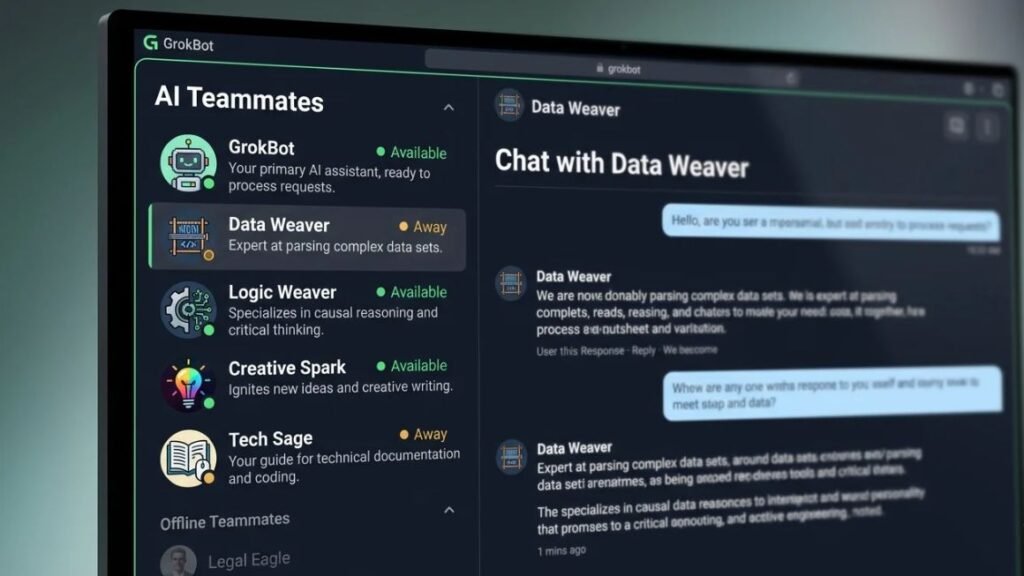
Open the app and it looks like a messaging client. Every conversation in the sidebar is a different AI teammate, each with a name and a defined job. One might manage your inbox. Another handles your content. You talk to them the same way you’d message a coworker on Slack.
Here’s the part that matters most for SEO teams specifically: every teammate runs on a cloud computer tied to your account, not your laptop. Close your laptop, turn off your phone, and the work keeps going. That’s the difference between an AI tool and something you can genuinely call an AI SEO employee.
GrokBot is currently available on Mac, Windows, iOS, and Android. It’s bundled into higher-tier Grok and Cursor plans rather than sold as a standalone product, and it comes with weekly usage limits. xAI hasn’t published exact pricing tiers publicly as of this beta stage, so treat any specific number you see online as unconfirmed until it’s out of beta.
What It Does Well
GrokBot’s strongest feature is persistence. A regular AI writing tool forgets everything the moment you close the tab. GrokBot’s teammates keep their memory, their connections, and their job description across sessions. Tell a teammate once that it owns your blog’s keyword research, and it stays in that lane every time you message it, without you re-explaining context.
It’s also genuinely good at task handoff. Because every teammate writes its own job description when you create it, other teammates can read that description and route work to the right one automatically. Your content teammate doesn’t need to know how to fix a broken canonical tag. It just needs to know which teammate does.
Where It Falls Short
This is still an early beta, and it shows. Connections to sites without an official integration require GrokBot to open a browser and log in manually, which is slower and occasionally flaky. The weekly usage caps mean you can’t just spin up ten teammates and let them all run wild. And because xAI hasn’t disclosed detailed performance benchmarks yet, you’re largely trusting early user reports rather than independent testing.
GrokBot is an AI agent from xAI that entered public beta on August 11, 2026, designed to sign into a user’s existing tools and complete tasks autonomously rather than simply answering questions in chat. For SEO teams, this means content, research, and publishing tasks can run on a schedule without manual oversight, though the early beta stage means usage limits and unconfirmed pricing still apply.
Step 1: Create Your First AI SEO Teammate
The single most important idea before you build anything: think in roles, not tasks. Most people’s instinct is to create a teammate to write “this one article.” That’s the wrong unit. Build a teammate around a theme, and let it own that theme permanently.
- Open GrokBot and start a new teammate. Talk to it in plain language, the same way you’d brief a new hire.
- Give it a role, not a task. Say something like, “You’re my SEO content lead. You own all blog research, drafting, and publishing for my site.”
- Let it write its own job description. GrokBot generates this automatically, and other teammates read it later to know when to hand it work.
- Add a chief of staff teammate. This one watches your calendar and inbox and routes anything SEO-related to your content teammate. Say: “You’re my chief of staff. Watch my email and calendar, and hand SEO work to the right teammate.”
One teammate, one job. Cram ten responsibilities into a single teammate and quality drops fast, the same way it would for an overloaded human hire.
Step 2: Connect GrokBot to Your SEO Stack
Connections used to mean digging through API keys and access tokens. GrokBot handles this conversationally instead.
Tell a teammate what you want connected, and it asks for permission directly in chat. Say “connect my Gmail” and it walks you through a one-click sign-in. Because every teammate runs on the same shared cloud account, a connection made once is available to every teammate you build afterward. You don’t reconnect Gmail five times for five different bots.
For platforms without an official GrokBot integration, the teammate opens its own browser window and logs in the way a person would, clicking through the actual site. You type the password yourself in that moment, so the teammate never stores or sees your credentials directly.
For SEO specifically, the connections worth prioritizing are your CMS or site host (Netlify, WordPress, Webflow), Google Search Console if you can link it, and your email for outreach or reporting. Skip connecting anything you don’t have a routine or skill planned for yet. GrokBot for SEO only earns its usage limits when every connection is actually doing work.
Step 3: Build Routines That Run Your Content Calendar
A routine is a saved job that runs on a schedule, and you set it up the same way you’d brief a task, in plain chat, not in a settings menu buried three clicks deep.
Here’s a real example: an SEO teammate connected to a Netlify-hosted site was told, in one message, to look through saved notes each morning, find a trending keyword that hadn’t been covered yet, write a full formatted article, and publish it live. That single instruction became a recurring routine. The teammate now checks in daily and posts a fresh article chasing keywords the site hadn’t ranked for, without anyone opening the app.
To set one up yourself:
- Message your content teammate directly. Describe the recurring job in one clear sentence, including timing.
- Let it draft the steps. GrokBot writes out its own execution plan and confirms it with you before saving it as a routine.
- Set the schedule. Daily, weekly, or triggered by a specific event, like a new note being added.
- Check the first few runs. Early beta software makes mistakes. Review the first week’s output before trusting it fully.
That’s a functioning content engine built from one connection, one routine, and a couple of sentences of instruction.
Step 4: Teach GrokBot Your SEO Skills
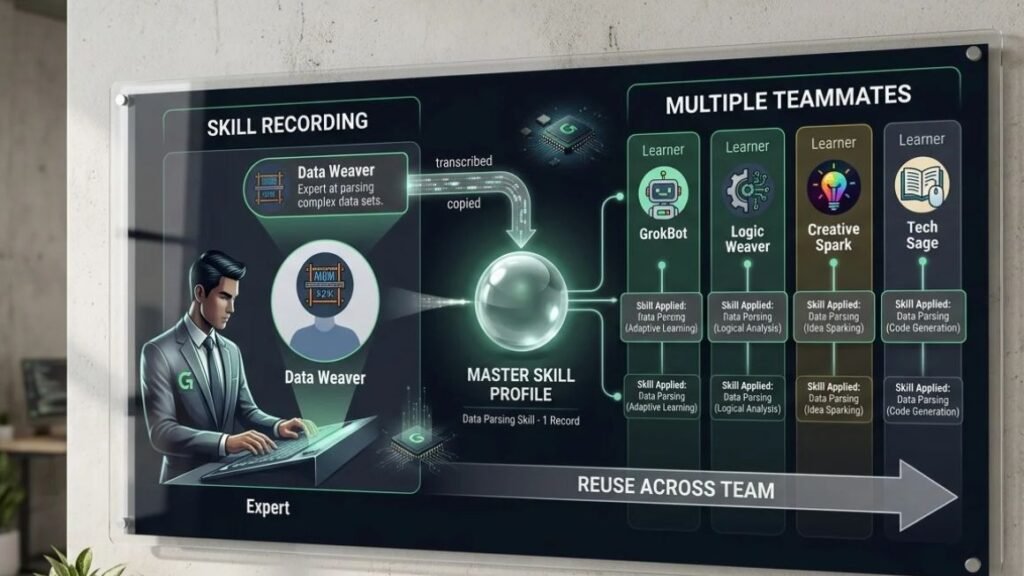
A skill is a saved way of doing something, like your exact keyword research process or your specific formatting standards for a blog post. Once taught, every teammate on your account can reuse it, not just the one you trained.
There are three ways to create a skill:
- Tell a teammate directly. After walking through a task together, say “save this as a skill” and it captures the steps.
- Upload a skill file from another AI tool. If you’ve already documented a process elsewhere, import it rather than rebuilding it from scratch.
- Record yourself doing it once. Hit record, walk through your actual process on screen, and GrokBot turns those actions into a repeatable skill.
This is where GrokBot stops feeling like generic AI output and starts sounding like you. Teach it your actual SEO writing voice, your internal linking habits, your title tag formula, once, and it applies that same standard to every article it publishes afterward.
Building a Full AI SEO Team (Not Just One Bot)
Once your first teammate is running, resist the urge to cram more jobs into it. Build separate teammates instead, each with a narrow lane:
- A content teammate that owns research, drafting, and publishing.
- A technical SEO teammate that checks for broken links, slow pages, and missing meta tags.
- A chief of staff that watches your inbox and calendar and routes work to the right teammate.
- An outreach teammate, if link building or partnerships matter to your site.
Each one gets its own connections and its own routines, but they can message each other when a job falls outside their lane. That’s the actual promise of an AI SEO employee: not one bot doing everything adequately, but several narrow specialists doing their one job well, coordinating without you in the middle of every handoff.
The Preferred Sources Button: A Second Way to Win Traffic
GrokBot handles the content side. But publishing great articles is only half the current SEO picture. Since 2025, Google has been rolling out a feature called Preferred Sources, and on August 20, 2026, it released a version any site owner can actually add to their own pages: an embeddable button.
Preferred Sources is a Google Search feature that lets readers mark a specific site as one they trust, after which that site’s content gets shown to them more often across Top Stories, AI Overviews, and AI Mode, carrying a small badge. Google reports that readers are roughly twice as likely to click through to a source they’ve personally selected, and more than 600,000 sources had been chosen this way by August 2026, up from around 345,000 in May.
The button embeds directly into your page template, and it works at the domain or subdomain level, not on a single article. Since your GrokBot content teammate is already connected to your site host, you can simply tell it to edit your template and add the button near the bottom of your articles, right where a reader who scrolled to the end is most likely to click.
The limitation is worth being honest about. This tool rewards loyalty, not discovery. A first-time visitor who’s never heard of your site won’t see your badge, because they haven’t chosen you yet. It works best stacked on top of content that’s already worth returning to, which is exactly what a well-run GrokBot routine produces on a schedule.
Google’s Preferred Sources button, released on August 20, 2026, lets readers mark a site as trusted directly from the page itself, after which that content is shown to them more often in Top Stories, AI Overviews, and AI Mode. It works at the domain level and rewards existing reader loyalty rather than helping a site get discovered by new visitors for the first time.
Conclusion
Building an AI SEO employee with GrokBot comes down to three moves: create a teammate around a role instead of a task, connect it to the tools it actually needs, and teach it a routine or skill so it keeps working without you. Start with one content teammate, get its first routine running cleanly for a week, then expand from there rather than building your whole team on day one.
If you want to keep building skills like this, Hotskill has structured, hands-on lessons on AI agents and automation built for exactly this kind of setup. Download the app on iOS or Android and start your first lesson today: hotskill.co/download
FAQ
What is GrokBot?
GrokBot is an AI agent from xAI that entered public beta on August 11, 2026. It signs into a user’s connected tools and completes tasks directly, rather than only answering questions inside a chat window.
How is GrokBot for SEO different from using ChatGPT or Claude for content?
ChatGPT and Claude generate text when you prompt them, but the session usually ends there. GrokBot keeps a persistent teammate connected to your actual site and tools, running scheduled routines like publishing without you prompting it each time.
How do I use GrokBot to automate my content calendar?
Create a content teammate, connect it to your site host, and give it a routine like “check my notes daily and publish an article on a trending keyword I haven’t covered.” It writes and saves its own execution steps and runs them on schedule.
Is GrokBot worth it for a small SEO team or solo creator?
If you’re already publishing regularly and hitting time limits, yes, especially for the routine and skill features that remove repetitive drafting work. If you publish only occasionally, the weekly usage caps make it less worthwhile right now.
Do I really need GrokBot if I already use AI writing tools?
Standalone writing tools still need you to prompt, copy, and publish manually every time. GrokBot’s value is in the parts around the writing: scheduling, publishing, and connecting to your actual site, which most writing-only tools don’t do.
Why isn’t my GrokBot teammate finishing its routine correctly?
This is common in early beta software. Check whether the connection to your site or tool is still active, since sessions can time out, and review whether the teammate’s job description is specific enough. Vague instructions produce vague results.
Do I need to know how to code to use GrokBot?
No. Every setup step, from creating a teammate to building a routine to teaching a skill, happens through plain conversation in the chat interface. No API keys or code are required for standard use.
What is Google’s Preferred Sources button and how is it related to GrokBot?
Preferred Sources is a Google feature that lets readers mark your site as trusted, increasing how often your content appears in their search results afterward. It’s unrelated to xAI, but you can use your GrokBot content teammate to add the embeddable button to your site template.
How much does GrokBot cost?
As of this beta stage in 2026, GrokBot isn’t sold separately. It’s included with certain higher-tier Grok and Cursor subscription plans and comes with weekly usage limits. xAI hasn’t published a standalone price.
Can one GrokBot skill be used by multiple teammates?
vYes. A skill you teach once, whether through direct instruction, a recorded walkthrough, or an uploaded file, becomes available to every teammate on your account, not just the one you trained it on.