

You’ve got 400 new leads this week and a sales team that can realistically call 60 of them. Which 60? Most teams still answer that with gut feel, a spreadsheet, or whoever filled in the form first. That’s exactly how good leads go cold.
AI Lead Scoring Software fixes this by ranking every lead on how likely it is to become a customer, using patterns in your own past deals instead of guesses. Lead scoring is the practice of giving each prospect a number that tells your team who to contact first.
The catch is choosing one. Every customer relationship management (CRM) system now claims to have “AI scoring,” pricing is hard to pin down, and a few products cost more than a junior hire.
This guide cuts through that. You’ll see what the technology does, which features matter, what results to expect, and how seven tools compare, with honest notes on where each one falls short. It’s written for marketers, founders, and revenue operations people who want a working scoring model, not another overview.
What Is AI Lead Scoring and How Does It Work?
AI lead scoring uses machine learning to study which past leads became customers, then predicts how likely each new lead is to do the same. The output is usually a number from 1 to 100 or a letter grade that appears inside your CRM.
Machine learning (ML) is software that finds patterns in historical data without being given explicit rules. Most AI lead scoring tools work this way, and they look at two kinds of signals. Fit signals describe who the lead is, such as industry, company size, and job title. Behavior signals describe what the lead does, such as visiting your pricing page, opening emails, or using a free trial.
Older scoring was manual. You’d assign 10 points for a pricing page visit and 5 for a webinar signup, and then hope those weights were right. They usually weren’t. Predictive scoring, the AI version, learns the weights from your actual closed deals and updates them as buyer behavior shifts.
Think of a SaaS company that notices trial users from 50 to 200 person companies who invite two teammates in week one convert at a far higher rate. A human might spot that after a quarter of analysis. A model finds it in hours, and it finds the patterns you’d never think to look for.
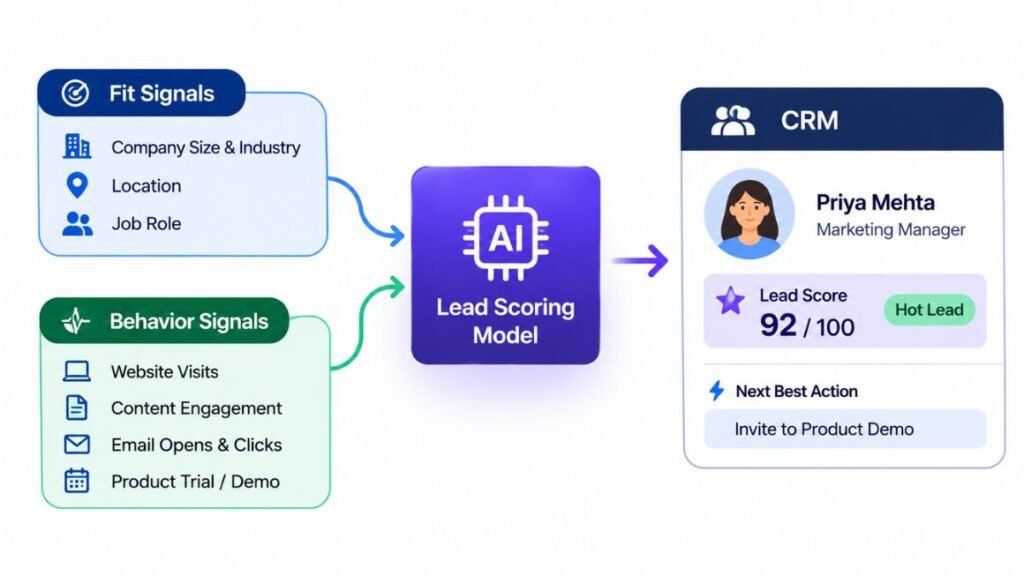
AI lead scoring ranks leads by predicting conversion likelihood from fit data (who they are) and behavior data (what they do). Unlike manual point systems, the model learns its weights from historical wins and losses, and it keeps adjusting as buyer behavior changes.
Which Features Matter Most?
The features worth paying for are the ones that change what your reps do on Monday morning: transparent scores, fresh data, CRM sync, and routing. Everything else is decoration. When you compare AI lead scoring tools, check these first.
Fit and behavior scoring together. A perfect-fit company that never engages isn’t hot. An eager student with no budget isn’t either. Good products score both and show them separately.
Score explanations. If a rep can’t see why a lead scored 87, they won’t trust it. Look for “top contributing factors” on every record. Honestly, this one feature decides whether your team uses the score or ignores it.
Intent data. Intent data is information about what a person or company is researching online, collected from website visits and third-party content networks. It helps you catch buyers before they fill in a form.
Real-time updates. A lead who visits your pricing page three times today matters now, not in tomorrow’s batch run. Scores that refresh in hours beat scores that refresh weekly.
CRM and marketing automation sync. Scores should land where reps already work. If someone has to open a separate dashboard, adoption drops fast.
Routing and alerts. The score should trigger action: assign the lead, notify the rep in Slack, or enroll the contact in a nurture sequence.
Model monitoring. Models drift. A good product shows you accuracy over time so you know when to retrain.
What Are the Real Benefits?
The main benefit is speed to the right lead. Your reps stop spreading effort evenly and start spending it where conversion odds are highest. Marketing and sales also get a shared definition of a “good lead,” which ends a surprising number of arguments.
Speed matters more than most teams admit. A Harvard Business Review study from 2011, “The Short Life of Online Sales Leads,” found that companies contacting web leads within an hour were nearly seven times as likely to qualify them as companies that waited even one hour longer. A score that surfaces hot leads instantly puts that finding to work.
The practical gains tend to show up in four places:
- Higher conversion rates, because reps call warm, well-fitted leads first.
- Shorter sales cycles, since buyers get contacted while interest is fresh.
- Less wasted outreach, because poor-fit leads move to low-cost nurture instead of consuming rep time.
- Cleaner reporting, since score bands let you forecast pipeline by lead quality.
Now the honest part. A scoring model can’t create demand, and it can’t fix a broken follow-up process. If reps ignore the top-scored leads, nothing improves. In Hotskill’s AI skill tracks, the pattern we see most often is that learners blame the tool when the real problem is messy training data or no agreed handoff rule.
The biggest benefit of predictive lead scoring is faster, better-targeted follow-up, which matters because response time strongly affects whether a lead qualifies. A 2011 Harvard Business Review study found that contacting web leads within an hour made qualification nearly seven times more likely than waiting an hour longer.
HubSpot: Best for Teams Already Living in HubSpot
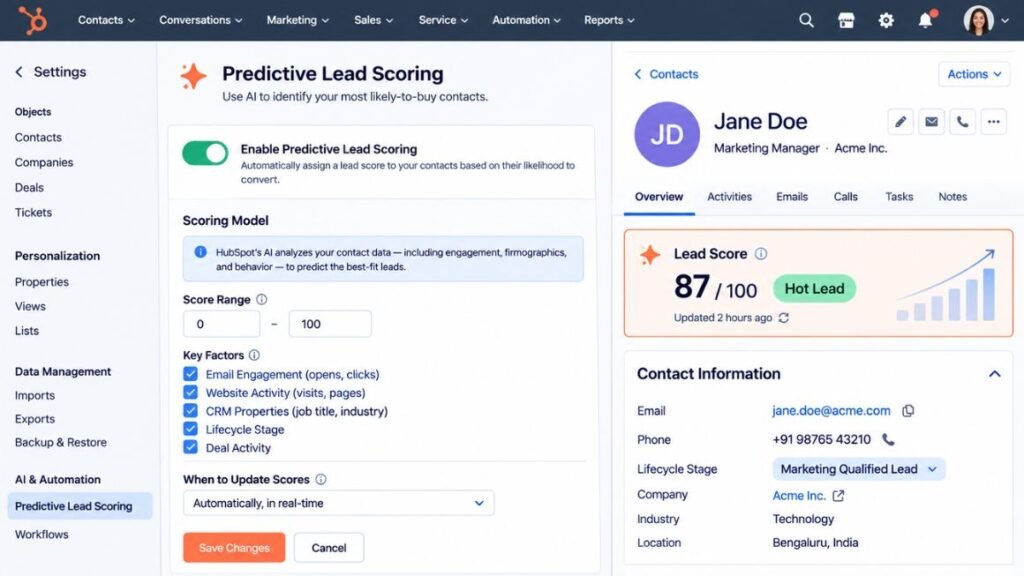
HubSpot’s predictive lead scoring is the easiest route to AI scoring if your contacts, emails, and deals already sit in HubSpot. It analyzes hundreds of data points on your existing records and gives each contact a likelihood-to-close score, with no model-building on your side.
What It Does Well
Setup is genuinely light. The model trains on your own CRM history, then scores new contacts automatically, and you can use those scores directly in workflows to assign owners, create tasks, or trigger emails. HubSpot also keeps a manual scoring option, so you can run rule-based points alongside the predictive score and compare them. Because marketing, sales, and service data share one database, the signals are cleaner than in a patchwork stack.
Where It Falls Short
The gate is the price tier. Predictive scoring sits on the Enterprise level of Marketing Hub and Sales Hub, while manual scoring starts lower on Professional. You’ll also pay a mandatory onboarding fee at the higher tiers. And the model is a black box compared with dedicated scoring vendors, so you get less control over how features are weighted.
Best For and Pricing
Best for: mid-market B2B teams already committed to HubSpot who want scoring without adding a vendor.
Pricing (as of 2026): Sales Hub Enterprise is listed at roughly $150 per seat per month on annual billing, and Marketing Hub Enterprise at roughly $3,600 per month, each with onboarding fees. Prices change often, so confirm on HubSpot’s pricing page.
Salesforce Einstein: Best for Salesforce-Native Teams
Einstein Lead Scoring is Salesforce’s built-in predictive model, and for teams running Sales Cloud it’s the most natural starting point. It ranks leads on a 1 to 99 scale based on conversion patterns in your own org’s data, and it refreshes automatically.
What It Does Well
Scores appear on the lead record next to the factors pushing them up or down, which is the explanation reps need to trust the number. It’s included with Sales Cloud Enterprise and above, so there’s no separate license for the scoring itself. Since it lives inside Salesforce, there’s no integration project. Salesforce has also layered Agentforce, its autonomous AI agent product, on top. Where Einstein tells a rep a lead looks hot, an Agentforce agent can start qualifying and following up. That’s a different and costlier product, so evaluate it separately.
Where It Falls Short
Einstein needs enough history to learn from. Salesforce’s documentation has long called for a meaningful volume of leads and conversions in the past six months, so smaller teams or new companies often can’t turn it on or get weak models. The Enterprise edition itself isn’t cheap, and the agent features add usage-based or per-seat costs that confuse many buyers.
Best For and Pricing
Best for: established Salesforce shops with a few hundred or more closed deals of history.
Pricing (as of 2026): Sales Cloud Enterprise is listed at around $165 per user per month, with Einstein Lead Scoring included. Agentforce options are priced separately and change frequently.
Zoho CRM Zia: Best for Tight Budgets
Zoho’s Zia is an AI assistant inside Zoho CRM that scores leads and deals, and it offers the lowest cost of entry on this list. If you’re a small team that wants predictive scoring without a four-figure monthly bill, start here.
What It Does Well
Zia’s scoring sits alongside deal win predictions, email sentiment analysis, anomaly detection, and best-time-to-contact suggestions, all inside one low-cost CRM. There are no per-use AI fees on top of the plan price, which makes budgeting simple. Zoho also lets you build rule-based scoring on cheaper tiers, so you can start manually and move to predictive scoring later. For companies already using other Zoho apps, the data flows together without extra work.
Where It Falls Short
The full Zia assistant starts on the Enterprise tier, not the entry plans. The model also needs a base of converted leads before it activates. One 2026 comparison puts that at roughly 75 conversions, and it can take several weeks to produce useful scores. And while Zoho’s analytics are decent, they’re thinner than what dedicated vendors give you for diagnosing model quality.
Best For and Pricing
Best for: small and mid-sized teams that want predictive scoring at the lowest possible cost.
Pricing (as of 2026): Enterprise is listed at about $40 per user per month on annual billing, with Ultimate at about $52. Check Zoho’s site for current regional pricing.
Freshsales Freddy AI: Best for Simple Setup
Freshsales, from Freshworks, uses its Freddy AI to score contacts and deals, and it’s one of the quickest tools here to get running. Reps see a score and a short reason, and managers can sort their lists by it without touching a settings page.
What It Does Well
Freshsales is built for ease. The interface is clean, onboarding is short, and the score is visible in list views, so reps use it. You can pair the AI score with your own manual rules, and the platform includes built-in phone, email, and chat, which means behavior signals from those channels feed the model. For a team with no dedicated revenue operations person, that low setup burden counts for a lot.
Where It Falls Short
Freshsales isn’t designed for complex enterprise scoring. You get fewer controls over model inputs than in Salesforce or a dedicated vendor, and advanced reporting is lighter. AI scoring also isn’t on the cheapest plans, and Freshworks has restructured its plan names more than once, so features can shift between tiers.
Best For and Pricing
Best for: startups and small sales teams that want a score working within days.
Pricing (as of 2026): Freddy AI scoring is reported to start on the Pro plan at around $39 per user per month on annual billing, with a free plan for up to three users. Verify the current tier before you buy.
MadKudu: Best for Product-Led Growth Companies
MadKudu is a dedicated scoring product built for companies where people try the product before they talk to sales. Product-led growth (PLG) is a go-to-market model in which free trials or free plans drive most new signups. MadKudu’s specialty is spotting product-qualified leads (PQLs), which are free users whose in-product behavior suggests they’re ready to buy.
What It Does Well
MadKudu scores on two separate dimensions: customer fit, built from firmographic data (company-level facts like size and industry), and behavior, built from marketing and product activity. A lead can be a great fit with low activity, or the reverse, and your team sees both. It trains on your historical conversions, explains the score with contributing factors, and recalibrates as your funnel changes. It connects to Salesforce, HubSpot, Segment, and Intercom.
Where It Falls Short
It’s a scoring layer and nothing else, so you still need a CRM, enrichment, and outreach tools. The value also drops sharply without product usage data. If you sell through demos and have no free tier, you’re paying for a feature set you won’t use. And there’s no public price list, so expect a sales process just to get a quote.
Best For and Pricing
Best for: SaaS companies with free trials or freemium plans and meaningful signup volume.
Pricing (as of 2026): Not published. Third-party reviews estimate entry plans around $1,000 per month and growth tiers around $24,000 per year, scaling with lead volume. Treat those as rough guides only.
6sense: Best for Enterprise Account-Based Teams
6sense scores accounts more than individual leads, and it’s the heaviest product here. It predicts where each target company sits in its buying journey, using a mix of your CRM data, website behavior, and intent signals gathered across the web.
What It Does Well
Accounts are placed into five buying stages: Target, Awareness, Consideration, Decision, and Purchase, each tied to an intent score from 0 to 100 that updates daily. That makes it very good at flagging companies that are researching your category before anyone has contacted you. Its Dark Funnel feature captures anonymous research activity, and the platform adds advertising and orchestration tools for account-based marketing (ABM), the practice of targeting specific companies rather than individual leads.
Where It Falls Short
Cost and complexity are the obstacles. Contracts are custom quoted, and third-party estimates run from roughly $25,000 a year at the low end to six figures for fuller packages. Reports on setup suggest the predictive model can take several weeks to configure. It also works best with large account lists, and it rewards teams that already have sales and marketing aligned on target accounts. If you don’t, 6sense will expose that gap rather than close it.
Best For and Pricing
Best for: enterprise B2B companies with a RevOps team, a big addressable market, and an ABM motion.
Pricing (as of 2026): Custom quotes only. Review sites cite a broad range from about $25,000 to well beyond $100,000 per year depending on modules and account volume. Among the AI lead scoring platforms in this guide, it’s the one most likely to require a procurement process.
Apollo.io: Best for Outbound Prospecting
Apollo.io is a sales engagement and contact database product with AI lead scoring built in. It’s the right pick when your problem is finding and contacting leads, not just ranking the ones you already have.
What It Does Well
Apollo’s database covers hundreds of millions of contacts, and you can filter prospects by score while building lists. It combines fit criteria with engagement signals, and you can define your own scoring criteria rather than relying only on automatic scores. Sequences, a dialer, and email tools sit in the same workspace, so a high score can lead straight to outreach. A free plan with limited scoring makes it easy to test.
Where It Falls Short
Scoring is a secondary feature layered on a prospecting product, and reviewers describe it as more basic than dedicated vendors. If your main job is ranking inbound leads already sitting in HubSpot or Salesforce, the fit is awkward. Credit-based pricing also frustrates some teams, and user reviews frequently raise data accuracy and email bounce concerns, so test the data on a small list first.
Best For and Pricing
Best for: small and mid-sized outbound teams that need data, outreach, and basic AI scoring in one place.
Pricing (as of 2026): A free plan exists, with paid plans reported from about $49 per user per month on annual billing, plus credits. Confirm current limits on Apollo’s pricing page.
How Do You Choose the Right Tool?
Choose by where your leads come from and where your data lives. The best AI Lead Scoring Software for you is the one that fits your CRM, your lead volume, and your team’s ability to maintain it, not the one with the longest feature list.
Here’s a quick way to match tools to situations:
| If this describes you | Start with |
|---|---|
| Already on HubSpot with Enterprise budget | HubSpot predictive scoring |
| Already on Salesforce Enterprise or above | Einstein Lead Scoring |
| Small team, tight budget | Zoho CRM Zia |
| Small team, want it running this week | Freshsales Freddy AI |
| Free trial or freemium product | MadKudu |
| Enterprise ABM with large account lists | 6sense |
| Outbound-heavy, need data plus scoring | Apollo.io |
Then run three checks before you sign anything. First, count your closed-won deals. Most predictive models need a few hundred to learn well, so if you have 40, start with manual rules. Second, ask each vendor to show the score explanation on a real lead. Third, run a short pilot and compare the model’s top 20% of leads against what your reps would have picked.
And be skeptical of demos. A polished dashboard says little about how the model performs on your messy data. The best AI Lead Scoring Software will let you test on a sample of your own records before you commit.
The right lead scoring product depends on your CRM, closed-deal volume, and sales motion. HubSpot and Salesforce suit teams already in those systems, Zoho and Freshsales suit smaller budgets, MadKudu suits product-led companies, 6sense suits enterprise account-based teams, and Apollo.io suits outbound prospecting.
How Do You Roll Out Lead Scoring in 30 Days?
You can have a working model in a month if you keep the scope small. Whichever of the AI lead scoring tools you pick, follow these steps in order.
- Week 1, Define a “good lead.” Agree with sales on what counts as a qualified lead and a closed win. Write it down in one sentence.
- Week 1, Clean your data. Remove duplicates, fix missing industries and job titles, and make sure won and lost deals are tagged correctly. Dirty history produces a dirty model.
- Week 2, Connect and train. Link your CRM and marketing tools, then let the model train on at least 12 months of history if you have it.
- Week 2, Check the explanations. Review 20 top-scored and 20 bottom-scored leads with a senior rep. Ask whether the ranking matches reality.
- Week 3, Set actions. Decide what happens at each score band: hot leads get a call within an hour, middle leads enter nurture, low leads get light-touch email.
- Week 4, Launch to a pilot group. Give the score to a few reps, track conversion by band, and gather their feedback.
- Week 4, Review and adjust. Compare results to your old process, then roll out to the whole team.
Simple idea. Most teams skip step 4 and wonder later why nobody trusts the score.
Mistakes That Quietly Break Scoring Models
Most failed rollouts trace back to a handful of avoidable errors, and the tool itself is rarely the cause. These are the ones we see most.
The first is training on bad outcomes. If your CRM marks deals “won” inconsistently, the model learns noise. The second is skipping the sales handoff rule. A score without a defined action is just a number on a screen.
Third, teams set it and forget it. Buyer behavior changes, so review model accuracy every quarter. Fourth, they overweight activity. A student downloading six ebooks isn’t a buyer, which is why fit signals must count alongside behavior.
Last, they buy for features they’ll never use. A small team doesn’t need the heaviest of the AI lead scoring platforms on this list. Match the tool to your real motion, and upgrade when your data volume justifies it.
Conclusion
Choosing AI Lead Scoring Software comes down to three things. First, a score is only useful if it triggers a clear action, so decide what each band does before you buy. Second, match the tool to your CRM and your closed-deal volume, because a heavy platform on thin data wastes money. Third, test on your own records before signing.
Here’s your next step today: export your last 12 months of leads, count the closed-won deals, and note where each lead came from. That one sheet tells you whether you’re ready for predictive scoring or should start with manual rules.
Hotskill teaches AI workflows like this in structured, bite-sized lessons built for busy professionals. Get the app at hotskill.co/download.
FAQ
What is AI lead scoring?
AI lead scoring is a method that uses machine learning to predict which leads are most likely to become customers. It studies your past wins and losses, then assigns each new lead a score based on fit and behavior. Reps use that score to decide who to contact first.
How is predictive scoring different from rule-based scoring?
Rule-based scoring uses point values that a person sets by hand, such as 10 points for a demo request. Predictive scoring learns the weights from your historical conversions and adjusts them over time. Rules are easier to explain, while predictive models usually catch patterns humans miss.
How much data do I need before predictive scoring works?
It depends on the tool, but most models need a few hundred closed deals or conversions to learn well. Zoho’s Zia reportedly activates after roughly 75 conversions, and Salesforce Einstein asks for a meaningful volume of leads and conversions over six months. With less history, start with manual scoring and switch later.
Which tool is best for a small business?
For tight budgets, Zoho CRM Zia has the lowest entry cost among the tools covered here. If you want the fastest setup, Freshsales Freddy AI is a strong choice. If you do a lot of outbound prospecting, Apollo.io bundles data, outreach, and basic scoring.
Do I need coding skills or a data scientist?
No. The CRM-based options, including HubSpot, Salesforce Einstein, Zoho, and Freshsales, train the model automatically on your records. You do need someone who understands your sales process and can check data quality. Dedicated products like MadKudu and 6sense benefit from a RevOps owner.
Is predictive scoring worth paying extra for if I already use a CRM?
It’s worth it when your lead volume is high enough that reps can’t contact everyone and you have enough closed-deal history. If your team calls every lead anyway, a score won’t change much. Run the numbers first: compare how many leads you get against how many your reps can realistically work.
Why are my lead scores inaccurate?
The usual causes are inconsistent won and lost tags, too little history, or missing fit data like industry and company size. Behavior signals also go stale if they’re not weighted by recency. Fix your data first, then retrain, and review a sample of high and low scores with a senior rep.
How long does it take to see results?
Setup can take days for simpler tools or several weeks for enterprise products. Meaningful conversion changes usually need one or two full sales cycles to measure. A 30-day pilot on a small group gives you early evidence without risking the whole pipeline.
Can scoring work for product-led or self-serve businesses?
Yes, but you need a tool that reads product usage data. MadKudu is built for this, scoring both fit and in-product behavior to flag product-qualified leads. Generic CRM scoring that only sees marketing activity will miss your best free users.
How do I know whether my scoring is working?
Compare conversion rates across score bands. If top-band leads convert at much higher rates than bottom-band leads, the model is separating good from bad. Also track time to first contact for hot leads and ask reps whether the ranking matches their instincts.