

You’ve got 4,000 reviews in a spreadsheet, a few hundred more on Google, and an app store page nobody on your team has read since the last release. Somewhere in that pile is the reason refunds jumped in September. Nobody has the time to find it.
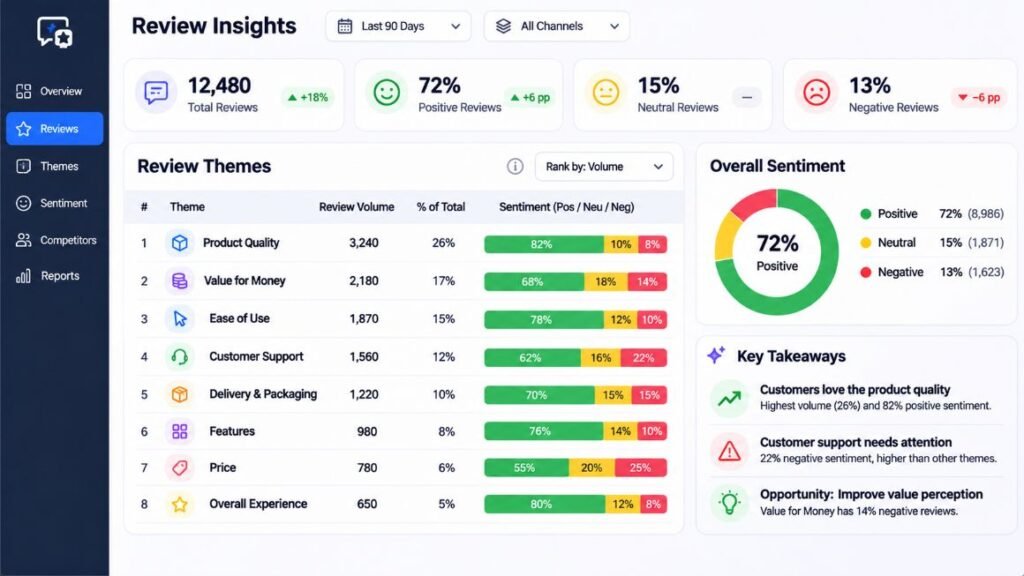
That’s the gap AI Review Analysis closes. It reads every review, groups them by topic, scores the emotion behind each one, and shows you which problems cost you the most. Work that once took an analyst a full quarter can now take an afternoon.
This guide is for marketers, founders, product managers and customer experience leads who want to make that jump. You’ll learn how the technology works, see twelve tools broken down one by one with honest strengths and weak spots, and get a workflow you can run this week. Features and prices reflect what we could verify as of November 2026. They change often, so check before you buy.
What Does AI Actually Do With a Customer Review?
AI does four jobs with reviews: it sorts them into topics, scores the sentiment, tracks how both change over time, and summarizes the findings in plain language. That’s it. Everything else is packaging.
Let’s define the terms, because vendors use them loosely.
Natural language processing (NLP) is the field of AI that lets software read and interpret human language. Sentiment analysis is the task of labeling text as positive, negative or neutral, and in newer tools it also detects emotions such as frustration or delight. Theme extraction, sometimes called topic modeling, is the task of grouping many comments into recurring subjects like “shipping delays” or “battery life.” And aspect-based sentiment analysis scores each topic separately inside a single review.
That last one matters more than it sounds. Take this review: “The app is gorgeous, but checkout crashed twice and support never replied.” A basic tool calls it neutral. An aspect-based tool says design is positive, checkout is negative, support is negative. You now know where to spend money.
A large language model (LLM) is the type of AI behind ChatGPT and Claude, trained on huge amounts of text so it can read, summarize and reason about writing. LLMs are why modern tools understand sarcasm and context better than the keyword counters of five years ago. AI-Powered Review Analysis today usually means NLP for the heavy sorting plus an LLM for the summaries and answers.
The market is growing fast because of this shift. The Business Research Company projects the sentiment analytics systems market will rise from $4.27 billion in 2025 to $5.61 billion in 2026, driven by wider use of AI methods over older keyword matching.
Review analysis with AI does four jobs: grouping comments into themes, scoring sentiment per topic, tracking trends over time, and summarizing findings in plain language. Aspect-based sentiment is the feature that matters most, because it separates what customers love from what they hate inside the same review. Large language models added context and sarcasm handling that keyword tools could not match.
How Does Review Data Turn Into a Business Decision?
Raw reviews become decisions in five steps: collect, clean, classify, quantify and act. Skip any of them and the output turns into a pretty chart nobody uses.
Step 1: Collect reviews from every source. Pull Google Business Profile, Amazon, Trustpilot, app stores, survey comments and support tickets into one place. Scattered data hides patterns.
Step 2: Clean the data. Remove duplicates, strip personal details like names and emails, and keep the star rating, date and product alongside each comment.
Step 3: Classify by theme and sentiment. This is where the AI earns its keep. It tags each review with topics and scores each topic.
Step 4: Quantify the impact. Counting mentions isn’t enough. A theme mentioned 40 times in one-star reviews hurts more than one mentioned 200 times in four-star reviews. Good tools connect themes to ratings, churn or revenue.
Step 5: Act and close the loop. Send the finding to whoever owns the fix, then check whether the theme shrinks next month.
Here’s an example. Imagine a meal-kit company analyzing 6,000 reviews. The AI finds that “late delivery” appears less often than “missing ingredients,” but missing ingredients cluster around one-star ratings. The team fixes the packing line first, not the courier contract. That’s the real value of AI Review Analysis: not the dashboard, but the decision it points you toward.
(This example is illustrative, not a real client result.)

General-Purpose AI Assistants: ChatGPT and Claude
You don’t need a dedicated platform to start. Chat assistants handle a few hundred or a few thousand reviews in a single session, and they’re the cheapest way to test whether the whole idea works for your business. The question every team asks next is which are the Best AI Tools for Customer Review Analysis, and the honest answer is that it depends on your volume, which the rest of this guide helps you sort out.
ChatGPT
What it does. ChatGPT is OpenAI’s chat assistant. You upload a CSV of reviews, describe what you want, and it returns themes, sentiment breakdowns, charts and written summaries. The paid Plus tier includes data analysis features that run real code on your file, so counts and averages come from calculations rather than guesses.
What it does well. It’s flexible and familiar. You can ask follow-up questions in plain English, request a chart, then ask it to draft a response plan for the top complaint. Most teams already know how to use it, so adoption costs nothing.
Where it falls short. Large exports can exceed what the model handles in one pass, so you often split files into batches. It also has no memory of last month’s analysis, so trends over time are your job. And it won’t connect to your review sources on its own.
Best for: Solo marketers and small teams analyzing a one-off export.
Pricing: A free tier exists, and ChatGPT Plus was listed at about $20 a month as of 2026.
Claude
What it does. Claude is Anthropic’s AI assistant. Its standout feature for this work is a large context window, which is the amount of text a model can hold in mind at once. That means you can paste in or upload a big batch of reviews and ask questions across all of them.
What it does well. In our experience, Claude is strong at nuanced reading: separating a complaint about the product from a complaint about delivery, or catching mixed feelings inside one review. Projects let you save instructions and a review set so follow-up questions stay consistent.
Where it falls short. Like ChatGPT, it’s a conversation, not a monitoring system. It won’t alert you when a new problem appears, and you still own the data export step.
Best for: Teams that want careful qualitative reading of long review sets, plus quotable examples.
Pricing: There’s a free tier and paid plans. Check Anthropic’s current pricing page, since plans change.
Dedicated Feedback Analytics Platforms
Dedicated platforms connect to your review sources, analyze everything continuously, and keep a history, so you see trends instead of snapshots. They’re built for teams with thousands of comments a month and several people who need answers. Expect quote-based pricing and a sales call.
Chattermill
What it does. Chattermill pulls feedback from surveys, reviews, support tickets, social media and app stores into one analysis layer. Its Lyra AI engine combines aspect-based sentiment with LLM features and ties themes to business metrics through impact analysis and anomaly detection.
What it does well. It handles unified, multi-channel analysis at consumer-brand scale. Its customer list includes Uber, HelloFresh, Tesco, Just Eat and H&M. It also offers an MCP server (a standard connector that lets AI assistants like Claude or ChatGPT query your data), so you can ask questions of your themes from a chat window.
Where it falls short. It analyzes feedback but doesn’t collect it, so you need your own survey and review sources. It’s also priced for enterprises, and small teams will find it heavy.
Best for: Mid-size and large consumer brands with feedback spread across many channels.
Pricing: Custom and quote-based, scoped by data volume and integrations. G2 shows a 4.5 out of 5 rating from more than 200 reviews.
Thematic
What it does. Thematic is a feedback analysis tool focused on finding themes and sentiment in open-ended text, especially survey comments and NPS (Net Promoter Score) responses.
What it does well. It surfaces recurring themes without heavy manual coding, and the output is easy for non-technical insights teams to read. G2 reviewers rate it 4.8 out of 5, though from a smaller pool of reviews than its bigger rivals.
Where it falls short. It’s narrower than a full customer experience platform. It’s a theming engine, so you’ll pair it with other tools for response workflows or collection.
Best for: Insights and research teams that want clean theme discovery on survey and review text.
Pricing: G2 lists a Foundation plan at $25,000 per year as of 2026. Third-party contract data suggests a median around $30,000 a year, with full deployments climbing much higher.
Enterpret
What it does. Enterpret builds what it calls an adaptive taxonomy, which is a topic structure that updates itself as new kinds of feedback arrive, plus a customer context graph linking feedback to accounts and users.
What it does well. It suits B2B software companies, where feedback arrives from tickets, calls, CRM notes and reviews, and many teams need access. It also offers an MCP server for AI assistants.
Where it falls short. There’s no public price list. And the setup effort makes sense for large feedback volumes, not for a founder with 300 reviews.
Best for: Product teams at B2B SaaS companies unifying feedback from many internal systems.
Pricing: Quote-based, scaling mainly with feedback volume and the integrations you need.
Unwrap.ai
What it does. Unwrap.ai analyzes customer feedback for product teams, grouping comments into themes and scoring sentiment across sources like reviews, surveys and support conversations.
What it does well. It prices by feedback volume with no per-seat charge, so everyone in the company can look at the data without extra cost. On G2, its thematic and sentiment analysis scores track at or above bigger competitors, though with fewer reviews behind them.
Where it falls short. It’s a younger product with a smaller review base, so you’ll want a proper trial. And its entry price is still enterprise-flavored.
Best for: Product teams that want wide internal access without paying per seat.
Pricing: Packages started at $24,000 per year on Unwrap’s own pricing page in 2026, according to a pricing guide published by Enterpret, one of its competitors. Confirm directly.
Enterprise Experience Suites
Experience management (XM) suites do far more than read reviews. They collect surveys, run case management, route alerts and report to executives. If you’re a large company with several business units, that breadth matters. If you’re not, it’s expensive overkill.
Medallia
What it does. Medallia captures feedback across surveys, social media, contact center interactions and more, then applies its Athena AI layer with natural language understanding and generative AI for root-cause explanations.
What it does well. It’s strong at operational use: routing a bad review to the right store manager within hours. Gartner has named it a Leader in its Magic Quadrant for Voice of the Customer Platforms, according to CB Insights.
Where it falls short. Implementation is long and costs escalate. It prices per record, so heavy volume raises the bill quickly.
Best for: Large enterprises running structured customer experience programs across many locations.
Pricing: Quote-based, with per-record pricing.
Qualtrics XM Discover
What it does. XM Discover is Qualtrics’ text and conversation analytics product. It applies topic modeling, emotion detection and effort scoring across surveys, calls, chat, social posts and reviews, in more than 20 languages.
What it does well. If your company already runs Qualtrics for surveys, the integration is the draw: one system holds scores and comments together.
Where it falls short. Its value drops if you’re not already in the Qualtrics world, and every tier is a quote rather than a published price.
Best for: Organizations already standardized on Qualtrics.
Pricing: Enterprise, custom quote.
Sprinklr
What it does. Sprinklr started as a social media management platform and now covers listening, care and feedback analytics. It was named a Leader in the 2026 Gartner Magic Quadrant for Voice of the Customer Platforms, and its Spring 2026 release added a Customer Feedback Copilot.
What it does well. If your reputation lives on TikTok, Reddit, X and review sites, its listening reach is hard to beat. It reads public conversation, not just the reviews you own.
Where it falls short. It’s a big platform with a learning curve, and buyers who only need review analysis end up paying for modules they won’t touch.
Best for: Brands where social conversation and public reviews matter as much as owned surveys.
Pricing: Enterprise, quote-based.
Enterprise suites such as Medallia, Qualtrics XM Discover and Sprinklr bundle review analysis with survey collection, alerting and executive reporting. They fit large organizations with many teams and locations, and they’re usually priced by quote. Smaller teams typically get better value from a focused analytics tool or a chat assistant.
Review Management Platforms
These tools start from a different place. Their main job is collecting and answering reviews, and analysis is built on top. If your business depends on star ratings on Google or the app stores, they’re often the most practical starting point.
Birdeye
What it does. Birdeye monitors reviews across more than 150 sites, sends review requests by text and email, suggests AI-written replies, and reports on sentiment and trending topics.
What it does well. It covers the full loop for multi-location businesses: ask, monitor, respond, report. It holds a 4.7 out of 5 rating on G2 from more than 4,000 reviews, which is a large sample.
Where it falls short. Pricing isn’t transparent and requires a sales call. Some G2 reviewers raise cancellation concerns, so read the contract term closely.
Best for: Multi-location businesses in healthcare, hospitality and retail that need collection and analysis together.
Pricing: Quote-based. Third-party write-ups reported entry plans from about $299 per month per location and a higher tier near $449, but treat those as estimates.
ReviewTrackers
What it does. ReviewTrackers monitors and analyzes reviews from Google, Yelp and over 100 other sites, with sentiment tagging, real-time alerts and custom reports.
What it does well. It’s focused. If you run many locations and want a clean view of ratings and themes by location, it does that without extra modules you don’t need.
Where it falls short. Competitors point out that its automation and predictive features are lighter than newer platforms. Review invites and responses can feel less flexible.
Best for: Multi-location brands wanting review-focused analytics rather than a full suite.
Pricing: Location-based and quote-only.
AppFollow
What it does. AppFollow specializes in App Store and Google Play reviews, with sentiment analysis, auto-tagging, real-time monitoring, multilingual support and workflow automation.
What it does well. App reviews are short, multilingual and tied to release versions. AppFollow is built for that, so you can see whether last Tuesday’s update caused a spike in complaints.
Where it falls short. It’s not the right tool for product reviews outside mobile apps, such as Amazon or Shopify listings.
Best for: Mobile app teams monitoring store reviews at scale.
Pricing: Check AppFollow’s current pricing page, since we couldn’t verify a figure for this guide.
Which Tool Should You Pick?
Pick by volume and by where your reviews live. Under a few hundred reviews a month, a chat assistant is enough. In the thousands, with several teams involved, move to a dedicated platform. If you manage many locations, start with a review management tool.
| Your situation | Start with | Why |
|---|---|---|
| One-off export, small team | ChatGPT or Claude | Low cost, fast test |
| Survey and NPS comments | Thematic | Clean theme discovery |
| B2B software, feedback in many systems | Enterpret | Unifies tickets, calls, CRM |
| Consumer brand, many channels | Chattermill | Multi-channel with impact analysis |
| Large enterprise, many locations | Medallia or Qualtrics XM Discover | Alerting, governance, reporting |
| Social-heavy reputation | Sprinklr | Public conversation coverage |
| Multi-location local business | Birdeye or ReviewTrackers | Collection plus monitoring |
| Mobile app | AppFollow | Store-specific analysis |
If you’re comparing the Best AI Review Analysis Tools for the first time, run the same 200 reviews through two or three of them and compare the answers. Most vendors offer demos or trials, and the differences show up fast.
One more thing: don’t buy on a demo alone. Demos use clean data. Your data is messy, multilingual and full of sarcasm. And if you’re building a shortlist of the Best AI Tools for Customer Review Analysis, put “can it handle my worst 100 reviews?” at the top of your checklist.
How Do You Run Your First Analysis This Week?
You can finish a first analysis in about two hours using a chat assistant and a CSV export. Here’s the process, step by step.
- Export your reviews. Pull the last 90 days from one source. Include date, star rating and review text.
- Remove personal data. Delete names, emails and order numbers.
- Upload the file to ChatGPT or Claude.
- Paste a structured prompt like the one below.
- Check 20 results by hand. Read twenty random reviews and confirm the tags match.
- Share one finding with one owner. Don’t send a 30-slide deck. Send the top problem and the evidence.
Here’s a prompt that works:
You are a customer insights analyst. The attached CSV has reviews with columns: date, rating, text. Group the reviews into no more than 8 themes. For each theme, give the number of reviews, the average star rating and the dominant sentiment. Quote two representative reviews per theme. Rank the themes by likely impact on revenue and explain your reasoning. Flag anything that looks like a safety issue, a legal risk or a fake review. If a theme has fewer than 10 reviews, say so instead of guessing.
That last line matters. It stops the model from inventing patterns out of thin air.
Once this works manually, you’ll know exactly what you want from a platform. And that’s when AI-Powered Review Analysis becomes a monthly habit instead of a one-time project, with a dedicated tool watching your sources and alerting you when a new theme spikes.
What Mistakes Ruin the Results?
Most failures come from bad inputs and blind trust, not from bad technology. Four mistakes show up again and again.
Treating star ratings as the whole story. A three-star review often contains the most useful detail. Read the text.
Ignoring sample size. Ten reviews about a feature isn’t a trend. Ask the tool to show counts, and be wary when it doesn’t.
Skipping the human check. AI misreads sarcasm, slang and mixed-language reviews. Sentiment accuracy depends heavily on language and domain, so sample-check every new data source before you trust it.
Analyzing without an owner. If nobody is responsible for acting on a theme, the analysis is a hobby. Assign each top issue to a named person with a date.
There’s also a privacy point. Reviews can contain names, addresses or health details. Strip them before uploading, and check each vendor’s data handling terms, including whether your data is used to train models.
Your Next Step
Reviews already tell you what to fix, what to double down on and what customers will pay for. The only question is whether you read them fast enough to act.
Three takeaways. First, aspect-based sentiment and impact ranking matter more than any flashy dashboard. Second, start small with a chat assistant and a 90-day export before you sign a contract. Third, every finding needs an owner and a deadline.
Today, export your last 90 days of reviews, run the prompt above, and send the top issue to one person. That’s a full cycle in one afternoon. When you’re ready to compare the Best AI Review Analysis Tools against what you’ve learned, you’ll know exactly what to test.
Want to build these skills properly? Hotskill teaches AI workflows like this one in structured, bite-sized lessons built for busy professionals. Get the app at hotskill.co/download, available on the App Store and Google Play.
FAQs
What is review analysis using artificial intelligence?
It’s the use of language models and related software to read large volumes of customer reviews, group them by topic, score sentiment and summarize what matters. Instead of reading every comment, you get a ranked list of issues and strengths backed by counts and quotes.
How accurate is sentiment analysis on customer reviews?
It depends on language, domain and data quality. Clean, English-language reviews in a well-defined category tend to score well, while sarcasm, slang and code-switching lower accuracy. Always read a random sample of 20 to 50 results before trusting any new source.
Can ChatGPT or Claude replace a dedicated platform?
For one-off analysis of a few hundred to a few thousand reviews, yes. They fall short on continuous monitoring, alerts, history and team dashboards, which is where platforms like Chattermill, Thematic or Birdeye earn their price.
Do I need coding skills to analyze reviews with AI?
No. Chat assistants take plain-English instructions and a CSV file. Dedicated platforms connect to your sources through built-in integrations, so setup is usually a vendor task, not a coding task.
How many reviews do I need before analysis is worth it?
A few hundred reviews is enough to find useful themes in a chat assistant. Below about 100, you can read them yourself. Platforms start paying off when you get thousands of comments a month across several channels.
Is this worth it for a small business?
Yes, if you get steady reviews and have never systematically read them. A free or low-cost chat assistant can reveal your top three complaints in an afternoon. Skip the enterprise suites until volume and team size justify them.
Why are my AI results generic or vague?
Usually the prompt is vague or the data lacks context. Include ratings and dates, ask for a fixed number of themes, request quotes as evidence, and tell the model to say when data is thin. Specific instructions produce specific answers.
How do I deal with fake or spam reviews?
Ask the tool to flag suspicious patterns, such as repeated phrasing, bursts of five-star reviews in one day or generic text, and then verify them manually. For platform-level removal, report them through Google, Yelp or the marketplace itself.
Is it safe to upload customer reviews to an AI tool?
Public reviews carry low risk, but exports can include personal data. Remove names, emails and order details first, and read each vendor’s terms on storage and model training. Enterprise plans usually offer stronger data controls than free tiers.
How often should I analyze my reviews?
Monthly is a good rhythm for most businesses, with extra runs after a product launch, a price change or a service incident. Teams with high volume should use a platform that monitors continuously and alerts on new spikes.