

LinkedIn has quietly become one of the most powerful platforms for B2B growth. Not just for job hunting anymore, it’s now where deals start, partnerships form, and entire pipelines are built. But let’s be honest doing outreach manually in 2026 feels a bit like sending handwritten letters in the age of email. It works, sure, but it’s painfully slow.
That’s exactly where automation, powered by AI, steps in. The right tools don’t just save time. They improve targeting, personalize conversations at scale, and honestly, make your outreach feel more human, not less.
In this guide, we’ll go deep into the 20 best tools available right now. Not just surface-level features, but what they actually do, where they shine, and where they might fall short. If you’re serious about scaling outreach, this will help you figure out what’s worth your time.
Why AI LinkedIn Automation Tools Are Dominating Outreach in 2026
There’s been a shift over the past couple of years. Earlier, automation meant blasting connection requests and generic messages. That approach doesn’t work anymore. LinkedIn’s algorithm is smarter, and users are too.
Modern tools now combine behavioral data, natural language generation, and smart sequencing. The result is outreach that feels surprisingly personal, even when it’s automated.
AI LinkedIn Automation Tools are no longer just “nice to have.” They’re becoming a competitive advantage. If you’re not using them, someone targeting your audience probably is.
And yeah, maybe it feels a bit unfair at first. But that’s marketing. The tools evolve, and so do the strategies.
1. Expandi
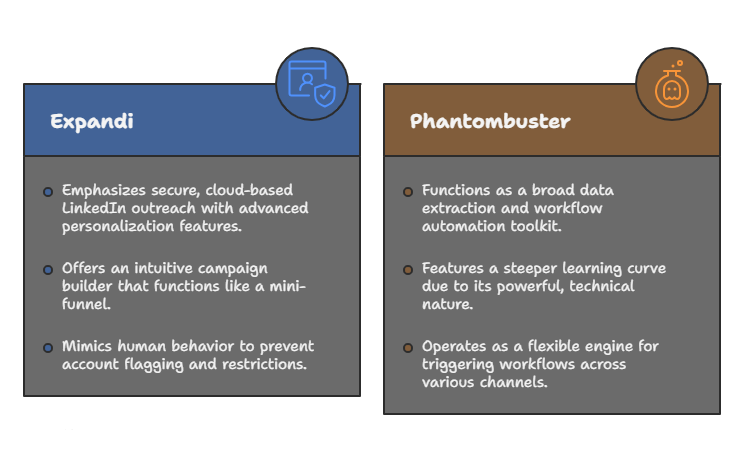
Expandi has built a reputation as one of the safest cloud-based LinkedIn automation tools. What makes it stand out is its focus on personalization. Instead of just inserting first names into messages, it allows dynamic variables like profile data, recent activity, and even custom images.
It also mimics human behavior quite well. That matters more than people think. LinkedIn restrictions are stricter now, and tools that don’t adapt can get accounts flagged.
One thing I like is its campaign builder. It’s flexible, almost like building a mini funnel inside LinkedIn.
2. Phantombuster
Phantombuster feels more like a toolkit than a single product. It’s designed for scraping, automating, and enriching data across platforms, not just LinkedIn.
For outreach, it allows you to extract profiles, auto-connect, and trigger workflows. It’s especially useful if you’re combining LinkedIn with other channels like email.
There’s a bit of a learning curve, though. It’s powerful, but not exactly beginner-friendly.
3. Dripify
Dripify focuses heavily on sales teams. It allows you to create multi-step campaigns with actions like profile visits, connection requests, and follow-ups.
The dashboard is clean, and tracking performance is straightforward. You can actually see which steps in your sequence are working and which aren’t.
One subtle but important feature is team management. If you’re running outreach for multiple reps, this becomes incredibly useful.
4. Zopto
Zopto has been around for a while, and it’s evolved quite a bit. It now integrates AI to optimize targeting and messaging.
It works particularly well for agencies and consultants. You can manage multiple campaigns and clients without things getting messy.
The analytics are solid too. Not overly complicated, but enough to make data-driven decisions.
5. Linked Helper
Linked Helper is one of the older tools in this space, but it’s still relevant. It’s a desktop-based solution, which means it runs locally rather than in the cloud.
That has pros and cons. It’s generally more affordable, but less flexible compared to cloud tools.
It’s still quite powerful, especially for basic automation like sending connection requests and messages.
6. Meet Alfred
Meet Alfred combines LinkedIn automation with email and Twitter outreach. So it’s more of a multichannel platform.
The AI features help craft messages and optimize sequences. It’s not the most advanced AI out there, but it gets the job done.
Where it shines is simplicity. You don’t need a steep learning curve to get started.
7. HeyReach
HeyReach is built specifically for agencies and outbound teams managing multiple LinkedIn accounts.
What’s interesting is its inbox system. It centralizes conversations from multiple accounts, which can save a lot of time.
It also handles sending limits intelligently, which reduces the risk of account restrictions.
8. Waalaxy
Waalaxy has a bit of a different vibe. It’s very beginner-friendly and focuses on making automation accessible.
It offers pre-built templates for outreach, which can be useful if you’re not sure where to start.
At the same time, advanced users might find it slightly limiting. It’s more about ease than deep customization.
9. TexAu
TexAu is similar to Phantombuster in many ways. It’s a powerful automation platform that goes beyond LinkedIn.
You can build workflows that include scraping, messaging, and integrations with other tools.
It’s great for growth hackers and technical marketers. Maybe not ideal if you just want something simple.
10. Dux-Soup
Dux-Soup is one of the most popular Chrome extensions for LinkedIn automation.
It’s lightweight and easy to use. You can start visiting profiles and sending connection requests within minutes.
The AI capabilities are improving, but it’s still more of a traditional automation tool compared to newer platforms.
11. Skylead
Skylead focuses on combining LinkedIn and cold email outreach into one system.
The smart sequences allow you to switch channels automatically. For example, if someone doesn’t respond on LinkedIn, they can be contacted via email.
That kind of flexibility can significantly improve response rates.
12. Octopus CRM
Octopus CRM is another browser-based tool that’s easy to set up.
It offers automation for profile visits, connection requests, and messaging.
It’s not the most advanced tool, but it’s reliable and affordable.
13. Salesflow
Salesflow is designed for scalability. It’s cloud-based and supports managing multiple accounts.
It also includes CRM integrations, which makes it easier to align outreach with your sales pipeline.
The interface is clean, and the automation feels stable.
14. Cleverly
Cleverly is more of a done-for-you service than just a tool.
They handle outreach campaigns on your behalf, using AI and human optimization.
It’s ideal if you don’t want to manage automation yourself. But it comes at a higher cost.
15. Lead Connect
Lead Connect is built specifically for LinkedIn Sales Navigator users.
It integrates seamlessly and allows automated messaging based on saved searches.
It’s quite focused, which is both its strength and limitation.
16. We-Connect
We-Connect emphasizes safety and compliance.
It’s cloud-based and uses dedicated IP addresses to reduce risks.
The campaign builder is intuitive, and the support team is quite responsive.
17. Lempod
Lempod is a bit different. It focuses on engagement rather than outreach.
It helps boost likes and comments on your posts, increasing visibility.
While it’s not a direct outreach tool, it complements your strategy well.
18. AeroLeads
AeroLeads is more of a lead generation tool.
It helps extract contact information from LinkedIn profiles.
You can then use that data for outreach, either on LinkedIn or via email.
19. Crystal
Crystal uses AI to analyze personality based on LinkedIn profiles.
It then suggests how to communicate with each prospect.
It’s fascinating, honestly. Not perfect, but it adds a layer of personalization that most tools miss.
20. Taplio
Taplio focuses on content and personal branding.
It uses AI to generate posts and optimize engagement.
While not strictly an outreach tool, it helps attract inbound leads, which reduces the need for cold outreach.
How to Choose the Right Tool for Your Needs
Choosing the right platform isn’t just about features. It’s about fit.
If you’re a solo founder, something simple like Waalaxy or Dux-Soup might be enough. If you’re running an agency, tools like HeyReach or Zopto make more sense.
Budget matters too. Some tools are surprisingly expensive once you scale.
And then there’s compliance. LinkedIn’s policies keep evolving, so safety should always be a priority.
Final Thoughts
Automation isn’t about replacing human connection. It’s about enabling it at scale.
The best tools don’t make you sound robotic. They actually help you sound more thoughtful, because they free up time to focus on strategy and conversations.
If you’re exploring AI LinkedIn Automation Tools, start small. Test a couple of platforms. See what fits your workflow.
Because honestly, the “best” tool is the one you’ll actually use consistently.
FAQs
1. Are LinkedIn automation tools safe to use in 2026?
Yes, but only if you use reputable tools that mimic human behavior and follow LinkedIn’s limits. Over-automation can still lead to restrictions.
2. Do these tools require technical knowledge?
Not always. Some tools are beginner-friendly, while others like TexAu or Phantombuster may require a bit of technical understanding.
3. Can AI really personalize outreach messages?
To an extent, yes. AI can analyze data and generate relevant messages, but human oversight is still important for authenticity.
4. What is the average cost of LinkedIn automation tools?
Prices vary widely, from around $15 per month to several hundred dollars depending on features and scale.
5. Can I use multiple tools at the same time?
It’s possible, but not recommended unless you know what you’re doing. It can increase the risk of account issues.
6. Are cloud-based tools better than desktop tools?
Generally, yes. Cloud tools offer more flexibility and are easier to manage, especially for teams.
7. Do these tools integrate with CRMs?
Many of them do. Tools like Salesflow and Zopto offer CRM integrations for better pipeline management.
8. Can automation replace manual outreach completely?
Not really. It should complement manual efforts, not replace them entirely.
9. How quickly can I see results?
It depends on your strategy, but most users start seeing responses within a few weeks.
10. Which tool is best for beginners?
Waalaxy and Meet Alfred are good starting points due to their simplicity and ease of use.