

Your CRM is supposed to save you time. For a lot of teams it does the opposite: reps spend hours logging calls, updating deal stages, and chasing contacts who went cold three weeks ago. AI CRM software fixes that by handling data entry, scoring leads, drafting follow-ups, and flagging deals at risk before they stall.
The problem is picking one. Every vendor now claims AI, and the label covers everything from a genuinely useful email assistant to a chatbot bolted onto a sidebar. This guide covers 15 AI CRM software tools, with honest notes on what each one does well, where it falls short, and who should actually buy it. Pricing is noted as of 2026 and changes often, so confirm with each vendor before you commit.
It’s written for marketers, founders, and sales leads who already know what a CRM is and want to know which one will actually reduce their workload.
What Does an AI CRM Actually Do?
An AI CRM takes the repetitive work out of customer management by capturing data automatically, predicting which leads will close, and drafting messages for you. It doesn’t replace your sales process. It removes the admin that slows it down.
A customer relationship management (CRM) system is the database where a business stores contacts, deals, and conversations. AI CRM software adds machine learning (software that finds patterns in your data and improves with use) and generative AI (models that write text, summarise calls, and answer questions) on top of that database.
In practice, the AI does five jobs:
- Data capture: logging emails, meetings, and calls without manual entry.
- Lead scoring: ranking prospects by how likely they are to buy.
- Forecasting: predicting which deals will close and when.
- Content drafting: writing follow-up emails, call summaries, and meeting briefs.
- Workflow automation: moving deals, assigning tasks, and triggering sequences based on behaviour.
Here’s the catch. AI is only as good as the data underneath it. If your pipeline is full of duplicate contacts and half-filled records, lead scores will be noise. Clean data first, then switch on the AI.
An AI CRM automates the admin around customer management: logging activity, scoring leads, forecasting revenue, and drafting messages. Its output depends heavily on the quality of the data stored in it. Teams with clean records see useful predictions, while teams with messy records mostly get noise.
How Do You Choose the Right AI CRM?
Pick the CRM that matches your team size and data quality first, then compare AI features. A simple tool that your team actually uses beats a powerful one that sits half-configured.
When you compare AI CRM software tools, five questions matter more than any feature list.
- Is the AI built in or bolted on? Native AI works on your CRM data directly. Add-on assistants often need extra setup and extra fees.
- Which plan includes the AI? Many vendors lock their best features behind top-tier plans or usage credits. Check this before you budget.
- How much data do you have? Predictive scoring needs history. A brand new startup with 30 deals won’t get much from it.
- Does it connect to your stack? Email, calendar, phone, and billing integrations decide whether data capture is truly automatic.
- Can you test it with real data? Run a 14-day trial using your own contacts, not the vendor’s demo dataset.
In Hotskill’s AI skill tracks, we’ve seen the same pattern repeatedly: professionals who test a tool against one real workflow, such as follow-up emails after demos, make better buying decisions than those who compare feature tables.
Salesforce Einstein and Agentforce: Best for Large Enterprises
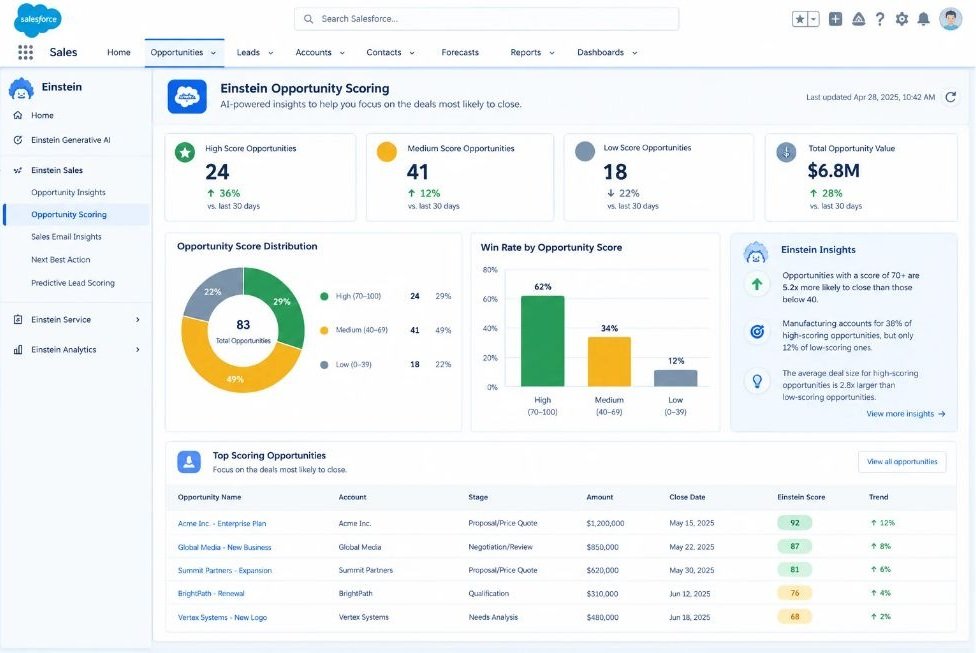
Salesforce is the biggest name in CRM, and its AI layer has two parts. Einstein handles predictions like lead scoring, opportunity insights, and forecasting. Agentforce is a set of AI agents (software that completes multi-step tasks on its own, without being prompted at each step) that can qualify leads, answer customer questions, and update records.
What it does well: Depth. If you have complex territories, multiple product lines, and a data team, Salesforce can model nearly any process. A global sales team can use Einstein forecasting to see which regional pipelines are slipping, while an Agentforce agent handles first-line inbound questions.
Where it falls short: Cost and complexity. The strongest AI features sit in higher editions, agent usage is often billed on consumption, and most companies need an admin or implementation partner. Smaller teams will find it overbuilt.
Best for: Companies with 200 or more employees and dedicated CRM administrators.
Pricing (as of 2026): Starter Suite begins around $25 per user per month, but the full AI capabilities cost considerably more.
HubSpot Smart CRM with Breeze AI: Best for Marketing-Led Teams
HubSpot’s free CRM is the easiest way to start, and its Breeze AI suite sits across the platform. Breeze Copilot is a chat assistant that drafts emails, summarises records, and answers questions about your contacts. Breeze Agents handle specific jobs such as prospecting and customer support.
What it does well: Everything connects. A lead who fills in a landing page form, opens three emails, and visits your pricing page shows up in the sales view with that history attached, and Breeze can draft the outreach based on it. The interface is also the friendliest on this list.
Where it falls short: Price creep. The CRM is free, but adding marketing, sales, and service tiers plus contact volume pushes the bill up fast. Some AI features also run on a credits system.
Best for: Marketing-led businesses that want one platform for campaigns and sales.
Pricing (as of 2026): Free CRM. Paid Starter plans begin around $15 to $20 per seat per month, with Professional tiers costing far more.
Zoho CRM with Zia: Best Value for Growing Businesses
Zia is Zoho’s built-in assistant. It scores leads, spots unusual patterns in deal activity, suggests the best time to contact someone, and reads the sentiment of incoming emails so you know which customers sound unhappy.
What it does well: Breadth for the price. Zoho CRM plugs into dozens of other Zoho apps, so a growing business can add invoicing, support, and campaigns later without switching vendors. A real example: a team can use Zia’s sentiment analysis to flag frustrated replies and route them to a senior rep the same day.
Where it falls short: The interface feels dated next to HubSpot or Attio, and Zia is noticeably stronger in the upper plan tiers. Setup takes more patience than the marketing suggests.
Best for: Small and mid-sized businesses that want broad features on a tight budget.
Pricing (as of 2026): Standard plans start around $14 per user per month when billed annually. Fuller AI features need higher tiers.
Microsoft Dynamics 365 Sales with Copilot: Best for Microsoft 365 Companies
If your team lives in Outlook, Teams, and Excel, Dynamics 365 Sales is the natural fit. Copilot (Microsoft’s generative AI assistant) summarises email threads, prepares briefs before meetings, drafts replies, and updates CRM records from conversations.
What it does well: Integration with tools your team already uses all day. A rep can finish a Teams call and have the notes, action items, and next steps pushed into the opportunity record without typing a word.
Where it falls short: Licensing is confusing, implementation usually needs a partner, and it’s expensive for small teams. If you’re not already committed to Microsoft, the case weakens quickly.
Best for: Mid-size and large companies already standardised on Microsoft 365.
Pricing (as of 2026): Sales Professional starts around $65 per user per month. The Enterprise edition runs around $105, with Copilot capabilities depending on the licence.
Pipedrive: Best for Small Sales Teams Focused on Pipeline
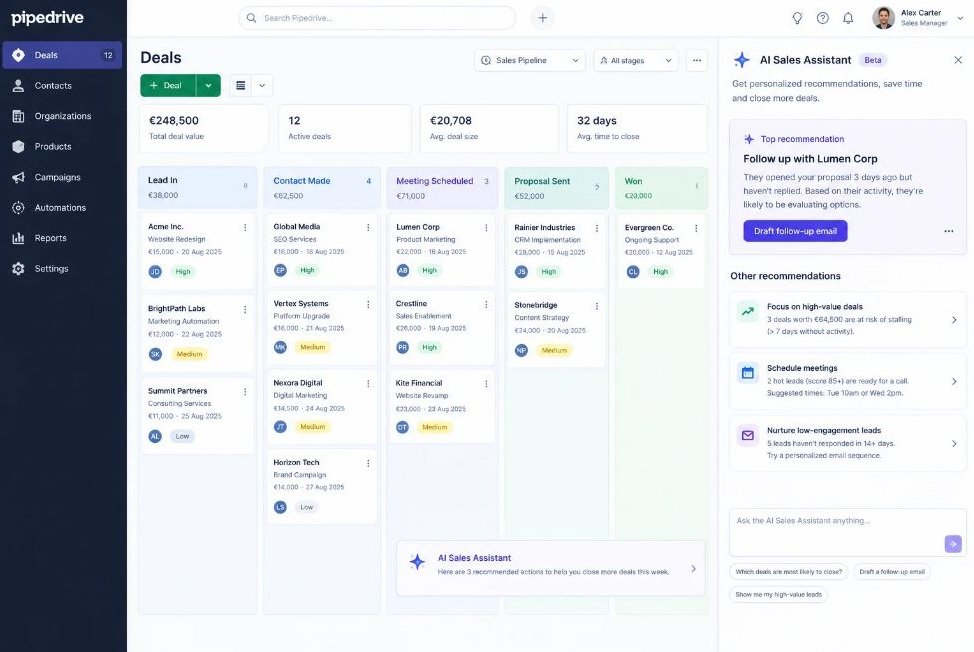
Pipedrive built its name on a clean, visual pipeline, and its AI Sales Assistant now recommends next actions, summarises emails and calls, and helps write messages. The idea is simple: the CRM tells you which deal needs attention today.
What it does well: Simplicity. New reps are productive in an afternoon, and automations like moving a deal when a proposal is opened are easy to build. For a five-person agency selling retainers, that’s often all you need.
Where it falls short: Marketing and service features are thin, so you’ll add other tools. Its AI is useful but less deep than Salesforce or HubSpot, and some features sit in higher plans.
Best for: Small teams that sell actively and want to see their pipeline at a glance.
Pricing (as of 2026): Paid plans start around $14 per seat per month when billed annually.
Freshsales with Freddy AI: Best for Teams Who Want Calls and Chat Built In
Freshsales comes from Freshworks, and Freddy AI is its assistant. It scores leads, highlights deal insights, summarises conversations, and drafts emails. A built-in phone and chat system means calls get logged automatically.
What it does well: Value. You get a CRM, telephony, and email tools in one place, which removes the need for separate subscriptions. Freddy’s deal insights are practical, flagging deals with no recent activity so they don’t quietly die.
Where it falls short: Some of Freddy’s generative features are sold as a separate add-on, which changes the real price. Reporting is also less flexible than in larger platforms.
Best for: Startups and small teams who want an affordable all-rounder.
Pricing (as of 2026): A free plan exists, and paid plans start at roughly $9 per user per month on annual billing. Freddy add-ons cost extra.
monday CRM: Best for Visual, Flexible Workflows
monday CRM sits on the same platform as monday.com’s project boards. Its AI features help write emails, summarise records, extract information from messages, and fill in fields, while automation recipes handle repetitive tasks.
What it does well: Flexibility. If your sales process doesn’t fit a standard pipeline, such as a design agency tracking proposals, revisions, and approvals, you can build custom boards that match the way you actually work.
Where it falls short: It isn’t as CRM-native as Salesforce or Pipedrive. Seat minimums apply, and AI usage can be limited by credits. Teams that want out-of-the-box sales structure will do more setup.
Best for: Teams that already use monday.com or need a customisable workflow.
Pricing (as of 2026): Plans start around $12 per seat per month, with a minimum of three seats.
Close: Best for High-Volume Inside Sales
Close is built for teams that spend their day calling and emailing. Calling, SMS, and email live inside the CRM, and its AI features transcribe calls, summarise them, pull out action items, and help draft follow-ups.
What it does well: Speed. A rep can make twenty calls, and each one is logged, transcribed, and summarised with no manual notes. That alone gives most inside sales teams back an hour or more a day.
Where it falls short: It’s narrow by design. Marketing automation is minimal, and reporting depth is lighter than enterprise tools. If you sell through long, complex cycles, you may outgrow it.
Best for: Inside sales and outbound teams running lots of calls.
Pricing (as of 2026): Tiered per-user monthly plans. Entry plans are inexpensive, while features like advanced automation cost more.
Attio: Best for Startups Who Want a Modern, AI-Native CRM
Attio is a newer CRM designed around AI from the start. It enriches contacts automatically, lets you create AI attributes (custom fields that an AI model fills in for you, such as “industry” or “likely budget”), and supports natural language search so you can ask questions about your data.
What it does well: Flexibility and speed. You can restructure your data model in minutes, and AI attributes turn messy company lists into sortable, useful fields. A founder can paste in a list of 200 accounts and have them categorised the same afternoon.
Where it falls short: It’s a younger product. The integration catalogue is smaller than the veterans, and very large enterprises may find it unproven at scale.
Best for: Startups and venture-backed teams that want a modern setup without legacy baggage.
Pricing (as of 2026): A free plan exists. Paid plans start around $29 per user per month.
Copper: Best for Google Workspace Users
Copper lives inside Gmail and the wider Google Workspace. It captures contacts and email history automatically, so your CRM updates as you work without a separate tab.
What it does well: It removes the biggest CRM annoyance, which is switching between inbox and database. Add a new client to an email thread and Copper builds the record around them.
Where it falls short: To be fair, its AI is lighter than most tools here. Its value is in automatic capture and simple workflows, not predictive scoring or autonomous agents. Teams that outside Google’s world get less from it.
Best for: Small professional services firms that run their business from Gmail.
Pricing (as of 2026): Entry plans start around $9 per user per month, with higher tiers adding automation and reporting.
Keap: Best for Small Service Businesses That Need Automation
Keap combines CRM, email campaigns, appointments, invoicing, and payments for small businesses. Its AI features help draft campaign copy and automation sequences, and its builder makes follow-up workflows easier to set up.
What it does well: It handles the full loop for a service business. A consultant can capture a lead, book a call, send a quote, take payment, and trigger a review request without leaving the platform.
Where it falls short: It’s pricey for what it is, and the learning curve is steeper than it looks. Larger sales teams will find the pipeline features basic.
Best for: Coaches, consultants, and local service businesses.
Pricing (as of 2026): Pricing is bundled by contact volume and typically starts in the low hundreds per month.
Nutshell: Best for Simple B2B Sales Teams
Nutshell is a straightforward CRM for small B2B teams that want sales and light marketing together. It includes email sequences, pipeline management, and AI-assisted features for writing and summarising.
What it does well: It’s easy to adopt and support is well regarded. A team of four sales reps can go from signup to a working pipeline in a day, which isn’t true of heavier platforms.
Where it falls short: AI depth is modest compared with Salesforce, HubSpot, or Attio. If you want predictive forecasting or autonomous agents, you’ll hit its ceiling.
Best for: Small B2B teams that value simplicity over advanced AI.
Pricing (as of 2026): Plans start in the high teens per user per month.
Salesflare: Best for Automatic Data Entry
Salesflare’s main pitch is that you shouldn’t have to type anything. It pulls data from your email, calendar, phone, and social profiles, then builds contact records, fills in company details, and logs your interactions.
What it does well: It attacks the root cause of bad CRM data. If your reps hate logging activity, Salesflare’s automation means records stay current anyway. It also nudges you when a lead has gone quiet.
Where it falls short: The integration list is smaller than the big platforms, and it isn’t designed for large, multi-team organisations.
Best for: Small B2B teams whose reps refuse to update the CRM manually.
Pricing (as of 2026): Plans start around $29 per user per month.
Creatio: Best for No-Code Workflow Automation
Creatio is a no-code platform (a tool where you build apps and automations by dragging and configuring blocks rather than writing code) with CRM at its core. It adds AI agents and generative AI for tasks like drafting content, scoring leads, and routing requests.
What it does well: Process automation. A company with an unusual approval flow, such as a financing firm that needs three sign-offs before a quote goes out, can model it without developers.
Where it falls short: Setup takes real effort, and the platform can feel heavy for a team of five. You’ll get the most from it with someone who enjoys configuring systems.
Best for: Mid-size companies with complicated, rules-driven processes.
Pricing (as of 2026): Plans start around $25 per user per month, with advanced capabilities priced higher.
folk: Best for Relationship-Driven Work
folk is a lightweight CRM for people who manage relationships rather than formal pipelines, such as recruiters, agencies, and founders raising money. Its AI helps enrich contacts, fill custom columns automatically, and write personalised messages.
What it does well: It’s fast and pleasant to use. A recruiter can import a list from LinkedIn, enrich it, group it, and send tailored outreach in a single session.
Where it falls short: It isn’t built for complex deal tracking, forecasting, or large teams. Think of it as a smart address book with sales features, not a full revenue platform.
Best for: Solo professionals and small teams that manage people, not pipelines.
Pricing (as of 2026): Paid plans start at roughly $20 per user per month.
Conclusion
Three things matter most when you choose. First, clean data decides whether the AI helps or just adds noise. Second, check which plan includes the features you’re paying for, because the best AI is often locked in the top tier. Third, match the tool to your team size: Salesforce and Dynamics 365 for large organisations, HubSpot, Pipedrive, and Zoho for growing teams, and Attio, Salesflare, or folk for lean ones.
Here’s your next step. Pick two tools from this list, load 50 of your real contacts into each, and run a 14-day trial focused on one workflow, such as post-demo follow-ups. Whichever one saves you more time wins.
Hotskill teaches AI workflows like this in structured, bite-sized lessons built for busy professionals, so you can set up tools like these with confidence. Download the app on iOS or Android at hotskill.co/download.
Frequently Asked Questions
What is an AI CRM?
An AI CRM is a customer relationship management platform that uses machine learning and generative AI to automate admin work. It logs activity, scores leads, forecasts revenue, and drafts emails or call summaries. The goal is to give your team more time to talk to customers.
How is an AI CRM different from a traditional CRM?
A traditional CRM stores data and waits for you to enter and interpret it. An AI CRM captures much of that data itself and gives you predictions and suggestions based on it. You still make the decisions, but you start with better information.
How do AI CRMs automate customer management?
They connect to your email, calendar, and phone, then log interactions automatically. Next, they score leads, flag stalled deals, and draft follow-ups based on the conversation history. Many also trigger workflows, such as assigning a task when a lead opens a proposal.
Which AI CRM is best for small businesses?
For most small teams, HubSpot, Pipedrive, Freshsales, and Zoho CRM are the strongest starting points. HubSpot suits marketing-led businesses, Pipedrive suits pure sales teams, and Zoho offers the broadest features per dollar. Test two of them with your own contacts before choosing.
Is an AI CRM worth it for a team of five?
Yes, if your reps spend a noticeable amount of time on data entry and follow-ups. Even basic call summaries and email drafting can save hours each week. If you only have a handful of deals a month, a free plan is enough to start.
Do I really need an AI CRM if I already use spreadsheets?
Spreadsheets work until you have more contacts than you can track in your head. Once you’re missing follow-ups or losing context between team members, a CRM pays for itself. The AI features then reduce the manual upkeep that makes spreadsheets painful.
Do I need coding skills to set up an AI CRM?
No. Most tools here, including HubSpot, Pipedrive, Attio, and folk, are set up through menus and drag-and-drop builders. Platforms like Salesforce and Creatio are more technical, and larger companies often hire an administrator or partner to configure them.
Why isn’t my AI CRM giving me useful lead scores or suggestions?
The usual cause is poor data. Duplicate contacts, empty fields, and too few closed deals leave the model with little to learn from. Clean your records, make sure email and calendar sync is switched on, and give the system a few weeks of activity before judging it.
Is my customer data safe in an AI CRM?
Reputable vendors encrypt data and offer admin controls, but you should check each one. Ask whether your data is used to train AI models, where it’s stored, and which compliance certifications the vendor holds. If you handle sensitive data, read the vendor’s security documentation before you sign.
HubSpot vs Salesforce: which has better AI?
Salesforce goes deeper on forecasting, customisation, and autonomous agents, which suits large enterprises with admin support. HubSpot is easier to adopt, and its AI is tightly connected to marketing data. For most small and mid-sized teams, HubSpot is the more practical choice.