

You’ve got an app idea. Maybe it’s a booking page for your studio, a client portal, or a habit tracker built the way you’d build it. And you’ve got a problem: you can’t code, and paying a developer to test an unproven idea feels like burning money.
That gap is why vibe coding tools took off. Vibe coding is the practice of describing software in plain English and letting an AI model write, run, and fix the code while you steer. Andrej Karpathy, a founding member of OpenAI and former AI director at Tesla, coined the term in February 2025, and Collins Dictionary named it Word of the Year for 2025.
The catch? By some counts there are well over a hundred platforms making the same promise, and most demos hide the credit limits, the bugs, and the moment the AI starts going in circles. This guide cuts through that. You’ll get 12 platforms we’d point a non-developer toward, what each one does well, where it breaks, and what it costs as of 2026.
Pick one, build something small this week, and you’ll learn more than a month of reading would teach you.
What Is Vibe Coding and Can You Really Build Apps Without Coding?
Yes, you can build a working app without writing code, but you can’t skip the thinking. You describe what you want, the AI writes the code, and you fix problems by describing them. Your job shifts from typing syntax to making product decisions.
Here’s the loop in practice. You type a prompt like: “Build a booking page for my yoga studio. Clients pick a class, enter their email, and I see a list of sign-ups.” The platform generates the screens, stores the sign-ups, and shows you a live preview. You react (“make the buttons bigger, add a waitlist”), and it updates.
Two terms you’ll see everywhere. An AI agent is an AI system that plans and carries out multi-step tasks on its own instead of answering one question at a time. A full-stack app has a front end (what users see), a backend (the server logic that handles logins and stores data), and a database.
What works? Prototypes, internal tools, and an MVP, which is a minimum viable product, the simplest version of an idea that real people can test. What doesn’t? Complex payments, strict security requirements, and anything that has to handle heavy traffic.
Vibe coding means building software by describing it in plain English while an AI agent writes and fixes the code. It works well for prototypes, internal tools, and MVPs, but apps that handle sensitive data or heavy traffic still need a developer’s review before launch.
How We Picked These 12 Platforms
We looked for platforms a non-developer can use to get a working result in a first session, that are actively maintained in 2026, and that are honest about what they cost. If you’ve searched for the best vibe coding tools, you’ve probably noticed the lists blend two different categories.
Prompt-first app builders (Lovable, Bolt.new, Base44, and others) run in your browser, host your app, and hide the code. Coding agents (Cursor, Claude Code, Devin Desktop) work inside your project files, give you more control, and expect a bit more technical comfort.
One more term before the table. A credit is a unit of usage the platform deducts each time the AI does work. Credits are where most surprise bills come from, so we flag them for every tool.
| Platform | Type | Best for | Entry paid price (2026) |
|---|---|---|---|
| Lovable | App builder | Polished MVPs | About $25/month |
| Bolt.new | App builder | Quick prototypes | About $25/month |
| Replit Agent | Builder + environment | Learning while building | About $20/month (annual) |
| v0 | App builder | Clean interfaces | About $20/month |
| Base44 | App builder | Internal tools | $16/month (annual) |
| Google AI Studio | App builder | Free experiments | Free to prototype |
| Anything | App builder | Web plus mobile | Free tier, then paid |
| Rork | Mobile builder | Phone apps | About $20/month |
| Emergent | App builder | Web and mobile | $20/month (annual) |
| Cursor | Coding agent | Growing into code | $20/month |
| Claude Code | Coding agent | Logic-heavy work | From $20/month |
| Devin Desktop | Coding agent | Multiple agents | About $20/month |
Prices change often, so treat the table as a starting point and check each pricing page before you pay.
Lovable: Best for Polished Full-Stack MVPs
If you’ve never built anything and want something that looks professional on the first try, start with Lovable. It turns a plain-English description into a hosted web app with a working login and database, and the interface usually looks like a designer touched it.
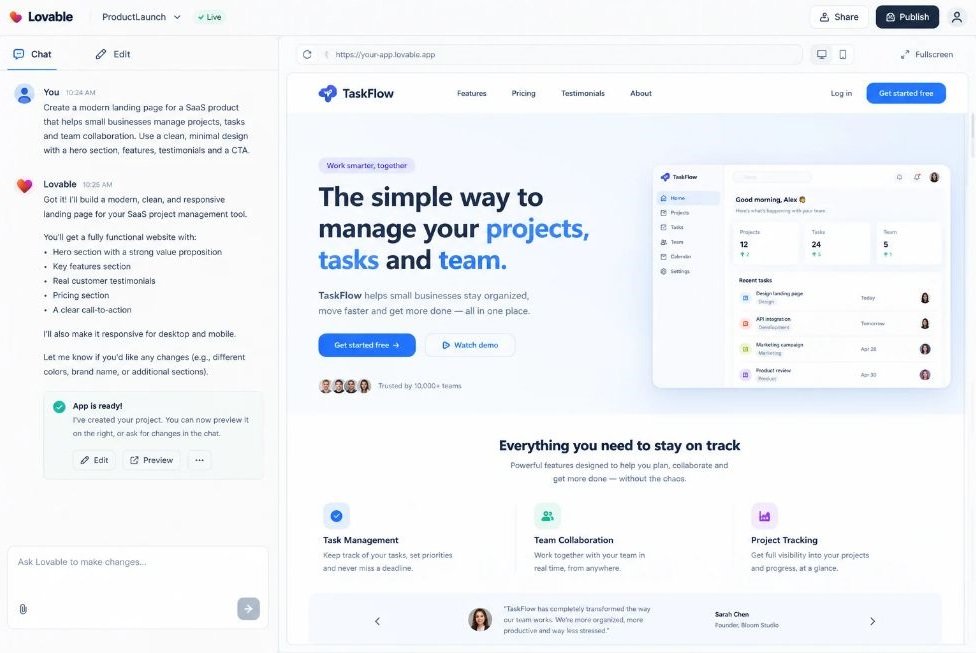
Under the hood, Lovable builds with React (a popular library for building web interfaces) and connects to Supabase, an open-source backend service that provides a database and user accounts. It also syncs your code to GitHub, the standard site for storing and sharing code, so a developer can pick it up later.
What It Does Well
Output quality is the headline. Reviewers consistently rank Lovable first for non-technical builders because the first draft looks finished, and the platform explains what it’s doing at each step. That second part matters if you want to understand your own app.
Where It Falls Short
Credits climb fast when you iterate. When the AI hits a bug it can’t solve, it sometimes loops, spending credits on attempts that don’t fix anything. It also builds web apps only, so a native mobile app is off the table. And you’ll still configure Supabase yourself, which trips up complete beginners.
Best For and Pricing
Best for: non-technical founders building an MVP. Pricing (as of 2026): a free plan with a small daily credit allowance, Pro from about $25 per month for 100 credits, and a Business tier around $50.
Bolt.new: Best for Fast Browser Prototypes
Bolt.new is the quickest way to see an idea running. It’s built by StackBlitz and runs a full development environment inside your browser tab, so there’s nothing to install and almost no waiting.
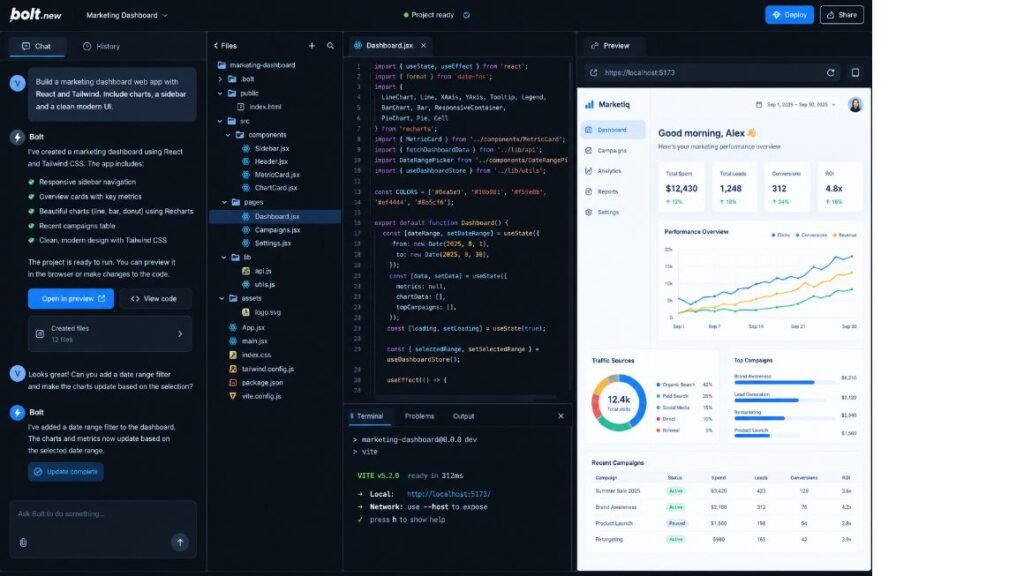
Unlike tools locked to one framework, Bolt lets you choose from several, and it connects to Stripe for payments, Supabase for data, GitHub for storage, and Figma for imported designs. It also includes a command terminal, a text window where developers type instructions, which is handy once you grow.
What It Does Well
Speed and flexibility. Honestly, Bolt feels lighter than most competitors when you’re testing five ideas in an afternoon. It also supports mobile projects through Expo, a toolkit for building phone apps.
Where It Falls Short
Bolt charges by tokens, which are small chunks of text the AI reads and writes. Debugging eats tokens quickly, and long conversations get expensive. Design polish also trails Lovable. Bolt is the faster tool, Lovable is the prettier one.
Best For and Pricing
Best for: quick prototypes and people who want framework choice. Pricing (as of 2026): a free tier of roughly 1 million tokens per month with a daily cap near 300,000, and Pro from about $25 per month.
Replit Agent: Best for Building and Hosting in One Place
Replit is the best option on this list if you want to learn while you build. Its Agent plans the app’s structure before writing code, then builds, tests, and hosts everything in one browser workspace, and you can read every line it writes.
The database, hosting, and deployment come bundled, so you don’t stitch services together. In early 2026 Replit also expanded into mobile app development.
What It Does Well
You get a real development environment, not a sealed box. That means an internal dashboard or an API-heavy project is easier here than in a prompt-only builder, and you slowly pick up how software works without trying.
Where It Falls Short
Pricing is effort-based, meaning complex requests cost more than simple ones. Simple edits can cost pennies, but several reviewers report that regular Agent users land at $50 to $150 a month in practice. UI polish is also a step behind Lovable.
Best For and Pricing
Best for: curious beginners, internal tools, and anyone who wants to own the whole stack. Pricing (as of 2026): a limited free plan, Core at $20 per month billed annually ($25 monthly), and Pro at $100 per month for up to 15 builders.
v0 by Vercel: Best for Clean Interfaces and Next.js Apps
v0 started as a tool that generated interface pieces from a prompt, and it now builds full-stack applications too. If design quality matters more to you than backend features, it’s a strong pick.
It outputs Next.js, a framework built on React and maintained by Vercel, the company that also hosts the finished app. That tight connection makes publishing nearly one click.
What It Does Well
Clean, modern layouts with sensible spacing and typography. Designers and product managers like it because the interface it produces needs little cleanup before you show it to someone.
Where It Falls Short
You’re inside Vercel’s way of doing things, which means more lock-in than some alternatives. The free tier gives you only a handful of messages per day. And the vocabulary leans developer-friendly, so a total beginner may feel lost faster than with Lovable.
Best For and Pricing
Best for: designers, marketers, and anyone prioritizing how the app looks. Pricing (as of 2026): a free tier with a small daily allowance, with paid plans starting around $20 per month and team plans near $30 per user. Reviewers list slightly different numbers, so confirm on Vercel’s site.
Base44: Best for Internal Tools With a Built-In Backend
Base44 is the least fiddly option if you want a working business tool without choosing any outside services. It bundles the database, user accounts, and hosting, so you get one account and one bill.
Wix, the website builder, acquired Base44 in June 2025 for a reported $80 million in cash, and the product still runs under its own name.
What It Does Well
Zero setup. You describe a client portal, an inventory tracker, or an approvals workflow, and the database and logins appear in the same conversation. Reviewers call it one of the fastest routes from prompt to a deployed app that actually stores data.
Where It Falls Short
The convenience has an exit cost. Your code can sync to GitHub, but the database, accounts, and integrations stay inside Base44, so moving later takes real work. It also runs two separate credit meters, one for AI messages and one for backend calls, which makes budgeting harder. And it won’t teach you how your app works.
Best For and Pricing
Best for: internal tools and small business apps. Pricing (as of July 2026): a free plan, then Starter at $16 per month, Builder at $40, Pro at $80, and Elite at $160 on annual billing.
Google AI Studio Build Mode: Best Free Starting Point
If you want to test the whole idea of building by prompt without paying anything, open Google AI Studio and choose Build mode. It’s free for prototyping, and it now creates real full-stack apps instead of just front-end demos.
Build mode runs on Gemini, Google’s AI model family, with the Antigravity coding agent doing the file edits. Its Firebase integration adds a database (Cloud Firestore), Google account login (Firebase Authentication), and a safe place to store secret keys. At Google I/O in May 2026, Google added native Android app generation and a mobile app for iterating from your phone.
What It Does Well
Price and backend. You get a working database and login without leaving the platform, deployment to Google’s Cloud Run hosting service, and a free tier that’s generous enough to finish a small project.
Where It Falls Short
Android builds are client-side only as of mid-2026, meaning no Firebase backend on that side. Costs also start once you move from prototype to production. Read Google’s data terms for the free tier before pasting anything confidential into it.
Best For and Pricing
Best for: free experiments and people already in Google’s world. Pricing (as of 2026): free to prototype, with usage costs when you deploy to production.
Anything: Best for Web and Mobile From One Project
Anything (formerly Create.xyz) is the pick if your idea needs payments and a phone app. It generates web and mobile apps from one project, with a database, logins, and payments already wired in.
The built-in database is Postgres, payments run through Stripe for web and RevenueCat for in-app purchases, and sign-in works with email, Google, and other providers. It also has a more autonomous mode called Max, which works through bigger tasks with less hand-holding.
What It Does Well
It handles the stuff beginners usually get stuck on. Payments, authentication, and App Store submission are built into the dashboard, so you’re not wrestling with three separate services to charge for a subscription.
Where It Falls Short
Its mobile output is cross-platform (Expo-based) rather than pure native Swift, which matters if you need Apple-specific features. App Store distribution was contested in 2026, so check the current status before you plan a launch around it. Credit costs also add up on bigger builds.
Best For and Pricing
Best for: small businesses selling something through an app. Pricing: free to start with paid tiers above it; confirm current numbers on Anything’s pricing page.
Rork: Best for Native-Feeling Mobile Apps
Rork does one thing: phone apps. You describe an app, scan a QR code, and test a working prototype on your own phone in minutes.
The standard product generates React Native, a framework that builds iPhone and Android apps from a single codebase, using Expo. In February 2026 Rork launched Rork Max, a separate product that writes pure Swift, Apple’s own language, for iPhone, iPad, Apple Watch, Apple TV, and Vision Pro.
What It Does Well
Publishing is the standout. Rork uses Expo Application Services (EAS) to handle the build and store submission, so you skip most of the Xcode headache. You can also export your React Native code if you ever leave.
Where It Falls Short
It’s mobile only, with no matching web app or admin dashboard. Reviewers also describe it as credit-hungry. And the Apple Developer Program costs $99 per year on top of whatever Rork charges.
Best For and Pricing
Best for: consumer mobile app ideas. Pricing (as of 2026): a limited free tier, with paid plans from about $20 per month.
Emergent: Best for Founders Who Want Web and Mobile Agents
Emergent bills itself as an AI engineer in a box. You give it a brief, and a team of agents produces a full-stack web app or an Expo mobile app, including backend and deployment.
The company reportedly raised $130 million at a $1.5 billion valuation in July 2026, so it’s not going anywhere soon, but its pricing is the thing to watch.
What It Does Well
It produces working apps instead of mockups, and it includes a code review feature that checks your project before you deploy. Operations managers and product people who need a hosted tool without assembling infrastructure tend to like it.
Where It Falls Short
Credits are the recurring complaint. A single prompt can cost a handful of credits or hundreds, and keeping a deployed app online costs credits every month (at least 50, depending on the publishing tier). Reviewers also warn that generated code needs developer review before production.
Best For and Pricing
Best for: ops teams and founders who want web and mobile in one place. Pricing (as of 2026): a free tier, Standard at $20 per month billed annually for 100 credits, and Pro at $200 per month for 750 credits.
Cursor: Best for Growing Into Real Code
Cursor is where you go after you’ve hit the ceiling of an app builder. It’s a code editor, an application where developers write and manage code, built on Visual Studio Code, with an agent that edits many files from a chat box.
That’s the catch for beginners. You’ll see actual code, you’ll install software on your computer, and you’ll bump into Git (a system for tracking code changes) sooner than you’d like. Nothing hosts the app for you.
What It Does Well
Control. You can ask Cursor to explain any file in plain English, fix one specific bug, or restructure a project, and it works on your whole codebase at once. That’s a genuinely better setup for an app that’s outgrown a prompt-only builder.
Where It Falls Short
It assumes some technical comfort, and a confident agent can break working code. Ownership is also in flux: SpaceX said in June 2026 it would acquire Cursor’s parent company in a $60 billion all-stock deal. Check the current status before you commit to a long-term plan.
Best For and Pricing
Best for: people who’ve built a few apps and want to go deeper. Pricing (as of 2026): a free tier and Pro at $20 per month.
Claude Code: Best for Logic-Heavy Projects
Claude Code is Anthropic’s coding agent, and it shines when the hard part of your project is logic rather than looks. It reads your project folder, plans changes, edits files, and runs commands, working in the terminal, a desktop app, and code editors.
You describe the goal (“add a monthly invoice report that totals each client’s hours”), it proposes a plan, and you approve the changes.
What It Does Well
Reasoning through messy, multi-step problems: data handling, automations, backend rules, and migrations from one setup to another. It explains its plan before it touches your files, which makes it easier to catch a wrong turn early.
Where It Falls Short
There’s no visual canvas and no one-click hosting. You decide the stack and handle deployment yourself, and the command-line start is intimidating for non-technical users. Usage limits also depend on your plan.
Best For and Pricing
Best for: builders with complex logic or an existing project. Pricing (as of 2026): included with paid Claude plans starting around $20 per month.
Prompt-first builders like Lovable and Base44 are faster for a first version because they host the app and hide the code. Coding agents like Cursor and Claude Code give you more control and handle complex logic better, but they expect you to manage setup, hosting, and testing yourself.
Devin Desktop (Formerly Windsurf): Best for Managing Multiple Agents
Devin Desktop is the same editor you may remember as Windsurf. Cognition, the company behind the Devin software agent, bought Windsurf in July 2025 and renamed it Devin Desktop on June 2, 2026.
Its default screen is an Agent Command Center that tracks several agents at once. Devin Local, a rewritten local agent, replaced the older Cascade agent in July 2026. Devin Cloud runs a longer task on an isolated cloud machine and returns a pull request, which is a proposed code change someone reviews before it’s merged.
What It Does Well
Handing off work. You can keep one agent iterating locally while a cloud agent chews through a bigger task in the background. Existing Windsurf users keep their plans and extensions with no migration.
Where It Falls Short
This is a developer’s tool. If you’re building your first app, managing multiple agents is overkill, and the name change still muddles documentation and search results.
Best For and Pricing
Best for: technical builders running several tasks in parallel. Pricing (as of 2026): a free tier, with Pro around $20 per month.
Which Platform Should You Pick?
Start with the outcome you want, not the feature list. For most non-coders, that means Lovable, Base44, or Google AI Studio first, and a coding agent only when you’ve outgrown them.
Match your situation to a starting point:
- A polished first MVP: Lovable
- A fast throwaway prototype: Bolt.new
- An internal business tool with logins: Base44
- A free test run: Google AI Studio
- Learning how software works: Replit Agent
- A beautiful interface: v0
- A phone app: Rork or Anything
- Web, mobile, and payments from one place: Anything or Emergent
- An app that’s outgrown its builder: Cursor, Claude Code, or Devin Desktop
One practical rule: spend $0 for the first week. Every builder here has a free tier or a trial, and a first app on the free plan tells you whether the tool fits how you think.
For non-developers, the safest starting point is a prompt-first builder with a free plan, such as Lovable, Base44, or Google AI Studio. Move to a coding agent like Cursor or Claude Code only when your app needs custom logic or you want to manage the code yourself.
5 Mistakes That Burn Your Credits
Most wasted money comes from the same handful of habits. Nearly all vibe coding tools meter usage, and a sloppy prompt costs the same as a sharp one.
- Prompting without a plan. Write a one-page description first: who uses the app, the three things it must do, and what data it stores. Then paste it in.
- Asking for everything at once. Build one feature, test it, then add the next. Giant prompts create tangled bugs.
- Letting the AI loop. If it fails the same fix twice, stop. Rewrite the problem in different words or start a fresh chat.
- Skipping the free plan. Test the platform with a small idea before you buy credits.
- Never testing as a real user. Click every button, sign up with a second email, and try the weird inputs before anyone else does.
Sharper prompts are a skill you can practice.
Conclusion
You don’t need to learn to code to ship a first app anymore. You do need to describe it clearly, test it like a skeptic, and pick a platform that matches the job.
Here’s the short version. Start free with Lovable, Base44, or Google AI Studio. Write a one-page plan before your first prompt. Build one feature at a time. Move to Cursor or Claude Code only when the builder stops keeping up.
The best vibe coding tools won’t decide what’s worth building for you, and that’s still the hard part. So this week, pick one idea, choose one platform from this list, and get a rough version in front of a real person.
Hotskill teaches the prompting and AI workflow skills that make these platforms work for you, in short, practical lessons built for busy professionals. Download the app on iOS or Android at hotskill.co/download.
FAQs
What is vibe coding?
Vibe coding means building software by describing what you want in plain English and letting an AI write the code. You test the result, describe what to change, and repeat. Andrej Karpathy coined the term in February 2025.
Do I need to know how to code to use these platforms?
No, not for the prompt-first builders such as Lovable, Bolt.new, Base44, Anything, and Google AI Studio. You’ll move faster if you understand basics like what a database is, and coding agents such as Cursor and Claude Code do expect more technical comfort.
Which platform is easiest for a complete beginner?
Lovable is the easiest starting point for most beginners because the first draft looks polished and the platform explains its steps. Base44 is a close second if you want logins and a database without setting up outside services.
What’s the difference between Lovable and Bolt.new?
Lovable produces more polished designs and works best for MVPs, but it builds web apps only. Bolt.new is faster, lets you pick frameworks, and supports mobile through Expo, but it charges by tokens and its designs look less refined.
Are apps built this way safe to launch to real customers?
Not automatically. Generated code can contain security gaps, so review login, payment, and data-handling features before launch, ideally with a developer. For an internal tool or a small test group, the risk is much lower.
How much does it cost to build an app with these platforms?
Many start free, and entry paid plans run roughly $16 to $25 per month as of 2026. Real costs depend on how much you iterate, since credits and tokens drain faster on complex changes. Some Replit users report $50 to $150 per month with heavy use.
Why does the AI keep breaking my app or looping on the same bug?
Large, vague prompts and long chat histories confuse the model. Fix one issue at a time, describe exactly what you see and what you expected, and start a fresh chat if two attempts fail. Hitting the same loop repeatedly burns credits, so stop early.
Can I build a mobile app and publish it to the App Store?
Yes. Rork and Anything both target phone apps and handle much of the publishing step, and Rork Max produces pure Swift for Apple devices. You’ll still need an Apple Developer account at $99 per year, and Apple’s review rules apply.
Do I need Cursor or Claude Code if I already use Lovable?
Not at first. Builders cover most MVPs. Add a coding agent when your app needs custom logic the builder keeps getting wrong, or when you want direct control of the code on GitHub.
Can I move my app elsewhere if I want to leave a platform?
It depends. Lovable and Bolt.new sync code to GitHub, Rork lets you export React Native code, and Base44 syncs code but keeps the database and accounts inside its own system. Check export options before you build something you can’t afford to lose.