
If you’ve been anywhere near content creation lately, you’ve probably noticed something… animation isn’t just for studios anymore. It’s everywhere. Instagram ads, YouTube explainers, SaaS demos, even LinkedIn posts.
And honestly, a big reason behind that shift is AI Animation Generator Tools.
These tools have completely changed how animation works. What used to take weeks, maybe months, can now be done in minutes. You type a script, upload an image, or just describe a scene and boom… you get a video. No timeline editing. No keyframes. No complex rendering pipelines.
This guide is not just a list. It’s a deep dive into 15 of the best tools in 2026, how they work, where they shine, and where they don’t.
Let’s get into it.
Why AI Animation Generator Tools Are Exploding Right Now
Before jumping into tools, it’s worth understanding why this space is growing so fast.
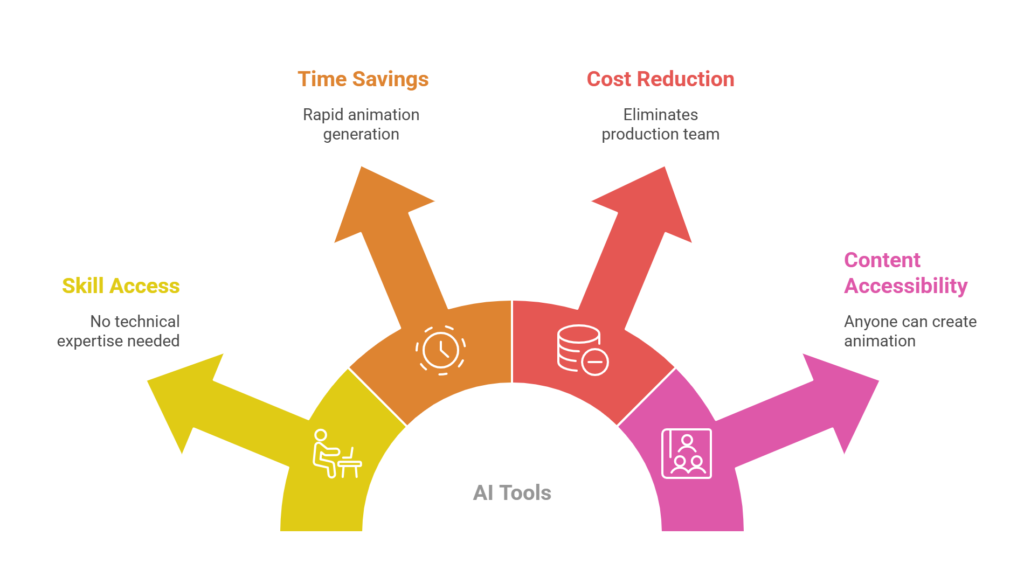
AI animation tools remove three major barriers:
First, technical skill. You no longer need to understand animation principles or software like After Effects.
Second, time. A full animation project that once took days can now be generated in minutes.
Third, cost. No need for animators, voice actors, or production teams.
And maybe this is just me, but the biggest shift isn’t efficiency. It’s accessibility. Anyone can now create animated content. Marketers, founders, students, even solo creators.
1. Synthesia
Synthesia is probably the most well-known tool in this space, especially for business and corporate content.
At its core, it converts text into videos using AI avatars. You type a script, choose an avatar, and the tool generates a realistic talking video. No camera, no mic, no studio required.
What makes Synthesia stand out is its scale and polish. It offers over 230 avatars and supports more than 140 languages, which makes it incredibly useful for global teams.
The lip-sync accuracy is surprisingly good. Not perfect, but good enough that most viewers won’t notice.
Another interesting feature is personal avatars. You can actually create a digital version of yourself and use it across videos. This is huge for brands trying to maintain a consistent face.
Where it really shines is in:
- Training videos
- Product demos
- Internal communications
Where it struggles slightly is creativity. If you want cinematic animation or storytelling, this isn’t the best tool.
But for structured, business-focused animation… it’s hard to beat.
2. HeyGen
HeyGen feels like Synthesia’s more flexible cousin.
It does similar things, like avatar-based video generation, but adds a layer of customization that makes it more appealing for creators and marketers.
One of its standout features is voice cloning. You can upload your voice, and the AI will replicate it across videos. That’s kind of wild when you think about it.
It also allows you to animate static images into talking videos. Upload a photo, add a script, and it turns into a moving, speaking character.
Another strong feature is multilingual video translation. It keeps the same voice tone and syncs lip movements across languages, which is extremely useful for localization.
That said, like Synthesia, it leans more toward presentation-style videos rather than creative animation.
3. Animaker
Animaker is one of those tools that feels very approachable.
If you’ve never created animation before, this is probably one of the easiest places to start.
It offers a drag-and-drop interface with thousands of templates, characters, and assets. You can create explainer videos, social media animations, and presentations without any prior experience.
What makes Animaker interesting is that it blends traditional animation tools with AI features.
You still have control over scenes, characters, and timing, but AI helps speed things up with auto voiceovers, smart transitions, and template suggestions.
It’s not as “automated” as some newer tools, but maybe that’s a good thing. You get more creative control.
The downside is that advanced customization can feel limited if you’re trying to create something highly unique.
4. Adobe Firefly (AI Animation Features)
Adobe entering the AI animation space was inevitable.
Firefly is their generative AI platform, and it now includes features for animation creation from text and images.
What makes Firefly powerful is its integration with the Adobe ecosystem. You can combine it with tools like Premiere Pro or After Effects for more advanced workflows.
It supports both 2D and 3D animation generation, which is a big deal for professionals who want more flexibility.
Also, Adobe emphasizes ethical AI. Their models are trained on licensed content, which makes them safer for commercial use.
But here’s the thing… Firefly is powerful, but not always beginner-friendly. If you’re new, it might feel overwhelming.
5. Runway ML
Runway ML is where things start to get more cinematic.
This tool is widely used for creative projects, short films, and experimental content.
It allows you to generate videos from text prompts, edit footage with AI, and even apply advanced effects like background removal and motion tracking.
What stands out is its camera control and visual style. You can create scenes that actually feel like film shots rather than simple animations.
It’s not perfect for long-form content yet, but for short clips, ads, and creative storytelling… it’s incredibly powerful.
6. Pika Labs
Pika Labs is one of the fastest-growing tools in AI video generation.
It focuses on short-form animation and quick content creation.
You type a prompt, and it generates a short animated clip. Simple as that.
What makes it interesting is its ability to apply styles and effects. You can create stylized animations that feel artistic and unique.
It’s especially useful for:
- Social media content
- Creative experiments
- Short ads
But it does have limitations. The clips are usually short, and consistency across scenes can be tricky.
Still, for quick content… it’s kind of addictive to use.
7. InVideo AI
InVideo AI is more of a marketing-focused tool.
It allows you to create videos from scripts, blog posts, or even simple prompts.
What’s nice is that it automatically adds visuals, transitions, voiceovers, and music. You basically get a finished video with minimal effort.
It’s ideal for content marketers who want to repurpose blogs into videos.
The animations aren’t super advanced, but they’re clean and professional.
8. Fliki
Fliki is another tool focused on turning text into videos.
You input a script, and it generates a video with voiceovers, visuals, and animations.
What makes Fliki stand out is its voice quality. It uses realistic AI voices that sound natural, which is crucial for engagement.
t’s commonly used for:
- YouTube automation
- Educational content
- Narrated videos
The animation itself is relatively simple, but it gets the job done.
9. Renderforest
Renderforest has been around for a while, but it’s evolved with AI.
It offers a wide range of templates for animated videos, intros, and branding content.
What makes it useful is its versatility. You can create logos, animations, presentations, and more in one platform.
It’s not the most advanced AI tool, but it’s reliable and easy to use.
10. Canva Animated Video Maker
Canva is already a favorite among marketers, and its AI animation features make it even more powerful.
You can create animated videos using templates, AI-generated visuals, and simple editing tools.
The biggest advantage is ease of use. If you’ve used Canva before, you’ll feel right at home.
It’s perfect for quick marketing content, social media posts, and presentations.
11. VEED AI
VEED AI combines video editing with AI animation features.
You can create videos, add subtitles, generate voiceovers, and apply animations all in one platform.
It’s particularly strong in post-production. If you already have footage, VEED can enhance it with AI.
12. DomoAI
DomoAI focuses on image-to-animation.
You upload an image, and it brings it to life with motion.
This is especially useful for creators who want to animate illustrations or artwork.
13. Easemate
Easemate is another image animation tool.
It allows you to create motion from static visuals quickly.
It’s not as feature-rich as some other tools, but it’s simple and efficient.
14. OpenArt
OpenArt is one of the most complete platforms in this space.
It handles everything from character creation to full animation production.
What makes it stand out is consistency. Characters maintain their appearance across scenes, which is a major challenge in AI animation.
This makes it ideal for storytelling and branded content.
15. Sora (OpenAI)
Sora represents the future of AI animation.
It can generate highly realistic videos from text prompts.
The quality is impressive, especially for cinematic scenes and storytelling.
However, it’s still evolving and not widely accessible yet.
How to Choose the Right AI Animation Tool
Choosing the right tool depends on your use case.
If you’re creating business videos, go with Synthesia or HeyGen.
If you want creative control, tools like Runway or OpenArt are better.
For beginners, Animaker or Canva are great starting points.
And for quick content, Pika Labs or InVideo AI work really well.
Final Thoughts
AI animation is no longer experimental. It’s practical.
These tools are already being used by marketers, creators, and businesses worldwide.
And honestly, we’re just getting started.
The gap between “AI-generated” and “studio-quality” content is shrinking fast. Some tools already produce results that are good enough for professional use.
If you’re in marketing or content creation, learning how to use these tools isn’t optional anymore.
It’s a competitive advantage.