

Design has always been a mix of intuition, creativity, and structured thinking. But lately, something interesting has been happening. The process is becoming… faster, smarter, maybe even a little unpredictable. That shift is largely because of one thing: AI.
If you’ve been designing interfaces for a while, you’ve probably noticed how expectations have changed. Clients want quicker turnarounds. Users expect hyper-personalized experiences. And teams are being pushed to test, iterate, and refine at a pace that would’ve felt unrealistic just a few years ago.
This is where AI steps in, not to replace designers, but to amplify what they can do.
In this article, we’re going to explore 10 powerful AI-driven tools that are reshaping UI and UX workflows in 2026. Some of them you may already know. Others might feel new, maybe even slightly experimental. But all of them have one thing in common: they can make your design process more efficient, insightful, and surprisingly creative.
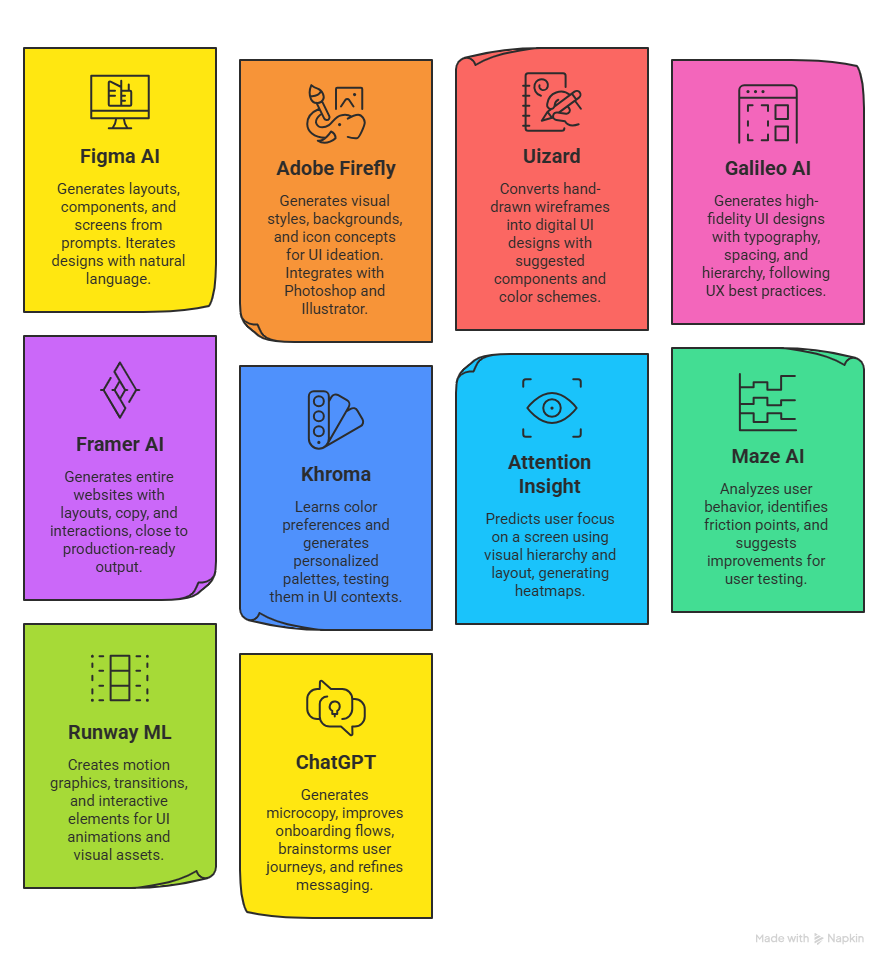
Why Designers Are Turning to AI More Than Ever
Before we jump into the tools, it’s worth pausing for a second and asking: why now?
Well, part of it is pressure. Digital products are evolving faster than ever. Another part is opportunity. AI is no longer just about automation; it’s about augmentation.
Designers are now using AI to:
- Generate layouts instantly
- Predict user behavior before testing
- Create personalized UI variations
- Speed up prototyping
- Improve accessibility without manual audits
And honestly, once you start using even one or two of these tools, it becomes hard to go back to purely manual workflows.
Let’s dive into the tools that are actually making a difference.
1. Figma AI
Figma has been a staple in UI/UX design for years. But its AI capabilities are pushing it into a completely new category.
Figma AI allows designers to generate layouts, components, and even entire screens based on simple prompts. You can type something like “create a mobile onboarding screen for a fintech app,” and it gives you a structured starting point.
What makes it powerful is not just generation, but iteration. You can tweak designs using natural language, almost like you’re having a conversation with your design tool.
Another thing that stands out is its collaboration layer. Teams can co-edit AI-generated designs in real time, which feels surprisingly seamless.
That said, it’s not perfect. Sometimes the generated layouts feel a bit generic. But as a starting point? It saves hours.
2. Adobe Firefly (for UI Concepts)
Adobe Firefly is often talked about in the context of image generation, but designers are increasingly using it for UI ideation.
You can generate visual styles, backgrounds, icon concepts, and even interface moods using text prompts. It’s especially useful during the early stages when you’re trying to define a visual direction.
What I personally find interesting is how it helps break creative blocks. You might not use the generated output directly, but it sparks ideas you wouldn’t have thought of otherwise.
Firefly integrates well with tools like Photoshop and Illustrator, which makes it easy to refine outputs into production-ready assets.
3. Uizard
Uizard feels like magic the first time you use it.
You can upload a hand-drawn wireframe, and it converts it into a digital UI design. Not just that, it also suggests components, layouts, and even color schemes.
For non-designers or early-stage startups, this is huge. It reduces the barrier to entry for creating decent-looking interfaces.
For experienced designers, it acts as a rapid prototyping tool. Instead of starting from scratch, you can sketch ideas quickly and let Uizard handle the structure.
It’s not going to replace detailed design systems, but it’s incredibly useful for speed.
4. Galileo AI
Galileo AI is one of the newer tools, and honestly, it feels like a glimpse into the future.
You describe the interface you want, and it generates high-fidelity UI designs. Not just wireframes, but polished screens with typography, spacing, and hierarchy.
What makes Galileo stand out is its understanding of UX patterns. The designs it generates often follow best practices, which is impressive.
For example, if you ask for a dashboard, it doesn’t just throw random elements together. It creates logical groupings, consistent spacing, and usable layouts.
Still, you’ll need to refine the output. But as a starting point, it’s incredibly strong.
5. Framer AI
Framer has evolved from a prototyping tool into a full-fledged website builder powered by AI.
You can generate entire websites using simple prompts. The AI creates layouts, copy, and interactions.
What’s interesting is how close it gets to production-ready output. You can actually publish the designs as live websites without heavy development work.
For designers who want to move faster or work independently, this is a game changer.
It also supports animations and responsive design, which adds another layer of flexibility.
6. Khroma
Color selection can be surprisingly time-consuming. Khroma solves this using AI.
It learns your color preferences and generates personalized palettes. Over time, it gets better at suggesting combinations that match your style.
What’s nice is that it doesn’t feel random. The palettes are usable and often align with modern design trends.
You can also test how colors work in different UI contexts, which helps in making more informed decisions.
It’s a small tool, but it adds real value to the design process.
7. Attention Insight
Design is not just about how things look, but how users interact with them.
Attention Insight uses AI to predict where users will focus on a screen. It generates heatmaps based on visual hierarchy and layout.
This means you can test designs before running actual user studies.
It’s not a replacement for real user testing, but it gives you a strong initial signal.
For example, if your CTA isn’t getting attention, you’ll know before launching the product.
That alone can save time, effort, and maybe even a few awkward stakeholder meetings.
8. Maze AI
Maze has been around as a user testing platform, but its AI features are making it more powerful.
It can analyze user behavior, identify friction points, and suggest improvements.
Instead of manually going through feedback, you get summarized insights that are easier to act on.
What I find useful is how it connects design decisions with real user data.
It helps bridge the gap between intuition and evidence.
9. Runway ML (for UI Motion & Visuals)
Runway ML is often used in video editing, but designers are using it for UI animations and visual assets.
You can create motion graphics, transitions, and even interactive elements using AI.
In modern interfaces, motion plays a huge role. It guides users, adds personality, and improves usability.
Runway helps designers experiment with motion without needing deep animation skills.
It’s not strictly a UI tool, but it complements the design process in interesting ways.
10. ChatGPT (for UX Writing & Ideation)
This one might feel obvious, but it’s worth mentioning.
ChatGPT is becoming a go-to tool for UX writing, content structuring, and idea generation.
You can use it to:
- Generate microcopy
- Improve onboarding flows
- Brainstorm user journeys
- Refine messaging
What makes it valuable is its flexibility. It adapts to different contexts and helps you think through problems.
Sometimes, you just need a second perspective. And this tool provides that instantly.
How These Tools Are Changing the Design Process
If you look at these tools collectively, a pattern starts to emerge.
Design is becoming less about execution and more about direction.
Instead of spending hours creating layouts from scratch, designers are now:
- Guiding AI outputs
- Refining generated designs
- Focusing on strategy and experience
This shift is subtle, but important.
It doesn’t mean design is becoming easier. If anything, it’s becoming more complex. But the complexity is moving to a higher level.
You’re no longer just designing screens. You’re designing systems, flows, and experiences at scale.
And that’s where tools like these really shine.
The Future of AI in UI/UX Design
It’s tempting to think that AI will eventually take over most design tasks. But that’s probably not the full picture.
AI is great at patterns. It can replicate what works. It can optimize based on data.
But design is also about context, emotion, and sometimes even intuition.
The best outcomes will likely come from a combination of both.
Designers who learn how to work with AI, rather than against it, will have a significant advantage.
And honestly, we’re just getting started.
Final Thoughts
If you’ve been hesitant about using AI in your workflow, that’s understandable. It can feel unfamiliar, maybe even a little intimidating.
But the reality is, these tools are not here to replace designers. They’re here to support them.
You don’t need to use all ten tools at once. Start with one or two. Experiment. See what fits your workflow.
Over time, you’ll find your own balance.
And who knows, you might end up designing faster, smarter, and with a lot more creative freedom than before.
FAQs
1. What are AI UI/UX Design Tools?
AI UI/UX Design Tools are software solutions that use artificial intelligence to assist designers in creating, testing, and optimizing user interfaces and experiences more efficiently.
2. Are AI design tools replacing human designers?
Not really. They are enhancing productivity and creativity, but human judgment, empathy, and decision-making are still essential.
3. Which AI tool is best for beginners in UI/UX design?
Uizard is a great starting point because it simplifies the design process and requires minimal experience.
4. Can AI tools create complete UI designs?
Yes, tools like Galileo AI and Framer AI can generate full UI designs, but they usually require refinement by designers.
5. Are these tools free to use?
Some tools offer free plans with limitations, while others require paid subscriptions for full features.
6. How accurate are AI-generated UX insights?
They are helpful for early-stage validation but should not replace real user testing entirely.
7. Can AI help with UX writing?
Yes, tools like ChatGPT can generate and refine microcopy, onboarding flows, and user messages.
8. Do AI tools support collaboration?
Many tools, especially Figma AI, support real-time collaboration among team members.
9. Is learning AI tools necessary for designers in 2026?
It’s not mandatory, but it’s becoming increasingly important to stay competitive in the industry.
10. How do I choose the right AI tool for my workflow?
Start by identifying your biggest pain point, whether it’s prototyping, testing, or ideation, and choose a tool that addresses that specific need.