

Most marketing teams aren’t short on tools. They’re short on time.
You have a CRM, an email platform, a social scheduler, an analytics dashboard, and at least three browser tabs open with ChatGPT. But you’re still manually writing follow-up sequences, pulling data from five different reports, and figuring out why last Tuesday’s campaign underperformed.
That’s the gap AI agents are built to close, not by giving you another tool to manage, but by doing the work across your existing stack.
This article breaks down what an AI agent for marketing actually does (not the pitch version, the real version), which tools are worth your attention in 2026, and how teams are using them to cut repetitive work and improve the quality of customer engagement at the same time.
What Is an AI Agent and Why Does It Matter for Marketers?
An AI agent is a system that uses a large language model (LLM) to take actions autonomously based on a goal, not just answer a single question. Where a standard AI chatbot responds to one prompt and stops, an agent plans a sequence of steps, uses tools, checks results, and keeps going until the task is done.
For marketers, that distinction matters a lot.
When you ask ChatGPT to write a product description, it writes one. When you give an AI agent the same task with access to your product database, your brand guidelines, your SEO keyword list, and your CMS, it can write, optimise, and publish 50 product descriptions while you’re in a meeting. That’s not science fiction, that’s what agents like Relevance AI, Make (with AI modules), and n8n are doing for marketing teams right now.
According to Salesforce’s 2025 State of Marketing report, 78% of high-performing marketing teams report using some form of automated AI decision-making in their campaigns, up from 49% in 2023. The shift isn’t about novelty. It’s about capacity.
An AI agent differs from a standard chatbot because it can take sequences of actions autonomously using tools, memory, and real-time data. In marketing, this means agents can move from insight to execution without requiring human input at every step. The practical result is a meaningful reduction in manual work on repetitive campaign tasks.
How AI Agents Work in a Marketing Context
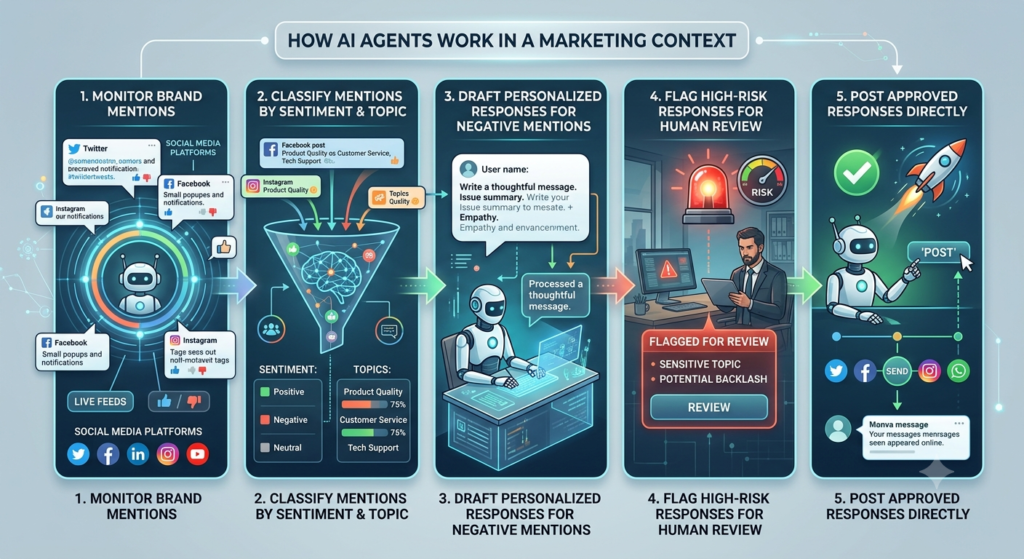
Here’s the simple version: an AI agent gets a goal, breaks it into steps, uses the tools available to it, and acts.
In practice, a marketing agent might:
- Monitor brand mentions across social media platforms
- Classify each mention by sentiment and topic
- Draft a personalised response for negative mentions
- Flag responses above a certain risk threshold for human review
- Post approved responses directly to the platform
That entire sequence can run automatically, triggered by a new mention, without a human touching it until step four.
The technical structure behind this involves three components. First, a reasoning layer (the LLM that decides what to do next). Second, a tool layer (APIs and integrations that let the agent take action in external systems). Third, a memory layer (context that carries information between steps, like customer history or campaign performance data).
Most no-code marketing agent platforms handle all three for you. You define the goal and the tools available. The agent figures out the steps.
The Best AI Agent Tools for Marketing in 2026
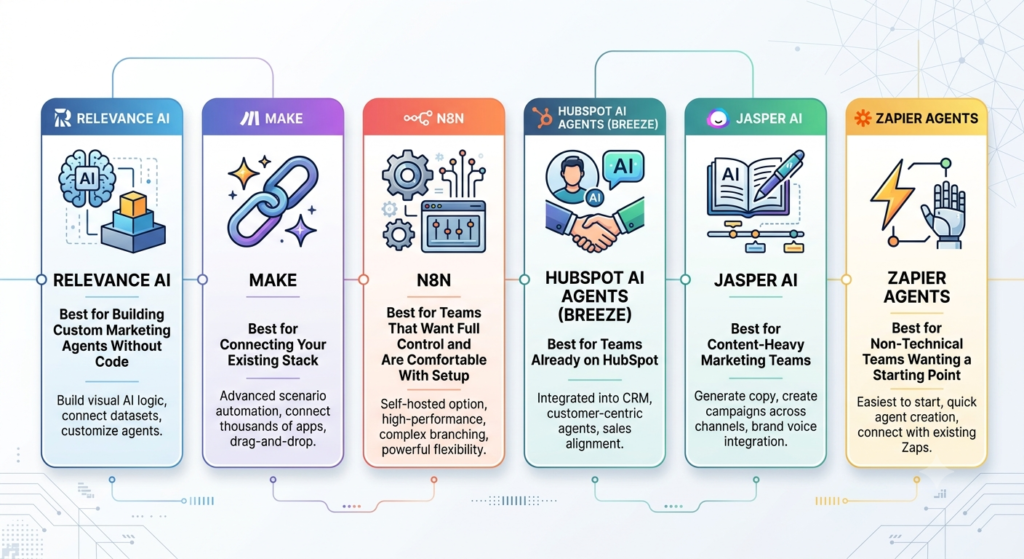
Not every tool that calls itself an “agent” is doing the same thing. Some are workflow automation platforms with AI modules bolted on. Others are built from the ground up for agentic reasoning. Here’s an honest breakdown of what’s worth your time.
Relevance AI — Best for Building Custom Marketing Agents Without Code
Relevance AI is a platform specifically built for creating AI agents and multi-agent workflows. You can build a “team” of agents where one does research, another drafts content, and a third formats and sends it, all without writing a line of code.
For marketing teams, the most practical use case is multi-step content production. A typical setup: one agent pulls brief data from a Google Sheet, a second drafts copy in your brand voice, a third checks it against your SEO guidelines, and the output lands in Notion or your CMS draft folder.
What it does well: The agent builder is genuinely visual and intuitive. Tool integrations are broad. You can build agents that use web search, run Python scripts, call external APIs, and write to databases. The multi-agent “workforce” feature is one of the more mature implementations available right now.
Where it falls short: For very large content teams, the pricing scales quickly. The free tier is useful for testing but not production. Debugging agent failures requires some patience since the reasoning logs can be hard to read without prior experience.
Best for: Marketing managers and content leads who want to automate multi-step production workflows without involving a developer.
Pricing: Free tier available; paid plans start at $19/month per user as of 2026. Enterprise pricing is custom.
Make (formerly Integromat) with AI Modules — Best for Connecting Your Existing Stack
Make is a visual workflow automation platform that added AI modules (including OpenAI, Anthropic’s Claude API, and Perplexity integrations) in 2024 and has expanded them significantly since. It’s not a pure AI agent platform, but for most marketing teams, it handles 80% of what they need agents to do.
The core strength of Make is breadth. It connects to over 1,600 apps. If your stack includes HubSpot, Salesforce, Google Ads, Meta Ads Manager, Slack, Airtable, and Shopify, Make can orchestrate workflows across all of them and insert an LLM step anywhere in the sequence.
A practical example: when a lead scores above 80 in HubSpot, Make triggers a Claude API call to generate a personalised outreach email based on the lead’s company, role, and recent activity, then sends it via your email platform and logs the action in your CRM, all in under 30 seconds.
What it does well: Reliability. Make has been running automation for years, and the infrastructure is solid. The AI modules are well-integrated, not afterthoughts. The visual builder is one of the clearest in the market.
Where it falls short: Make isn’t doing autonomous reasoning. It’s running a defined workflow with AI steps inside it. If you want an agent that decides its own next action based on results, Make is the wrong tool. It’s a workflow orchestrator with AI modules, not a true reasoning agent.
Best for: Teams with an established tool stack who want to add AI decision points to existing processes.
Pricing: Free plan with 1,000 operations/month; paid plans from $9/month as of 2026.
n8n — Best for Teams That Want Full Control and Are Comfortable With Setup
n8n is an open-source workflow automation platform with strong AI agent capabilities. It added a native AI agent node in 2024 that lets you build actual reasoning agents using OpenAI, Anthropic, or local models, not just scripted workflow steps.
What sets n8n apart is flexibility. You can self-host it, which matters for teams with data residency requirements. You can use local LLMs via Ollama if you don’t want to send customer data to an external API. And you can build complex conditional logic that would require expensive custom plans in tools like Make or Zapier.
The honest caveat: n8n has a steeper learning curve than Relevance AI or Make. You’ll spend time configuring the agent node correctly. But if you have someone on the team who’s comfortable with APIs and JSON, n8n can do things the no-code platforms simply can’t.
What it does well: True agent reasoning (via the AI agent node), self-hosting option, local model support, highly flexible logic, and strong community documentation.
Where it falls short: Not beginner-friendly. The visual builder is functional but less polished than Make. Debugging requires reading JSON output.
Best for: Technical marketers, growth teams, or companies with strict data privacy requirements who want an agent platform they fully control.
Pricing: Free and open-source for self-hosted. Cloud version starts at $20/month as of 2026.
HubSpot AI Agents (Breeze) — Best for Teams Already on HubSpot
HubSpot Breeze is HubSpot’s native AI layer, launched in 2024 and significantly expanded in 2025. It includes an AI agent called Breeze Copilot that works across HubSpot’s CRM, marketing hub, and sales hub, plus specialised agents for content creation, social media, and customer support.
For teams already running their marketing on HubSpot, Breeze removes the need to build external agent workflows. The content agent can draft blog posts, social captions, and email sequences from a brief. The prospecting agent can research companies, pull contact data, and draft outreach. The customer agent can handle common support queries in chat without human intervention.
What it does well: Native integration with HubSpot data means agents have access to your CRM, contact history, deal stages, and campaign performance without any setup. The barrier to using it is very low if you’re on HubSpot.
Where it falls short: Breeze agents are constrained to what HubSpot’s data model knows. If your key marketing data lives outside HubSpot, the agents are working blind. Output quality for long-form content is solid but not best-in-class compared to dedicated writing tools.
Best for: HubSpot customers on Professional or Enterprise tiers who want quick wins without building a separate agent stack.
Pricing: Included with HubSpot Professional and Enterprise plans as of 2026. Pricing for HubSpot itself starts at $800/month for Marketing Hub Professional.
Jasper AI with Campaigns Feature — Best for Content-Heavy Marketing Teams
Jasper AI is a content generation platform that added a “Campaigns” feature in 2025 that functions as a lightweight marketing agent. You input a campaign brief, and Jasper’s campaign agent generates a complete set of assets: landing page copy, email sequence, social posts, and ad variants in your brand voice.
It’s not an agent in the autonomous-reasoning sense. Jasper doesn’t monitor performance and adjust automatically. But for teams that produce large volumes of content across multiple formats and channels, the campaign agent cuts the coordination overhead significantly.
In Hotskill’s testing, a campaign brief that typically takes a content team two days to produce (writing, editing, formatting, cross-channel adaptation) can come out of Jasper Campaigns in under three hours. The output isn’t always publish-ready, but it’s 70-80% of the way there, which is where the real time saving comes from.
What it does well: Brand voice consistency across asset types. The brand voice training is genuinely effective. Output quality for short-to-medium copy is high. The multi-format output in one workflow is the real differentiator.
Where it falls short: Long-form output (blog posts over 1,500 words) requires more editing than short-form. Jasper doesn’t integrate with your analytics data, so it can’t adapt suggestions based on performance.
Best for: Content marketing teams producing high volumes of campaign assets across multiple channels.
Pricing: Starts at $49/month per seat as of 2026. Team plans with brand voice features start at $125/month.
Jasper AI’s Campaigns feature acts as a content agent that generates full multi-format campaign assets from a single brief, cutting production time significantly for content-heavy teams. Its brand voice training is one of the stronger implementations in the market. The limitation is that it doesn’t connect to performance data, so output optimisation is still a manual step.
Zapier Agents — Best for Non-Technical Teams Wanting a Starting Point
Zapier Agents launched in 2024 as Zapier’s answer to the agent trend. Unlike standard Zaps (which are scripted workflows), Zapier Agents use a reasoning layer to decide which actions to take based on natural language instructions.
You describe what you want the agent to do in plain English, connect it to your tools, and it figures out the execution. For example: “When a new lead fills out our contact form, research their company using web search, check if they match our ICP criteria, and if they do, add them to the priority outreach list in HubSpot and send me a Slack message with a summary.”
That entire workflow, with reasoning, research, and multi-tool action, runs from a plain English instruction.
What it does well: The lowest barrier to entry of any tool on this list. If you can describe what you want done in a sentence, you can build a Zapier Agent. Integration library is massive.
Where it falls short: For complex multi-step reasoning or custom logic, Zapier Agents hit limits faster than Relevance AI or n8n. Pricing adds up quickly at scale. Agent reliability on multi-step tasks is improving but not yet as consistent as a well-built n8n or Relevance AI workflow.
Best for: Marketing teams new to agents who want a fast, low-friction starting point.
Pricing: Agents feature available on Zapier Professional plan at $49/month as of 2026.
Zapier Agents lets non-technical marketers build reasoning-based automation using plain English instructions across Zapier’s 6,000+ app integrations. It’s the lowest-friction entry point into agent-based marketing automation, with the trade-off that complex workflows have reliability limits compared to purpose-built agent platforms like Relevance AI or n8n.
Real Use Cases: What Teams Are Actually Automating
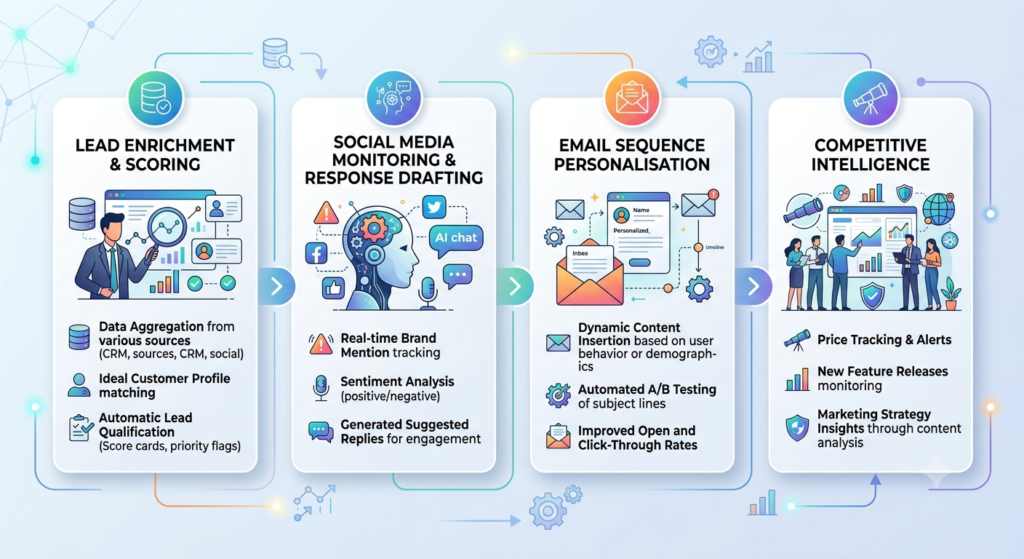
The tools above cover the “what.” Here’s the “so what” for day-to-day marketing work.
Lead enrichment and scoring. An agent monitors new form submissions, queries LinkedIn and company databases for firmographic data, scores leads against ICP criteria, and updates CRM records. What used to take an SDR 20 minutes per lead takes the agent under 60 seconds.
Social media monitoring and response drafting. An agent monitors brand mentions on X, LinkedIn, and Reddit. It classifies each mention by sentiment, topic, and urgency. For high-priority negative mentions, it drafts a response and flags it for human review. For standard questions, it drafts responses for quick approval. According to Sprout Social’s 2025 Benchmark Report, average response time to social mentions correlates directly with customer satisfaction scores, and teams using agent-assisted monitoring cut their average response time from 4 hours to under 45 minutes.
Email sequence personalisation. Rather than sending the same five-email nurture sequence to every lead, an agent checks the lead’s engagement history, company size, and industry, and selects (or generates) the most relevant content for each email. Open rates on personalised sequences consistently outperform generic ones.
Competitive intelligence. An agent monitors competitor blog posts, press releases, and social content. It summarises changes weekly and delivers a briefing to the marketing team in Slack or email. No more manually checking five competitor websites every Monday.
What AI Agents Cannot Do (Yet)
This matters more than the feature list.
Current AI agents are good at well-defined, repeatable tasks with clear success criteria. They struggle with genuinely novel situations, ambiguous goals, and tasks that require cultural or contextual judgement that wasn’t in their training data.
An agent can draft 50 email subject lines. It can’t tell you which one will land with a specific audience segment in a way that beats your experienced copywriter’s instinct.
An agent can monitor and flag brand mentions. It can’t handle a PR crisis that requires careful, sensitive communication, that still needs a human in the loop.
And reliability is a real issue. Complex multi-step agent workflows fail more than simple ones. The more tools an agent is orchestrating, the more chances for something to break. Budget time for monitoring and maintenance, especially in the first few weeks of deploying a new agent workflow.
The honest take: agents are force multipliers for repetitive, high-volume work. They’re not replacements for strategic thinking or genuine creative judgement.
How to Get Started Without Overcomplicating It
Start with one task. Not a full marketing stack overhaul.
Pick the most repetitive task on your team’s plate this month, something with clear inputs and a clear desired output. Lead enrichment, social caption drafting, weekly report generation, something concrete.
Follow these steps:
- Map the current manual process. Write out every step a human takes to complete the task. This is your agent design blueprint.
- Choose the right tool for your setup. If you’re on HubSpot, start with Breeze. If you need cross-tool workflows, start with Make or Zapier Agents. If you have technical support, look at n8n.
- Build a minimal version first. Get the agent doing 80% of the task before you try to make it perfect. A draft that needs light editing is better than a complex workflow that breaks constantly.
- Set up a monitoring step. Build in a human review checkpoint before any agent output goes to customers or gets published publicly.
- Measure time saved, not just output volume. The metric that matters for justifying the investment is hours recovered per week, not tasks completed.
From what we’ve seen with Hotskill learners who’ve applied this approach, most teams find their first agent workflow saves 3-5 hours per week within 30 days. That’s a conservative estimate for repetitive tasks like reporting and content formatting.
Final Thoughts
The gap between teams that use AI for individual tasks and teams that build agent workflows is widening. The first group is saving 20 minutes here and there. The second is restructuring how work gets done.
The tools exist. Most are genuinely usable without a technical background. The most effective starting point is a single, well-defined workflow where the time saving is obvious and measurable.
Pick that workflow. Build a minimal version. Measure what it actually saves. Then expand from there.
That’s the practical path in 2026, not a complete stack overhaul, but a disciplined start with something real.
If you want to build these skills properly, Hotskill has structured AI skill tracks specifically designed for marketers who want to move from “using AI occasionally” to running actual agent workflows. Bite-sized lessons, real tools, practical outcomes. Download the app on iOS or Android, and start your first lesson today.
FAQ
What is an AI agent for marketing?
An AI agent for marketing is a software system that uses a large language model to autonomously complete multi-step marketing tasks, such as drafting personalised emails, monitoring brand mentions, enriching lead data, or generating campaign assets, without requiring human input at every step. It connects to your existing tools and works across them toward a defined goal.
What is the difference between an AI agent and a regular marketing automation tool?
Regular marketing automation tools follow a fixed script: if X happens, do Y. An AI agent can reason about what step to take next based on context, handle variations it wasn’t explicitly programmed for, and use multiple tools in sequence to complete a goal. The key difference is adaptive decision-making versus scripted execution.
Do I need coding skills to use an AI agent for my marketing team?
No. Tools like Relevance AI, Zapier Agents, and Make have visual builders and natural language interfaces that don’t require coding. If you want full control, custom logic, or self-hosting, n8n is more technical but still accessible with API basics. Most marketing teams can get started with zero code.
Which AI agent tool is best for a small marketing team?
For small teams, Zapier Agents or Make with AI modules are the most practical starting points. Low setup time, broad integrations, and pricing that scales with usage. Relevance AI is worth considering if multi-step content workflows are your primary use case.
Can an AI agent replace a content marketer?
No. Agents handle volume and repetition well. They can draft, format, adapt, and distribute content at scale. What they can’t do is develop a genuine content strategy, form an original point of view, or produce the kind of writing that builds real brand authority. The practical model is: agents handle production load, humans handle strategy and creative direction.
How do AI agents personalise marketing campaigns?
Agents personalise by accessing customer data at the point of execution. When generating an email, an agent pulls the recipient’s CRM history, engagement data, company information, and any other connected data, then uses that context to adapt the message. This is fundamentally different from rule-based personalisation (where you pre-define segments) because the agent can account for individual context rather than group averages.
What tasks should I not automate with an AI agent?
Avoid automating tasks that require public-facing judgement in sensitive situations, legally consequential decisions, communications during a crisis, anything requiring deep cultural nuance, and tasks where errors would be expensive or hard to reverse. Always build a human review step for anything going directly to customers on complex or sensitive topics.
Why isn’t my AI agent giving me good output?
The most common cause is a vague goal. Agents perform significantly better with specific, constrained instructions. “Write an email” is a bad agent prompt. “Write a 150-word follow-up email for a SaaS lead who downloaded our pricing guide, using a helpful and non-pushy tone” is a good one. The second most common issue is missing context, check that the agent has access to the data it needs to make good decisions.
Is my customer data safe when using AI agent tools?
It depends on the tool and your configuration. Cloud-based tools like Relevance AI and Zapier Agents send data to external APIs, including the LLM providers they use. If you have data residency requirements or process sensitive customer data, n8n’s self-hosted option with a local model (via Ollama) keeps all processing within your infrastructure. Always review the data processing agreements of any tool you’re considering.
How is an AI agent different from using ChatGPT for marketing?
ChatGPT is an interface for single-turn or multi-turn conversations. You prompt it, it responds, you copy the output. An AI agent operates autonomously across multiple tools and steps without you in the loop for each action. Think of ChatGPT as a capable consultant you have to direct manually, and an agent as a capable assistant who takes the brief and executes the workflow while you focus on other things.