

LinkedIn remains one of the most powerful platforms for B2B marketing, and when it comes to generating high-quality leads, a well-executed LinkedIn Ads Strategy can make all the difference. But unlike Facebook or Google ads, LinkedIn requires a nuanced approach that respects the professional nature of the audience while still driving performance. In this article, we’ll walk you through everything you need to design, launch, and optimize a LinkedIn advertising campaign focused on generating leads that convert into real business opportunities.
In the fast-evolving world of digital marketing, LinkedIn is no longer an “optional” platform for B2B brands. Tech companies feature there. Consultants thrive. Service providers grow their pipelines. Yet many advertisers treat LinkedIn hastily, underutilizing its detailed targeting options and ignoring some of its most effective ad formats. This guide will change that.
Understanding Why LinkedIn Works for Lead Generation
LinkedIn is unique among social platforms because its audience self-selects based on professional intent. People list their job titles, skills, company names, industries, and even career aspirations. That means when you’re targeting decision-makers in manufacturing, healthcare, finance, or SaaS, LinkedIn allows you to do so with precision that other platforms simply can’t match.
A strong LinkedIn Ads Strategy leverages this professional data, aligning your campaign goals with audience segments that are most likely to engage and convert. At the heart of it is a deep understanding of who your ideal buyer is and what messaging resonates with them during each stage of the buyer journey.
But before we dive into execution, let’s clarify the key components that make LinkedIn advertising both different and powerful.
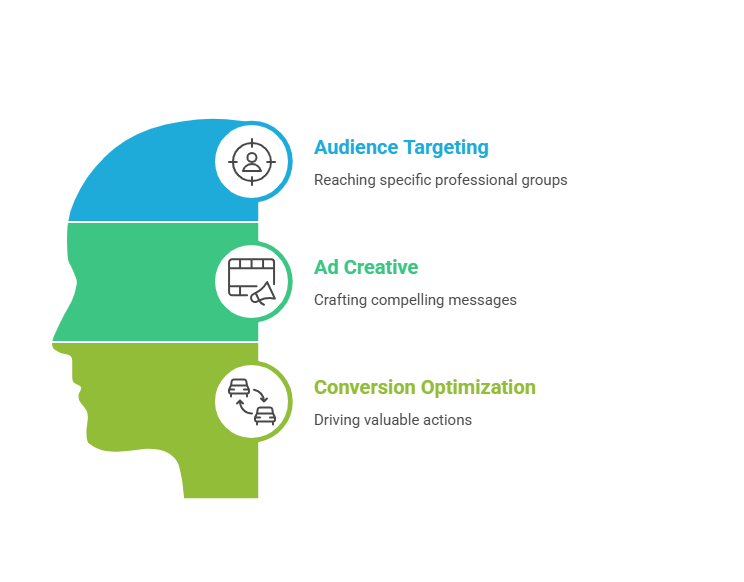
LinkedIn’s advertising ecosystem is built around three pillars: audience targeting, ad creative, and conversion optimization. Each plays a critical role in lead generation.
Audience targeting allows you to reach people based on job title, industry, seniority, company size, and even professional interests. Creative involves the messaging, value proposition, and offer itself. Conversion optimization ensures that you’re not just attracting clicks, but driving valuable actions like form submissions, demo requests, or content downloads.
With that foundation, let’s dive into a step-by-step workflow that you can follow for your next LinkedIn ads initiative.
Step 1: Define Your Lead Generation Objectives Clearly
Before you build an ad or choose a target audience, you need to be clear about your objective. Lead generation can mean different things depending on your business model. Are you seeking email subscribers? Webinar signups? Demo bookings? Or direct inquiries from enterprise buyers?
This clarity matters because it influences everything that comes next: your bidding strategy, your conversion tracking setup, and your creative messaging.
Start by determining what constitutes a “lead” for you. For some B2B SaaS businesses, a lead might be a free trial signup. For professional service firms, a qualified lead might be someone requesting a consultation. Align your LinkedIn campaign objective with the most meaningful action for your sales funnel.
Once you have that, set realistic KPIs for your campaign. Instead of shooting for “1,000 leads,” define the quality of the leads you want. For example, you might aim for leads with director-level titles in companies with 50+ employees. Setting these parameters upfront will save you time and budget later.
Step 2: Build Your Ideal Audience Personas
Effective LinkedIn advertising doesn’t work without clearly defined audience segments. This is where LinkedIn’s professional targeting options shine.
Start by outlining your ideal customer profiles. Create at least three detailed personas, including their job roles, industry, company size, geographic location, and pain points. For example, if you’re selling HR software, one persona could be “HR Managers at mid-sized companies” while another could be “Chief People Officers at enterprises.”
Don’t rush through this. Spend time understanding what truly motivates each group. What challenges are they facing? What solutions are they searching for? What content formats do they prefer? The answers inform your messaging and creative.
LinkedIn allows you to get extremely specific with targeting: job titles, skills, years of experience, professional interests, and even groups people belong to. Use a combination of criteria to make your audience precise but not so narrow that it becomes overly restrictive.
Also consider layering in company size and industry filters. A persona targeting startup founders in the fintech space will behave differently than one targeting operations directors at legacy healthcare firms. Treat each segment like a small campaign audience that deserves its own tailored messaging.
Step 3: Choose the Right LinkedIn Ad Format for Your Goal
LinkedIn offers several ad formats, and choosing the right one depends on your conversion objective.
Sponsored Content, for instance, appears directly in the LinkedIn feed and is ideal for promoting thought leadership pieces, case studies, or webinars. Sponsored InMail (or Message Ads) delivers a personalized message to a user’s LinkedIn inbox, which can be highly effective for exclusive offers or invitations. Text ads and Dynamic ads serve different purposes, often useful for broad branding or retargeting.
For lead generation specifically, LinkedIn’s Lead Gen Forms are a standout feature. These forms auto-populate a user’s LinkedIn profile data — name, contact info, company, job title — making it incredibly easy for users to submit their information without typing. This typically results in higher conversion rates because the friction is low.
Align your choice of format with your audience’s expectations. For an educational webinar, a Sponsored Content post with a Lead Gen Form usually performs well. For a personalized offer to executives, a Message Ad feels more direct and engaging.
Remember that creative matters as much as format. Even the most precisely targeted ad won’t perform if the messaging doesn’t resonate with the audience’s immediate needs.
Step 4: Craft Irresistible Creative and Value-Driven Messaging
You’ve defined your audience, objectives, and ad format. Now it’s time to write ad creative that actually converts.
Great ad copy on LinkedIn is clear, value-focused, and resonates with the professional audience’s priorities. Avoid generic phrases like “Click here” or “Learn more” unless they are tied to a compelling benefit.
Instead, focus on the outcome. What transformation will your audience experience? Will they save time? Reduce costs? Improve decision-making? Be specific.
For example, an HR solution ad might say, “Discover 5 Proven Strategies to Reduce Employee Turnover in 90 Days.” This statement communicates urgency and clearly states what the user gets.
Your visuals should also reflect professionalism while standing out on a busy feed. Use images or graphics that are simple, branded, and relevant to the offer. For B2B audiences, showing real people or real data often performs better than abstract stock images.
Always align ad creative with the landing page experience. If your ad promotes a webinar titled “Future of Remote Work,” the landing page must continue that conversation with consistent messaging.
A common mistake advertisers make is treating LinkedIn like Facebook — casual and broad. But LinkedIn audiences are there for professional insights, so your tone should match their mindset. Think less “funny meme” and more “smart solution.”
Step 5: Set Up Conversion Tracking and Lead Attribution
Without tracking, you’re flying blind. For effective lead generation, you need to know not just how many clicks your ads get, but how many of those clicks turn into leads and, more importantly, paying customers.
LinkedIn’s Insight Tag is essential. It’s a piece of code you install on your website that allows you to track conversions, see key demographics of people interacting with your site, and attribute actions back to your ads. If you haven’t installed it already, do this early in your campaign planning.
You should also configure conversion events that matter. For example, form submissions, demo requests, whitepaper downloads, or any action that signals a lead. Define these in LinkedIn Campaign Manager so that your reporting reflects engagement quality, not just quantity.
If possible, integrate your CRM (like HubSpot, Salesforce, or Zoho) with LinkedIn so you can see lifecycle stage progression. This will help you understand whether the leads you generate are actually converting to SQLs (sales qualified leads) and opportunities.
Tracking and attribution not only show you what’s working now but also provide data you need to optimize over time. When you can see which audience segments and creatives generate the most qualified leads, you can reinvest your budget toward them.
Step 6: Launch Your Campaign with Smart Budgeting and Bidding
Now that everything is in place — objectives, audience, creative, and tracking — it’s time to launch.
LinkedIn typically has higher CPCs (cost per click) than other social platforms, largely because of the professional audience and rich targeting capabilities. That doesn’t mean budgets need to be huge, but it does mean you should spend wisely.
Start with a moderate daily budget and conservative bids. LinkedIn’s automated bidding options like “Maximum Delivery” can help you get an initial sense of performance. Over time, you can test manual bidding to see if targeting specific bid levels improves your results.
Remember: budget allocation should be guided by audience and offer value. More competitive audiences (e.g., C-suite executives) may cost more per lead than mid-level managers. But if executives are a key decision-maker group for your product, the ROI can justify the higher cost.
Since LinkedIn’s ad auction system favors relevance and engagement, ads that resonate better with your audience will cost less over time. So keep observing your relevance scores and engagement metrics, and refine messaging where needed.
Step 7: Monitor Performance, Analyze Results, and Optimize
Once your ads are live, the real work begins. Daily monitoring is essential, especially during the first week. Keep an eye on key metrics like click-through rate (CTR), conversion rate, cost per lead, and overall spend.
But don’t just look at surface numbers. Use LinkedIn’s demographic reporting to see which segments are engaging most with your ads. You might discover that certain job titles or industries outperform others, giving you insight to refine your audience targeting.
If a campaign is underperforming, dig into the creative. Does the ad headline align with the offer? Is the landing page delivering on expectations? Sometimes even small tweaks in copy or visual elements can have an outsized effect.
Also be prepared to pause audiences or creatives that are draining budget with little return. Focus your spend on high-performing combinations. Over time, this iterative process will improve overall efficiency and lower your cost per qualified lead.
Keep in mind that lead generation isn’t a “set and forget” task. Market dynamics change, audiences fatigue, and competitor activity evolves. Your campaign should be dynamic as well.
Step 8: Scale What Works and Test New Ideas
Once you’ve gathered enough data to understand what’s working, it’s time to scale.
Scaling doesn’t just mean spending more. It means replicating successful elements and cautiously expanding into new variations. You might take a high-performing creative and test a new offer or tailor the messaging to a different yet related audience segment.
Another powerful scaling strategy is retargeting. People who engaged with your initial ads but didn’t convert can be re-engaged with a different offer. For instance, someone who clicked but didn’t fill out a Lead Gen Form might see a follow-up ad offering a more enticing resource.
LinkedIn’s Matched Audiences feature lets you retarget based on website visits, email lists, or engagement with your previous ads. This layered approach creates a funnel that nurtures interest and gently pushes prospects toward conversion.
Testing remains key. Even when an ad set is performing well, there’s almost always room for improvement. Play with headlines, call-to-actions, and visual styles to see if performance can be incrementally enhanced.
Step 9: Align Marketing and Sales for Follow-Up
High-quality lead generation doesn’t end with a form submission. For real business impact, there must be alignment between your marketing efforts and sales follow-up.
Ensure that every lead captured is correctly routed into your CRM and that sales teams are notified promptly. Slow follow-ups can diminish lead quality and frustrate prospects.
Develop a consistent follow-up cadence. Whether it’s an automated welcome email followed by a sales outreach, or a series of nurturing messages, prompt engagement increases conversion likelihood.
Also track lead quality over time. A successful LinkedIn campaign is one where generated leads convert into meaningful revenue, not just a long list of email addresses.
Step 10: Evaluate and Evolve Your LinkedIn Advertising Approach
After a full campaign cycle, take time to evaluate holistically. Look beyond numbers to understand patterns. Which audiences engaged best? Which offers resonated? What time of day or week drove the most conversions?
These insights inform future campaigns and help refine your overall marketing strategy.
LinkedIn, like all platforms, updates features and targeting options over time. Stay informed about best practices, new ad formats, and emerging capabilities so your campaigns remain competitive. Industry insights, case studies, and benchmark reports can provide valuable context.
Conclusion
A successful LinkedIn Ads Strategy for lead generation is both an art and a science. It requires deep audience understanding, compelling creative, precise targeting, disciplined tracking, and constant optimization. By following the step-by-step approach outlined above, you can build campaigns that not only deliver leads, but deliver leads that matter.
Whether you’re new to LinkedIn advertising or looking to elevate your existing efforts, this methodical process will help you create more efficient, effective, and scalable lead generation campaigns on one of the most powerful professional platforms available today.