
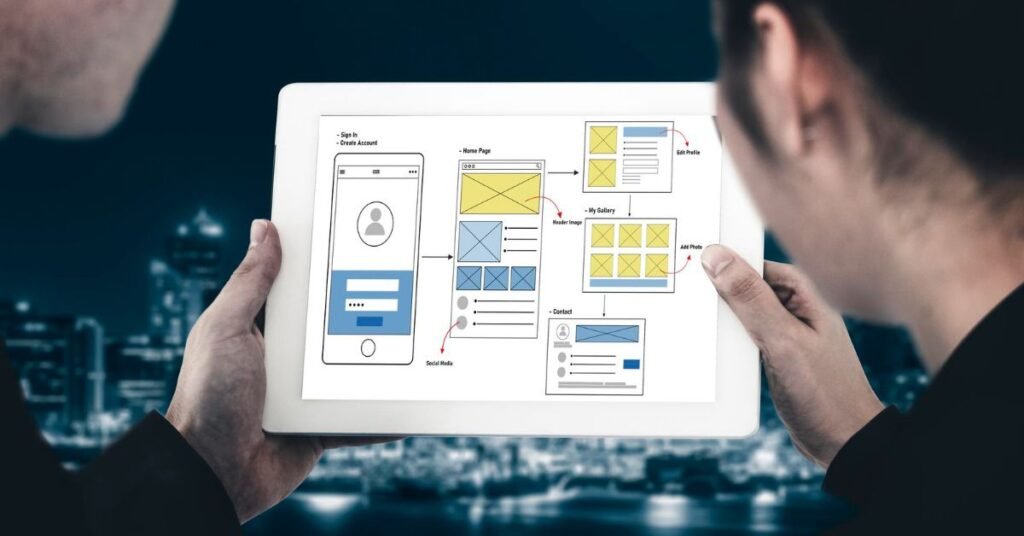
ketching a wireframe used to take half a day. Adjusting it after a stakeholder review took another half. If you’re still doing it that way in 2026, you’re losing time you don’t have.
The shift isn’t just about speed. The best AI wireframing tools now handle layout logic, generate responsive component structures, and translate rough text prompts into structured screens, so you can spend your energy on the decisions that actually require design thinking rather than box-drawing.
The problem is that the market is crowded. Every tool claims to be “AI-powered” and “intuitive,” and most of them look identical on a features page. This article cuts through that. Below are 15 tools that genuinely deliver on their AI promises, with honest notes on what each does well, where each falls short, and who each one is actually for.
What Makes a Wireframing Tool Genuinely “AI”?
Not every tool that slaps “AI” on its landing page deserves the label. For the purposes of this list, a tool qualifies if it does at least one of the following: generates layouts from natural language prompts, auto-suggests UI components based on context, converts screenshots or sketches into editable wireframes, or uses AI to assist user flow logic.
Tools that only offer smart resize or colour-fill auto-complete didn’t make the cut.
Figma AI — Best Overall for Professional Design Teams
Figma is already the industry standard for collaborative UI design, and its AI layer, rolled out through 2024 and expanded significantly in 2025, puts it at the top of this list for most design teams.
The AI features that matter most: First Draft, which generates a complete screen layout from a text prompt; Rename Layers, which sounds minor but saves hours on large files; and the auto-layout suggestions that intelligently restructure components as you resize. Figma AI doesn’t replace your design instinct, but it handles the scaffolding so you can focus on refinement.
What it does well: The integration is seamless because the AI sits inside a tool your team already uses. No context-switching. No new file format to manage. If you describe a user onboarding flow in plain language, First Draft produces a reasonable, editable starting frame in seconds.
Where it falls short: The AI generation is still fairly conservative. It produces clean but generic layouts. You won’t get a distinctive visual identity from a prompt alone, and for highly custom design systems, the AI suggestions can conflict with your existing components.
Best for: Design teams already on Figma who want AI to accelerate iteration rather than replace the design process.
Pricing: Free plan available. Professional plan at $15/editor/month. Organisation plan at $45/editor/month. As of 2026.
Uizard — Best for Non-Designers Who Need Screens Fast
Uizard was purpose-built for product managers, founders, and anyone who needs a working wireframe without design training. That focus shows in everything from the interface to the prompting style.
The standout feature is Autodesigner: type a description of your product or screen, pick a visual style, and Uizard generates a multi-screen wireframe within a minute. It also handles sketch-to-wireframe conversion, so a photo of a whiteboard scrawl becomes an editable digital screen.
What it does well: Speed and accessibility. In Hotskill’s testing with product-focused learners, Uizard consistently produced usable, shareable wireframes in under five minutes from a standing start. The Autodesigner is genuinely impressive for rough concepts and stakeholder previews.
Where it falls short: The output quality plateaus quickly. Uizard is excellent for low-to-mid fidelity wireframes. When you try to push it toward production-ready UI, the component library starts to feel thin and the customisation options become limiting.
Best for: Product managers and early-stage founders who need to visualise ideas quickly without relying on a designer.
Pricing: Free plan with limited projects. Pro plan at $12/month. Business at $39/month. As of 2026.
Visily — Best for Turning Screenshots into Editable Wireframes
Visily solves a specific problem particularly well: you have a reference app or website, and you want to use its layout structure as a starting point. Feed Visily a screenshot and it converts it into an editable wireframe you can modify.
The reverse-engineering capability works better than any other tool on this list for screenshot input. The AI accurately identifies navigation patterns, card structures, and form layouts, then maps them to editable Visily components. The prompt-based generation is competent, though not as strong as Uizard’s Autodesigner.
What it does well: Screenshot-to-wireframe conversion is fast and accurate. The team collaboration features are solid, and the UI component library is well-organised. It’s also genuinely easy to learn.
Where it falls short: If you’re not using the screenshot feature, Visily feels like a capable but unremarkable wireframing tool. The AI prompt generation works, but it isn’t the standout capability here.
Best for: Designers who regularly reference competitor apps or need to create wireframes based on existing interfaces.
Pricing: Free plan available. Starter at $8/user/month. Business at $20/user/month. As of 2026.
Galileo AI — Best for High-Fidelity UI Generation from Text
Galileo AI sits at the more ambitious end of the spectrum. The pitch: describe a UI screen in detail, and Galileo generates a high-fidelity, production-style design rather than a basic wireframe.
The generation quality is noticeably higher than most competitors when you give it a detailed prompt. Components look polished, spacing is considered, and the typography choices are generally sensible. It’s less of a wireframing tool and more of a rapid design generator.
What it does well: When the output is good, it’s very good. Galileo produces designs that are closer to a first draft from a mid-level UI designer than a rough wireframe, which changes the starting point of the design process entirely.
Where it falls short: Consistency is the problem. The output quality varies significantly based on how the prompt is written, and editing the generated designs requires familiarity with the interface, which has a steeper learning curve than Uizard or Visily. It also doesn’t yet support full user flow or multi-screen generation as fluidly as Uizard.
Best for: Designers who want AI to generate high-quality single-screen UI as a starting point for refinement.
Pricing: Waitlist/invite-based access with paid plans starting at $19/month. As of 2026.
Mockplus — Best for Teams That Need Prototyping and Design in One Place
Mockplus is a full-suite product design tool with strong AI-assisted wireframing built in. Where it differs from pure AI wireframing tools is in its emphasis on interaction design and prototyping alongside generation.
The AI component recommender suggests relevant UI elements as you build, and the auto-layout feature handles spacing and alignment with less manual effort. The collaboration features are strong, and the handoff tools for developers are well-built.
What it does well: The breadth of the toolset. You can go from wireframe to interactive prototype to developer handoff without leaving Mockplus. For teams that don’t want to pay for separate tools at each stage, the all-in-one model makes sense.
Where it falls short: The AI generation features are less sophisticated than dedicated AI tools. Mockplus is a strong design tool that has added AI, rather than an AI-native product. If pure generative speed is your priority, look elsewhere.
Best for: Small product teams that want a single tool covering wireframing, prototyping, and handoff.
Pricing: Free plan available. Pro at $9.95/user/month. Team at $15.95/user/month. As of 2026.
Marvel — Best Lightweight Option for Quick Concept Testing
Marvel has been around since 2013 and has kept pace with the AI shift without overcomplicating its core experience. The tool is deliberately simple, and that’s the point.
The AI features include basic layout suggestions and a screen generation tool that works from rough sketches. You won’t mistake Marvel’s output for Galileo’s, but the learning curve is almost zero, and getting a clickable prototype from a wireframe takes minutes.
What it does well: Speed to prototype. Marvel’s handoff from wireframe to shareable clickable demo is faster than any other tool on this list. For quick concept testing and stakeholder sign-off, it earns its place.
Where it falls short: The AI is the thinnest on this list. Marvel’s AI features feel more like smart templates than genuine generation. If you need serious AI capability, this isn’t your tool.
Best for: Designers who need to go from rough layout to clickable prototype as fast as possible.
Pricing: Free plan (1 project). Pro at $12/month. Team at $42/month. As of 2026.
Framer AI — Best for Generating Web Layouts That Actually Work on Live Sites
Framer started as a prototyping tool and has shifted toward a full web publishing platform with AI-generated layouts built in. Type a prompt describing your website or landing page, and Framer generates a responsive, publishable layout.
The key distinction from other tools: Framer’s output isn’t just a wireframe. It’s live-publishable code. That changes the value proposition entirely. You’re not wireframing to later hand off to a developer. You’re generating the actual site.
What it does well: The gap between wireframe and live website is effectively eliminated. For marketing landing pages, portfolio sites, and product pages, Framer’s AI generation is practical and fast. According to Framer’s own published data, users building with AI generate publishable pages up to 10x faster than from scratch.
Where it falls short: The generated output uses Framer’s proprietary component structure, so there’s limited portability. If you’re building in React or another framework, you’ll spend time converting. It’s also not a UI/UX wireframing tool in the traditional sense, so complex app interfaces aren’t its strength.
Best for: Marketing teams and solo founders who need to publish AI wireframing-to-live-site as fast as possible.
Pricing: Free plan available. Mini at $5/month. Basic at $15/month. Plus at $30/month. As of 2026.
Relume — Best for AI-Powered Website Sitemap and Wireframe Generation
Relume takes a top-down approach. Start by describing your website, and it generates a full sitemap with page-by-page wireframes before you build anything. It’s the only tool on this list that treats information architecture as the starting point.
The sitemap generation is fast and surprisingly thoughtful. For a SaaS product site, Relume will generate logical navigation structure, propose the right page types, and build wireframe layouts for each. Those wireframes can then be exported to Figma or Webflow.
What it does well: Structural thinking. If you’re building a new website from scratch and don’t know where to start, Relume gives you a logical foundation in minutes. The export to Figma workflow is clean.
Where it falls short: It’s primarily a website tool. Mobile app wireframes, dashboard UIs, and complex application interfaces are outside its core strength. The wireframes are also fairly generic, requiring significant customisation before they’re presentation-ready.
Best for: Web designers and agencies building new websites who want AI to handle sitemap and initial page structure.
Pricing: Starter at $36/month. Pro at $79/month. As of 2026.
Adobe XD with AI — Best for Adobe Ecosystem Teams
Adobe XD isn’t the most AI-native tool on this list, but Adobe’s generative AI capabilities (built on Firefly) have been progressively integrated into XD’s workflow since 2024. If your team already runs on Creative Cloud, there’s a real case for staying inside the ecosystem.
The AI features include content-aware layout suggestions, auto-repeat for component grids, and Firefly-powered asset generation directly inside the design canvas. Adobe Sensei handles some of the more routine tasks like smart alignment and component grouping.
What it does well: The Creative Cloud integration is genuinely useful. If your wireframes need to incorporate brand assets, photography, or illustration from other Adobe products, the pipeline is frictionless.
Where it falls short: Adobe XD has lost ground to Figma over the last two years, and that gap is visible in the AI feature set. The generation capabilities don’t match Figma AI or Galileo, and the roadmap has been slower than competitors.
Best for: Design teams already on Adobe Creative Cloud who want to extend their existing workflow rather than switch platforms.
Pricing: Included in Creative Cloud All Apps at $59.99/month. As of 2026.
Miro AI — Best for Team Workshops and Collaborative Wireframing
Miro is a collaborative whiteboard tool, not a traditional wireframing product, but its AI features make it relevant for early-stage design thinking. The AI can generate structured wireframe outlines from brainstorm notes, cluster sticky notes into themes, and create rough layout suggestions from workshop outputs.
What it does well: The collaborative context is the strength. When a product team is in a workshop and needs to move from ideas to rough screen layouts quickly, Miro AI bridges that gap without requiring everyone to switch to a dedicated design tool.
Where it falls short: Miro is not where you’d create production-quality wireframes. The design fidelity is low, and the output needs significant rework before it’s useful as a design reference. Think of it as idea-to-rough-sketch, not wireframe-to-handoff.
Best for: Product teams who run collaborative discovery workshops and want AI to accelerate the translation from ideas to rough layouts.
Pricing: Free plan available. Starter at $8/user/month. Business at $16/user/month. As of 2026.
Sketch with AI Plugins — Best for Mac-Based Design Teams Who Don’t Want to Move to Figma
Sketch remains the preferred tool for many senior designers on Mac, and its plugin ecosystem has expanded to include AI capabilities through third-party integrations. Plugins like Genius for Sketch and Automate Sketch handle repetitive layout tasks, while AI assistant integrations allow prompt-driven component generation.
What it does well: If you have a strong existing Sketch workflow and a well-built symbol library, the AI plugins extend that workflow without requiring migration. The base tool is still excellent for detailed, pixel-precise design.
Where it falls short: The AI capabilities are plugin-dependent, which means inconsistent quality, separate pricing, and occasional compatibility issues. There’s no native AI generation at the level Figma has built in.
Best for: Established Mac-based design teams with deep Sketch workflows who want to add AI without switching platforms.
Pricing: Sketch at $12/contributor/month. Individual plugins vary. As of 2026.
Motiff — Best AI-Native Alternative to Figma
Motiff is an AI-native design tool built from scratch to have AI at its core rather than as an add-on. Launched in 2023 and gaining traction through 2025, it’s the most credible challenger to Figma in the AI-native category.
The AI Toolbox in Motiff allows you to select any element and apply AI-driven transformations, generate new components from descriptions, and auto-complete layout patterns. The interface will be immediately familiar to Figma users, which lowers the switching cost.
What it does well: The AI features feel integrated rather than bolted on, because they were designed in from day one. The component generation is fast, the interface is clean, and for teams starting fresh without a Figma investment, Motiff is the most compelling option.
Where it falls short: The plugin ecosystem is much smaller than Figma’s. The community resources, templates, and third-party integrations that make Figma powerful aren’t there yet.
Best for: New design teams or startups who want an AI-first design tool and aren’t locked into Figma’s ecosystem.
Pricing: Free plan available. Professional at $10/editor/month. As of 2026.
Penpot — Best Free and Open-Source Option
Penpot is the open-source design tool, and it added AI-assisted features through its 2024 and 2025 releases. The AI capabilities include layout suggestions, component organisation, and CSS generation for developer handoff.
What it does well: It’s free and self-hostable, which matters for teams with privacy requirements or budget constraints. The developer handoff is genuinely strong, and the CSS generation from designs is more accurate than most commercial tools.
Where it falls short: The AI features are the thinnest on this list. Penpot’s AI is functional, not impressive. You’re choosing it for the open-source model and handoff quality, not for AI generation speed.
Best for: Teams with strict data privacy requirements, or budget-constrained teams who need a professional design tool without the subscription cost.
Pricing: Free and open-source. Cloud-hosted version also free. As of 2026.
Canva Wireframe Builder — Best Entry Point for Non-Technical Teams
Canva added wireframing templates and AI layout generation to its product in 2024, and the result is accessible in a way no other tool on this list matches. If your team already uses Canva for marketing assets, the wireframing tools sit inside the same workspace.
The AI layout generator works from brief prompts and produces simple screen structures. It’s not deep, but it doesn’t need to be. For non-technical teams creating internal process flows, app concepts for client presentations, or early product ideas, it clears the bar.
What it does well: Zero learning curve for existing Canva users. The templates are well-designed, and the sharing and presentation features are the best on this list.
Where it falls short: This isn’t a tool for UI/UX professionals. The component fidelity is low, there’s no developer handoff, and the AI generation is basic. Serious design work needs a serious design tool.
Best for: Marketing and business teams who need to communicate product ideas visually without any design background.
Pricing: Free plan available. Canva Pro at $15/month. As of 2026.
Whimsical AI — Best for Flow Diagrams and Wireframes Together
Whimsical has always been good at flowcharts and diagrams alongside wireframes. The AI update, rolled out in 2024, brought prompt-based generation for both wireframes and flow diagrams, which makes it useful for teams that think in user journeys as much as screen layouts.
Describe a user flow in plain language and Whimsical generates both the flowchart and rough wireframe screens in a connected diagram. That combination is genuinely unique.
What it does well: The wireframe-plus-flowchart combination is the strongest on this list. If your design process starts with user journey mapping, Whimsical AI lets you move from journey to screen layout without switching tools.
Where it falls short: The wireframe fidelity is low-to-medium. It’s a thinking tool, not a production tool. And the AI generation for complex multi-screen apps isn’t as strong as Uizard or Galileo.
Best for: Product designers and UX researchers who work from user journeys and need wireframes to stay connected to the flow logic.
Pricing: Free plan available. Pro at $12/month. As of 2026.
How to Choose the Right Tool for Your Workflow
The honest answer: it depends on where you sit in the design process.
If you’re a professional designer on a team, Figma AI is the default choice because the collaboration and plugin ecosystem are unmatched. If you’re a product manager or founder who needs screens fast without design training, Uizard is the clearest choice. If you’re building websites and want AI to take you from idea to live page, Framer AI is in a category of its own.
For teams that work heavily from reference material, Visily solves a real problem. For teams thinking in user journeys, Whimsical AI earns its place. And for anyone who needs a powerful tool at zero cost, Penpot is the honest answer.
No single tool is the best for everyone. But one of these fifteen is the right tool for your specific workflow right now.
FAQ
What are AI wireframing tools?
AI wireframing tools are design applications that use machine learning and natural language processing to help designers and product teams create screen layouts, UI components, and user flows faster. Instead of building layouts manually from scratch, you can describe what you need in plain language and the tool generates a starting structure. Some tools also convert sketches or screenshots into editable wireframes automatically.
Which AI wireframing tool is best for beginners?
Uizard is the strongest starting point for beginners. Its Autodesigner feature generates multi-screen wireframes from a text prompt without requiring any design background. Canva’s wireframe builder is even simpler, but the output is less suitable for actual product design work. If you’re a beginner who wants to build real product screens rather than presentation mockups, start with Uizard.
Can AI wireframing replace a UI/UX designer?
No, and it’s worth being direct about this. AI wireframing accelerates the scaffolding phase of design, but it doesn’t replace design judgment, user research, interaction logic, or the ability to evaluate what actually works for a specific user. What it does is reduce the time a designer spends on mechanical layout work, which frees up more time for the decisions that actually require expertise.
Is Figma AI worth upgrading to the paid plan for?
If you’re already on a Figma paid plan, the AI features are included and worth using. If you’re on the free plan and primarily want the AI generation features, evaluate whether the First Draft functionality alone justifies the cost for your use case. For individual designers, the free tier still covers a lot of ground. For teams of three or more, the Professional plan is almost always worth it regardless of the AI features alone.
What is the difference between a wireframe and a prototype?
A wireframe is a static layout that shows the structure and content placement of a screen without interaction. A prototype is an interactive version that simulates how a user would move through an application. Most AI wireframing tools can generate wireframes quickly. Some, like Mockplus, Marvel, and Framer, also handle prototyping. The two are separate steps in the design process, though some tools blur the line.
Do I need design experience to use these tools?
For most of the tools on this list, no. Uizard, Visily, Canva, and Whimsical are all usable without design training. Figma and Galileo have a steeper learning curve and assume some familiarity with design concepts. If you have zero design background and need wireframes for a startup or internal project, Uizard is genuinely accessible within an hour.
Which tool is best for mobile app wireframing specifically?
Uizard and Figma AI are the strongest for mobile app wireframes. Uizard’s Autodesigner is particularly well-suited to mobile-first screens and generates layouts that respect mobile component patterns by default. Figma AI handles mobile within a professional design environment. Framer and Relume are more web-focused and aren’t the right choice if your primary output is a mobile app interface.
Are there free AI wireframing tools that are actually good?
Yes. Penpot is the strongest free option for professional use, with AI-assisted features and excellent developer handoff. Figma’s free plan covers a lot of ground for individual designers. Uizard’s free plan is limited but enough to test the Autodesigner. Canva’s free tier includes the wireframe builder. None of the free plans match the full capability of paid tiers, but they’re real tools, not just demos.
How does AI wireframing improve design team efficiency?
In Hotskill’s AI skill tracks, teams that integrate AI wireframing tools into their workflow consistently report cutting initial concept-to-wireframe time from several hours to under 30 minutes. The gains are most significant in the early exploration phase, where teams need to evaluate multiple layout options quickly. The AI handles structural generation so designers can focus on evaluating and refining options rather than building them from scratch.
What should I look for when evaluating an AI wireframing tool?
Focus on four things: generation quality (does the AI output actually reduce your work or just give you something to delete?), editability (can you modify the output easily, or is it locked?), export and handoff (can your developer work with the output?), and collaboration (can your whole team use it without everyone needing a design background?). Tools that score well on all four, like Figma AI and Uizard, are worth the subscription cost. Tools that only score well on one or two are worth knowing about but shouldn’t anchor your workflow.
The Right Tool Saves You More Than Time
Picking the wrong wireframing tool doesn’t just slow you down. It creates friction at every stage: the designer resents the interface, the developer can’t use the export, and the product manager gives up trying to contribute. Getting the tool right removes that friction.
The three takeaways worth acting on: if you’re a design professional, Figma AI is the default choice and the AI features are worth learning properly. If you’re a non-designer who needs to wireframe, Uizard removes the barrier to entry more effectively than anything else. And if you’re building websites and want to go from idea to live page, Framer AI shortens that path more than any other tool on this list.
Start with one tool. Build one wireframe today. The gap between knowing about a tool and actually using it is where most people stay stuck.
If you want to go deeper on AI design tools and build real workflows around them, Hotskill has structured AI skill tracks designed for exactly this, built for professionals who want to use these tools effectively rather than just know they exist. Download the HotSkill app on iOS or Android to start learning today.