

Most social media teams are stuck in a loop. Write a post, find an image, schedule it, check analytics, reply to comments, repeat. Five platforms. Seven content formats. No headspace left for actual strategy.
That’s not a productivity problem. It’s a structure problem. And AI Agents for Social Media Marketing is how teams are starting to fix it at the root.
This article breaks down exactly what these agents do, where they actually help, where the limitations are, and which tools are worth your time. No vague promises about automation. Just what works and why.
What Is an AI Agent, Exactly?
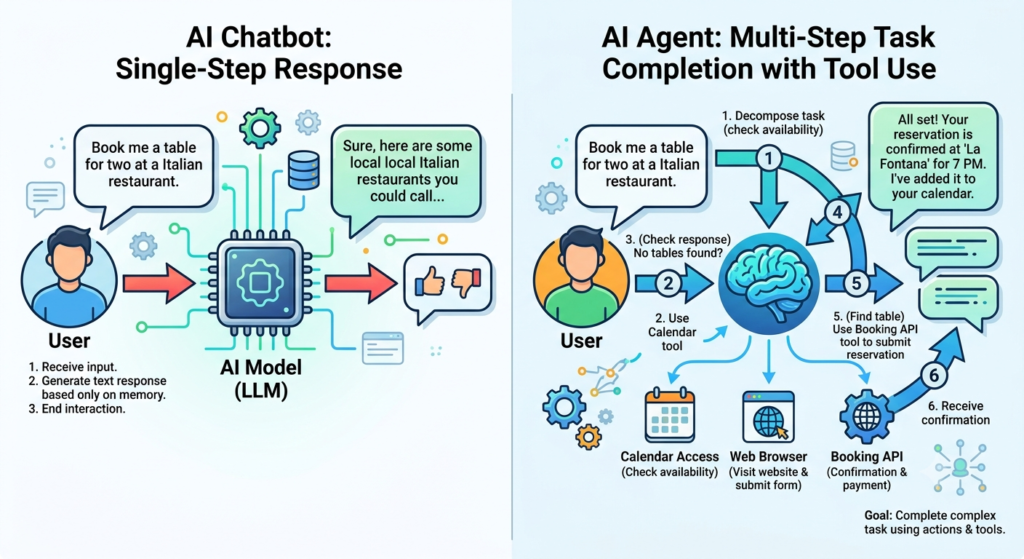
An AI agent is a software system that uses a large language model (LLM) to plan and complete multi-step tasks autonomously, without requiring manual input at every stage. Unlike a standard AI chatbot that responds to one prompt at a time, an agent can set sub-goals, use tools, browse the web, call APIs, and take sequential actions toward a broader objective.
Here’s a simple way to think about it. You give a regular AI model a task: “Write five Instagram captions for our product launch.” It writes them. Done. An AI agent gets the same task and can also check what performed well in your last three launches, pull the most relevant trending hashtags, format the captions for your brand tone, and schedule them via your social tool’s API. Same goal. Fundamentally different scope of action.
That distinction matters a lot in social media, where good content alone isn’t enough. Context, timing, consistency, and data all feed into results. Agents can hold and act on all of that at once.
Why Social Media Marketing Needs Agents, Not Just AI Assistance
Standard AI tools like ChatGPT have made copywriting faster. That’s real and useful. But they don’t change the number of decisions you have to make each day. You still have to prompt them, paste the output somewhere, check the calendar, brief the designer, and monitor what’s happening.
That’s the gap. AI assistance reduces effort per task. AI agents reduce the number of tasks you have to touch.
According to Sprout Social’s 2025 Social Media Productivity Report, marketers spend an average of 5.4 hours per week on scheduling, reformatting, and administrative content tasks that require no real creative judgment. That’s the exact territory agents can own.
And the scale of social media isn’t getting simpler. Brands are now expected to publish on Instagram, LinkedIn, TikTok, X (formerly Twitter), YouTube Shorts, and Pinterest, often with different formats and different audiences for each. Running that manually, even with AI writing help, is a constant bottleneck.
According to Sprout Social’s 2025 Social Media Productivity Report, marketers spend an average of 5.4 hours per week on repetitive administrative tasks like scheduling and reformatting content. AI agents can handle this tier of work autonomously, freeing social media teams to focus on strategy and audience relationships. The impact is not just time saved but decision fatigue reduced.
Core Benefits of Using AI Agents in Your Social Media Workflow
AI agents in social media don’t provide one big benefit. They provide several smaller ones that compound across your workflow. Here are the ones that matter most.
Consistency Across Platforms Without Extra Effort
Brand voice breaks down when content is rushed or reformatted manually across platforms. An agent can take a single core message, adapt it for LinkedIn’s professional tone, Instagram’s visual-first framing, and X’s brevity constraints, and schedule all three without you touching a prompt again.
In Hotskill’s AI skill tracks, we’ve found that learners who set up platform-specific voice instructions inside agent systems see measurably more consistent brand output within two weeks of starting, compared to teams running everything through single ChatGPT prompts.
Faster Response to Trends
Social moves fast. A trending topic or sound on TikTok has a window of maybe 24 to 48 hours where jumping on it actually helps. An agent that monitors trends, drafts a reactive post, and flags it for human approval can compress that cycle from a full day to under an hour.
Deeper Analytics Without a Data Team
Most social analytics platforms give you numbers. What they don’t give you is the “so what.” AI agents connected to your analytics API can surface patterns, compare periods, and generate plain-language insight summaries that tell you what’s actually driving or hurting performance.
Reduced Context-Switching
Every time you move between your content calendar, your writing tool, your scheduler, and your analytics platform, you lose time and mental continuity. Agents centralise the workflow, often through a single interface or chat-based system that handles the moving between tools on your behalf.
Real Use Cases: Where AI Agents Are Actually Useful
Let’s get specific. These are the use cases where social media teams are getting real ROI from agents in 2026, not theoretical ones.
Content Planning and Batch Creation
An agent receives your monthly content brief, reviews your top-performing posts from the previous month (pulled via API from your analytics platform), checks competitor content using web search, and generates a full content calendar with draft copy, hashtag suggestions, and posting time recommendations.
A solo marketer running a direct-to-consumer skincare brand cut their monthly content planning from 12 hours to just under 3 hours by moving this workflow to an agent built on Make and Claude 3.5 Sonnet. The agent handles research and first drafts; the marketer handles final review and approval.
Comment and DM Management
Agents can classify incoming comments and DMs, route support queries to the right team, flag sentiment shifts, and respond to FAQs using an approved script. They don’t replace human relationship-building in the comments, but they remove the 80% of interactions that are routine so your team can focus on the 20% that actually matter.
Cross-Platform Reformatting
You write one long-form LinkedIn post. The agent reformats it into a Twitter/X thread, a short TikTok script, and an Instagram carousel caption without you lifting a finger. This isn’t magic; it’s a well-structured agent workflow with clear format instructions per platform.
Performance Reporting
Instead of downloading CSVs every Monday morning, an agent can pull data from multiple platforms via API, generate a structured report, highlight anomalies, and send it to your Slack channel or inbox. What used to take two hours can run in under five minutes.
AI agents used for social media content operations are reducing time spent on batch creation, reformatting, and performance reporting by 60 to 70% in documented team workflows. The gains are largest when agents are given access to platform APIs and analytics tools rather than operating only on text prompts.
The Best AI Agent Tools for Social Media Marketing in 2026
Here’s where most articles just paste a list of logos. That’s not useful. Below is an honest assessment of the tools that are actually worth building on, what they do well, where they fall short, and who they’re best suited for.
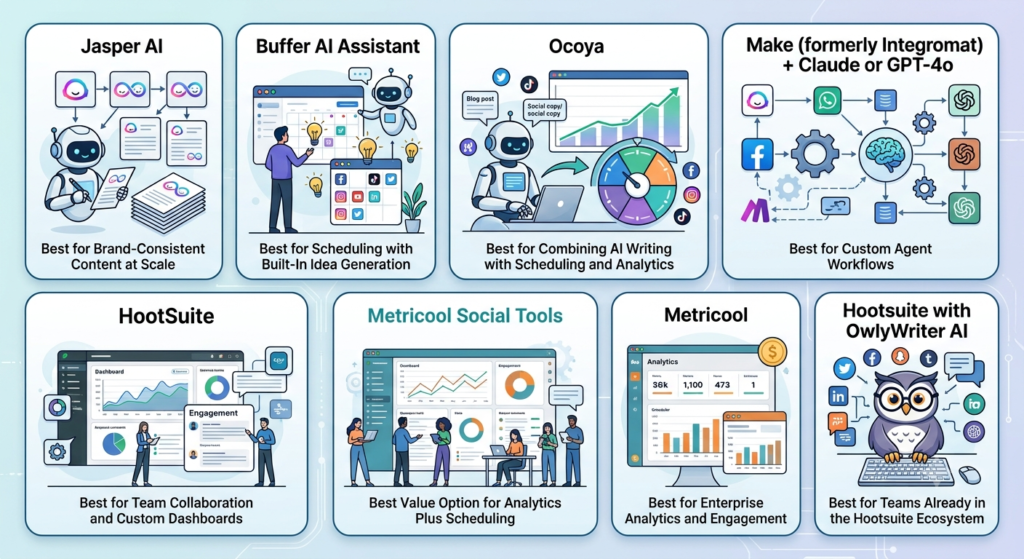
Jasper AI — Best for Brand-Consistent Content at Scale
What it does: Jasper is an AI writing platform with built-in agent workflows designed specifically for marketing teams. It includes social-specific templates, a brand voice layer you can configure, and integrations with content calendars and CMS platforms.
What it does well: Jasper’s Brand Voice feature is genuinely one of the best in the category. You upload examples of your existing content, and it trains the system to match your tone across outputs. For social teams managing multiple brand accounts or sub-brands, this is a real differentiator. The Social Media Post Generator produces platform-specific copy that doesn’t feel like it came from a generic template, which most competitors still struggle with.
Where it falls short: Jasper doesn’t natively handle scheduling or analytics. It’s a content production tool, not a full end-to-end social agent. You’ll still need a scheduler like Buffer or Hootsuite alongside it. The pricing is also on the higher end for small teams.
Best for: Mid-size to enterprise marketing teams that produce high volumes of social content and need brand consistency across multiple writers or accounts.
Pricing (as of 2026): Creator plan starts at $49/month. Teams plan starts at $125/month for three seats. Enterprise pricing on request.
Buffer AI Assistant — Best for Scheduling with Built-In Idea Generation
What it does: Buffer is a social media scheduler that added an AI layer to help with content ideation and copy drafting. The AI Assistant can suggest post ideas based on your account history, generate captions from simple inputs, and repurpose long-form content into social snippets.
What it does well: The combination of scheduling and AI in a single interface reduces context-switching significantly. You can go from idea to scheduled post without opening another tool. The repurposing feature is legitimately useful: paste a blog URL and it pulls key points and generates multiple post formats automatically.
Where it falls short: The AI layer is relatively shallow compared to dedicated agent platforms. It’s generative assistance, not true agentic behaviour. It can’t monitor trends, pull your analytics for context, or take actions based on conditions. It’s a good starting point for smaller teams, not a replacement for a real workflow automation system.
Best for: Freelancers, small businesses, and social media managers who want AI-assisted content creation combined with scheduling in one affordable tool.
Pricing (as of 2026): Free plan available (limited to 3 channels). Essentials plan at $6/month per channel. Team plan at $12/month per channel.
Ocoya — Best for Combining AI Writing with Scheduling and Analytics
What it does: Ocoya brings together AI content generation, a social media scheduler, a basic design tool, and analytics into one platform. Think of it as an all-in-one social media cockpit with AI built throughout rather than bolted on.
What it does well: The workflow from content creation to scheduling to performance tracking is genuinely unified. You don’t switch between platforms. The AI writing quality is solid for short-form social content, and the built-in design tool (similar to a simplified Canva) means you can produce images and captions in the same place. The hashtag suggestions are smarter than average because they’re pulled dynamically rather than served from a static list.
Where it falls short: The analytics depth is limited compared to dedicated platforms like Sprout Social or Metricool. If you need granular reporting or audience demographic breakdowns, you’ll hit a ceiling. The design tool is also not a Canva replacement for anything more than simple layouts.
Best for: Small-to-mid-size businesses and solo social media managers who want to consolidate tools and reduce the number of monthly subscriptions.
Pricing (as of 2026): Starter plan at $19/month. Pro plan at $47/month. Business plan at $105/month.
Make (formerly Integromat) + Claude or GPT-4o — Best for Custom Agent Workflows
What it does: Make is a no-code automation platform that lets you build multi-step workflows connecting hundreds of apps and APIs. Combined with an LLM like Claude 3.5 Sonnet or GPT-4o via API, it becomes one of the most flexible social media agent systems available.
What it does well: This is the power user option. You can build workflows that monitor RSS feeds or Google Trends, draft platform-specific content using an LLM, get approval via Slack, schedule through Buffer’s API, and log the result in a Google Sheet, all automatically. The flexibility is unmatched by any all-in-one platform. For teams with specific workflow requirements that off-the-shelf tools can’t meet, this is the right foundation.
Where it falls short: It requires setup time and basic workflow logic knowledge. If you’ve never built an automation, the learning curve is real. Debugging a broken scenario is not intuitive. You’re also stitching together multiple tool costs rather than paying one subscription.
Best for: Technical marketers, growth teams, and agencies that need custom workflows and have the time to build them properly.
Pricing (as of 2026): Make free plan includes 1,000 operations/month. Core plan at $10.59/month (10,000 operations). Claude API and GPT-4o API costs are separate and usage-based.
Sprout Social with AI Features — Best for Enterprise Analytics and Engagement
What it does: Sprout Social is an enterprise social media management platform that has integrated AI features across listening, content suggestions, engagement, and reporting. Its AI capabilities are embedded inside a comprehensive platform rather than standing as a separate product.
What it does well: Sprout’s AI-driven social listening is genuinely strong. It can surface brand mentions, sentiment trends, and competitive signals across platforms in near real-time. The Optimal Send Time feature uses machine learning on your specific audience data, not generic benchmarks, to recommend posting times that consistently improve reach. The reporting suite is the most detailed in this list, and the AI-generated report summaries save significant time for teams that present to stakeholders weekly.
Where it falls short: Sprout Social is expensive. It’s built for teams, not individuals. If you’re a solo marketer or a brand with a modest social budget, the cost-to-value ratio doesn’t work in your favour. The AI content generation is also not as strong as dedicated writing tools.
Best for: Mid-size to enterprise teams with serious analytics requirements and budgets to match. If you present social performance data to senior stakeholders regularly, Sprout is hard to beat.
Pricing (as of 2026): Standard plan at $249/month per seat. Professional at $399/month per seat. Enterprise on request.
Metricool — Best Value Option for Analytics Plus Scheduling
What it does: Metricool is a social media management platform that combines scheduling, analytics, competitor tracking, and basic AI content features. It’s positioned as a cost-effective alternative to Sprout Social for teams that need real analytics without enterprise pricing.
What it does well: The analytics-to-price ratio is strong. You get detailed performance breakdowns, audience growth tracking, and competitor benchmarking at a fraction of what Sprout charges. The AI writing assistant generates solid first-draft captions. The hashtag manager and best-time-to-post features are genuinely data-driven rather than generic.
Where it falls short: The AI features are limited in scope. This is an analytics-plus-scheduling tool with some AI assistance, not an agentic system. Don’t expect it to handle autonomous multi-step workflows.
Best for: Freelancers, agencies managing multiple client accounts, and small-to-mid-size brands that want proper analytics without an enterprise contract.
Pricing (as of 2026): Free plan available (covers one brand). Starter plan at $22/month. Advanced at $59/month. Agency pricing starts at $179/month.
Hootsuite with OwlyWriter AI — Best for Teams Already in the Hootsuite Ecosystem
What it does: Hootsuite is one of the oldest social media management platforms. OwlyWriter AI is its built-in AI writing assistant that generates captions, repurposes content, and suggests post ideas directly within the scheduling interface.
What it does well: If your team is already in Hootsuite, OwlyWriter makes sense. It’s well-integrated, requires no additional setup, and handles caption generation for all major platforms. The content ideas feature, which generates post suggestions based on a URL or keyword you provide, is a practical time-saver for content planning.
Where it falls short: OwlyWriter is solidly middle-of-the-road on content quality. It doesn’t match Jasper for brand voice control or produce the output depth of Claude-based workflows. Hootsuite’s pricing has also climbed significantly, which is worth knowing if you’re starting fresh.
Best for: Teams already committed to the Hootsuite platform who want to add AI content generation without switching tools.
Pricing (as of 2026): Professional plan at $99/month (1 user, 10 accounts). Team plan at $249/month (3 users, 20 accounts). Enterprise pricing on request.
The most effective AI agent tools for social media marketing in 2026 fall into two categories: all-in-one platforms like Ocoya, Metricool, and Hootsuite that embed AI into scheduling and analytics workflows; and custom agent stacks built on tools like Make combined with LLM APIs. All-in-ones offer faster setup; custom stacks offer deeper capability. The right choice depends on team size, technical comfort, and the complexity of the workflow you need to automate.
How to Get Started Without Overcomplicating It
This is the part most guides skip. You don’t need to rebuild your entire workflow at once.
Step 1: Identify the task that eats the most time and has the lowest creative value. For most teams, that’s content reformatting or performance reporting.
Step 2: Pick one tool from the list above that solves that specific problem. Don’t try to solve everything at once.
Step 3: Run it in parallel with your existing workflow for two weeks. Measure time saved and output quality honestly.
Step 4: Once it’s stable, identify the next high-friction task and extend the system.
The teams that fail with AI agents are the ones that try to automate everything simultaneously. Start narrow. Build confidence. Expand from a stable foundation.
Conclusion
The gap between teams struggling to keep up with social and teams running efficient, consistent content operations is not talent. It’s workflow structure.
AI agents don’t remove the need for human judgment on strategy, creative direction, or audience relationships. What they do is remove the mechanical overhead that eats into the time you’d need to exercise that judgment. Batch creation, reformatting, scheduling, reporting: these are all tasks that agents can own completely or substantially reduce.
Start with one bottleneck. Pick one tool from the list above that directly addresses it. Measure what changes. Build from there.
The marketers getting real results from AI agents in 2026 are the ones who’ve stopped treating it as an experiment and started treating it as infrastructure.
If you want structured, hands-on training on building AI workflows for marketing, Hotskill has dedicated skill tracks built exactly for this. The app covers everything from prompt engineering for social content to building automation systems on Make. Download the app on iOS or Android, and start your first lesson today.
Frequently Asked Questions
What is an AI agent for social media?
An AI agent for social media is a software system built on a large language model that can plan and complete multi-step tasks autonomously. Unlike a standard chatbot, it can connect to external tools and APIs, make sequential decisions, and take actions like drafting posts, scheduling content, or pulling analytics data without step-by-step human input.
How is an AI agent different from AI writing tools like ChatGPT?
ChatGPT and similar tools respond to individual prompts. An AI agent goes further: it can set sub-goals, use external tools (like your social scheduling API or analytics platform), and complete a chain of actions toward a broader objective. AI writing tools assist with single tasks. Agents can run entire workflows.
Do I need technical skills to use AI agents for social media marketing?
Not necessarily. All-in-one platforms like Buffer, Ocoya, and Metricool have AI features that require no coding or technical setup. If you want to build custom agent workflows using Make or n8n plus an LLM API, a basic understanding of automation logic helps, but many no-code tools are designed to make this accessible without programming knowledge.
Which AI agent tool is best for a small business or solo marketer?
Buffer or Metricool are the most practical starting points for smaller teams. Both offer free plans, combine scheduling with AI assistance, and don’t require technical setup. Ocoya is worth considering if you also want basic design capabilities included in the same platform.
Can AI agents manage my social media comments and DMs automatically?
Yes, with some caveats. AI agents can classify incoming messages, respond to FAQs using approved scripts, flag sentiment shifts, and route complex queries to a human team member. What they can’t do reliably is handle nuanced or sensitive conversations. The best practice is to automate routine responses and keep humans involved in anything that requires relationship judgment.
Will using AI agents make my social media content feel generic?
Only if you set them up without brand voice instructions. The more specific context you give an agent about your tone, audience, and content examples, the more consistent the output becomes. Jasper’s Brand Voice feature and Claude’s system prompt configuration both allow detailed voice setup. Generic output is usually a sign of generic instructions, not a fundamental limitation of the technology.
How much time can I actually save using AI agents for social media?
Based on documented team workflows, marketers using agents for content batch creation, reformatting, and performance reporting are saving between 4 and 8 hours per week. The Sprout Social 2025 report puts routine administrative social tasks at 5.4 hours per week for the average social media manager, which is the ceiling for what automation can realistically recover.
Is it worth building a custom agent workflow on Make or n8n instead of using an all-in-one tool?
For most teams, no. All-in-one platforms cover the core use cases and require much less setup time. The custom route makes sense when your workflow has specific requirements (like connecting to a proprietary data source, triggering actions based on complex conditions, or integrating with tools the all-in-ones don’t support) that off-the-shelf products genuinely can’t meet.
What data do AI agents need access to in order to work well for social media?
At minimum, agents work best with access to your post history and performance analytics (via API), your brand voice and tone guidelines (via system prompt or uploaded document), and your content calendar or brief. More advanced workflows also benefit from competitor data via web search and audience demographic data from platform analytics APIs.
Are AI agents safe to use with client social media accounts?
Yes, with the right setup. Use separate workspace credentials for each client, configure permission levels carefully (don’t give any agent broader API access than it actually needs), and always have human approval in the loop before anything publishes. Most enterprise tools like Sprout Social and Hootsuite have approval workflows built in specifically for this scenario.