

Most AI products don’t fail because the model is bad. They fail because nobody agreed on the problem, the data was a mess, or the thing shipped with no way to tell whether it still worked a month later. If you’re a marketer, founder or product person building with AI for the first time, that’s the gap you’re staring at.
The AI product development lifecycle looks a lot like the software process you may already know, but it breaks in different places. Code does the same thing every time. Models don’t. That changes how you plan, test, ship and maintain everything.
This guide walks through ten steps, from defining the problem to governing the product after launch. Each step names the specific tools teams actually use, what each one does well, and where it lets you down. Prices and features change fast, so check each vendor’s page before you commit.
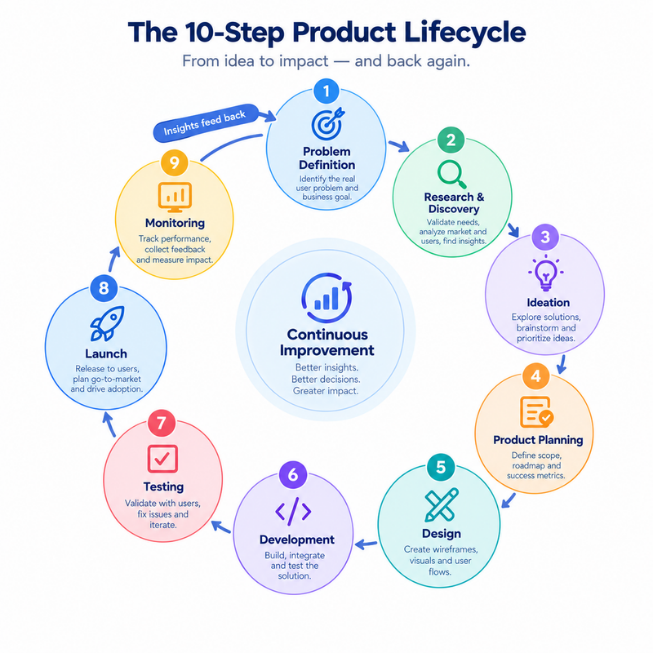
What Does an AI Product Lifecycle Look Like?
It’s a loop, not a straight line. You define a problem, prepare data, build a model or prompt-based system, test it, ship it, then monitor and improve it, which sends you back to the start.
Here’s the formal version. The AI product development lifecycle is the end-to-end process of taking an AI product from a business problem to a deployed, monitored and continuously improved system.
Three things make it different from ordinary software. First, outputs are probabilistic, meaning the same input can produce slightly different results and some of them will be wrong. Second, data is part of the product, so bad data produces a bad product no matter how clean the code is. Third, quality decays. A model that was accurate in March can drift by September because customers, language and products change.
Throughout this guide I’ll use one running example: an online clothing store that wants an assistant to answer order-status and returns questions. It’s a realistic project, and it exposes every stage of the loop.
A few terms you’ll see often. A model is a program that learned patterns from data instead of following hand-written rules. A large language model (LLM) is a model trained on huge amounts of text to generate and understand language, such as GPT from OpenAI or Claude from Anthropic. MLOps is the set of practices for deploying and maintaining machine learning models in production.
An AI product is built in a loop of problem definition, data preparation, model building, evaluation, deployment and monitoring. It differs from traditional software because its outputs are probabilistic, its data is part of the product, and its quality decays over time. Teams that plan for this from day one ship more reliable products.
Step 1: Define the Problem and Success Metrics
Write down the one problem the product solves and the number that proves it’s solved. If you can’t state both in two sentences, you’re not ready to build.
“Add AI to customer support” is not a goal. “Answer returns questions in under two minutes with accuracy at least equal to a human agent” is. Notice the second one gives you something to measure.
Split your metrics into three types. A product metric is what the business cares about, like resolution rate. A model metric measures output quality, like answer accuracy. A guardrail metric tracks harm, like how often the assistant promises a refund it shouldn’t. Most teams track the first two and forget the third. Don’t.
Tools for this step:
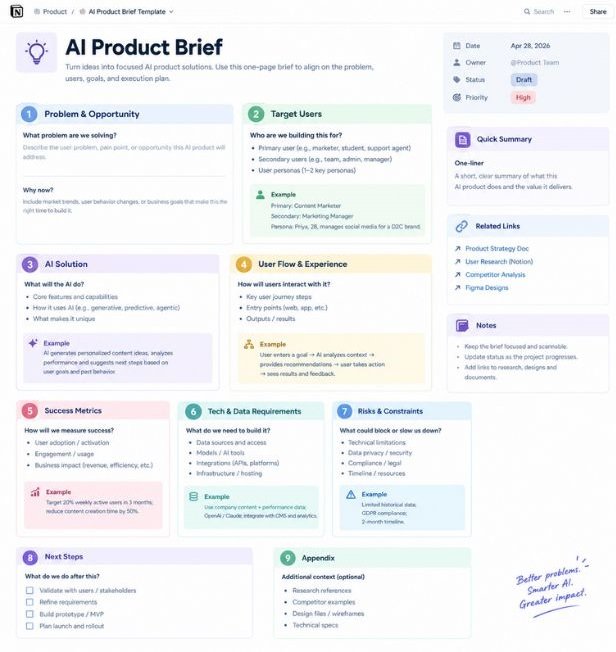
Notion is a workspace for documents and databases. Use it for a one-page product brief covering the problem, users, metrics and risks. It’s quick and the templates are good, but it has no link to your experiments, so briefs go stale unless someone owns them.
Miro is an online whiteboard. It’s useful for mapping the customer journey and spotting where AI genuinely helps versus where a simple FAQ page would do. The catch: boards sprawl fast, so turn the output into a written brief within a day.
Linear and Jira are issue trackers. Linear is faster and cleaner for small teams. Jira makes more sense if you need approval workflows and reporting for a large organisation. Pick one, not both.
Amplitude and Mixpanel are product analytics tools that track what users do inside an app. Use them to record your baseline, which is how the process performs today without AI. Without a baseline you can’t prove the product helped. Amplitude is stronger for funnel and cohort analysis, while Mixpanel is usually quicker to set up. Both offer free tiers as of 2026, but limits change.
Step 2: Check Feasibility and Data Readiness
Before building anything, confirm that AI is the right tool and that you have enough relevant data to support it. A cheap test saves months.
Try this first: take 20 to 50 real examples, such as past support tickets, and run them by hand through a chat model like ChatGPT or Claude. If the answers are mostly usable, the problem is feasible. If they’re mostly wrong, find out why before spending a rupee on infrastructure.
Then audit the data. Is there enough of it? Is it recent? Does it contain personal information you aren’t allowed to send to a third-party API? That last question catches more teams than you’d expect.
Google Colab gives you free hosted notebooks in the browser, with GPU access on the free tier within limits. It’s great for quick experiments. It’s not for production, because sessions time out and disconnect.
Jupyter Notebook is the same notebook idea, running on your own machine. You control the environment and the data never leaves your laptop, which matters for sensitive datasets.
pandas is a Python library for working with tables of data. It handles cleaning, filtering and quick analysis. It struggles once your data no longer fits in memory, which is your signal to move to a warehouse.
Great Expectations is an open-source tool for writing data tests, such as “order ID is never empty” or “return dates are never in the future.” It catches bad data before it reaches a model. The learning curve is real at first, but a handful of checks on your most important columns pays off quickly.
BigQuery and Snowflake are cloud data warehouses that run queries over very large datasets. BigQuery fits teams already on Google Cloud, and Snowflake works across clouds. Both can get expensive if nobody watches query costs.
Step 3: Collect, Label and Prepare Your Data
Good AI products are built on data that is relevant, clean, correctly labelled and versioned. This step is slow and unglamorous, and it decides most of your results.
Data labelling is the process of attaching correct answers or categories to raw examples so a model can learn from them or be tested against them. In the store example, that means taking 500 past tickets and marking each with the right intent (“order status,” “return request,” “complaint”) and a correct reply written by your best agent.
Don’t skip the privacy pass. Strip names, phone numbers, addresses and payment details before data touches any external tool. India’s Digital Personal Data Protection Act, 2023 and Europe’s GDPR both make this a legal matter, not only an ethical one.
Label Studio is an open-source labelling tool that handles text, images, audio and video. You can self-host it for free. The interface needs some configuration for custom tasks, so budget an afternoon to set it up properly.
Labelbox is a managed platform with workforce management and quality review built in. It suits teams labelling at scale who don’t want to run anything themselves. It costs noticeably more than the open-source route, so it’s overkill for a first project.
Apache Airflow is a scheduler that lets you define data pipelines as Python code, such as “pull tickets nightly, clean them, load them.” It’s powerful but heavy to run yourself, so most small teams choose a managed version.
dbt (data build tool) transforms data inside a warehouse using SQL, with built-in tests and documentation. It’s excellent for structured data. It does nothing for unstructured text or images.
DVC (Data Version Control) works like Git for datasets. It lets you say exactly which data produced which model, which saves you when results change and nobody knows why. You need a storage location set up to use it.
Hugging Face Datasets is a library for loading and sharing datasets, with thousands available publicly. Check each dataset’s license before using it commercially. Many carry restrictions.
Step 4: Should You Prompt, Use RAG, Fine-Tune or Train From Scratch?
For most teams, start with prompting a hosted model, add retrieval if it needs your company’s knowledge, and fine-tune only when you can prove those two aren’t enough. Training from scratch is rarely worth it.
Here are the four options, defined plainly:
- Prompting means giving a pre-trained model instructions and examples at request time. It’s the fastest and cheapest route.
- Retrieval-augmented generation (RAG) means fetching relevant documents from your own data and handing them to the model with the question, so answers are grounded in your content.
- Fine-tuning means continuing to train an existing model on your own examples so it learns a style, format or task.
- Training from scratch means building a model from raw data and random starting weights. It needs enormous data and compute.
For the clothing store, RAG is the right call. Return policies and shipping rules change often, and you want the assistant to read the current policy, not a memorised old one.
Honestly, many teams jump to fine-tuning because it sounds serious. In most cases a well-written prompt plus good retrieval gets most of the way there, and it’s far easier to update.
OpenAI API, Anthropic’s Claude API and Google’s Gemini API give you hosted access to leading LLMs with no infrastructure to manage. Claude tends to follow long, structured instructions well, and OpenAI has the broadest tooling around it. Gemini is a natural fit if you live in Google Cloud. All three charge by usage, so cost grows with traffic.
Hugging Face hosts open models such as Meta’s Llama and Mistral’s models that you can run yourself. You get control and privacy. You also take on hosting, scaling and updates.
LangChain and LlamaIndex are frameworks for wiring models, tools and data together. LlamaIndex is focused on retrieval and documents. LangChain covers broader agent workflows. Both change quickly, and their abstractions can make debugging harder than writing plain code, so keep your first version simple.
Pinecone, Weaviate and pgvector store embeddings, which are numerical representations of text that let you search by meaning instead of keywords. Pinecone is fully managed and easy to start. Weaviate is open source with rich search features. pgvector adds vector search to PostgreSQL, which is the right choice if you already run Postgres and don’t want another database.
Most teams should start with prompting, add retrieval-augmented generation when answers depend on company data, and fine-tune only when testing shows the first two fall short. Training a model from scratch is rarely justified outside large organisations with massive datasets.
Step 5: Build the First Version
Build the smallest version that can be measured against your success metric, then improve it in short loops. Resist the urge to polish before you can test.
If your product predicts something from structured data, such as churn or fraud, start with classic machine learning. If it’s language based, build a prompt-and-retrieval pipeline. Either way, track every experiment so you can reproduce your best result.
scikit-learn is an open-source Python library of classic machine learning algorithms like regression and decision trees. For tabular data it’s often all you need, and it’s simple to learn. It isn’t built for deep learning or very large datasets.
PyTorch is a deep learning framework that began at Meta and is now governed by the PyTorch Foundation. It’s flexible and dominates research. It also requires more code than higher-level tools.
TensorFlow with Keras is Google’s deep learning stack. Keras makes model building approachable, and TensorFlow Lite is strong for running models on phones. Community momentum has moved towards PyTorch, which matters when you’re searching for help and examples.
Experiment tracking is the practice of recording the data, settings and results of every training run. Two tools lead here.
Weights & Biases gives you a hosted dashboard to compare runs visually. It’s polished and teams love it. Paid plans apply for teams, and your run data lives on their servers unless you self-host.
MLflow is open source and covers experiment tracking plus a model registry, which is a catalogue of approved model versions. The interface is plainer, but it’s free and works with nearly every framework.
If you’re building on an LLM API instead, treat prompts like code. Store them in Git, version them, and never edit a live prompt without a test.
Step 6: Evaluate Before Anyone Else Sees It
Test the product against a fixed set of real examples it has never seen, and decide in advance what score counts as good enough to ship. Skipping this step is the most expensive mistake in the whole lifecycle.
An evaluation set is a collection of examples kept separate from your build data and used only to measure quality. For the store assistant, pull 100 real questions. Make sure about 15 are deliberately tricky, like a customer asking for a refund 45 days after purchase when your window is 30.
Watch for hallucination, which is when a model states something false with confidence. Also measure precision (of the answers given, how many were right) and recall (of all the questions that had right answers, how many did the system find).
Ragas is an open-source library that scores RAG systems on things like faithfulness to source documents and answer relevance. It saves time. It also uses an LLM as the judge, so the scores carry that model’s blind spots. Treat them as a signal, not a verdict.
Promptfoo is an open-source command-line tool that runs your prompts against test cases and compares models side by side, configured through simple files. It fits neatly into automated checks on every code change. It’s less friendly for non-engineers.
Evidently is an open-source library that produces reports on data quality, model performance and drift. Its visual reports make stakeholder conversations easier, though setup takes longer than the lighter tools above.
Then add humans. Build a spreadsheet rubric with columns for accuracy, tone, policy compliance and safety, and have two people score a sample independently. Automated judges miss tone problems that a customer would spot instantly.
Finally, red teaming, which means deliberately trying to make the system fail or misbehave. Ask it to ignore its instructions, reveal internal prompts, or promise things it can’t. Fix what breaks before launch, not after.
Evaluation should use a fixed set of real examples, scored automatically and by human reviewers against thresholds set before launch. Automated judges like Ragas are useful but carry the biases of the model doing the judging. Red teaming before release catches failures that standard tests miss.
Step 7: Design the Product Around the AI
A good model inside a bad interface still feels broken. Design for the moments when the AI is wrong, because it will be.
Four patterns work again and again. Show sources so users can verify answers. Let users edit, undo or regenerate. Give a clear path to a human when confidence is low. And add a simple thumbs up or down, because that feedback becomes training and evaluation data later.
In the store example, the assistant should cite the exact returns policy section it used and offer “talk to an agent” after one failed answer, not three.
Figma is the standard tool for interface design and prototyping. Use it to mock up conversation flows, including error and fallback states, before engineers build them. It doesn’t test how a live model behaves, so pair it with a real prototype soon after.
Maze runs usability tests on Figma prototypes and reports where people get stuck. It’s fast for early validation. Its numbers are only as good as the participants you recruit.
UserTesting connects you with participants who record themselves using your product while speaking aloud. It’s the best way to hear real confusion. It’s also the priciest of these three, so reserve it for major releases.
Step 8: Deploy Without Breaking Things
Release the product gradually, behind controls you can switch off, and keep a fallback ready. Never launch to everyone at once.
Two release methods matter. A shadow deployment runs the AI alongside your current process without showing users its output, so you can compare results safely. A canary release sends the new version to a small slice of real users first, then widens if metrics hold.
Even if you only call an external API, put a thin layer in front of it. That layer handles rate limits, caching, cost caps and a backup model if your main provider has an outage.
FastAPI is a Python framework for building APIs quickly, and it’s the usual choice for wrapping a model in a service. It’s simple and fast. It doesn’t handle scaling by itself.
Docker packages your application and its dependencies into a container that runs the same everywhere. It removes the “works on my machine” problem. It adds a learning step for beginners.
Kubernetes runs and scales containers across many machines. It’s powerful and complicated. Unless you have someone with infrastructure experience, it’s more than a first AI product needs.
GitHub Actions automates testing and deployment whenever code changes. Pair it with Promptfoo from Step 6 so every change is checked before it ships.
Amazon SageMaker, Google Vertex AI and Azure Machine Learning are managed cloud platforms that handle training, hosting and scaling of models. Choose the one that matches the cloud your company already uses. They save time, though costs and vendor lock-in rise as you adopt more of their features.
Hugging Face Inference Endpoints let you host open models with a few clicks. It’s the simplest route for small teams running their own model, with less control than the big cloud platforms.
Step 9: Monitor, Observe and Improve
Launch is the starting line. After release, you need to watch quality, cost and speed continuously and feed what you learn back into the product.
Observability for AI means logging every input, output, cost and delay so you can trace why a particular response went wrong. Without it, you’re guessing.
You also need to watch for drift. Data drift is when the inputs change, for example customers suddenly ask about a new product line. Concept drift is when the right answer changes, for example the returns window shrinks from 30 days to 14. Both quietly lower quality.
Langfuse is an open-source tool for tracing LLM calls, tracking cost and collecting user feedback. You can self-host it, which helps with privacy. You’ll need to configure dashboards yourself.
LangSmith, from the makers of LangChain, handles tracing, testing and prompt management. It’s smooth if you already use LangChain and less compelling if you don’t.
Arize AI offers monitoring for both classic machine learning and LLMs, and its open-source Phoenix tool is a good free starting point. The full enterprise platform is built for larger teams.
Evidently returns here for drift reports on tabular and text data, running on a schedule.
Datadog is a general infrastructure monitoring platform with an LLM observability product. It works well if your engineers already live in it. Costs climb with volume.
Make the loop a habit. Every week, sample 50 real conversations, score them with your Step 6 rubric, and log failures. Add the recurring failures to your evaluation set, update prompts or data, and retest. That weekly ritual does more for quality than any new model release.
Monitoring an AI product means tracing every request, watching for data drift and concept drift, and reviewing real outputs on a regular schedule. Tools such as Langfuse, LangSmith, Arize AI and Evidently make this practical. Failures found in production should be added to the evaluation set so they never recur.
Step 10: Govern the Product Responsibly
Governance means knowing who is accountable for the product, what could go wrong, and what you’ve done about it. It’s much easier to build in early than to bolt on after a complaint.
Two frameworks are worth knowing. The NIST AI Risk Management Framework, published by the US National Institute of Standards and Technology in January 2023, organises risk work into four functions: Govern, Map, Measure and Manage. The EU AI Act, which entered into force in August 2024, sorts AI systems into risk tiers with obligations that phase in over several years. If you serve European users, check which tier applies to you.
A model card is a short document describing what a model is for, how it was tested and where it fails. The idea comes from the 2019 paper “Model Cards for Model Reporting” by Margaret Mitchell and colleagues. Write one for every model or major prompt system you ship. A risk register in a plain spreadsheet works too, with columns for risk, likelihood, impact, owner and mitigation.
These aren’t heavy tools. They’re habits. The teams that adopt them early spend less time in panic meetings later.
Is Digital Marketing a Good Career? Where Marketers Fit in an AI Product Team
Yes, and it’s getting more interesting, as long as you add AI product skills to your marketing skills. Roles that only produce basic copy or routine reports are shrinking. Roles that combine customer insight, data literacy and AI fluency are growing.
We hear a version of this question constantly from Hotskill learners. Every few weeks someone asks “is digital marketing a good career” now that models can draft ad copy in seconds. The honest answer depends on which part of the job you do.
Look at the lifecycle above and you’ll see marketing skills at almost every stage:
- Step 1: Customer research and positioning define the problem and the metrics.
- Step 3: Brand voice samples and past campaign data become training and test material.
- Step 6: Domain experts score outputs for tone and accuracy, and marketers are often the best people for this.
- Step 7: UX writing decides whether the assistant sounds helpful or robotic.
- Launch: Positioning, messaging and onboarding decide whether anyone uses the product.
- Step 9: Reading user feedback and spotting patterns is analysis marketers already do.
That opens real career paths: AI product marketing manager, growth product manager, experimentation lead, and AI content operations. You don’t need to become an engineer for any of them. You do need to understand the lifecycle well enough to ask good questions and challenge weak answers.
In Hotskill’s AI skill tracks, the learners who progress fastest are the ones who stop treating AI as a copywriting shortcut and start treating it as a system they can design, test and improve.
Common Mistakes That Sink AI Products
Most failures trace back to a short list of avoidable errors.
- Starting with the model instead of the problem. Teams pick a fashionable model, then hunt for a use case. Reverse it.
- No baseline. Without pre-AI numbers you can’t prove improvement, and sceptical executives will notice.
- Skipping evaluation. Demos look great because they’re cherry-picked. Real traffic isn’t.
- Ignoring cost and speed. A model that costs too much per request or takes ten seconds to answer will lose users, however accurate it is.
- No human fallback. When the AI fails with no escape route, customers blame your brand, not the model.
- Treating launch as the finish line. Quality decays. Plan for maintenance from the start.
Simple list. Most teams still repeat at least three of them.
A Simple Tool Stack by Team Size
You don’t need every tool in this guide. Here’s a practical starting point based on team size, with all pricing subject to change as of 2026.
| Stage | Solo founder or small team | Growing team | Larger organisation |
|---|---|---|---|
| Planning | Notion, Google Sheets | Linear, Amplitude | Jira, Amplitude |
| Data | pandas, Label Studio | dbt, DVC, Airflow | Snowflake or BigQuery, Labelbox |
| Build | Claude or OpenAI API, pgvector | LlamaIndex, Pinecone, MLflow | PyTorch, SageMaker or Vertex AI |
| Evaluate | Promptfoo, spreadsheet rubric | Ragas, Evidently | Custom suites plus human review |
| Deploy | FastAPI, Docker | GitHub Actions, managed endpoints | Kubernetes, managed platforms |
| Monitor | Langfuse | LangSmith or Arize Phoenix | Arize AI, Datadog |
Start in the left column. Move right only when a specific problem forces you to.
Conclusion
The AI product development lifecycle rewards teams that stay disciplined about the unglamorous parts: a clear problem, clean data, honest evaluation and steady monitoring. The model itself is rarely what separates good products from bad ones.
If you take three things from this guide, make them these. Write your success metric and baseline before building anything. Test against real examples with a fixed evaluation set before launch. And review real outputs every week afterwards.
For your next step today, pick one workflow in your job and run the Step 2 test. Take 20 real examples and run them through a chat model by hand. You’ll learn more in an hour than in a month of reading.
If you’re a marketer wondering where this leaves you, the question “is digital marketing a good career” has a strong answer for people who can combine marketing judgment with real AI skills.
Ready to build those skills? Hotskill teaches AI workflows like this one in structured, bite-sized lessons built for busy professionals, including how to plan, test and improve AI-driven work. Download the app on iOS or Android at https://hotskill.co/download.
FAQ
What are the stages of AI product development?
The main stages are problem definition, feasibility and data checks, data preparation, choosing an approach, building, evaluation, product design, deployment, monitoring and governance. They run as a loop, so monitoring results feed back into problem definition and data work. This guide covers all ten in order.
How is AI product development different from traditional software development?
Traditional software follows fixed rules, so the same input gives the same output. AI products learn from data and produce probabilistic outputs, so testing means measuring quality across many examples instead of checking for a single right answer. They also decay over time through drift, which means maintenance never really ends.
How long does it take to build an AI product?
A working prototype using a hosted LLM API can take days to a few weeks. A production-ready product with evaluation, monitoring and a polished interface usually takes months. Custom model training or heavy data labelling pushes timelines out further, so scope the first release narrowly.
Do I need to know coding to build an AI product?
Not for every stage. You can define problems, write briefs, design flows, create evaluation rubrics and run no-code prototypes without coding. Building and deploying a production system still needs engineers. Knowing enough to talk to them clearly is the real advantage.
Should I fine-tune a model or use RAG?
Use RAG when answers depend on information that changes, like policies, prices or documentation. Use fine-tuning when you need a consistent style, format or specialised behaviour that prompting can’t deliver. Most teams should try prompting and RAG first, since they’re cheaper and simpler to update.
Which tools should a beginner team start with?
Keep it small. Notion for planning, a hosted API from OpenAI or Anthropic for the model, Promptfoo plus a spreadsheet rubric for testing, and Langfuse for monitoring cover a surprising amount. Add more only when a clear problem demands it.
Do I really need monitoring if my AI product tested well?
Yes. Testing tells you how the product performed on past examples. Monitoring tells you how it performs on live traffic, where customers, products and policies keep changing. Drift can lower quality within weeks without any error message appearing.
Why does my AI product give worse answers over time?
The usual causes are data drift, concept drift, or an unannounced change to the underlying model by your API provider. Check your logs for new types of questions, compare recent outputs against your evaluation set, and pin to a specific model version where the provider allows it.
How much does it cost to build and run an AI product?
It varies widely. Prototypes on hosted APIs can cost very little, while production costs scale with traffic, model choice and data volume. The biggest hidden costs are usually labelling, evaluation time, engineering hours and monitoring, so estimate those alongside API fees.
Can marketers move into AI product roles?
Yes. Marketers already do customer research, messaging, testing and feedback analysis, which map directly onto several lifecycle steps. Roles like AI product marketing, growth product management and content operations suit that background. Learn the lifecycle and a few core tools, and you can contribute from the first planning meeting.