

You run a small business. Marketing is one of about fourteen jobs on your plate, and it’s usually the one that gets pushed to Friday afternoon. Posts go out late. Leads sit unanswered overnight. The email newsletter is “coming soon” for the third month in a row.
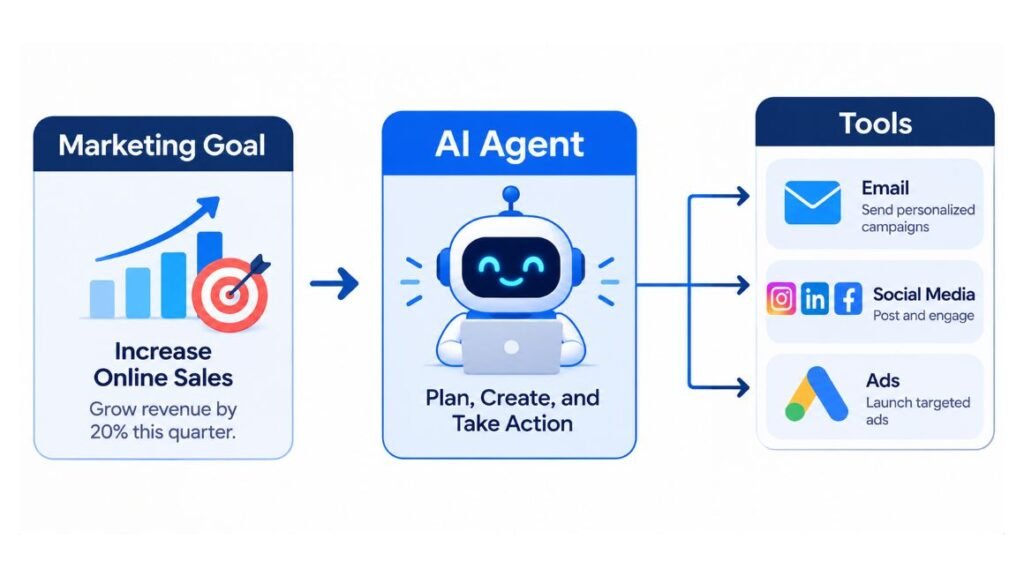
This is the gap AI agents are built to fill. An AI agent is software that takes a goal, decides which steps are needed, uses connected tools to carry them out, and checks its own progress with little human input. That’s different from a chatbot that only replies when you type. If you’ve been wondering which AI agents for small business marketing are worth your time and money, this guide covers ten of them in detail: what each one does, where it works well, where it falls short, and what it costs.
Some of these are true agents that act on their own. Others are marketing tools with agent-style features inside them. We’ll flag which is which, because the difference matters when you’re spending real budget.
What Is an AI Agent, and How Is It Different From a Chatbot?
An AI agent works toward a goal across several steps, while a chatbot answers one prompt at a time. Ask a chatbot for a newsletter and you get a draft. Give an agent the goal “send this week’s newsletter” and it can pull your latest blog posts, write the copy, build the email, and schedule it, pausing only where you’ve told it to ask first.
Under the hood, most agents rely on a large language model (LLM), which is the type of AI trained on huge amounts of text that powers tools like ChatGPT and Claude. The agent part is the layer around it: memory, access to your apps, and rules about what it may do alone.
That’s why AI Marketing Agents for Small Businesses are suddenly practical. Five years ago, this level of automation needed a developer. Now you connect your accounts and describe the job in plain English.
One honest caveat. Agents make mistakes, and they make them confidently. Every tool below works best with a human approving anything that reaches a customer.
An AI agent is software that pursues a goal across multiple steps, using connected tools and its own judgment, rather than answering a single prompt. For small businesses, the value is handing off repetitive marketing work such as replies, scheduling and reporting. The safest setup keeps a human approving anything customer-facing.
How We Picked These Ten Tools
We looked for tools a team of one to ten people can set up in an afternoon, with a free tier or a price that doesn’t need a finance meeting. Each one covers a different marketing job, so you can build a small stack instead of buying ten versions of the same thing.
We also weighed honesty about limits. If you’re searching for the Best AI Agents for Small Business Marketing, a long feature list is not the test. The test is whether the tool still helps you when your budget is small, your data is messy, and nobody on staff is technical.
Pricing below is as of 2026 and changes often, so check each vendor’s page before you commit. Prices are in US dollars.
Tidio Lyro: Best for Answering Customers and Capturing Leads Around the Clock
Lyro is the AI agent inside Tidio, a live chat and customer service platform. It answers visitor questions on your website using your own help content, and it can hand the conversation to a human when it gets stuck.
What It Does Well
Speed is the main win. A visitor asking “Do you deliver to Leeds?” at 11pm gets an answer in seconds instead of an email reply the next afternoon. Lyro learns from your FAQs and web pages, so it answers in your terms, not generic ones.
Tidio’s own pricing page says customers average a 75% resolution rate, meaning Lyro closes that share of chats without a human. Treat that as the vendor’s figure, not a promise. Your result depends on how good your help content is.
It also works as a lead catcher. Pair it with Tidio’s Flows builder, a visual tool for creating automated chat sequences, and you can ask visitors for an email before sharing a discount code.
Where It Falls Short
Lyro is only as good as what you feed it. Thin FAQs produce thin answers. Billing is also per conversation, so a busy week can push you past your limit.
Pricing and Best Use Case
As of 2026, Tidio has a Free plan, a Starter plan around $24 a month, and a Growth plan from about $49 a month. Lyro includes 50 free conversations (one-time on the free plan), and standalone Lyro plans start around $32.50 a month for 50 conversations.
Best for: online shops and service businesses that get repeat questions about delivery, pricing, and bookings.

HubSpot Breeze Agents: Best for Pay-Per-Result Support and Prospecting
Breeze is HubSpot’s family of AI agents. Two matter most for marketing and sales: the Customer Agent, which resolves support conversations, and the Prospecting Agent, which researches prospects and recommends who your team should contact.
What It Does Well
The pricing model is the interesting part. Since April 2026, HubSpot charges the Customer Agent at $0.50 per resolved conversation and the Prospecting Agent at $1.00 per lead recommended for outreach, billed through HubSpot Credits (50 and 100 credits respectively). You pay when the work is done, not for a seat that sits idle.
HubSpot says its Customer Agent resolves 65% of conversations. That’s HubSpot’s claim from its own announcement, so test it on your own traffic during the 28-day free trial.
Everything also writes straight into your HubSpot CRM, which is the system that stores your contacts and deals. No copy-pasting between tools.
Where It Falls Short
Both agents are available on Pro and Enterprise tiers of HubSpot. For a tiny business on the free CRM, that’s a real step up in cost. And outcome-based billing is great on a quiet month but harder to forecast on a busy one.
Best for: small businesses already running HubSpot, or ready to move to it, that want costs tied to results.
Zapier Agents: Best for Connecting Your Marketing Apps Without Code
Zapier is best known for linking apps together. Zapier Agents takes that further: you describe a job in plain language, give the agent access to apps like Gmail, Google Sheets, Slack, and your CRM, and it carries the work out.
What It Does Well
Here’s a real example. Tell an agent: “Each morning, check new form submissions, look up the company online, add a short summary to our spreadsheet, and message me the three best leads.” That’s a task that used to eat 30 minutes a day.
Because Zapier connects to thousands of apps, it’s the glue for the rest of this list. Your Mailchimp, your spreadsheet, and your Slack can all talk to one agent. For AI Agents for Small Business Growth, that flexibility is the main reason to start here.
Where It Falls Short
Setup takes patience. Agents need clear instructions, and vague ones produce odd results. A single run is capped (10 activities on Free, 40 on paid plans), after which the agent asks before continuing. That’s a sensible safety limit, though it can interrupt bigger jobs.
Pricing and Best Use Case
As of 2026, agents are included on every plan, including Free, with 400 activities a month. Pro starts at about $19.99 a month billed annually for automations, and agent activity on Pro rises to 1,500 a month.
Best for: owners who want one agent to move data between the apps they already use.
Jasper: Best for Keeping Brand Voice Consistent
Jasper is a content platform built around marketing. Its standout feature is Brand Voice, where you upload samples of your writing and Jasper tries to match your tone across everything it produces. Its Agents handle repeatable marketing workflows such as campaign drafts.
What It Does Well
If three people write for your business, Jasper keeps the output sounding like one company. You also save your products, audiences, and knowledge assets once, so you stop re-explaining your business in every prompt.
It’s good for turning one idea into many formats: a blog outline, five social posts, an email, and an ad variation, all in the same voice.
Where It Falls Short
Jasper is not cheap, and it’s honestly more than a solo owner needs. A general chat assistant like Claude or ChatGPT can write decent copy for far less money. Jasper earns its price only when brand consistency across a team really matters.
Pricing and Best Use Case
As of 2026, the Pro plan is $69 per seat monthly, or $59 per seat billed yearly. It includes 2 brand voices, agents for core marketing workflows, and a 7-day free trial. Business is custom-priced.
Best for: small agencies and teams of three or more producing steady content.
Buffer AI Assistant: Best for Low-Cost Social Media Scheduling
Buffer is a social media scheduler, and its AI Assistant helps you write, reword, and repurpose posts inside the same tool. It’s closer to an assistant than a fully independent agent, but it removes a lot of weekly busywork.
What It Does Well
You can paste a blog post link and ask for five post ideas in different tones, then drop them straight into your queue. It also suggests replies to comments, which helps if you’re answering the same questions weekly.
The pricing is the real draw. As of 2026, the AI Assistant is included on every plan, including Free.
Where It Falls Short
Buffer won’t plan a strategy or decide what to post. It writes what you ask for. The free plan also limits you to 3 channels and 10 scheduled posts per channel at a time.
Pricing and Best Use Case
Free covers 3 channels. Paid plans are billed per channel: Essentials from $6 per channel monthly and Team from $12 per channel monthly, with lower rates as you add channels.
Best for: solo owners and tiny teams who want steady posting without paying much.
[IMAGE: Buffer composer showing the AI Assistant suggesting post variations]
Mailchimp with Intuit Assist: Best for Email Campaigns
Mailchimp is an email marketing platform, and Intuit Assist is the AI layer Intuit added to it. It helps draft campaign copy, suggest subject lines, build segments, and recommend automations from your customer data.
What It Does Well
Email still earns its keep for small businesses because you own the list. Intuit Assist speeds up the blank-page problem: give it a product and an audience, and it drafts a campaign you then edit. It can also suggest which customers to group together, such as people who bought once and never returned.
Where It Falls Short
AI features and limits vary by plan, and Mailchimp’s pricing climbs as your contact list grows. Drafts read generically until you add your own details and voice. Plan on editing every one.
Pricing and Best Use Case
Mailchimp offers a free plan with small limits, and paid plans start at roughly $13 a month, rising with contacts. Confirm current AI inclusion on your plan before buying.
Best for: shops and local businesses with an email list of a few hundred to a few thousand people.
Surfer: Best for Search-Optimised Blog Content
Surfer is an SEO (search engine optimisation) tool, meaning it helps your pages rank on Google. It analyses pages already ranking for your target keyword and tells you what to include: topics, headings, and length. Its AI features can draft and optimise content against that guidance.
What It Does Well
Surfer takes the guesswork out of “what should this blog post cover?” You enter a keyword, and it shows the terms and questions top pages use. Writers like it because the scoring gives a clear target.
Where It Falls Short
It’s a guide, not a strategist. Chasing a high score can produce stiff, over-stuffed writing. AI drafts also need a human pass for accuracy and originality. And it’s one of the pricier tools here for a small budget.
Pricing and Best Use Case
Plans start at roughly $49 a month as of 2026, with higher tiers for more articles. Check Surfer’s pricing page for current limits.
Best for: businesses that rely on blog traffic, such as local services, consultants, and online shops.
[IMAGE: Surfer content editor showing a content score and keyword suggestions]
Perplexity: Best for Fast Market and Competitor Research
Perplexity is an AI search engine. Instead of ten blue links, it gives a written answer with sources you can click. Its Deep Research mode runs many searches and compiles a report.
What It Does Well
Try this prompt: “Summarise how three competitors in [your city] price their services and what customers say in reviews.” You get a structured summary with links in minutes, a job that normally eats an afternoon. It’s honestly underrated for campaign research, audience questions, and finding what’s trending in your niche.
Where It Falls Short
It can still misread sources. Always click through before quoting a statistic. It also researches; it doesn’t act, so it won’t send, post, or schedule anything.
Pricing and Best Use Case
The free version handles everyday searches. Perplexity Pro has been priced at about $20 a month, and it adds heavier research. Check the current plan page.
Best for: owners who need quick, sourced research before writing or planning.
Canva Magic Studio: Best for On-Brand Visuals
Canva is a design platform, and Magic Studio is its set of AI tools: generating images, writing text in designs, resizing a design for different channels with one click, and removing backgrounds.
What It Does Well
Visuals are where small teams slow down most. With a saved Brand Kit (your logos, colours, and fonts in one place), you can produce a social graphic, flyer, or short video that actually looks like your business. Magic Resize turns one design into a post, story, and banner in seconds.
Where It Falls Short
It’s a design assistant, not an independent agent. AI images can look generic, and many AI features are gated behind the paid Pro plan with usage limits.
Pricing and Best Use Case
Canva has a free plan with limited AI use. Canva Pro is paid, and the price varies by region and billing period, so check Canva’s pricing page.
Best for: anyone creating their own graphics without a designer.
[IMAGE: Canva Magic Studio tools menu with Brand Kit applied]
Meta Advantage+: Best for Automated Facebook and Instagram Ads
Advantage+ is Meta’s automation suite inside Meta Ads Manager, the dashboard where you run Facebook and Instagram ads. You supply creative and a budget, and Meta’s system chooses audiences, placements, and creative combinations itself.
What It Does Well
For a small business with no ads specialist, it removes dozens of settings. The system tests variations and shifts spend toward what performs, which suits tight budgets where manual testing is too slow.
Where It Falls Short
You give up control. Meta decides who sees your ad, and reporting on why something worked can be thin. Weak creative still produces weak results, because automation can’t fix a bad offer. Start with a small daily budget.
Pricing and Best Use Case
There’s no extra fee for Advantage+. You pay for ad spend only. Start small and set a limit you’re comfortable losing while you learn.
Best for: businesses with a clear offer and at least a few decent images or videos.
[CITATION CAPSULE: Meta Advantage+ automates audience, placement and creative testing inside Meta Ads Manager, which suits small businesses without an ads specialist. It carries no extra fee beyond ad spend, but it reduces control and can’t rescue a weak offer. Begin with a small daily budget and judge results on real sales, not clicks.]
How Do You Start With Your First Agent? A 5-Step Plan
Pick one job, not ten. The most common mistake is buying several tools at once and finishing none of the setups. Here’s a plan that works.
- Choose the job that costs you the most time. Replying to chats, scheduling posts, and writing emails are the usual winners.
- Write the task as a sentence. Example: “Answer delivery and returns questions, and collect an email before offering a discount.”
- Feed it good source material. Upload your FAQs, price list, and past best-performing posts.
- Set approval rules. Let it draft, you approve. Loosen only after two weeks of clean results.
- Measure one number. Track hours saved, leads captured, or cost per lead. If it doesn’t move, change tools.
If you want to pick AI Agents for Small Business Marketing that fit your budget, start free. Tidio, Zapier, and Buffer all offer free tiers, so you can test these AI Marketing Agents for Small Businesses before paying.
Conclusion
You don’t need all ten tools. Pick one job that drains your week, match it to the right tool, and keep a person approving what customers see. For many owners, the sensible first stack is a free chat agent, a scheduler, and a research tool. Those are the Best AI Agents for Small Business Marketing for a tight budget, because they cost little and show results fast.
The bigger point is simple. Used well, AI Agents for Small Business Growth don’t replace you. They buy back the hours you were spending on jobs a machine can do, so you can spend them on the work only you can do.
Your next step today: choose one task from the 5-step plan, sign up for a free tier, and run it for seven days. Write down hours saved.
Hotskill breaks down the AI tools that actually matter for marketers, with hands-on lessons, not just overviews. Download on iOS or Android at https://hotskill.co/download.
FAQ
What are AI agents in small business marketing?
They’re software tools that carry out marketing tasks with limited supervision, such as answering customer chats, scheduling posts, researching competitors, or drafting emails. Unlike a basic chatbot, they work through several steps toward a goal and use your connected apps. A human should still approve anything customers see.
How are AI agents different from marketing automation?
Traditional automation follows fixed rules: if this happens, do that. An agent can handle messy, changing situations because it decides which step to take next. In practice, many tools mix both, so you’ll often see rules for the predictable parts and AI for the judgment calls.
Do I need coding skills to use these tools?
No. Every tool in this article is built for non-technical users. You connect accounts and describe tasks in plain English. Zapier Agents and Tidio Flows are the most hands-on, but both use visual setup screens rather than code.
Which tool should I start with if my budget is tiny?
Start with free tiers. Buffer’s free plan includes its AI Assistant, Zapier includes agents on its free plan, and Tidio gives you 50 free Lyro conversations. Pick the one that matches your biggest time drain, and add paid tools only after you see results.
Is Jasper worth it compared with ChatGPT or Claude?
For a solo owner, usually not. A general assistant can write good copy for less. Jasper makes sense when several people create content and you need Brand Voice to keep everything consistent, since its Pro plan is $59 to $69 per seat monthly as of 2026.
Can an AI agent replace my marketing hire or agency?
Not fully. Agents are strong at repetitive work like replies, scheduling, and first drafts. They’re weak at strategy, judgment about your market, and relationships. Most small businesses get the best results by using agents to free a person’s time, not to remove the person.
How much do HubSpot’s Breeze agents cost?
As of April 2026, HubSpot charges $0.50 per resolved conversation for the Customer Agent and $1.00 per lead recommended by the Prospecting Agent. Both require a Pro or Enterprise plan and come with a 28-day free trial. Check HubSpot’s credits page for current rates.
Why isn’t my AI agent giving good results?
Usually the cause is thin input or vague instructions. Add detailed FAQs, examples of good replies, and a clear description of the task and tone. Also narrow the job. An agent told to “do my marketing” will wander, while one told to “answer shipping questions” will perform.
Are AI agents safe to use with customer data?
They can be, but check each vendor’s privacy and data policy first. Avoid pasting sensitive information such as payment details into general tools. Limit each agent’s access to only the apps it needs, and keep approval on for anything that sends messages or spends money.
How long before I see results?
Simple jobs such as chat answers and scheduling can show time savings within the first week. Search content and ads take longer, usually a few weeks to a few months, because they rely on rankings and testing. Track one number from day one so you can tell what’s working.