

You’ve used ChatGPT. You’ve tried Claude or Gemini. And at some point, you’ve probably stared at a blank input box and typed something like “write me a blog post about digital marketing” — and gotten back something generic, flat, and basically useless.
That’s not an AI problem. That’s a prompting problem.
What is Prompting, exactly? It’s the skill of communicating with AI in a way that gets you results you can actually use. And it’s the single biggest lever you have over the quality of everything an AI produces for you. The difference between a marketer who gets 20% of an AI tool’s value and one who gets 80% is almost always prompting skill.
This guide covers what prompting is, why it matters more than most people realise, the main techniques and tools built around it, and how you can start writing better prompts today.
What Is Prompting and Why Does It Matter?
A prompt is the instruction you give to an AI model. It’s how you tell it what to do, what role to take, what format to use, and what output you’re looking for. The model can only work with what you give it.
Here’s the thing most people miss: AI models don’t read your mind. They pattern-match on your input and generate the most statistically likely response. If your input is vague, the output will be vague. If your input is precise and well-structured, the output can be genuinely impressive.
AI Prompting matters because it’s the interface layer between you and every AI tool you use. You can have access to the most advanced language model in the world and still get mediocre results if you don’t know how to talk to it. According to McKinsey’s 2025 AI Productivity Report, professionals who received structured prompting training saw a 42% improvement in the quality of AI-generated work outputs versus those who self-taught through trial and error.
That gap is real. And it’s closeable.
Prompting is the skill of writing instructions that guide AI models toward useful, specific, and high-quality outputs. It’s not about knowing how the model works internally. It’s about knowing how to communicate clearly with it. Professionals who invest in prompting skill consistently outperform those who rely on default, untrained inputs.
The Core Components of a Strong Prompt
Most people write prompts like they’re texting a friend. One line, no context, no format guidance. That works for simple tasks. It falls apart for anything complex.
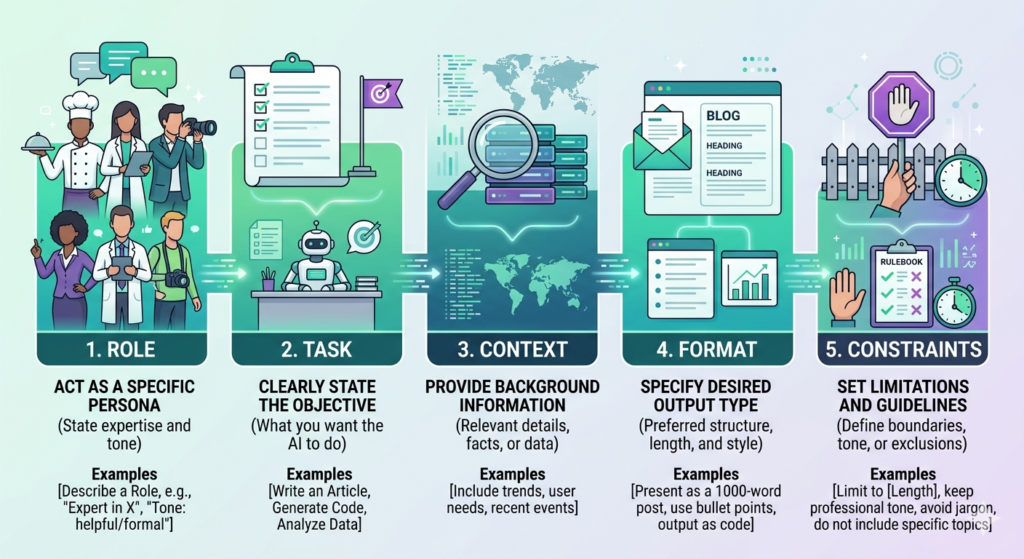
Strong prompts have five components. You don’t need all five every time, but knowing them means you can diagnose why a prompt isn’t working.
1. Role Tell the model who it is. “You are a senior B2B content strategist with 10 years of experience writing for SaaS companies.” This sets the register, expertise level, and assumed context for everything that follows.
2. Task The specific action you want it to take. “Write a 600-word LinkedIn post” is clearer than “write something for LinkedIn.” The more specific the task, the less guessing the model has to do.
3. Context What the model needs to know to do the job well. Your audience, your product, the tone you’re going for, what you’ve already tried. Don’t make it infer. Give it the background.
4. Format How you want the output structured. Headers, bullet points, plain prose, JSON, a table, a script. If you don’t specify, the model will make a choice that may not match what you need.
5. Constraints What to avoid. “No jargon”, “under 200 words”, “don’t recommend competitors”, “write in British English”. Constraints are often what separate a usable output from one that needs heavy editing.
Put these together and a prompt like “write me a blog post” becomes: “You are a content strategist for a B2B SaaS company targeting mid-market CFOs. Write a 700-word blog post about the ROI of accounts payable automation. Use short paragraphs, no jargon, and a confident but not salesy tone. Include three specific benefits with real numbers where possible. No headers beyond the title.”
That prompt will produce a usable first draft. The original probably won’t.
Prompting Techniques You Should Know
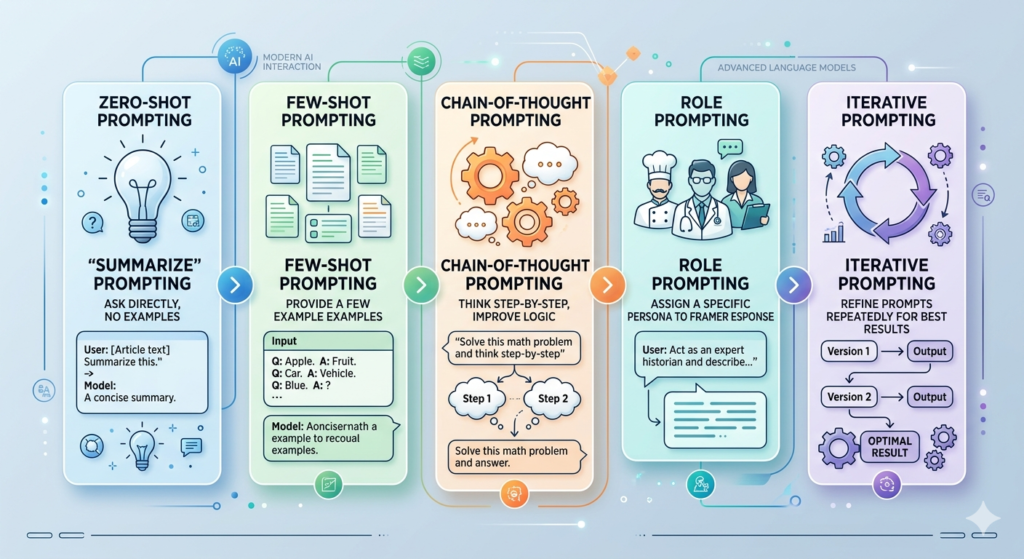
Prompt Engineering is the practice of designing and refining prompts systematically to improve AI outputs. It’s part instinct, part method. These are the techniques that actually matter.
Zero-Shot Prompting
You give the model a task with no examples. “Summarise this email in three bullet points.” Simple, fast, effective for well-defined tasks where the model already has strong training.
Zero-shot works well for common tasks. It breaks down for specialised or nuanced ones.
Few-Shot Prompting
You give the model two to five examples of what good output looks like before asking it to produce one. This is one of the highest-impact techniques available and it’s criminally underused.
Example structure:
- “Here are three product descriptions that match our brand voice: [examples]. Now write one for this product: [details].”
In our testing at Hotskill, few-shot prompts consistently improve output quality by a significant margin on creative and branded tasks. The examples teach tone, format, and specificity far faster than describing them in words.
Chain-of-Thought Prompting
You ask the model to reason through the problem step by step before giving you the answer. Adding “think through this step by step before answering” to a complex question dramatically improves accuracy, especially for analytical or logical tasks.
Researchers at Google DeepMind found in 2024 that chain-of-thought prompting improved reasoning accuracy by up to 40% on complex multi-step tasks compared to standard prompting.
Role Prompting
Setting a persona or expert identity at the start of a conversation shapes everything that follows. “You are a growth hacker who has scaled three D2C brands from zero to $10M” will produce very different marketing advice than “you are a marketing assistant.”
Role prompting works best in system prompts (the instruction layer that runs before a conversation starts) and in tools like Claude Projects or ChatGPT’s Custom GPTs where you can save these settings.
Iterative Prompting
This isn’t really a technique so much as a mindset. Treat your first prompt as a draft, not a final request. Ask for the output, evaluate what’s wrong, then either refine the prompt or add a follow-up instruction to correct course.
“That’s too formal. Rewrite the opening paragraph with a more direct, conversational tone” is a valid and effective prompting move.
The five most commonly used prompting techniques are zero-shot, few-shot, chain-of-thought, role prompting, and iterative prompting. Few-shot and chain-of-thought consistently produce the highest quality improvements on complex tasks. Zero-shot works well for simple, well-defined requests.
Want to Learn Prompting Through Short Videos?
Reading about prompting is helpful, but the fastest way to improve is by seeing real examples in action. On the Hotskill app, you’ll learn AI prompting, prompt engineering, and practical AI workflows through short, easy-to-follow video lessons designed for marketers, creators, students, and professionals.
Download the Hotskill app iOS or Android today and start mastering AI prompting with bite-sized lessons that fit into your daily routine.
Prompting Tools Built for Serious Users
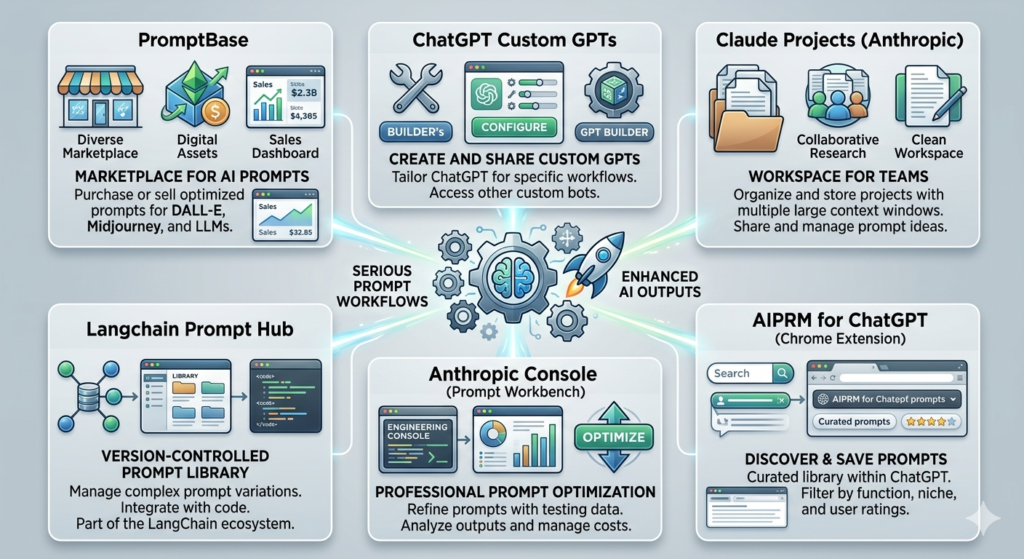
AI Prompt Writing has spawned an entire category of tools designed to help you write, save, test, and optimise prompts. Here’s an honest rundown of the ones worth knowing.
PromptBase
PromptBase is a marketplace where you can buy and sell prompts for ChatGPT, Claude, Midjourney, and other models. Think of it as a library of pre-built prompts for specific tasks, written by practitioners who’ve already done the optimisation work.
What it does well: Great starting point if you’re new to prompting a specific tool or trying to do something you haven’t attempted before. The prompts for image generation are particularly strong.
Where it falls short: Quality is uneven. Some prompts are genuinely useful templates; others are basic and overpriced. You still need to understand prompting well enough to customise what you buy.
Best for: Marketers who want a shortcut on image generation prompts or niche task prompts they’d take a long time to develop from scratch.
Pricing (as of 2026): Prompts typically range from $1 to $10 each. No subscription required.
ChatGPT Custom GPTs
Custom GPTs are GPT-4o-powered AI assistants with a system prompt, tools, and behaviour settings baked in. You build them once and reuse them. OpenAI’s GPT Store has thousands available, and you can build your own through the ChatGPT interface.
What it does well: Saves you from rewriting your context and role setup every session. A Custom GPT for your brand voice means every team member gets consistent output without needing to know anything about prompting.
Where it falls short: Custom GPTs are tied to the ChatGPT platform. If you use Claude or Gemini for certain tasks, you need separate solutions there. Also, the quality of the underlying GPT-4o model still has a ceiling that better prompting can’t always get around.
Best for: Teams who want standardised AI outputs without training everyone to be a skilled prompter.
Pricing (as of 2026): Requires a ChatGPT Plus or Team subscription, starting at $20/month.
Claude Projects (Anthropic)
Claude Projects is Anthropic’s equivalent of Custom GPTs but with a different flavour. You set instructions, upload documents or brand guidelines, and Claude uses that context across all conversations in the project.
What it does well: Claude’s instruction-following on structured, detailed prompts is genuinely strong. Projects with extensive system prompts tend to produce consistently on-brand outputs. Hotskill learners working in content creation have found Claude Projects particularly useful for maintaining tone consistency across long content series.
Where it falls short: Projects don’t have the plugin integrations of ChatGPT’s Custom GPTs. If you need real-time data or web browsing within the same workflow, Claude is more limited.
Best for: Content creators and writers who need consistent tone, style, and context across a long content programme.
Pricing (as of 2026): Requires Claude Pro at $20/month or Claude Team at $30/user/month.
Langchain Prompt Hub
Langchain Prompt Hub is a developer-focused tool for storing, versioning, and sharing prompts as part of larger AI applications. It’s part of the broader Langchain framework used to build AI agents and multi-step workflows.
What it does well: Version control for prompts. If you’re running AI workflows in a business context and need to track what changed and when, Prompt Hub solves a real operational problem.
Where it falls short: Not a tool for non-developers. The setup requires familiarity with the Langchain framework and Python or JavaScript. If you’re not building applications, this isn’t what you need.
Best for: Developers and technical marketers building repeatable, production-grade AI workflows.
Pricing (as of 2026): Free tier available. Paid plans via LangSmith start at $39/month.
Anthropic Console (Prompt Workbench)
The Anthropic Console includes a Prompt Workbench feature that lets you test, compare, and evaluate prompts systematically. You can run the same prompt across different inputs and see outputs side by side.
What it does well: If you’re serious about Generative AI Prompting and want to A/B test prompt variations to find what works best, this is one of the most structured environments available. It’s particularly strong for prompt evaluation at scale.
Where it falls short: Primarily a tool for developers and power users. It’s tied to Claude models only. No equivalent for testing across different model providers.
Best for: Teams building Claude-based workflows who want to optimise prompt performance systematically before deploying.
Pricing (as of 2026): Access through the Anthropic API. Usage is billed per token. No flat subscription.
AIPRM for ChatGPT (Chrome Extension)
AIPRM is a Chrome extension that sits inside the ChatGPT interface and gives you access to a library of community-built prompt templates, directly in the chat window.
What it does well: Zero friction. You don’t have to leave ChatGPT to find a prompt. Categories cover SEO, copywriting, customer service, coding, and more. Good for teams who want to standardise prompts without any engineering effort.
Where it falls short: The template quality varies significantly and some are outdated. The best templates are hidden behind the paid plan.
Best for: Marketing teams already using ChatGPT who want a quick way to standardise common tasks without building Custom GPTs.
Pricing (as of 2026): Free tier with limited templates. Plus plan at $9/month, Pro at $29/month.
The most useful prompting tools fall into two categories: prompt libraries and saved-context environments. Libraries like PromptBase and AIPRM speed up adoption. Saved-context tools like Claude Projects and ChatGPT Custom GPTs solve the real operational problem of consistency across sessions and team members.
Common Prompting Mistakes and How to Fix Them
Most prompting failures come down to the same five problems.
Mistake 1: Being too vague “Write me some social media posts” gives the model nothing to work with. Fix it by specifying the platform, the audience, the goal, the tone, and the number of posts.
Mistake 2: Not giving examples Describing what you want in words is harder than showing it. Add one or two examples of outputs you like. The model will pick up on tone, structure, and style faster than any description.
Mistake 3: Asking for too many things at once One prompt, one task. If you need a blog post AND a social caption AND an email teaser, do them in separate prompts. Stacking requests produces mediocre output on all of them.
Mistake 4: Accepting the first draft The first response is a starting point. If it’s 70% there, tell it what to change. “The tone is too formal. Rewrite paragraph two in a more conversational voice.” That follow-up prompt often does more work than the original.
Mistake 5: Ignoring the system prompt Tools like Claude and ChatGPT let you set system-level instructions that apply to every conversation. Most users skip this entirely. Setting your role, your audience, your tone, and your output preferences once at the system level means you don’t have to repeat yourself in every session.
How to Build a Prompting Practice
Skill without practice is just theory. Here’s how to actually improve.
Step 1: Keep a prompt library. When you write a prompt that works well, save it. A simple Notion page or Google Doc is enough. Over time you’ll build a collection that covers 80% of your regular tasks.
Step 2: Run comparison tests. Take one task and write three different prompts for it. Compare the outputs. Notice what changed. That’s how you develop instinct for what works.
Step 3: Study prompt breakdowns. Hotskill’s prompt engineering track breaks down real prompts used in marketing, sales, and content creation, with explanations of why each component is there. Learning from worked examples is faster than experimenting from scratch.
Step 4: Add one new technique per week. Don’t try to adopt everything at once. This week, try few-shot prompting on one task. Next week, add a chain-of-thought instruction to an analytical prompt. Small additions compound.
Step 5: Share what works with your team. The biggest efficiency gains aren’t personal. They come when a whole team runs from the same set of tested, optimised prompts. Build a shared library. Run a monthly 20-minute prompt review.
The Skill That Compounds
Prompting isn’t a trick. It’s a discipline. The people getting the most out of AI tools right now aren’t the ones with access to the best models. They’re the ones who’ve put time into communicating clearly with those models.
The techniques here are a starting point. The real value comes from practice: building your library, running comparison tests, and treating every prompt as something you can improve. Start with the five-component structure. Pick one technique this week and apply it to something you already do. Notice what changes.
The gap between average AI output and genuinely useful AI output is mostly made up of prompting skill. That gap is yours to close.
Frequently Asked Questions
What is Prompting in simple terms?
Prompting is the practice of writing instructions to guide an AI model toward a specific output. The better your instruction, the better the output. It’s the primary skill that separates people who get genuine value from AI tools from those who find them frustrating or unreliable.
What’s the difference between a prompt and a message?
Any message you send to an AI is technically a prompt. But in practice, “prompt” implies a crafted instruction with intent behind it, not just a casual message. A prompt is designed to produce a specific type of output, usually by including role, context, task, format, and constraints.
Do I need to know coding to write good prompts?
No. Prompting is a communication skill, not a technical one. You need clear thinking and specific language, not programming knowledge. Tools like ChatGPT, Claude, and Gemini are all designed for plain-language interaction. That said, understanding basic AI concepts like context windows and system prompts does help at more advanced levels.
What’s the difference between prompting and Prompt Engineering?
Prompting is the everyday practice of writing instructions to get AI outputs. Prompt Engineering is the more systematic discipline of designing, testing, and optimising prompts for consistent results, often in a business or development context. If you’re writing prompts for your own use, you’re prompting. If you’re building and testing prompt templates for a product or team workflow, that’s closer to prompt engineering.
Why am I getting bad results even with detailed prompts?
A few common causes: the model you’re using may not be the right one for the task (Claude is stronger for long-form writing; GPT-4o is better for multi-step tasks with tool use); your context may be contradictory; or you may be asking for too many things in a single prompt. Try splitting complex requests into sequential steps and checking whether the model you’re using fits the task type.
Is prompting different across models like ChatGPT and Claude?
Yes, notably. Claude responds well to very detailed system prompts and structured role instructions. ChatGPT handles conversational, back-and-forth iteration particularly well. Gemini 1.5 Pro has a larger context window that suits document-heavy tasks. You’ll often get better results by learning each model’s strengths rather than writing identical prompts for all three.
How long should a good prompt be?
As long as it needs to be. For simple tasks, two to three sentences is enough. For complex, branded, or multi-part outputs, a prompt can be several paragraphs. The rule is: include everything the model needs to know, cut everything it doesn’t. Length isn’t the goal. Precision is.
Can I reuse prompts across different tasks?
Yes, but with care. Prompt templates save time for repeating task types, but they need customisation for context. A content brief prompt template works for multiple clients, but the client-specific details still need to change each time. Building a reusable structure is smart. Copying without adapting is where templating goes wrong.
What’s the best way to learn prompting quickly?
The fastest path is worked examples, not theory. Study prompts that produced good outputs and understand why each component is there. Then test variations. Hotskill’s prompt engineering track is built on exactly this method: real prompts, real tasks, explained in detail. Most learners in our tracks see meaningful output quality improvement within the first week of structured practice.
Is prompting a long-term skill or will AI improve to the point where it’s not needed?
Prompting as a specific skill will evolve, but the underlying capability it develops won’t go away. As AI models get better at handling ambiguity, the gap between a vague prompt and a specific one will narrow for simple tasks. But for high-stakes, nuanced, or complex outputs, the ability to communicate clearly and precisely with AI will matter even more. Prompting skill is also transferable: what you learn about structuring instructions for ChatGPT applies to every new model you encounter.