

Most people who use AI tools daily hit the same wall. They type something in, get an output that’s close but not quite right, edit the prompt slightly, try again, get something different but still not what they needed, and eventually just rewrite it themselves.
The problem isn’t the tool. It’s that they’re treating prompting like guessing.
The Framework in Action approach changes that. Instead of improvising a new prompt every time, you apply a repeatable structure that gives the model exactly what it needs to produce the output you actually want. This guide walks you through every component of that structure, shows you how each one works in practice, and gives you real examples you can adapt starting today.
This is written for people who already use ChatGPT, Claude 3.5 Sonnet, or similar tools regularly and want their outputs to stop feeling like a coin toss.
Why Most Prompts Underperform
Here’s the short answer: vague input produces vague output.
When you write “write me a blog post about AI tools,” you’re giving the model almost nothing to work with. It doesn’t know your audience. It doesn’t know your tone. It doesn’t know how long the post should be, what angle to take, which tools to cover, or what action you want readers to take at the end. So it makes all of those decisions for you, and it makes them generically.
The model isn’t failing. It’s doing exactly what it was trained to do: produce a plausible, coherent response to the input it received. The input was weak, so the output reflects that.
This is why the AI prompting framework approach exists. It’s not about writing longer prompts for the sake of it. It’s about giving the model the specific inputs it needs to produce the specific output you want.
Most AI prompt underperformance comes from vague inputs, not model limitations. A structured prompting approach gives the model the role, context, task, format, and constraints it needs to produce precise, usable outputs. Applying a consistent prompt structure is one of the highest-leverage AI skills a professional can build in 2026.
What Is a Prompting Framework?
A prompting framework is a repeatable structure for writing AI prompts that separates the what, who, how, and what-not-to-do into distinct components. Instead of writing one big instruction and hoping for the best, you define each element deliberately.
The version covered in this article is built around six components: Role, Context, Task, Format, Constraints, and Examples. You don’t always need all six. But knowing what each one does and when to use it is what separates consistent outputs from random ones.
The Core Components of a Structured Prompt
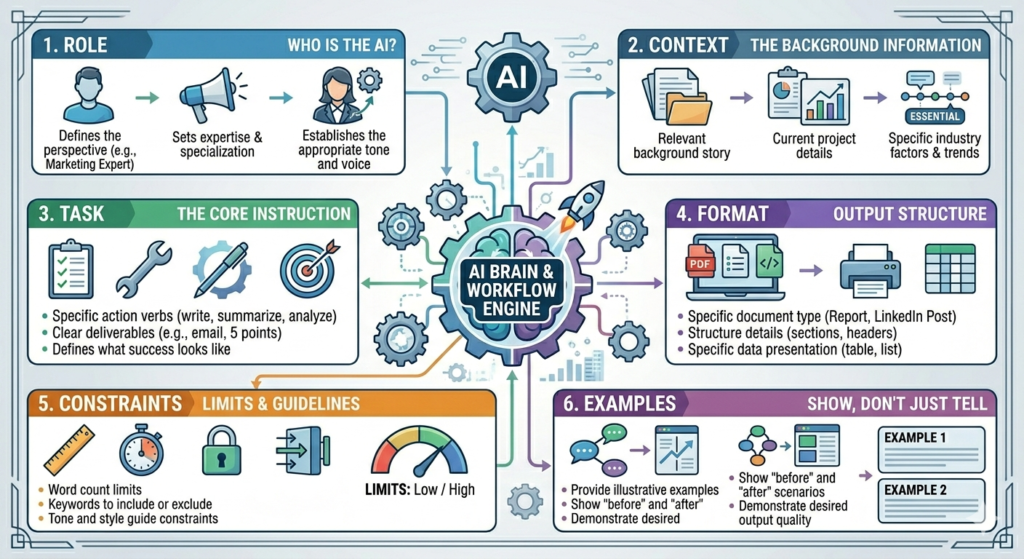
Before going deep on each one, here’s what the full structure looks like together:
Component overview:
- Role — Who is the model acting as?
- Context — What situation, background, or data does it need to know?
- Task — What specific action should it take?
- Format — What should the output look like?
- Constraints — What should it avoid or stay within?
- Examples — What does good output look like?
A prompt that hits all six of these gives the model almost no room to guess. And less guessing means better outputs.
Want to See the Framework in Action?
Reading about prompting is useful, but watching real examples makes it much easier to apply. Learn how to use role assignment, context, task instructions, format specifications, constraints, and examples through short, practical video lessons on the Hotskill app. See real prompts being built step by step and start creating better AI outputs faster.
Download Hotskill app iOS or Android today and learn The Framework in Action with bite-sized lessons designed for everyday AI users.
Role Assignment — Why Telling the Model Who to Be Matters
Role assignment means opening your prompt by telling the model what persona or expertise to take on. It’s not just cosmetic. It genuinely shifts how the model frames its response.
When you write “You are a senior B2B copywriter with 10 years of SaaS experience,” you’re not just setting a vibe. You’re activating a specific cluster of patterns in the model: the vocabulary, the tone, the assumptions about the reader, the typical structure of that kind of writing.
The difference in practice:
Without role: “Write a LinkedIn post about our new product feature.”
With role: “You are a B2B SaaS product marketer who writes punchy, insight-led LinkedIn posts for technical buyers. Write a LinkedIn post about our new product feature.”
The second prompt produces a post that sounds like it was written by someone who actually understands the platform and the audience. The first produces something that could have come from anywhere.
For ChatGPT prompting tips that work across all platforms, role assignment is one of the easiest wins to implement immediately. It costs nothing extra, takes ten seconds, and reliably shifts output quality.
Context — The Component Most People Skip
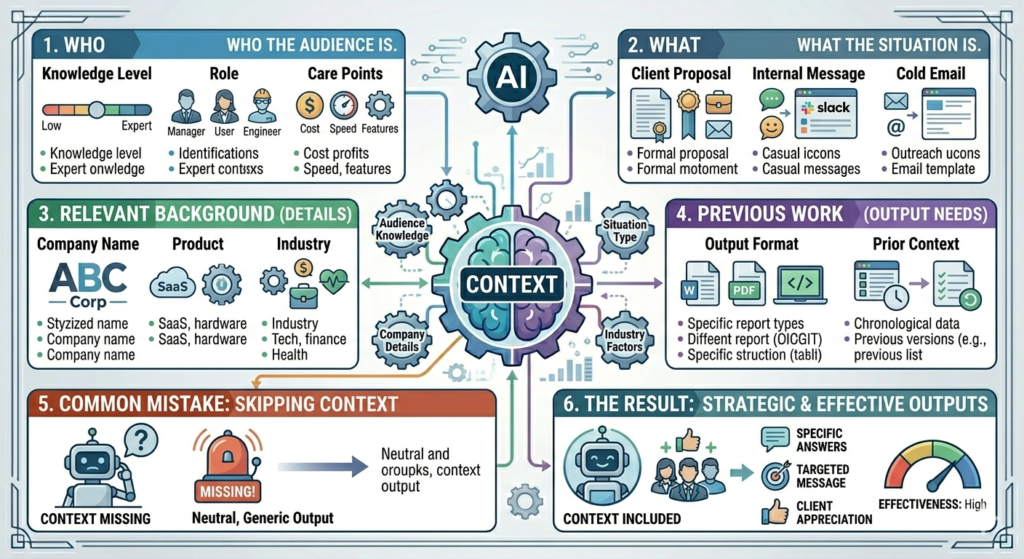
Context is the background the model needs before it can do its job well. It’s the briefing you’d give a competent freelancer before they started work.
Most people skip it because it feels like extra writing. That’s the wrong way to think about it. The context block is what lets you stop rewriting outputs repeatedly. Invest two minutes here, save fifteen on the back end.
Context should include:
- Who the audience is (their knowledge level, role, what they care about)
- What the situation is (is this for a client proposal? an internal Slack message? a cold email?)
- Any relevant background (company name, product, industry, previous work the output needs to connect to)
Example context block:
“I work at a 40-person B2B SaaS company that sells project management software to mid-market professional services firms. Our target buyer is an Operations Manager who is time-poor and skeptical of AI claims. We are launching a new reporting feature next week.”
Drop this before your task instruction and the output is already halfway there.
Context is the most frequently skipped prompt component and the one that creates the most variance in output quality. Providing audience details, situational framing, and relevant background before the task instruction consistently reduces the need for follow-up edits. In Hotskill’s AI skill tracks, learners who add proper context blocks see noticeably better first-draft outputs within days of making the change.
Task Instruction — Precision Over Brevity
The task is where you tell the model exactly what to do. The common mistake is keeping it too short in the name of simplicity.
“Write a blog post” is not a task instruction. It’s a category.
A proper task instruction is specific about:
- The action (write, rewrite, summarise, compare, extract, categorise, rate)
- The subject (what specifically is being acted on)
- The scope (how much? how detailed? which parts?)
Weak task: “Write an email about our service.”
Strong task: “Write a 150-word cold email to an Operations Manager at a professional services firm introducing our project management software. The email should open with a pain point about reporting time, mention one specific feature, and end with a low-friction call to action asking for a 15-minute call.”
That second instruction gives the model almost no room to go off-track. It knows the length, the recipient, the topic, the structure, and the goal.
AI prompt writing gets easier the more you think of it like briefing a contractor. You wouldn’t tell a graphic designer “make something nice.” You’d give them dimensions, brand guidelines, and a reference image. The model works the same way.
Format Specification — Getting the Output Shape Right
Format specification tells the model what the output should look like structurally. This is separate from the task itself.
Without a format instruction, the model defaults to what it thinks looks good. Sometimes that’s fine. Often it’s not, especially when the output needs to fit into a specific workflow or be handed off directly.
Format components worth specifying:
- Length (word count, number of points, number of paragraphs)
- Structure (headers, bullet points, numbered list, table, prose)
- Style (formal, conversational, punchy, technical)
- Output wrapper (just the copy, no preamble; or include a meta-description; or output as JSON)
Practical example:
“Output as a two-column table. Column 1: feature name. Column 2: plain-language explanation for a non-technical buyer. No preamble, just the table.”
That single format instruction eliminates the typical back-and-forth of “can you make this into a table?” and “can you remove the introduction?”
Structured prompting at this level is where you stop editing outputs and start using them directly.
Constraints and Guardrails — What Not to Do
Constraints are negative instructions. They tell the model what to avoid. They’re easy to overlook because people naturally focus on what they want rather than what they don’t want. But they’re often the difference between an output you can use and one you have to rewrite.
Common constraints worth adding:
- Tone avoidances (“Do not use corporate jargon or buzzwords like ‘synergy’ or ‘leverage'”)
- Content boundaries (“Do not include competitor mentions”)
- Format restrictions (“Do not add a preamble or explanation, just deliver the output”)
- Claim restrictions (“Do not make specific pricing claims or guarantees”)
- Length caps (“Keep to under 200 words”)
The model tends to do things by default that are technically correct but not what you want. Preambles. Caveats. Bullet lists when you wanted prose. Formal language when you wanted conversational. Constraints cut those defaults off before they happen.
One useful technique is keeping a running list of outputs you’ve had to edit in the past. Every time you fix something the model did that you didn’t want, add it as a constraint to your standard templates. Over time, you build a constraint library specific to your use cases.
Examples in the Prompt — The Fastest Way to Improve Output Quality
Few-shot prompting is the practice of including one or more examples of the output you want directly inside your prompt. It’s one of the most consistently effective techniques across all major models.
The reason it works so well is that examples communicate things that instructions can’t. Tone, rhythm, the level of specificity you want, how formal or casual the language should be, what a good structure actually looks like. All of this is much harder to describe than to show.
Prompt design strategies that include examples consistently outperform those that don’t, even when the instruction itself is detailed. A good example does more work than a good description.
What few-shot prompting looks like in practice:
“Here is an example of the kind of LinkedIn post I want:
[Example post: ‘Most companies waste 6 hours a week on reporting. Not because the data is hard to get, but because nobody built a clean workflow for it. We fixed that. Here’s how.’]
Write three more LinkedIn posts in the same style about [your topic].”
The model now has a tonal and structural reference. It knows the sentence length you prefer. It knows you want to open with a problem statement. It knows the register is direct and specific.
You can include up to three or four examples for complex tasks. For most tasks, one strong example is enough.
Few-shot prompting, where examples of desired output are included directly in the prompt, is one of the highest-ROI prompt techniques available. A single well-chosen example communicates tone, structure, and specificity better than most written instructions can. Models like Claude 3.5 Sonnet and GPT-4o both respond strongly to example-based prompting, particularly for content and copy tasks.
Iteration and Refinement — Treating Prompts Like Drafts
A first-draft prompt is rarely the final prompt. The models are capable, but even a well-structured prompt will occasionally produce something slightly off. The key is knowing how to iterate efficiently rather than starting over.
Three ways to iterate productively:
1. Targeted follow-ups. Instead of scrapping the prompt and starting fresh, follow up with a specific correction. “Keep everything but change the opening sentence to focus on the cost issue rather than the time issue.” This is faster and preserves what worked.
2. Version testing. Write two versions of the same prompt with one variable changed (a different role, a different format instruction, examples vs no examples) and compare the outputs. This teaches you which components matter most for your specific use case.
3. Prompt templates. Once a prompt structure produces reliable outputs for a recurring task, save it as a template. Replace the variable parts (topic, audience, product name) and leave the structure in place. This is where structured prompting starts to pay dividends at scale.
From what we’ve seen with Hotskill learners, people who start building a personal prompt template library in the first two weeks of structured practice see their output quality stabilise much faster than those who write prompts from scratch every time.
Conclusion
Prompting well isn’t a creative skill. It’s a systematic one.
The six components covered here, role, context, task, format, constraints, and examples, each handle a specific way that prompts go wrong. Use all six on a complex task and you’ve given the model almost nothing to guess about. Use them consistently and you start building a library of templates that produce reliable outputs every time.
The most actionable thing you can do today: take one task you regularly use AI for, and rebuild the prompt you’ve been using from scratch using this structure. Compare the output to what you’ve been getting. That comparison alone usually makes the value immediately obvious.
FAQ
What is an AI prompting framework?
An AI prompting framework is a structured approach to writing prompts that breaks each instruction into distinct components: role, context, task, format, constraints, and examples. Rather than writing one big instruction and hoping for a good result, you define each element deliberately so the model has less room to guess and more guidance to produce exactly what you need.
How is structured prompting different from just writing a detailed prompt?
A detailed prompt can still be unstructured. Structured prompting organises information into specific components, each doing a different job. Role tells the model who to be. Context gives it the situation. Task tells it what to do. Format tells it how to present the output. Constraints tell it what to avoid. Each component handles a different potential failure point, which is why structure reliably outperforms length alone.
H3: Does this framework work the same way on ChatGPT and Claude?
Yes, with minor differences. Both ChatGPT-4o and Claude 3.5 Sonnet respond well to all six components. Claude tends to handle long, detailed prompts with multiple components particularly well, especially when the context block is substantial. ChatGPT is slightly more flexible with informal prompt structures. For most use cases, the same structured prompt produces strong results on both.
How many examples should I include in a few-shot prompt?
For most tasks, one strong example is enough. If the task is complex or the tone is very specific, two to three examples give the model more to work with. Including more than four examples in a single prompt can sometimes cause the model to pattern-match too narrowly, producing outputs that feel like carbon copies of the examples rather than original work in the right style.
Why isn’t my structured prompt producing better outputs?
The most common issue is that one component is doing too much work while others are missing. Check whether you have: a clear role, actual background context (not just the task restated), a specific task instruction with scope, a format specification, and at least one constraint. If the output is still off after all six are in place, the problem is usually in the examples. Add one good example of what you want and retest.
Do I need to write a new structured prompt for every task?
Not once you build templates. Identify your five most common AI tasks and build a full structured prompt for each. Once tested and refined, save those templates and swap out only the variable parts (topic, product, audience) each time. Over time you build a library that eliminates most of the prompting work upfront.
Is structured prompting only useful for writing tasks?
No. The same framework applies to data analysis, summarisation, classification, coding assistance, research synthesis, and decision-making support. The components shift slightly (for a coding task you might emphasise constraints around language version and output format), but the underlying logic is the same: reduce guessing by increasing specificity.
How does this compare to using a system prompt vs a user prompt?
A system prompt sets persistent instructions for a session (role, tone, general constraints). A user prompt handles the specific task at hand. In practice, split the work: put the role and standing constraints in the system prompt, put the context, task, format, and examples in the user prompt. This is particularly useful in API-based setups or when using Claude or ChatGPT in a custom assistant configuration.
Can beginners use a structured prompting approach, or is this for advanced users?
Beginners benefit from it more than advanced users do, because it removes the uncertainty of where to start. Experienced users sometimes develop an intuition that lets them skip components and still get good results. Beginners don’t have that intuition yet. A framework gives you a checklist that works even before your instincts have caught up.
How do I know when my prompt structure is good enough to save as a template?
When the same structured prompt produces outputs you’d use without major editing three times in a row, it’s template-ready. That threshold sounds low, but in practice it means the role, context, task, format, constraints, and examples are all doing their jobs correctly. Minor variable swaps (different topic, different product name) should still produce usable output without structural changes.