
Graphic design has always been a balance between creativity and execution. Designers imagine visual concepts, but a large portion of their time often goes into repetitive tasks like resizing assets, generating variations, organizing files, or aligning layouts. These tasks are essential but rarely the most exciting part of the job.
This is exactly where AI Design Automation is changing the landscape. Instead of manually performing repetitive production tasks, designers can now rely on intelligent tools that automate many stages of the workflow. From ideation to asset generation and even quality control, AI is reshaping how designers work.
According to industry research, generative AI can automate many routine design activities and help professionals focus more on strategic and creative work. Some estimates suggest that up to 60–70% of repetitive tasks can be automated, dramatically improving productivity and reducing turnaround time.
The impact is already visible across the creative industry. Marketing teams can generate hundreds of visual variations in minutes. Design agencies can streamline workflows. Freelancers can handle larger projects without increasing their workload.
In this detailed guide, we will explore 12 practical ways automation powered by artificial intelligence helps designers save time in graphic design projects. Each section explains not only the concept but also how designers can apply it in real-world workflows.
Understanding the Role of AI Design Automation in Modern Graphic Design
Before diving into specific use cases, it’s important to understand what design automation actually means.
Design automation refers to the use of artificial intelligence, machine learning, and algorithmic processes to perform design-related tasks that normally require manual effort. These systems analyze design patterns, brand guidelines, and user inputs to generate or modify visual assets automatically.
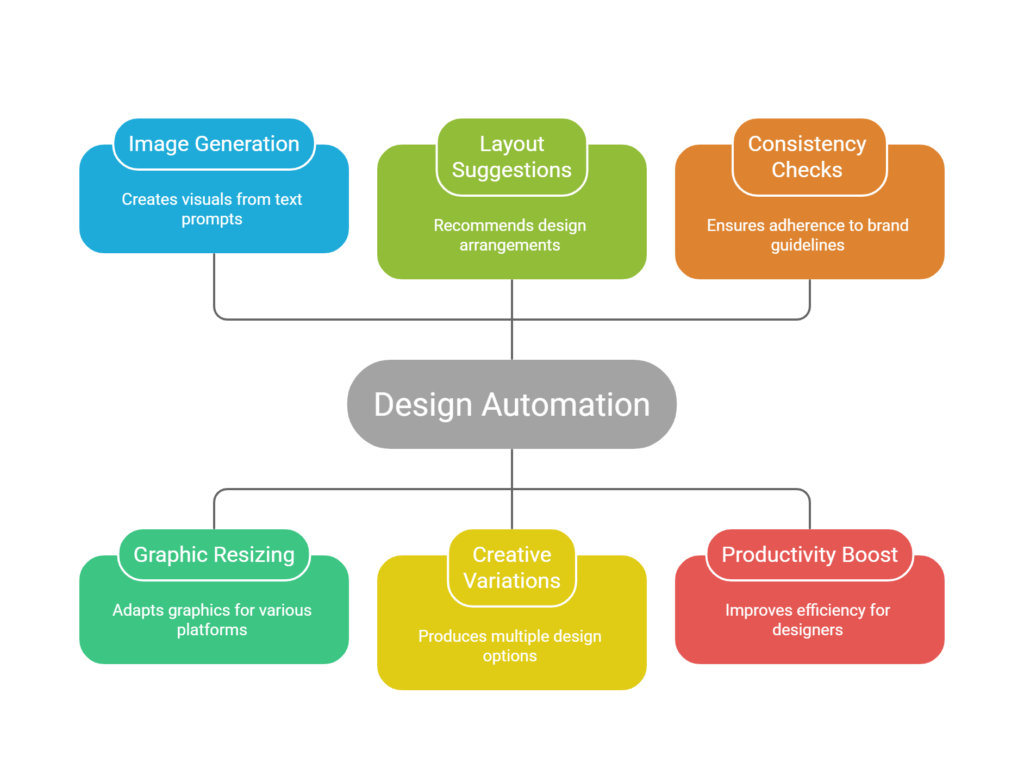
Modern AI-powered design tools can:
- Generate images and visual concepts from text prompts
- Automatically resize graphics for different platforms
- Suggest layouts, typography, and color palettes
- Produce large volumes of creative variations
- Detect design inconsistencies or brand guideline violations
Instead of replacing designers, automation acts as a creative assistant. It handles repetitive or technical tasks while designers focus on storytelling, visual strategy, and user experience.
In fact, many designers report significant productivity improvements after adopting AI tools in their workflows. Studies show that more than half of designers experience noticeable efficiency gains when using AI-driven workflows.
Now let’s explore the specific ways this technology saves time in real-world graphic design projects.
1. Automated Design Ideation and Concept Generation
The early stage of any design project usually involves brainstorming, sketching, and concept exploration. Traditionally, this phase can take hours or even days as designers experiment with different visual directions.
Automation powered by artificial intelligence significantly accelerates this stage.
Instead of starting with a blank canvas, designers can generate multiple visual concepts instantly by entering prompts, keywords, or references. AI systems analyze large datasets of existing design patterns and produce original design ideas that match the requested style or theme.
For example, a designer working on a branding project can generate dozens of logo ideas, color schemes, or typography combinations in minutes.
Research indicates that generative design tools can reduce ideation time by up to 60–80%, allowing creative teams to explore more possibilities without extending project timelines.
This means designers spend less time trying to “find an idea” and more time refining and improving promising concepts.
2. Instant Generation of Design Variations
One of the most time-consuming tasks in graphic design is creating multiple versions of the same design.
Marketing campaigns often require different formats for:
- Social media platforms
- Display ads
- Website banners
- Email headers
- Mobile screens
Without automation, designers must manually recreate each variation.
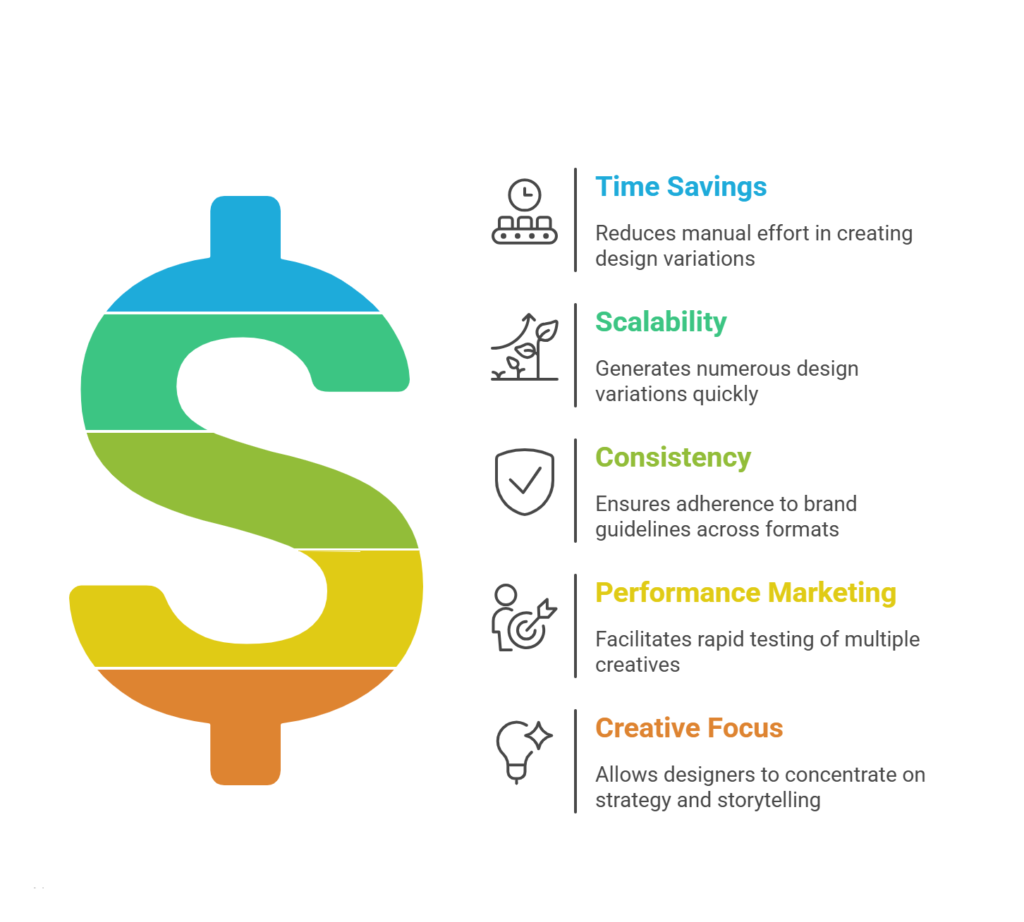
Modern automation tools can generate dozens or even hundreds of design variations automatically. Designers simply define rules such as image placement, typography style, and brand colors. The system then produces multiple versions tailored for different formats and audiences.
This is particularly useful for performance marketing campaigns where large numbers of creatives are needed for testing.
Instead of spending hours creating variations, designers can generate them in minutes.
3. Automated Image Editing and Enhancement
Photo editing is another area where automation dramatically reduces workload.
Tasks such as background removal, object replacement, color correction, and image enhancement traditionally require detailed manual work in tools like Photoshop.
Artificial intelligence now automates many of these processes.
AI-powered editing tools can automatically:
- Remove or replace backgrounds
- Enhance image resolution
- Adjust lighting and color balance
- Detect and fix visual imperfections
This significantly speeds up production tasks, especially for e-commerce teams that handle hundreds or thousands of product images.
Instead of editing each image individually, designers can process large batches of images simultaneous.
4. Smart Layout and Composition Suggestions
Creating visually balanced layouts requires careful decisions about spacing, alignment, typography hierarchy, and visual flow.
Automation tools now assist designers by analyzing design patterns and recommending optimal layouts.
Some platforms can automatically suggest:
- Grid structures
- Typography pairings
- Color combinations
- Element alignment
These suggestions are based on machine learning models trained on millions of high-performing designs.
Such intelligent recommendations help designers overcome decision fatigue and move faster through the layout phase. They also provide strong starting points for new projects.
As a result, designers spend less time experimenting with basic structural decisions and more time refining the final aesthetic.
5. Automated Resizing for Multiple Platforms
One of the most repetitive tasks in digital design is resizing graphics for different platforms.
A single design might need versions for:
- Instagram posts
- Facebook ads
- LinkedIn banners
- YouTube thumbnails
- Display ads
Each platform has different dimensions and formatting requirements.
Automation tools solve this problem with features like smart resizing.
These tools automatically adapt a design to different dimensions while preserving layout balance, typography proportions, and visual hierarchy.
For example, a square Instagram post can be instantly transformed into a vertical story or a horizontal banner.
Automation in resizing significantly reduces the time spent on repetitive production tasks.
6. Template-Based Design Automation
Design templates have existed for years, but AI has made them far more powerful.
Modern automated templates are dynamic. Instead of simply duplicating layouts, they can automatically populate content such as:
- Text
- images
- brand colors
- product information
For example, a company launching a promotional campaign can automatically generate hundreds of localized ad creatives using a single template.
The system inserts different product images, prices, languages, and promotional messages while maintaining consistent design.
This allows marketing teams to scale creative production without overwhelming designers.
7. Rapid Prototyping and Wireframe Generation
Prototyping is an essential part of design projects, especially in digital product design.
Traditionally, designers create wireframes and mockups manually, which can take significant time during the early stages of product development.
Automation tools now generate wireframes directly from text prompts or rough sketches.
Designers can describe a layout such as:
“Create a landing page with a hero section, testimonial slider, and pricing table.”
Within seconds, the system produces a structured wireframe that can be refined and customized.
AI can also generate multiple prototype variations to test different layouts or user flows.
This speeds up experimentation and helps teams reach better design decisions faster.
8. Batch Processing for Repetitive Tasks
Batch processing is one of the most practical uses of automation in graphic design.
Instead of editing files one at a time, designers can apply changes to hundreds of files simultaneously.
Examples include:
- Applying filters to image sets
- Converting file formats
- Adding watermarks
- Resizing assets
- Exporting multiple formats
Automation tools allow designers to create scripts or workflows that execute these tasks automatically.
This is particularly valuable for agencies managing large content libraries or media assets.
Instead of spending hours repeating the same action, designers can process entire batches in seconds.
9. AI-Powered Brand Consistency Checks
Maintaining brand consistency across multiple designs can be challenging, especially for large teams.
Automation tools can analyze visual elements and detect inconsistencies in:
- Colors
- typography
- logo usage
- spacing
- brand guidelines
If a design violates brand standards, the system automatically flags the issue.
This reduces the time spent on manual reviews and revisions.
It also ensures that every design aligns with the company’s visual identity.
Automation systems integrated with design tools can even enforce brand rules automatically, ensuring consistency across large design teams.
10. Intelligent Asset Organization and File Management
Design projects often involve hundreds of assets, including images, icons, fonts, and templates.
Manually organizing and searching through these files can become a major productivity bottleneck.
Automation tools use artificial intelligence to categorize and tag assets automatically.
For example, an AI system might identify objects inside images and label them accordingly.
Designers can then search for assets using natural language queries such as:
“Find blue icons related to finance.”
This drastically reduces the time spent searching through folders and improves overall workflow efficiency.
11. Automated Localization and Multi-Language Design
Global marketing campaigns require design localization for different languages and regions.
Without automation, designers must manually adapt layouts for each language, which can be time-consuming.
Automation tools can automatically adjust designs when text length changes.
For example:
- Expanding text containers
- Adjusting spacing
- Repositioning elements
Some systems can even generate localized visuals tailored to specific audiences.
This allows brands to produce region-specific creatives quickly while maintaining visual consistency.
12. Faster Collaboration and Feedback Loops
Collaboration often slows down design projects.
Clients, marketers, and developers frequently provide feedback that requires multiple revisions.
Automation tools now streamline feedback and collaboration.
Some platforms automatically:
- Track design versions
- summarize feedback
- highlight requested changes
- suggest design improvements
Real-time collaboration features allow teams to work on the same design simultaneously.
AI can even analyze feedback patterns and recommend design improvements automatically.
These capabilities reduce the time spent managing revisions and approvals.
The Real Impact of Automation on Creative Workflows
One common concern about automation in graphic design is that it might reduce creativity.
However, the opposite tends to happen.
When repetitive tasks are automated, designers gain more time to focus on:
- creative direction
- storytelling
- visual experimentation
- brand strategy
Automation shifts the designer’s role from manual production to creative problem-solving.
Instead of spending hours resizing assets or organizing files, designers can focus on crafting meaningful visual experiences.
This shift is transforming the creative industry and redefining the role of modern designers.
Challenges and Considerations
While automation provides many advantages, it also comes with certain challenges.
AI systems are still evolving, and they may occasionally produce inaccurate outputs or designs that require manual adjustments.
Some designers also worry about ethical concerns related to training data, copyright, and originality.
Another challenge is maintaining human creativity and judgment in automated workflows.
Design tools can generate ideas quickly, but they cannot fully understand brand context, cultural nuance, or emotional storytelling.
For this reason, the most effective approach is collaboration between humans and machines.
Designers guide the creative vision while automation handles repetitive execution.
The Future of AI-Driven Design Workflows
The evolution of automation in design is just beginning.
Future tools will likely become even more intelligent, capable of understanding complex creative briefs and generating high-quality designs with minimal input.
We can expect advancements in areas such as:
- real-time generative design systems
- AI-assisted brand identity creation
- automated design systems for marketing campaigns
- intelligent UX and UI design tools
As these technologies mature, designers will spend less time on technical production tasks and more time on creative strategy.
Automation will not replace designers. Instead, it will redefine their role and expand their capabilities.
Conclusion
Graphic design has always been a creative discipline, but it also involves many repetitive production tasks.
Automation powered by artificial intelligence is transforming how designers approach their work.
From ideation and layout generation to asset management and collaboration, these technologies streamline workflows and reduce time-consuming manual processes.
The twelve methods explored in this article demonstrate how automation can dramatically improve efficiency in graphic design projects.
Designers who embrace these tools gain a powerful advantage. They can produce high-quality visuals faster, experiment with more ideas, and scale their creative output without increasing workload.
Ultimately, the goal of AI Design Automation is not to replace human creativity but to enhance it.
When used effectively, automation becomes a creative partner that handles the repetitive work while designers focus on innovation, storytelling, and visual impact.