

Most marketing teams still build segments the same way. Someone exports a list, filters by purchase date or location, and saves it as “Active Customers Q3.” By the time the campaign goes out, the segment is stale, and half the people in it have already changed how they behave.
That gap is exactly what an AI agent for customer segmentation closes. Instead of a static filter you rebuild by hand, you get software that watches customer behavior, spots patterns, creates segments, and updates them as people move between groups. This article is for marketers, founders, and growth teams who want to know what these agents actually do, where they pay off, and which tools are worth your time. I’ll also say plainly where the tools overpromise.
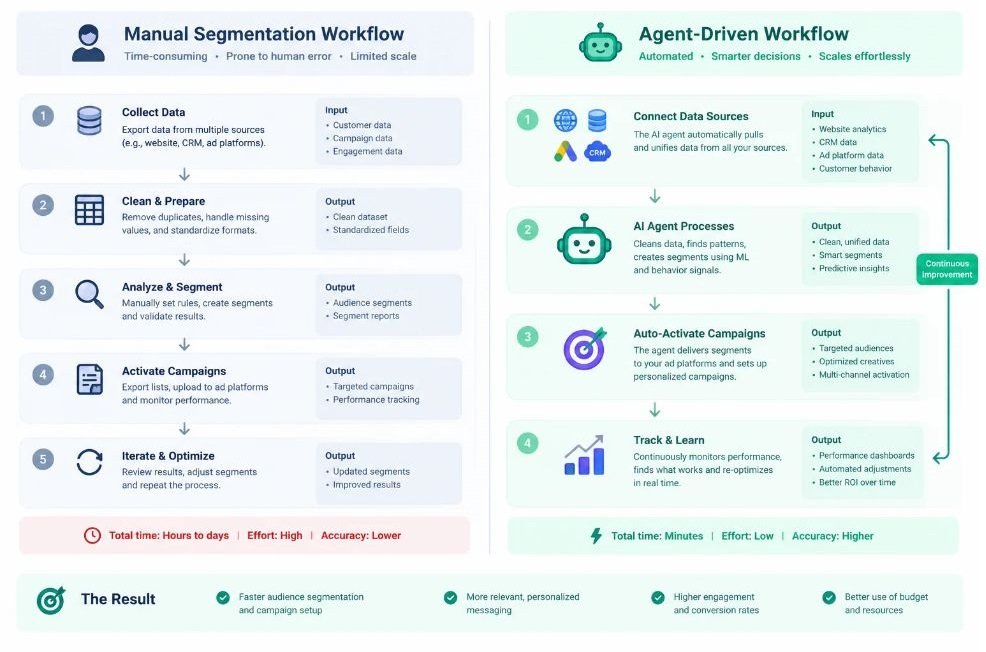
What Is an AI Agent in Customer Segmentation?
An AI agent is software that takes a goal, decides which steps to run, uses tools and data to carry them out, and adjusts based on what it finds. Customer segmentation is the practice of splitting your customers into groups that share behaviors, needs, or value, so you can treat each group differently.
Put them together and you get a system that doesn’t just run a rule you wrote. It looks at your customer data, proposes groupings you hadn’t thought of, builds those groups, and keeps them current.
Traditional segmentation and agentic segmentation differ in one big way. Rule-based segmentation answers questions you already know to ask (“Who bought twice in 90 days?”). An agent can also surface questions you didn’t ask (“Why do customers who buy a specific product first churn 40 days later?”).
Here’s a quick comparison of the three levels you’ll run into:
- Rule-based segments: you define the filters, the tool applies them. Static until you change them.
- Machine learning segments: a model clusters customers or scores them, such as a churn score. You still decide what to do with the output.
- Agentic segments: the agent proposes segments, builds them, tests messaging against them, and reports back, often with a human approving key steps.
An AI agent for customer segmentation goes beyond static filters by finding patterns in customer data, building groups automatically, and updating them as behavior changes. The main difference from older machine learning tools is that the agent acts on its findings, not just reports them. Most teams still keep a human approval step before any segment triggers a live campaign.
How Does Agentic Segmentation Work?
An agent-driven segmentation workflow follows a loop: collect data, find patterns, build segments, take action, and learn from results. Each stage can be automated, but the quality of the whole loop depends on your data.
Here’s the process, step by step.
- Connect data sources. The agent pulls from your CRM (customer relationship management system), website analytics, email platform, payment system, and support tickets. A customer data platform, or CDP, often sits in the middle. A CDP is software that collects customer data from every channel and merges it into one profile per person.
- Resolve identities. The same customer might appear as three records: an email signup, a mobile app user, and a checkout guest. Identity resolution is the process of matching those records into one profile. Weak identity resolution ruins everything downstream.
- Analyze behavior. The agent looks at purchase frequency, product mix, browsing patterns, support history, and engagement. It might run RFM analysis, which scores customers on recency, frequency, and monetary value, or use clustering algorithms to find natural groupings.
- Predict outcomes. Propensity models estimate how likely someone is to buy, churn, or upgrade. A propensity model is a statistical model that assigns each customer a probability of taking a specific action.
- Build and label segments. The agent creates groups, names them in plain language, and explains why each exists. Good tools show you the reasoning, not just the list.
- Activate. Segments feed into email, SMS, ads, push notifications, or sales outreach.
- Measure and refine. The agent tracks which segments respond, moves customers between groups, and flags segments that have stopped making sense.
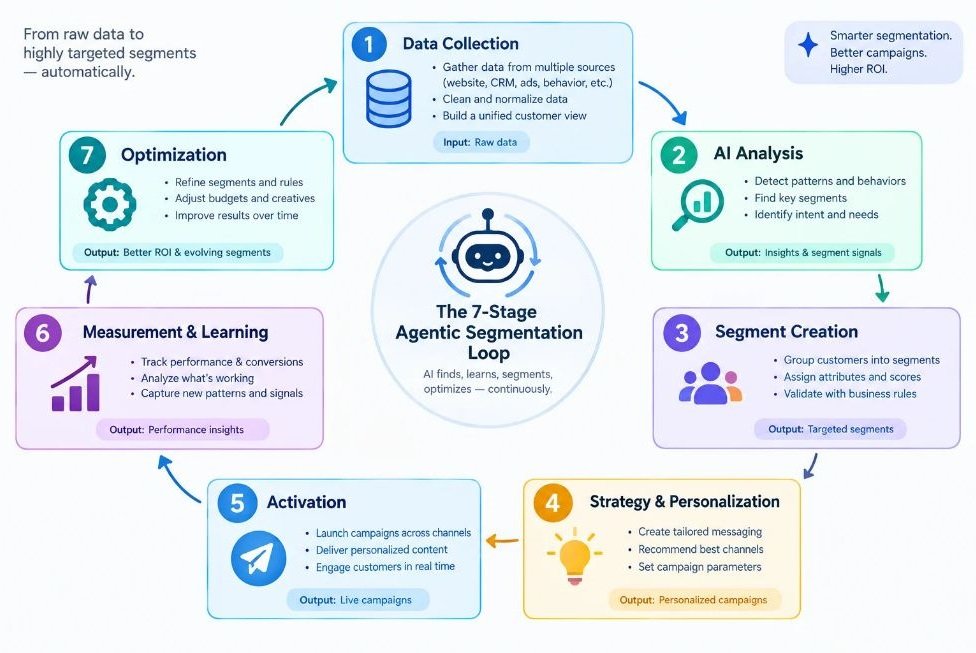
The thing is, steps 1 and 2 are where most projects fail. Agents are impressive at pattern detection and mediocre when the input data is messy. If your customer records are duplicated and your purchase history is incomplete, no tool will fix that for you.
What Are the Real Benefits?
The core benefits are speed, precision, and freshness. Agents build segments faster than analysts, find narrower and more useful groups, and keep those groups updated without a weekly rebuild.
Faster Segment Creation
Building a good segment by hand usually means a request to a data analyst, a wait, a query, a review, and a revision. With a segmentation agent, a marketer can describe a goal in plain language, like “customers likely to lapse in the next 30 days who spent above average,” and get a working segment in minutes. That’s the difference between running a campaign this week and running it next month.
Segments You Wouldn’t Have Found Yourself
Human-built segments reflect human assumptions. You segment by age, location, and last purchase because those are the fields you know. Clustering and behavioral analysis often reveal groups defined by combinations no one would write a rule for, such as customers who browse late at night, buy only discounted items, and open every email but never click.
Real-Time Updates
A static list starts decaying the moment you export it. Agents can move a customer from “new subscriber” to “repeat buyer” to “at risk” as it happens, so your messaging reflects who the customer is today.
Better Personalization
Personalization is what most teams actually want from segmentation. According to McKinsey’s 2021 “Next in Personalization” report, 71% of consumers expect companies to deliver personalized interactions, and 76% get frustrated when that doesn’t happen. Segments are the foundation for meeting that expectation at scale.
Lower Manual Workload
Analysts spend a lot of time on repetitive list building. When an agent handles routine segment creation, your data team can focus on modeling, data quality, and strategy. To be fair, the workload doesn’t vanish. It shifts toward reviewing agent output and maintaining data.
Improved Retention and Revenue
Predictive segments let you act before a customer leaves. A “likely to churn” group that receives a timely offer or support outreach is cheaper to retain than a lost customer is to replace. McKinsey’s same research found that faster-growing companies drive 40% more revenue from personalization than slower-growing ones.
The biggest benefits of agentic segmentation are faster segment creation, discovery of non-obvious groups, and real-time updates as customer behavior changes. These gains feed directly into personalization and retention. The catch is that results depend on clean, unified customer data.
Which Use Cases Should You Build First?
Start with the use case where a wrong guess is cheap and a right guess pays quickly. For most teams that means churn prevention, repeat purchase, or lead prioritization.
Churn Prediction and Win-Back
Churn prediction identifies customers likely to stop buying or cancel. The agent watches signals like declining login frequency, longer gaps between orders, or rising support complaints, then builds an at-risk segment. You can then trigger a targeted win-back email, a discount, or a call from customer success.
Illustrative example: a subscription coffee brand notices that customers who skip two consecutive deliveries and stop opening emails cancel within a month far more often than others. The agent creates an “early skippers” segment and routes it to a flexible-schedule offer instead of a discount. (This is a hypothetical scenario to show the pattern, not a reported result.)
eCommerce Personalization
For online stores, agents group shoppers by browsing behavior, category affinity, price sensitivity, and purchase cycle. One segment might be “full-price loyalists,” another “discount-only buyers.” You then stop giving 20% off to people who would have paid full price. That alone protects margin.
Lead Scoring and B2B Account Segmentation
In B2B, an agent can combine firmographic data (company size, industry, location) with behavioral data (pages visited, content downloaded, emails opened) to rank leads and group accounts. Sales gets a shorter, better list. Marketing stops sending enterprise messaging to solo freelancers.
Loyalty Program Tiering
Retail and hospitality brands can use agents to move beyond spend-only tiers. A customer who spends modestly but refers friends and leaves reviews may be worth more than a big spender who returns everything. Agents help find that value beyond the obvious number.
Product Adoption in SaaS
SaaS (software as a service) teams segment users by feature usage. An agent can find the users who’ve set up the core feature but never invited a teammate, then trigger an in-app prompt. These “stuck” users are often the easiest to convert to paying customers.
Lookalike Audiences for Paid Ads
A lookalike audience is a group of new prospects who resemble your best existing customers. Agents can define what “best customer” means using lifetime value instead of a single purchase, then pass that seed group to Meta Ads Manager or Google Ads. Better seed segments generally mean better ad targeting.
Personalized Email and SMS Journeys
Email is where most teams first feel the benefit. Segment-specific subject lines, send times, and offers lift engagement because the message matches the reader’s situation.
[IMAGE: Table mapping each use case to the data inputs and output segment]
Which Tools Handle Segmentation Best?
No single tool wins for everyone. The right pick depends on your data setup, team size, and whether you need a full platform or a focused add-on. Below are eight tools I’d shortlist, with honest notes on each. Pricing notes are as of 2026 and change often, so always check the vendor’s current page.
Salesforce Agentforce with Data Cloud
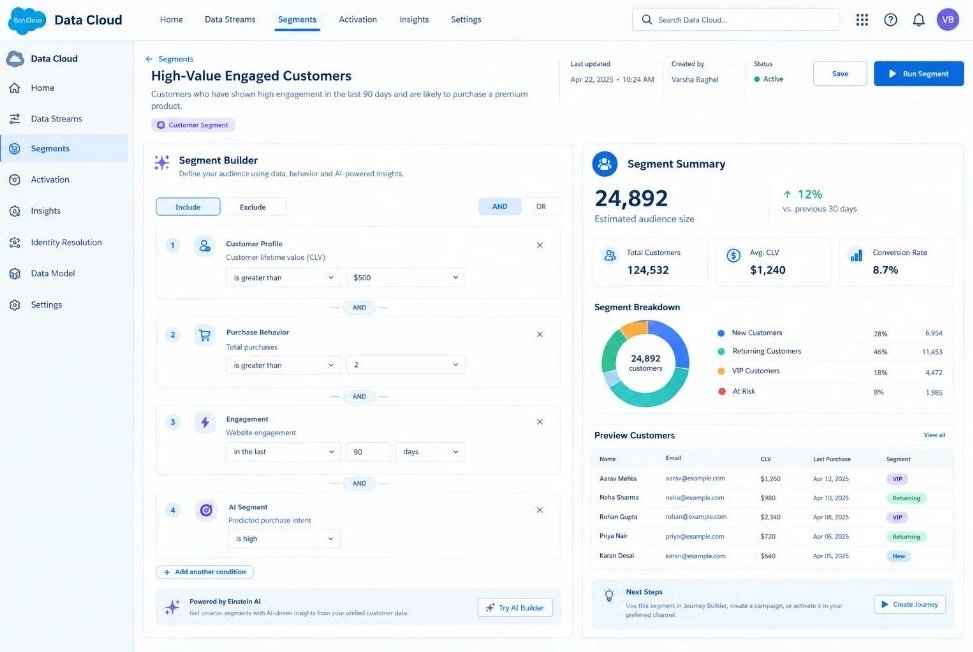
Agentforce is Salesforce’s platform for building AI agents inside its ecosystem of CRM products. Data Cloud is the Salesforce layer that unifies customer data from many sources into one profile.
What it does well: If your company already runs on Salesforce Sales Cloud, Service Cloud, or Marketing Cloud, this combination is hard to beat for depth. Data Cloud builds unified profiles and segments, and Agentforce agents can act on those segments across sales, service, and marketing workflows. Enterprise governance and permission controls are strong.
Where it falls short: It’s a heavy implementation. Small teams will find it expensive and slow to set up, and you’ll likely need a Salesforce admin or partner. The value shows up mainly when your data already lives in Salesforce.
Best for: Mid-market and enterprise companies already invested in Salesforce.
Pricing: Custom and usage-based pricing, generally aimed at larger budgets (as of 2026, verify with Salesforce).
HubSpot (Breeze AI and Smart Segments)
HubSpot is a CRM and marketing platform, and Breeze is its set of built-in AI features and agents. Segments in HubSpot are lists that update automatically based on contact properties and behavior.
What it does well: HubSpot is the most approachable option on this list. Marketers can build active lists, use AI assistance to draft segment logic, and connect segments directly to email, forms, and workflows. Everything sits in one interface, so there’s little integration work.
Where it falls short: The predictive and agentic features are less deep than in dedicated CDPs. Complex clustering or custom modeling usually needs an outside tool. Costs also climb as your contact count and feature tier grow.
Best for: Small and mid-sized teams that want segmentation, email, and CRM in one place.
Pricing: Free CRM tier; paid Starter, Professional, and Enterprise plans scale with features and contacts (as of 2026, verify with HubSpot).
Klaviyo
Klaviyo is a marketing platform built mainly for eCommerce brands, with deep integrations for Shopify, WooCommerce, and Magento.
What it does well: Klaviyo’s predictive analytics estimate things like expected next order date, predicted lifetime value, and churn risk for each customer. You can build segments from those predictions in a few clicks and send them straight to email and SMS flows. For online stores, the time from idea to live campaign is short.
Where it falls short: It’s focused on eCommerce. If you run a B2B or SaaS business, the model fits less well. Predictions also need enough order history to be reliable, so new stores may see thin results.
Best for: Shopify and other online store owners who live in email and SMS.
Pricing: Free tier for small lists; paid plans scale with the number of active profiles (as of 2026, verify with Klaviyo).
Braze
Braze is a customer engagement platform used for push notifications, in-app messages, email, and SMS, popular with mobile apps and consumer brands.
What it does well: Braze handles real-time segmentation at large scale. Segments update as events stream in, and its AI features (branded BrazeAI) support predictive audiences, send-time optimization, and content testing. If your business depends on the mobile app, this is a serious option.
Where it falls short: It’s built for larger teams and can be overkill for small companies. Setup takes real technical work, and pricing is quote-based.
Best for: Consumer apps and high-volume brands that need real-time, cross-channel messaging.
Pricing: Custom quotes based on volume (as of 2026, verify with Braze).
Twilio Segment
Segment, now part of Twilio, is a CDP that collects event data from your website, app, and servers, then routes it to other tools. Its Engage and Unify products handle profile building and audiences.
What it does well: Segment is strong at the data plumbing. It gives you clean, unified profiles and lets you send the same audience to dozens of downstream tools, such as ad platforms, email, and analytics. If your problem is scattered data, this addresses the root cause. Predictive traits and AI-assisted audience building add intelligence on top.
Where it falls short: It isn’t a full marketing suite. You’ll still need separate tools to send messages. Engineering involvement is usually required, and costs rise with tracked users.
Best for: Teams with multiple data sources who need one reliable customer profile feeding many tools.
Pricing: Free tier for limited use; paid plans priced by monthly tracked users (as of 2026, verify with Twilio).
Optimove
Optimove is a customer-led marketing platform that specializes in AI-driven segmentation and campaign orchestration, with a long history in retail, gaming, and financial services.
What it does well: Optimove was built around segmentation, so it’s opinionated in a helpful way. It automatically groups customers into lifecycle segments, recommends the next best action for each, and runs experiments to measure incremental lift. That emphasis on measuring whether a campaign caused a result, not just whether it correlated, is genuinely useful.
Where it falls short: It’s a specialist platform with an enterprise feel, and it isn’t cheap. Smaller teams may not need its depth.
Best for: Brands with large customer bases and a serious lifecycle marketing program.
Pricing: Custom quotes (as of 2026, verify with Optimove).
Amplitude
Amplitude is a product analytics platform that tracks how users behave inside apps and websites. It offers behavioral cohorts, which are groups of users defined by the actions they’ve taken.
What it does well: For SaaS and digital products, Amplitude is excellent at answering “which behaviors predict retention?” You can build cohorts from actual in-product actions and push them to messaging tools. Its AI features help surface insights and build analyses faster.
Where it falls short: It’s an analytics tool first. It doesn’t send campaigns on its own, and its strength is product behavior, not offline purchase data or CRM history.
Best for: Product and growth teams at SaaS companies and digital products.
Pricing: Free starter plan; paid plans scale with event volume (as of 2026, verify with Amplitude).
Custom Agent Using Claude or GPT Plus Your Data Warehouse
This option means building your own agent using a large language model, or LLM (an AI system trained on large amounts of text that can reason over instructions), such as Claude or GPT-4o, connected to a data warehouse like BigQuery or Snowflake.
What it does well: You get full control. An agent can read your customer tables, run SQL, apply RFM or clustering code, explain its logic in plain language, and write results back to your warehouse. From there, a reverse ETL tool (software that syncs warehouse data back into business apps) pushes segments to your email or ad platforms. It’s flexible and doesn’t lock you into one vendor.
Where it falls short: This route needs technical skill and ongoing maintenance. You own the security, testing, and cost. Without guardrails, an LLM can write incorrect queries or misread a column, so human review is not optional.
Best for: Companies with a data team that want a tailored setup and already keep customer data in a warehouse.
Pricing: You pay for LLM usage and warehouse compute, which varies widely with volume (as of 2026, verify with each provider).
HubSpot and Klaviyo are the most approachable tools for small teams, while Salesforce Agentforce, Braze, and Optimove suit larger organizations with heavier needs. Twilio Segment fixes data unification, Amplitude serves product analytics, and a custom LLM build offers flexibility for teams with engineering support. The best choice depends on where your data lives and how technical your team is.
How Do You Choose the Right Tool?
Pick based on your data location, team size, and main goal, not on feature lists. A simple decision path works better than a spreadsheet of 40 criteria.
Ask yourself these questions in order:
- Where does your customer data live today? If it’s in Salesforce, start there. If it’s in Shopify, look at Klaviyo. If it’s in a warehouse, consider Segment or a custom build.
- Who will run it? A marketer working alone needs HubSpot or Klaviyo. A team with analysts and engineers can handle Braze, Optimove, or a custom agent.
- What’s the primary outcome? Retention points to Klaviyo, Optimove, or Braze. Product adoption points to Amplitude. Sales prioritization points to Salesforce or HubSpot.
- What’s your budget for setup, not just licenses? Implementation time and data cleanup often cost more than the software.
My honest view: most small teams overbuy. If you have under 50,000 contacts, a tool like HubSpot or Klaviyo will cover nearly everything you need, and the enterprise platforms will sit half-used.
How to Set Up Your First Segmentation Agent: Step-by-Step
Start small with one goal, one data source, and one segment you can measure. Here’s a practical way to do it.
Step 1: Pick one business goal. Choose something specific, like reducing 60-day churn among first-time buyers. Vague goals like “better personalization” produce vague segments.
Step 2: Audit your data. Check for duplicate contacts, missing fields, and inconsistent formats. Fix the worst problems first. This step feels boring and saves weeks later.
Step 3: Connect your core sources. Link your CRM, store or app, and email platform. Start with two or three sources, not ten.
Step 4: Give the agent a clear brief. Describe the goal, the metric that matters, and the constraints. A useful prompt looks like this: “Analyze customers who made a first purchase in the last 180 days. Identify behaviors that predict no second purchase within 60 days. Propose up to four segments, explain the logic for each, and estimate segment size.”
Step 5: Review the segments yourself. Read the logic. Do the segments make business sense? Check sizes and sample a few customer records. Remove anything that looks like an artifact of bad data.
Step 6: Test before you scale. Send each segment a tailored message and hold out a control group that receives nothing new. A control group is a set of similar customers you deliberately leave untouched so you can measure the real effect of your campaign.
Step 7: Measure and iterate. Compare conversion, revenue, and unsubscribe rates against the control. Keep what works, retire what doesn’t, and give the agent the results so it can refine.
In Hotskill’s AI skill tracks, we’ve found that learners who write structured briefs like the one in Step 4 get dramatically more useful output than those who type a one-line request. The brief is the skill.
What Mistakes Should You Avoid?
The most common failures come from bad data, unreviewed output, and privacy shortcuts, not from the technology itself.
Trusting the agent without checking its work. An agent can produce a confident, well-written explanation for a segment that’s actually built on a data error. Always spot-check.
Ignoring privacy law. Segmentation uses personal data, so rules like the GDPR (General Data Protection Regulation, the European Union’s data protection law) and California’s CCPA (California Consumer Privacy Act) apply. Get consent, honor opt-outs, and avoid using sensitive attributes such as health or ethnicity in ways the law restricts. Talk to your legal team before you launch.
Creating too many segments. Twenty micro-segments sound smart until you realize you can’t write twenty messages. Build only as many groups as you can act on.
Skipping the control group. Without one, you can’t tell whether your segment worked or whether customers would have bought anyway.
Amplifying bias. If your historical data reflects skewed past decisions, an agent may learn and repeat them, for example by ignoring certain customer groups. Review who’s included and excluded in each segment.
Buying on the demo. Vendor demos use clean sample data. Ask to run a trial on your own messy data before you sign.
Conclusion
Three takeaways matter most. First, agents work best on a narrow goal with clean data, so start with one use case like churn or repeat purchase. Second, match the tool to your data and team: HubSpot or Klaviyo for smaller teams, Salesforce, Braze, or Optimove for larger ones, and a custom build if you have engineering strength. Third, always test against a control group and review the agent’s logic before you trust it.
Here’s a next step you can do today: pull your last 180 days of customer data, count the duplicates and missing fields, and write a one-paragraph brief for a single segment you want to build. Once you’ve done that, you’ll know whether you need a tool or just better data. That works whether you plan to use an AI agent for customer segmentation or a simple rule-based list.
Hotskill teaches AI workflows like this in structured, bite-sized lessons built for busy professionals, including how to write the briefs that get useful output from AI tools. Get the app at hotskill.co/download, available on the App Store and Google Play.
FAQ
What is an AI agent in customer segmentation?
It’s software that analyzes customer data, builds groups based on behavior or predicted outcomes, and updates them automatically. Unlike a static filter, it can propose segments you didn’t define and act on them, often with human approval before anything goes live.
How is agentic segmentation different from traditional segmentation?
Traditional segmentation relies on rules you write, such as “purchased in the last 30 days.” Agentic segmentation uses machine learning and automated reasoning to find patterns, predict outcomes, and refresh groups as behavior changes. You set the goal, and the agent handles much of the analysis.
What are the main benefits for a marketing team?
The biggest gains are faster segment creation, discovery of non-obvious customer groups, real-time updates, and stronger personalization. Teams also spend less time on manual list building. Results depend heavily on the quality of your underlying data.
Do I need coding skills to use these tools?
Not for most of them. HubSpot, Klaviyo, and similar platforms use point-and-click interfaces with plain-language prompts. A custom build with Claude or GPT and a data warehouse does require SQL or Python knowledge, or a developer on your team.
Which tool is best for a small eCommerce store?
Klaviyo is usually the strongest starting point for Shopify and similar stores, thanks to built-in predictive analytics and tight email and SMS integration. HubSpot is a good alternative if you also need a CRM. Check current pricing before you commit.
Is Salesforce Agentforce worth it compared to HubSpot?
It depends on scale. Agentforce with Data Cloud suits large organizations already on Salesforce and needing deep governance. HubSpot is simpler, faster to launch, and cheaper for small and mid-sized teams. If you don’t already have Salesforce, HubSpot is the more practical choice for most.
Do I really need an agent if I already have a CDP?
Not necessarily. A CDP unifies data and builds audiences, but you may not need extra automation if your team builds segments comfortably. An agent adds value when you want faster creation, predictive groups, or analysis that your team doesn’t have time to do manually. Many CDPs now include agent-style features anyway.
Why isn’t my segmentation agent giving useful results?
Poor results usually trace back to messy data, unclear goals, or too little history. Check for duplicate records and missing fields, sharpen your brief so it names a specific outcome, and confirm you have enough past customer activity for patterns to form. A very small customer base may not support predictive models.
Is customer segmentation with AI legal and safe for customer privacy?
It’s legal when you follow data protection laws such as GDPR and CCPA, collect proper consent, and respect opt-out requests. Avoid using sensitive personal attributes without legal review. Choose vendors with clear security practices, and involve your legal or compliance team early.
How long does it take to see results?
Simple segments in tools like HubSpot or Klaviyo can go live within days. Predictive segments need enough data history, and enterprise platforms can take months to implement. Run a controlled test for a few weeks to see whether a segment actually improves your key metric.