
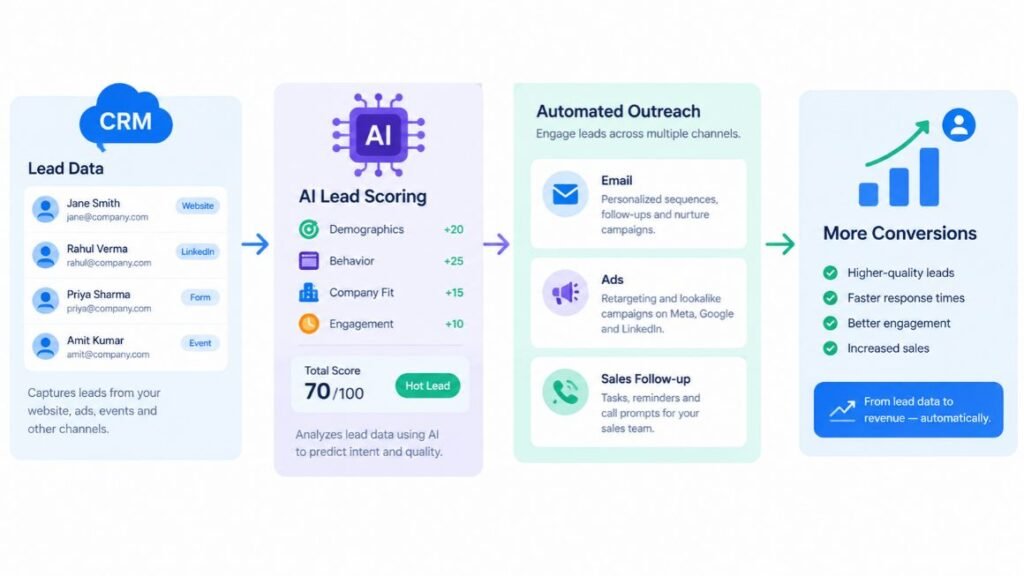
Most marketing teams don’t have a CRM problem. They have a CRM nobody trusts. Contacts pile up, lead scores go stale, and the follow-up email goes out three days late. The Best AI CRM Marketing Tools close that gap by scoring leads, drafting first-pass copy, and flagging stalled deals before a human notices.
The hard part is choosing. Every vendor now claims AI, and the demos all look impressive. So this guide cuts through it. You’ll get 15 platforms, what each one actually does well, where it falls short, who it fits, and what it costs, so you can match a tool to your team instead of to a landing page.
What Is an AI CRM and Why Does It Matter in 2027?
An AI CRM is a customer relationship management platform that uses machine learning and generative AI to score leads, predict deal outcomes, write messages, and trigger actions without a person doing each step by hand. A traditional CRM stores what happened. An AI CRM suggests what should happen next.
Here are the terms you’ll see throughout this guide, defined once:
- Lead scoring is a ranking of contacts by how likely they are to buy, based on behavior and profile data.
- Predictive analytics means using past patterns to estimate future outcomes, such as which deals will close this quarter.
- An AI agent is software that completes a multi-step task on its own, such as qualifying an inbound lead and booking a meeting.
- Send-time optimization picks the hour each contact is most likely to open an email.
Why does this matter now? According to Fast.io’s 2026 market overview, AI inside CRM is growing roughly three times faster than the broader CRM market. Fireflies’ 2026 buyer guide makes a related point: your monthly CRM bill is now a mix of seat licenses and AI usage, so pricing is harder to predict than it used to be.
That shift is the reason this list exists. Good AI-Powered CRM Tools for Marketing don’t just add a chatbot to a dashboard. They connect campaign data, sales activity and customer conversations so each team sees the same picture.
An AI CRM is a customer platform that scores leads, predicts outcomes and drafts or sends messages automatically. The category is growing about three times faster than CRM overall, according to Fast.io’s 2026 analysis, and pricing now mixes seat licenses with AI usage fees. Marketers should judge a tool by what its AI does with their own data, not by the demo.
How We Picked These 15 Tools
We weighed four things: how deep the AI goes beyond a writing assistant, how clearly the vendor prices it, how well the tool supports marketing work (not just sales), and which team size it genuinely fits. A tool with a great demo and a confusing credit system lost points.
We also leaned on current 2026 vendor documentation and recent buyer comparisons, and we’ve marked every price “as of 2026” because AI pricing changes often. In Hotskill’s learner conversations, the most common complaint isn’t missing features. It’s picking a platform that’s too big or too small for the team using it. So each entry names its ideal user.
One more note. Some of these are full CRMs. Others are marketing-first platforms with a built-in CRM. Both count, because the goal is more sales and conversions, and AI-Powered CRM Tools come in both shapes.
HubSpot: Best for Marketing and Sales in One Platform
HubSpot is the strongest all-round pick for most marketing-led teams because its AI sits across marketing, sales and service on one shared data model. If you want a single system and don’t have an admin to maintain it, start here.
What It Does Well
HubSpot’s AI layer is called Breeze. Breeze Copilot is an assistant that lives inside records and drafts emails, summarizes contacts and answers questions about your data. Breeze Agents handle jobs such as customer support, prospecting and content, and Breeze Intelligence enriches contact records with company details.
The real advantage is that marketing engagement and sales activity feed the same predictions. A lead who opened three emails and visited your pricing page shows up that way to the rep, without anyone exporting a spreadsheet. The free CRM also makes testing painless.
Where It Falls Short
Costs climb fast. The free tier is limited, the better AI features sit in Professional-level plans, and agents run on a credit model, so heavy usage raises the bill. Marketing Hub pricing also scales with contact count, which surprises growing lists.
Best for: Mid-market and growth-stage teams (roughly 20 to 250 people) that want marketing and sales in one place.
Pricing (as of 2026): Free CRM; paid Starter seats begin around $15 per seat per month; Professional and Enterprise cost considerably more, plus credits for agents.
Salesforce: Best for Enterprise Teams With Complex Sales
Salesforce is the right choice when your sales process has many stages, regions and approval rules, and you have people to configure it. For a ten-person team, it’s usually overkill.
What It Does Well
Salesforce’s AI story centers on Agentforce, its platform for building autonomous agents, built on top of Einstein, the company’s long-running predictive layer. Einstein handles lead scoring, opportunity insights and forecasting. Agentforce agents can answer customers, qualify leads and update records, with guardrails your admin defines.
Pair that with Data Cloud and Marketing Cloud and you get unusually deep audience segmentation across channels. The customization ceiling is far higher than anything else here.
Where It Falls Short
Complexity and cost. Salesforce moved Agentforce toward consumption-based pricing, with Flex Credits drawn down per agent action, which makes budgeting harder. Implementation often needs a consultant or a dedicated admin, and the AI features usually require higher-tier editions.
Best for: Enterprise and large mid-market teams (200+ people) with dedicated Salesforce admins.
Pricing (as of 2026): Entry Sales plans start near $25 per user per month; full AI capability costs far more, and Agentforce usage is billed by credits.
Zoho CRM: Best Budget Option With Real AI Depth
Zoho CRM delivers more AI per dollar than almost anyone else on this list, which makes it the practical pick for cost-conscious small and mid-size teams.
What It Does Well
Zia is Zoho’s AI assistant. It provides predictive lead and deal scoring, churn prediction, anomaly detection in sales metrics, sentiment analysis and forecasting. One 2026 comparison counted 22 distinct Zia capabilities, and Zoho’s higher tiers add Zia Agents and a no-code studio for building your own.
Zoho also connects to its own marketing tools, such as Zoho Campaigns, and the free plan covers up to three users. That’s rare.
Where It Falls Short
The interface feels less polished than HubSpot’s, and the learning curve is real. Zia’s strongest features generally sit at Professional or Enterprise tiers, and reviewers note its predictions still trail Salesforce’s on enterprise-scale accuracy.
Best for: Budget-minded teams of 5 to 200 that want broad AI features without enterprise pricing.
Pricing (as of 2026): Free for up to three users; paid plans start around $14 per user per month, with fuller Zia features arriving on higher tiers (roughly $23 to $40 and up).
ActiveCampaign: Best for Email and Automation Journeys
ActiveCampaign is the pick when your conversions depend on well-timed email sequences rather than a long sales cycle. It’s a marketing automation platform first and a CRM second, and it’s honest about that.
What It Does Well
Its visual automation builder is among the best in the category. AI features include predictive sending, win-probability scoring for deals, AI-assisted email and subject line writing, and content suggestions. Site tracking lets you trigger a sequence the moment someone views a specific page.
If you run nurture campaigns, abandoned-cart flows or onboarding series, the logic you can build here is hard to match at this price.
Where It Falls Short
The CRM side is lighter than HubSpot’s or Zoho’s, so teams with complex pipelines may outgrow it. Deliverability and list hygiene need attention, and heavy automation setups can get messy without naming conventions.
Best for: Small and mid-size marketing teams, ecommerce shops and course creators that live in email.
Pricing (as of 2026): Paid plans start at roughly $15 per month for small lists and rise with contact count and tier.
Freshsales: Best Value for Growing Sales Teams
Freshsales, from Freshworks, gives small sales teams practical AI without enterprise pricing or a long setup. It’s a good middle ground if Pipedrive feels thin and HubSpot feels expensive.
What It Does Well
Freddy AI scores leads, surfaces deal insights, suggests next steps and drafts emails. It also handles contact enrichment and flags stale deals. The built-in phone and email save you from stitching together extra tools.
Where It Falls Short
Marketing automation lives in Freshmarketer, a separate Freshworks product, so true campaign management means another subscription. The best AI features also sit on upper tiers.
Best for: Sales teams of 10 to 100 reps that want sensible AI and a short learning curve.
Pricing (as of 2026): Paid plans start near $9 per user per month on annual billing; Freddy features get stronger on higher tiers.
Pipedrive: Best for Small, Sales-Led Teams
Pipedrive wins on simplicity. If your team just wants a visual pipeline that reps will actually use, this is it, and its AI is practical rather than flashy.
What It Does Well
The AI Sales Assistant recommends next actions and flags deals that need attention, and email tools can summarize threads and draft replies. Reps like the drag-and-drop pipeline, which means adoption is rarely the problem.
Where It Falls Short
Be clear about the limits. Pipedrive is sales-focused, so marketing automation comes through the paid Campaigns add-on and stays basic. Its AI is shallower than HubSpot’s Breeze or Salesforce’s Einstein, and there’s no permanent free tier.
Best for: Small teams of 2 to 50 reps running a straightforward sales process.
Pricing (as of 2026): Plans start around $14 per user per month; AI features and add-ons cost extra on some tiers.
monday CRM: Best for Project-Driven Teams
monday CRM suits companies where selling and delivery overlap, such as agencies and consultancies. Its main strength is flexibility, since you can shape pipelines, dashboards and handoffs without a developer.
What It Does Well
AI blocks inside workflows can summarize notes, categorize leads, draft emails and extract data from messages. The platform connects sales stages to project boards, so a closed deal can create a delivery project automatically.
Where It Falls Short
AI usage runs on credits, so watch consumption. Marketing features are basic compared with ActiveCampaign or HubSpot, and the flexibility can tempt teams into over-engineering boards.
Best for: Agencies, consultancies and operations-heavy teams that want sales and project work in one view.
Pricing (as of 2026): Paid plans start near $12 per seat per month; a limited free option exists, and AI credits are metered.
Attio: Best for Startups That Want a Modern Data Model
Attio is a newer CRM built around a flexible, database-style data model. Startups like it because you can mirror how your business actually works instead of bending to fixed objects.
What It Does Well
Its AI can fill in custom fields by researching companies, summarize calls, and answer questions across your records in plain language. Real-time sync with email and calendar means data enters the system without manual entry, which is where most CRMs quietly fail.
Where It Falls Short
There’s no deep marketing automation here. If you need complex nurture sequences, pair Attio with a dedicated email platform. Larger teams may also miss the reporting depth of older systems.
Best for: Seed to Series B startups and product-led teams with a technical, data-curious culture.
Pricing (as of 2026): A free plan exists for small teams; paid plans scale per seat, and advanced AI features sit on higher tiers.
GoHighLevel: Best for Agencies and Service Businesses
GoHighLevel bundles CRM, funnels, SMS, email, calendars and automation into one white-label platform. Agencies use it to run many client accounts from a single login.
What It Does Well
Its AI tools include conversation bots that answer messages and book appointments, automated review requests, and workflow triggers across SMS, email and social channels. If you manage dozens of local business clients, the per-account economics are hard to beat.
Where It Falls Short
It does a lot, so setup takes time, and the interface can feel crowded. SMS and some AI usage carry separate fees, and brand-new marketers often underestimate the build time. It’s also more agency-shaped than in-house-marketer-shaped.
Best for: Marketing agencies, consultants and local service businesses.
Pricing (as of 2026): Plans have historically ranged from about $97 to $497 per month depending on tier, with usage-based extras.
Klaviyo: Best for eCommerce Brands
Klaviyo is a customer data platform with email and SMS built in, and it’s the strongest fit for online stores because it reads purchase behavior directly from your shop.
What It Does Well
Predictive analytics estimate each customer’s expected lifetime value, churn risk and likely next order date. You can build segments like “high-value customers likely to lapse” in a few clicks, then trigger a campaign automatically. Integrations with Shopify, WooCommerce and Magento are tight.
Where It Falls Short
It’s built for retail, so B2B teams with long sales cycles will find it awkward. Pricing is based on active profiles, so large lists get expensive, and its CRM features for managing individual sales deals are limited.
Best for: DTC and ecommerce brands that sell through Shopify or similar platforms.
Pricing (as of 2026): A free tier exists for small lists; paid plans start around $20 per month and scale with profiles.
Brevo: Best Low-Cost Multichannel Option
Brevo combines a free CRM with email, SMS, WhatsApp and chat, making it a smart starting point for small businesses that need to reach customers on several channels without a big bill.
What It Does Well
Generative AI helps write email copy and subject lines, and send-time optimization improves open rates. Automation workflows cover welcome series, abandoned carts and lead nurturing. Pricing based on email volume rather than contacts is friendlier for large, slow-moving lists.
Where It Falls Short
The CRM’s AI is lighter than a dedicated sales platform’s, so pipeline forecasting and deal scoring are limited. Advanced reporting also trails the bigger players.
Best for: Small businesses and early-stage teams that need multichannel marketing on a tight budget.
Pricing (as of 2026): Free plan available; paid plans start near $9 per month, based on send volume.
Microsoft Dynamics 365: Best for Microsoft-Heavy Companies
If your people live in Outlook, Teams and Excel, Dynamics 365 fits naturally. It connects sales and marketing to the tools your staff already use all day.
What It Does Well
Copilot, Microsoft’s generative AI assistant, summarizes emails and meetings, drafts replies and updates records. Dynamics 365 Customer Insights lets marketers build segments and run customer journeys across channels, while Sales Insights adds scoring and forecasting.
Where It Falls Short
Licensing is complicated, with separate modules for sales, marketing and service. Setup usually needs a Microsoft partner, and smaller teams will find it heavy.
Best for: Mid-size and large organizations already standardized on Microsoft 365.
Pricing (as of 2026): Sales plans start around $65 per user per month for the professional tier, with higher tiers and add-on modules costing more.
Keap: Best for Solo Founders and Local Service Businesses
Keap (formerly Infusionsoft) targets small service businesses that need appointments, invoices, follow-ups and marketing in one place, run by a team of one to ten.
What It Does Well
Automation handles the full path from lead capture to quote, invoice and payment. AI-assisted writing and setup help busy owners build campaigns without starting from a blank page. Text and email follow-ups reduce missed leads, which is the main revenue leak for local businesses.
Where It Falls Short
Pricing climbs as contacts grow, and its AI is lighter than the enterprise-focused tools here. The interface takes some learning, and larger sales teams will outgrow it.
Best for: Solo founders, coaches, contractors and small service companies.
Pricing (as of 2026): Tiered by contacts and features; check Keap’s current pricing page, since plans have changed repeatedly.
Insightly: Best for Relationship-Heavy, Project-Linked Sales
Insightly links CRM records to projects, which suits businesses where a won deal turns into a long delivery engagement, such as consulting, construction or professional services.
What It Does Well
You get contact and pipeline management, workflow automation, email tools and marketing features in one suite, plus a project module that keeps handoffs clean. Lead routing and task automation reduce manual admin for mid-size teams.
Where It Falls Short
Honestly, its AI is lighter than the leaders on this list, so treat it as a solid CRM with strong automation first and an AI platform second. If predictive scoring is your top priority, look at Zoho, HubSpot or Salesforce.
Best for: Mid-size services firms that want deals and delivery in one system.
Pricing (as of 2026): Plans start near $29 per user per month, with higher tiers adding marketing and service features.
Zendesk: Best for Retention and Post-Sale Experience
Zendesk isn’t a classic sales CRM, but it belongs here because retention drives conversions too. Customers who get fast, accurate support buy again.
What It Does Well
Its AI agents resolve common questions automatically, and generative replies and an agent copilot speed up human responses. Sentiment detection flags unhappy customers early, which gives marketing and customer success a chance to step in before a cancellation.
Where It Falls Short
It’s service-first, so lead scoring, campaigns and pipeline tools are limited. You’d pair it with a marketing platform, and AI resolution pricing adds a usage element to your budget.
Best for: Support-led businesses, SaaS companies and subscription brands focused on churn.
Pricing (as of 2026): Seat-based plans plus usage-based charges for AI resolutions; check Zendesk’s current page for exact figures.
HubSpot suits teams that want marketing and sales on one data model, Salesforce suits enterprises that can afford configuration, and Zoho gives the most AI features per dollar. ActiveCampaign, Klaviyo and Brevo are stronger when email and SMS drive revenue, while Attio, Pipedrive and Freshsales fit lean sales teams.
How Do You Choose the Right AI CRM for Your Team?
Choose by team size and the job you need done first, not by feature count. A tool you’ll use daily beats a powerful one nobody opens.
Use this quick guide:
- Solo or under 5 people: Start with HubSpot’s free CRM, Brevo, or Keap.
- Small team, sales-led: Pipedrive or Freshsales.
- Marketing-led, email-heavy: ActiveCampaign, or Klaviyo if you sell online.
- Growing mid-market team: HubSpot or Zoho CRM.
- Agency or service firm: GoHighLevel or monday CRM.
- Enterprise or Microsoft shop: Salesforce or Dynamics 365.
- Churn is your problem: Add Zendesk.
Before you commit, ask three questions. Which AI features are included, and which are credit-based add-ons? Can you export your data cleanly if you leave? And does the vendor let you test the AI on your own data during a trial?
That last one matters most. The strongest AI-Powered CRM Tools for Marketing look good on a demo database and fall apart on messy real contacts. A two-week trial with your actual lists tells you more than any comparison article, including this one.
How Do You Get Results From Your CRM’s AI in the First 30 Days?
Clean data and one clear goal produce results faster than turning on every feature. Follow these steps:
- Step 1: Audit your contacts. Remove duplicates, fix missing fields and delete dead records. AI trained on junk gives junk.
- Step 2: Pick one goal. Choose a single metric such as demo bookings or reactivated customers.
- Step 3: Turn on lead scoring. Compare the AI’s top 20 leads against what your sales team would have picked.
- Step 4: Automate one follow-up. Build a single sequence, such as a welcome email plus a task for a rep after a pricing-page visit.
- Step 5: Test AI-written copy. Run the AI draft against your usual version in an A/B test and keep what wins.
- Step 6: Review weekly. Check what the AI got wrong, adjust rules, and add the next automation only after the first one works.
It sounds like a lot. It isn’t once you’ve done it twice.
Conclusion
The right platform comes down to three things: your team size, whether email or sales drives revenue, and how much admin time you can spare. HubSpot suits most marketing-led teams, Zoho gives the most AI for the money, Salesforce is for complexity at scale, and ActiveCampaign, Klaviyo and Brevo win when messaging is the engine. Whichever you choose, the Best AI CRM Marketing Tools are the ones your team opens every morning.
Your next step today: pick two tools from this list, start both free trials, and load the same 500 real contacts into each. Compare lead scores and draft emails side by side. A week of that will tell you more than any review.
Hotskill breaks down the AI tools that actually matter for marketers, with hands-on lessons, not just overviews. Download it on iOS or Android at hotskill.co/download.
Frequently Asked Questions
What is an AI CRM?
An AI CRM is customer relationship software that uses machine learning and generative AI to score leads, predict deal outcomes, write messages and automate follow-ups. It stores customer data like any CRM, but it also recommends or takes the next action. Most platforms in this guide add these features on top of a standard contact and pipeline database.
How is an AI CRM different from a regular CRM with automation?
Automation follows rules you set, such as “send email B three days after email A.” AI looks at patterns in your data and decides, for example, which leads are warmest or when each person is likeliest to open an email. In practice most platforms combine both, so you set the guardrails and the AI handles the judgment calls.
Which AI CRM is best for small businesses?
For most small businesses, HubSpot’s free CRM and Zoho CRM are the best starting points, since both let you test AI features at low cost. Pipedrive suits small sales-led teams, while Brevo and Keap work well if email and appointments matter more than complex pipelines. Your best pick depends on whether sales or marketing is your main bottleneck.
HubSpot vs Salesforce: which has better AI?
Salesforce has the deeper, more customizable AI, particularly for large organizations that need autonomous agents and strict controls. HubSpot’s Breeze AI is simpler, easier to adopt and included in more of its plans. If you have an admin and a complex process, lean Salesforce. If you want speed and one shared system, lean HubSpot.
Do I need coding skills to use these tools?
No. Nearly every platform here offers visual workflow builders and plain-language prompts. Salesforce and Dynamics 365 are the exceptions, since advanced setups often need an admin or partner. For the rest, a marketer who is comfortable with spreadsheets can build useful automations in a few hours.
Is it worth paying for AI features if I already have an email tool?
It depends on whether your pain is sending or deciding. If your email tool works and your list is small, the free tier of a CRM may be enough for now. If you’re losing leads because follow-ups are late or scoring is guesswork, the paid AI tier can pay for itself quickly. Test on a trial before upgrading.
How much do AI CRM platforms cost?
Entry costs range from free to roughly $15 per user per month, while full AI capabilities usually sit on mid-tier or enterprise plans costing $40 to several hundred dollars per user. Many vendors also bill AI agents by credits or resolutions. Always ask for a total cost estimate that includes usage, not just seats.
Why isn’t my AI lead scoring accurate?
The usual causes are thin or messy data, too few closed deals for the model to learn from, and a scoring setup that doesn’t match how your customers really buy. Clean your records, make sure deal outcomes are logged consistently, and give the model a few months of history. Compare its picks against your reps’ instincts and adjust.
How long does it take to see results?
Simple wins, such as faster follow-ups and AI-drafted emails, can show up within two to four weeks. Predictive features like forecasting and churn alerts need more data and often take a quarter to become reliable. Set expectations accordingly and measure one metric from the start.
Is my customer data safe with an AI CRM?
Major vendors publish security and privacy documentation, and many let you control whether your data is used to train models. Still, check each vendor’s data processing terms, where data is stored, and whether you can turn AI features off for sensitive fields. If you handle regulated data, involve your legal or security team before rollout.