

Video creation used to be slow, expensive, and honestly a little intimidating. You needed editing skills, expensive software, and sometimes even a full production team. But things have changed fast. AI is now doing what used to take hours in just minutes, and it’s not just about speed, it’s also about creativity.
If you’re a marketer, creator, business owner, or even someone just experimenting, these tools can completely change how you produce content. I’ve spent quite a bit of time exploring this space, and I’ll walk you through the best options available right now, what they’re good at, and where they might fall short.
This guide is meant to be practical. Not just features, but real-world usability.
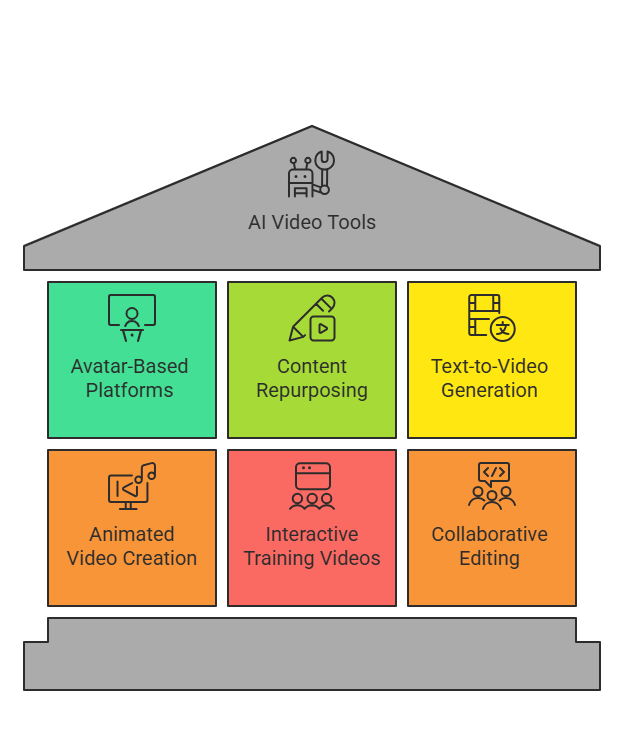
Why AI Video Tools Are Blowing Up Right Now
Before we jump into the tools, it’s worth understanding why this category has exploded.
Short-form video dominates platforms like Instagram, YouTube, and TikTok. At the same time, businesses are under pressure to produce more content, faster. That’s where AI comes in.
Instead of manually editing timelines, adding subtitles, syncing audio, or even recording voiceovers, these tools automate large parts of the workflow. Some even generate entire videos from a simple text prompt.
And yeah, it sounds a bit futuristic, but it’s already here.
1. Synthesia
Synthesia is one of the most widely used AI video platforms, especially in corporate environments.
At its core, it allows you to create videos using AI avatars. You type a script, choose an avatar, select a background, and the platform generates a video where the avatar speaks your script.
What makes Synthesia powerful is its scalability. Companies use it to create hundreds of training videos without needing cameras, actors, or studios. It supports over 120 languages, which is huge for global teams.
The avatars themselves look quite professional. The lip-syncing is fairly accurate, and the voices are clean, though if you listen closely, you might still notice that slightly synthetic tone.
One thing I’ve noticed is that it works best for structured content. Think onboarding videos, HR training, internal communication, product walkthroughs. If you try to use it for storytelling or highly emotional content, it feels a bit stiff.
Pricing can be on the higher side, especially for small creators. But for businesses, the ROI is pretty clear.
2. Pictory
Pictory is built around content repurposing, and honestly, it does that really well.
You can take a blog post, paste it into the platform, and it automatically converts it into a video. It extracts key sentences, matches them with visuals, adds captions, and even background music.
This is extremely useful if you’re doing content marketing. Instead of writing a blog and stopping there, you can turn it into multiple short-form videos for Instagram, LinkedIn, or YouTube Shorts.
Another feature is turning long videos into short clips. For example, if you upload a webinar, Pictory can identify highlights and convert them into bite-sized content.
The downside is creative control. Sometimes the visuals it selects don’t perfectly match your intent. You can edit them, but that adds extra time.
Still, for speed and efficiency, it’s hard to beat.
3. Runway
Runway is not just a video generator, it’s more like a creative AI lab.
Its most talked-about feature is text-to-video. You describe a scene like “a cinematic shot of a city in the rain at night,” and it generates a video clip.
Now, to be honest, the results are not always perfect. Sometimes they look surreal or slightly distorted. But that’s also what makes it exciting.
Beyond that, Runway offers tools like:
- Background removal without green screen
- Motion tracking
- Video inpainting (removing objects from videos)
- AI slow motion
This tool is best suited for creators, filmmakers, and designers who want to experiment.
If you’re looking for polished marketing videos, this might not be your first choice. But if you want creative control and cutting-edge features, Runway is unmatched.
4. InVideo AI
InVideo AI is designed for speed. You give it a prompt, and it generates an entire video including script, visuals, voiceover, and transitions.
For example, you could type “create a YouTube video about digital marketing tips,” and it will produce a ready-to-use video.
This is especially useful for content creators who need to produce videos consistently. It reduces the effort dramatically.
The templates are modern and optimized for social media, which is a big plus.
However, because it relies on templates and stock footage, some videos can feel generic. If you’re building a strong brand identity, you may need to customize heavily.
Still, for quick turnaround content, it’s very effective.
5. Lumen5
Lumen5 focuses heavily on turning written content into videos.
The interface is simple. You paste your blog, and it breaks it into scenes. Then it suggests visuals, animations, and layouts.
What’s nice is the drag-and-drop editor. You can easily adjust text, change visuals, and tweak timing.
It’s widely used by marketing teams to distribute blog content across social media.
The limitation is that it doesn’t offer advanced AI generation like text-to-video. It’s more of a smart automation tool rather than a creative AI platform.
6. HeyGen
HeyGen is a strong competitor to Synthesia, but with more flexibility.
It offers a wide range of avatars and voices, and you can even create custom avatars.
One standout feature is personalized video creation. You can generate videos where each viewer sees their name or specific details, which is powerful for sales and outreach.
Voice cloning is another big feature. You can replicate your voice and use it across videos without recording again.
The interface is clean, but some advanced features require time to learn.
It’s ideal for businesses that want to scale personalized communication.
7. Descript
Descript changes how you edit videos.
Instead of editing timelines, you edit text. When you delete a sentence from the transcript, it removes that part from the video.
This is incredibly intuitive, especially for beginners.
It also includes:
- Screen recording
- Podcast editing
- AI voice cloning (Overdub)
- Automatic filler word removal
It’s not a traditional AI video generator, but it’s a powerful tool for editing and refining content.
If you’re creating talking-head videos, podcasts, or tutorials, Descript is extremely useful.
8. Veed.io
Veed.io is a browser-based editor with strong AI features.
It includes automatic subtitles, which are surprisingly accurate. This alone saves a lot of time, especially for social media content.
It also offers text-to-speech, background noise removal, and basic editing tools.
What I like about Veed is its simplicity. You don’t need technical skills to get started.
However, it’s not as advanced in AI generation compared to tools like Runway or InVideo AI.
It’s more of a practical, everyday tool.
9. FlexClip
FlexClip is designed for beginners.
It offers templates, stock media, and simple AI features like script generation and text-to-video.
The interface is straightforward, which makes it easy to use even if you’ve never edited a video before.
It’s great for small businesses, freelancers, or anyone who needs quick videos without a steep learning curve.
But for advanced users, it might feel limited.
10. DeepBrain AI
DeepBrain AI focuses on hyper-realistic AI avatars.
These avatars are often used for news-style videos, educational content, and corporate presentations.
The realism is impressive. Facial expressions and voice delivery feel more natural compared to many competitors.
It also supports real-time AI avatars, which can be used for live interactions.
However, like other avatar-based tools, it’s not ideal for creative storytelling.
11. Elai.io
Elai.io is another avatar-based platform with strong multilingual capabilities.
You can create videos in multiple languages with accurate lip-syncing.
This makes it a great option for global marketing and training.
The interface is simple, and the workflow is straightforward.
The only drawback is that avatars can sometimes feel slightly robotic.
12. Steve AI
Steve AI specializes in animated videos.
You input a script, and it generates an animated video with characters, scenes, and transitions.
It’s perfect for explainer videos, educational content, and storytelling.
The animations are engaging, though not as advanced as professional animation software.
Still, for quick and effective explainer videos, it works well.
13. Colossyan
Colossyan is built specifically for workplace learning.
It allows you to create interactive training videos using AI avatars.
You can add quizzes, branching scenarios, and other engagement features.
This makes it more than just a video tool, it’s a learning platform.
It’s not designed for general content creation, but within its niche, it’s very powerful.
14. Designs.ai Videomaker
Designs.ai is an all-in-one creative platform.
Its video maker allows you to generate videos from text input.
It automatically adds visuals, voiceovers, and transitions.
This is useful for quick marketing content, especially if you’re handling multiple creative tasks.
However, like most all-in-one tools, it lacks depth compared to specialized platforms.
15. Kapwing
Kapwing is a collaborative video editing platform.
It includes AI features like subtitle generation, smart cuts, and content resizing.
What makes it stand out is teamwork. Multiple users can work on the same project in real time.
It’s widely used by social media teams and content creators.
While it’s not the most advanced AI generator, it’s extremely practical for day-to-day use.
How to Choose the Right Tool
Choosing between these tools really depends on what you’re trying to do.
If you want AI avatars, tools like Synthesia or HeyGen are strong choices. For content repurposing, Pictory or Lumen5 might be better. If you’re experimenting with creative AI, Runway is probably the most exciting option.
And honestly, you might end up using more than one tool. That’s pretty common.
The Real Impact of AI Video Creation
The biggest shift isn’t just speed, it’s accessibility.
People who never edited videos before can now create professional-looking content. Small businesses can compete with larger brands in terms of content output.
At the same time, there’s a bit of a trade-off. Some videos can feel generic if you rely too much on templates or automation.
So maybe the real advantage comes when you combine AI efficiency with human creativity.
That’s where things get interesting.
Final Thoughts
Choosing the right AI Video Generator Tools really depends on your goals.
If you want automation and speed, tools like InVideo AI and Pictory are great. If you’re focused on avatars, Synthesia and HeyGen stand out. And if you’re exploring creative possibilities, Runway is probably the most exciting.
Honestly, there’s no single “best” tool. The best approach is to test a few and see what fits your workflow.
Because at the end of the day, these tools are just that tools. The real magic still comes from how you use them.
FAQs
1. What are AI video generator tools?
They are software platforms that use artificial intelligence to create videos automatically from text, images, or prompts without requiring advanced editing skills.
2. Are AI-generated videos good for marketing?
Yes, they are widely used for ads, social media content, and product videos because they reduce production time and cost.
3. Do these tools require technical skills?
Most tools are designed for beginners, though advanced features may require some learning.
4. Can AI completely replace video editors?
Not really. AI can automate tasks, but human creativity and storytelling are still important.
5. Which tool is best for beginners?
Tools like InVideo AI, FlexClip, and Veed.io are generally easier to start with.
6. Are AI avatars realistic?
They are improving rapidly. Some tools offer highly realistic avatars, though they may still feel slightly artificial in certain situations.
7. Can I use these videos for YouTube?
Yes, many creators use AI-generated videos for YouTube content.
8. Do these tools support multiple languages?
Many tools offer multilingual support, especially avatar-based platforms.
9. Are free versions available?
Most tools offer free plans, but they usually come with limitations like watermarks or restricted features.
10. What is the future of AI video creation?
It’s likely to become more realistic, customizable, and integrated with other AI tools, making content creation even more accessible.