

Building a website used to take weeks. You needed a developer, a designer, a brief that somehow turned into a two-month project, and a budget that kept expanding. That’s not most people’s reality anymore.
AI Website Builder Tools have changed what’s possible. A solo founder can spin up a professional site in an afternoon. A marketing team can test five landing page variants without touching code. A freelancer can deliver client websites faster than ever and still charge the same rate.
The market has exploded. Every major no-code platform now ships AI features, and a new wave of AI-first builders has arrived alongside them. Not all of them are worth your time. Some are genuinely impressive. Some are polished demos hiding shallow functionality.
This article breaks down 20 of the best options available right now, covering what each tool actually does, who it’s built for, and where it falls short.
What Makes an AI Website Builder Actually Useful?
An AI website builder worth using does at least three things well: it generates a functional starting point quickly, it lets you customise without fighting the interface, and it doesn’t lock you into something you’ll outgrow in six months.
The weakest tools in this category are essentially template pickers with a chatbot slapped on top. The best ones use AI throughout the workflow, from layout generation to copy suggestions to SEO metadata, and get out of your way once you know what you’re doing.
AI website builders use machine learning and natural language processing to generate complete website layouts, copy, and structure from a short prompt or questionnaire. The best tools combine AI-generated starting points with full customisation controls, so they work for complete beginners and experienced designers alike. Features like AI-generated SEO metadata, image suggestions, and responsive layout adjustments separate the leading tools from the rest.
The 20 Best AI Website Builder Tools
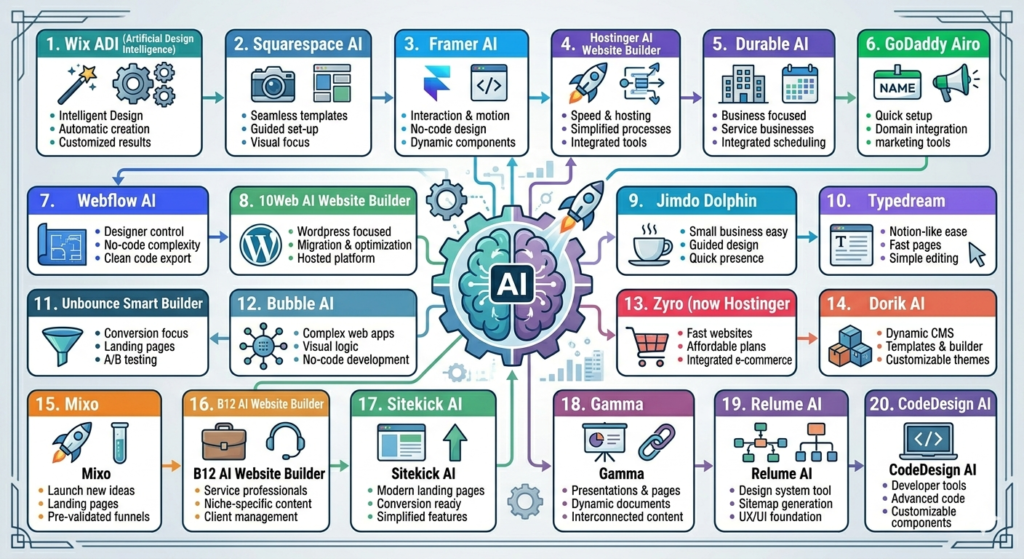
1. Wix ADI (Artificial Design Intelligence)
Wix ADI is one of the most mature AI builders on the market. You answer a series of questions about your business, goals, and style preferences, and Wix generates a complete site with relevant pages, images, and copy already in place.
The AI handles the initial layout and structure well. Where Wix really earns its place is in the editing layer underneath: the drag-and-drop editor is among the most flexible available, which means you’re not stuck with what the AI produces. You can accept the skeleton and fully rebuild it, or use it almost as-is.
Best for: Small business owners, portfolio sites, and anyone who wants a capable editor alongside the AI features.
Limitation: The AI-generated copy is generic and almost always needs rewriting before you publish.
2. Squarespace AI
Squarespace introduced AI tools across its platform, including an AI text generator, an AI image editor, and an AI blueprint feature that helps plan your site structure before you build.
The design quality on Squarespace is consistently high. If your brand requires a polished, editorial aesthetic, few builders match it. The AI features layer on top of this rather than replacing the existing editor, which keeps quality high but also means there’s a learning curve.
Best for: Creatives, photographers, designers, and brands where visual identity matters most.
Limitation: Less flexible than Wix for complex layouts; some AI features are available only on higher-tier plans.
3. Framer AI
Framer built its reputation as a prototyping tool. It’s now a full website builder with strong AI capabilities, including a prompt-to-site feature that generates a complete site from a text description.
The results are genuinely impressive. Type something like “a landing page for a SaaS productivity tool with a dark theme” and Framer produces something you could actually ship. The output leans modern and design-forward, which makes it a favourite among startup founders and product teams.
Best for: Startups, SaaS companies, product launches, and designers comfortable with a more technical interface.
Limitation: Steeper learning curve than Wix or Squarespace. Not ideal for beginners.
4. Hostinger AI Website Builder
Hostinger’s AI builder is arguably the most beginner-friendly option available. You describe your website in plain language, and the AI generates a complete site in under two minutes, including copy, images, and a structure tailored to your use case.
The pricing is competitive, and Hostinger bundles hosting with the builder, which simplifies the setup considerably. The editing experience isn’t as polished as Wix or Squarespace, but for someone who needs a simple professional site fast, it does the job.
Best for: Beginners, solopreneurs, and small businesses on a tight budget.
Limitation: Less design flexibility than premium builders; custom functionality is limited.
5. Durable AI
Durable markets itself as the fastest AI website builder, and the claim holds up. It generates a complete small business website in about 30 seconds from a business name and category. You get a site, copy, images, and a contact form ready to go.
There’s also a built-in AI CRM and invoicing feature, which makes Durable more than just a website builder. It’s positioning itself as an all-in-one tool for service businesses.
Best for: Local service businesses, consultants, and tradies who need a basic online presence quickly.
Limitation: Not suitable for complex sites; customisation options are limited compared to more established platforms.
6. GoDaddy Airo
GoDaddy Airo is the AI layer built on top of GoDaddy’s website builder. It uses your business information to generate a site, social media content, and even a logo. The integration with GoDaddy’s broader suite, including domains, email, and payments, makes it convenient for businesses already in the GoDaddy orbit.
The AI-generated designs have improved significantly in recent years and are more capable than GoDaddy’s older template-based system.
Best for: Small businesses, restaurants, and brick-and-mortar shops looking for an all-in-one solution.
Limitation: Design quality lags behind Squarespace and Framer; brand-conscious businesses may find it limiting.
7. Webflow AI
Webflow is a professional-grade no-code builder that added AI capabilities to its already powerful platform. The AI features include AI-powered copy generation, layout suggestions, and an experimental prompt-to-site feature in its newer iterations.
Webflow gives developers and designers full control over HTML, CSS, and interactions without writing code manually. The AI speeds up production without removing the precision that makes Webflow popular among agencies and in-house design teams.
Best for: Agencies, freelance designers, and marketing teams who need full design control with production-ready output.
Limitation: Significant learning curve; pricing is higher than most consumer builders.
Webflow is a no-code platform that generates clean, production-ready HTML and CSS, making it one of the few AI website builders suited to agency-level work. Its AI tools accelerate content generation and layout suggestions without limiting design flexibility, which is why it remains a go-to for professional web teams despite its steeper learning curve and pricing.
8. 10Web AI Website Builder
10Web is a WordPress-based AI builder that generates websites on top of Elementor, one of the most widely used WordPress page builders. It analyses competitor websites if you provide a URL and uses that analysis to inform your site’s structure.
For businesses that want to stay in the WordPress ecosystem, this is one of the smartest AI entry points. You get the flexibility of WordPress with an AI-assisted starting point.
Best for: WordPress users, bloggers, and businesses that need WordPress-specific plugins and features.
Limitation: The output requires Elementor knowledge to customise properly; not truly beginner-friendly.
9. Jimdo Dolphin
Jimdo Dolphin is a lightweight AI builder focused on small business owners and side projects. You answer questions in a short onboarding flow and Jimdo generates a basic site with relevant copy and images.
It won’t win design awards, but it gets a functional site live fast and has a genuinely simple editing experience. Jimdo also offers a free tier, which makes it accessible for anyone just testing the waters.
Best for: Very small businesses, hobby projects, and anyone who wants a free option.
Limitation: Limited design flexibility; the free plan shows Jimdo branding.
10. Typedream
Typedream is a Notion-style website builder with AI features for copy and layout generation. The interface is document-like, which makes it unusually approachable for people who spend their days in productivity tools rather than design software.
It’s well-suited to founders who want to publish a clean landing page or product site quickly without managing a complex editor. The output is minimal and modern.
Best for: Founders, indie makers, and product people building simple landing pages or documentation sites.
Limitation: Not suited to complex multi-page sites or e-commerce.
11. Unbounce Smart Builder
Unbounce is primarily a landing page platform, but its Smart Builder uses AI to recommend layouts based on conversion data from millions of landing pages. The AI doesn’t just guess at design. It predicts which layouts are more likely to convert based on real performance data.
This is a meaningfully different use of AI than most builders. Unbounce uses it to improve outcomes, not just speed up production.
Best for: Performance marketers, growth teams, and anyone running paid campaigns who needs conversion-optimised landing pages.
Limitation: Not a full website builder; focused specifically on landing pages and conversion flows.
12. Bubble AI
Bubble is a full-stack no-code platform. It recently integrated AI features to help users build database structures, design workflows, and generate page layouts from text prompts. If you’re building a web app rather than a marketing site, Bubble is in a different category from the others on this list.
Think membership platforms, marketplaces, internal tools, and SaaS prototypes. The AI features accelerate what is already a powerful platform.
Best for: Founders and product teams building web applications, not just websites.
Limitation: Steep learning curve; overkill if you only need a marketing site.
13. Zyro (now Hostinger Website Builder)
Zyro merged into Hostinger’s builder, but many of its AI tools continue under the Hostinger brand. These include an AI heatmap tool that predicts where visitors will look on your page, an AI business name generator, and an AI writer for page copy.
The heatmap tool in particular is genuinely useful and not something most builders offer. It’s a practical AI application that helps you make layout decisions based on predicted attention patterns.
Best for: Small businesses that want data-informed layout decisions without hiring a UX researcher.
Limitation: The base builder is less polished than Wix or Squarespace.
14. Dorik AI
Dorik is a newer AI builder with a clean interface and strong output quality. You describe your site and Dorik generates a multi-page website with relevant copy and imagery. The platform has an active development team shipping updates frequently.
It’s positioned as a more affordable alternative to Webflow with AI built in from the start rather than added on.
Best for: Freelancers, agencies, and small teams who want Webflow-quality output at a lower price.
Limitation: Smaller community and fewer templates than established players.
15. Mixo
Mixo is built specifically for launching startup landing pages fast. You input your idea and Mixo generates a landing page in seconds, complete with a waitlist signup form. It’s not a full website builder, but as a way to validate a startup idea and start collecting email signups, it’s hard to beat.
Best for: Early-stage founders validating startup ideas and collecting pre-launch signups.
Limitation: Very limited scope; not suitable for anything beyond a simple landing page.
16. B12 AI Website Builder
B12 is an AI website builder with a twist: it combines AI generation with a team of human designers and copywriters who review and refine the output. The result is higher quality than most pure-AI tools, but it comes at a higher price.
For professional services businesses, law firms, consultancies, and agencies, the quality bar matters more than the speed. B12 targets exactly that audience.
Best for: Professional services businesses that need a high-quality site and are willing to pay for human review alongside AI generation.
Limitation: More expensive than self-serve alternatives; less suitable for fast iteration.
17. Sitekick AI
Sitekick generates landing pages from a single sentence description. The output focuses on a single-page format optimised for conversions, with sections for features, testimonials, and CTAs automatically included.
It’s a narrow tool with a narrow use case, but it does that use case well. If you need a quick landing page for a product launch or a lead magnet, Sitekick delivers it faster than most.
Best for: Marketers and founders who need single-page landing pages quickly, without design work.
Limitation: Limited to single-page layouts; no multi-page site capability.
18. Gamma
Gamma blurs the line between website builder and presentation tool. You describe your content and Gamma generates a document, presentation, or webpage from it. The AI handles structure, layout, and design simultaneously.
It’s become popular among marketers who create decks, proposals, and content hubs that live online rather than in PowerPoint files. The output quality is consistently clean.
Best for: Marketers, consultants, and content creators who need polished online documents or microsites.
Limitation: Not a traditional website builder; limited to structured content formats.
Gamma uses AI to generate structured web documents, presentations, and simple microsites from text prompts. Unlike traditional AI website builders that focus on marketing sites, Gamma targets marketers and consultants who publish proposals, reports, and content hubs online. Its AI handles layout, typography, and structure in a single pass, making it unusually fast for polished business content.
19. Relume AI
Relume is built for designers and agencies working in Figma and Webflow. Its AI generates complete website sitemaps and component-level wireframes from a brief, which you then build out in Webflow. It’s not a standalone builder, but as an AI planning and wireframing tool, it dramatically cuts down the pre-production time on professional web projects.
Best for: Web designers and agencies using Webflow and Figma as their production tools.
Limitation: Requires Webflow knowledge to use effectively; not useful for non-designers.
20. CodeDesign AI
CodeDesign AI generates fully coded websites from text prompts, producing clean HTML, CSS, and JavaScript. Unlike most builders that use proprietary editors, CodeDesign outputs standard code you can host anywhere.
For developers who want to use AI to accelerate front-end work without getting locked into a proprietary platform, this is one of the more practical tools available.
Best for: Developers and technical founders who want AI-generated code rather than a visual editor.
Limitation: Requires technical knowledge to modify and host the output; not beginner-friendly.
How to Choose the Right AI Website Builder for Your Needs
The tool that’s right for you depends on three things: your technical comfort level, the type of site you’re building, and whether the platform can grow with you.
If you’re a beginner building a basic business site, Hostinger AI or Wix ADI will get you live fastest with the least friction. If you’re a designer or agency, Webflow AI or Framer AI gives you the control and output quality professional work demands. If you’re a marketer running paid campaigns, Unbounce Smart Builder’s conversion-focused AI is genuinely different from anything else on this list.
One thing worth thinking about: most of these tools are good at generating a starting point. The sites that actually perform well are the ones where someone made real decisions about copy, structure, and positioning after the AI did its work. The AI saves you time. It doesn’t replace judgment.
Choosing the right AI website builder comes down to technical comfort, site complexity, and room to grow. Beginners benefit most from guided tools like Wix ADI and Hostinger AI, while professionals and agencies typically need the design control offered by Webflow AI or Framer AI. Conversion-focused marketers should look at Unbounce Smart Builder, which uses performance data from millions of pages to recommend layouts rather than relying on design aesthetics alone.
Wrapping Up
Twenty tools is a lot to process. So here’s the short version: if you’re starting from scratch and just need something live, Hostinger AI or Wix ADI won’t let you down. If you’re a professional who needs precise output, Webflow AI and Framer AI are where the quality lives. If conversions matter more than aesthetics, look hard at Unbounce Smart Builder.
The AI website builder market is moving fast. Features that were experimental twelve months ago are now standard. What hasn’t changed is this: the site you publish is only as good as the decisions you make with it. AI handles the production. The strategy is still yours.
If you want to go deeper on AI tools for marketing, not just website builders but the full stack of AI-powered workflows, the Hotskill app brings together courses on AI in marketing, automation, and content strategy for practitioners who want to apply these tools, not just understand them.
Frequently Asked Questions
What are AI Website Builder Tools?
AI Website Builder Tools are platforms that use artificial intelligence to generate website layouts, copy, images, and structure automatically, typically from a short text prompt or a guided questionnaire. They reduce the time and technical skill required to build a professional-looking website from scratch.
Are AI website builders good enough for professional use?
Some are, some aren’t. Tools like Webflow AI, Framer AI, and B12 produce professional-quality output suitable for agency work and client-facing sites. Most consumer-grade AI builders generate a good starting point but need meaningful customisation before they’re ready for a professional audience.
How is an AI Website Builder different from a regular website builder?
A traditional website builder gives you templates and a drag-and-drop editor. An AI Website Builder uses machine learning to generate a custom layout and copy based on your inputs, which means you start with something closer to a finished site rather than a blank template.
Do I need coding skills to use AI website builders?
Not for most of the tools on this list. Platforms like Wix ADI, Hostinger AI, Durable, and Squarespace AI require zero coding knowledge. Tools like Webflow AI and CodeDesign AI benefit from technical familiarity, but even these have interfaces designed to be used without writing code.
Which AI website builder is best for beginners?
Hostinger AI Website Builder and Durable are the two strongest options for beginners. Both generate a complete site within minutes, include hosting, and have simple editing interfaces that don’t require design knowledge.
Can I use AI website builders for e-commerce?
Yes. Wix, Squarespace, and GoDaddy Airo all support e-commerce with their AI tools. Shopify doesn’t appear on this list because it’s primarily an e-commerce platform, but its AI tools are worth exploring separately if your primary goal is selling products online.
Is the AI-generated copy good enough to publish?
Rarely without editing. AI-generated copy is usually generic and benefit-heavy without being specific to your brand, your customers, or your market position. Use it as a first draft to edit from, not a finished product.
Which AI website builder is best for landing pages?
Unbounce Smart Builder is the strongest option for conversion-focused landing pages. For speed, Sitekick and Mixo generate single-page sites in seconds. For design quality, Framer AI produces landing pages that look genuinely professional out of the box.
How much do AI website builders cost?
Pricing ranges from free (Jimdo’s basic tier) to several hundred dollars per month (B12, Webflow’s higher plans). Most tools fall in the $10-$50 per month range for functional plans. Hostinger AI is one of the most affordable at under $5 per month when billed annually.
Will AI website builders replace web designers?
Not in any meaningful near-term timeframe. AI tools handle pattern-based work: generating layouts, filling in copy templates, resizing images. The work that actually differentiates a good website, positioning, brand voice, conversion architecture, and user experience decisions, still requires human judgment. AI makes designers faster. It doesn’t replace what they decide.