

Most people type a question into an AI tool the same way they’d type it into a search engine. One line. No context. No format instructions. Then they get a vague, generic answer and assume the tool isn’t that useful.
The tool isn’t the problem. The prompt is.
What is prompting? It’s the skill of communicating with an AI model in a way that gives it everything it needs to produce the output you actually want. Not a vague sentence. Not a half-formed question. A structured instruction that sets the context, defines the task, specifies the format, and gives the model enough to work with.
This article breaks down every component of a well-built prompt, explains what each one does, and shows you what the difference looks like in practice. By the end, you’ll be able to look at any AI output you’re unhappy with and diagnose exactly which part of the prompt caused the problem.
Why Most AI Prompts Underperform
Here’s the honest truth: the gap between a mediocre AI output and a genuinely useful one almost always comes down to the prompt, not the model.
Most people treat AI tools like a search bar. They type “write me a product description” and wonder why they get something so generic it could apply to any product on earth. Or they ask “give me marketing ideas” and get a list of suggestions so broad they’re useless in practice.
The model isn’t failing. It’s doing exactly what was asked. The problem is that “write me a product description” is not a complete instruction. It tells the model what to do, but gives it nothing about who’s reading it, what the product actually is, what tone to use, how long it should be, or what the reader needs to feel after reading it.
Prompt engineering is the discipline of learning how to structure these instructions so the model has everything it needs. And once you understand the components, you can build prompts that produce strong, usable output on the first try far more often.
What Is Prompting and Why Does Structure Matter?
What is prompting, at its core? It’s the act of writing an instruction that guides an AI model to produce a specific output. Every word in that instruction shapes what the model generates.
AI models like Claude 3.5 Sonnet or GPT-4o don’t have intentions. They predict the most likely and useful continuation of whatever text you give them. That means they’re extremely sensitive to what you include and what you leave out. A structured prompt gives the model more accurate signals. A vague prompt gives it room to guess, and it will usually guess toward the most average, generic version of what you asked.
Structure matters because it reduces ambiguity. When a model knows the role it’s playing, the context it’s working in, the specific task at hand, the format you want, the constraints to respect, and the audience it’s writing for, the output space narrows dramatically. The model doesn’t have to guess. It can focus.
A structured AI prompt gives the model accurate signals about role, context, task, format, constraints, and audience. Each component narrows the output space and reduces ambiguity. Skipping components forces the model to guess, which consistently produces more generic output.
The Role: Telling the AI Who It Is
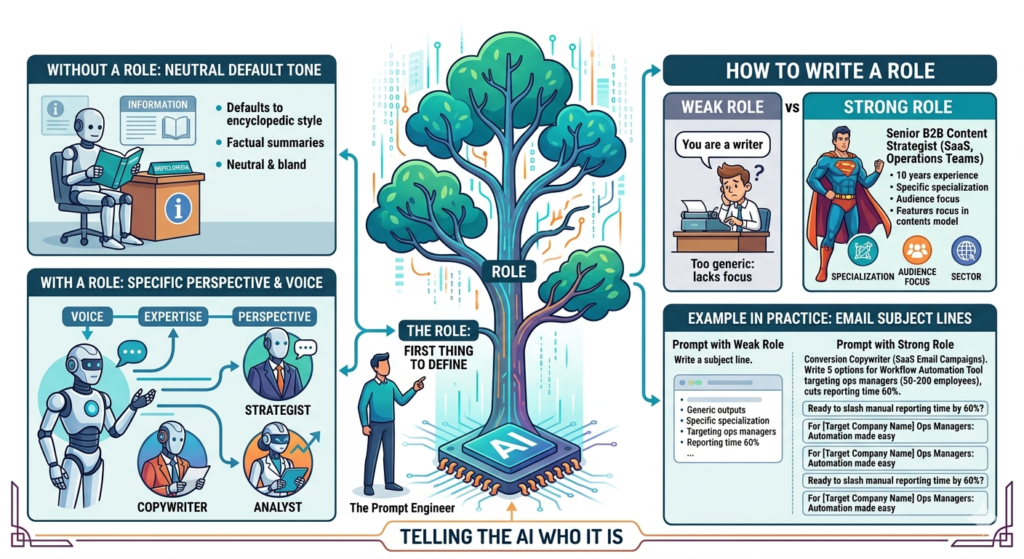
The role is the first thing you should define in any serious prompt. It tells the model what perspective to write from, what expertise to draw on, and what voice to use.
Without a role, the model defaults to a neutral, encyclopedic tone. That might work for factual summaries, but it’s rarely what you need for copy, strategy, analysis, or anything that requires a specific point of view.
How to write a role:
A role instruction doesn’t need to be complicated. It just needs to be specific.
- Weak: “You are a marketing expert.”
- Strong: “You are a senior B2B content strategist with 10 years of experience writing for SaaS companies targeting mid-market operations teams.”
The stronger version gives the model a specialisation, an audience focus, and a sector. That context shapes vocabulary choices, the examples it reaches for, and the assumptions it makes about the reader.
Example in practice:
Prompt with weak role: “You are a writer. Write an email subject line for a product launch.”
Prompt with strong role: “You are a conversion copywriter who specialises in SaaS email campaigns. Write five subject line options for a product launch email targeting ops managers at companies with 50-200 employees. The product is a workflow automation tool that cuts manual reporting time by 60%.”
The second prompt produces testable, specific, audience-aware subject lines. The first produces placeholders.
The Context: Giving the AI What It Needs to Know
Context is the background information the model needs to do the job properly. It’s the most commonly skipped component, and skipping it is usually why outputs feel generic.
Think of it this way: if you hired a freelance copywriter and gave them a brief with no context about your company, your product, your audience, or your competitive position, you’d get generic copy. The same applies here.
Context can include:
- Who the audience is (job title, industry, level of knowledge)
- What the product or service does
- What the reader already knows coming in
- What problem is being solved
- Any relevant background that changes how the task should be approached
The key is specificity. “Our audience is marketing managers” is context. “Our audience is marketing managers at e-commerce brands doing $1M-$10M in annual revenue who currently use Meta Ads Manager but are frustrated with attribution gaps” is useful context.
The more specific you are, the less the model has to invent. And what the model invents is usually wrong.
The Task: The Core Instructions
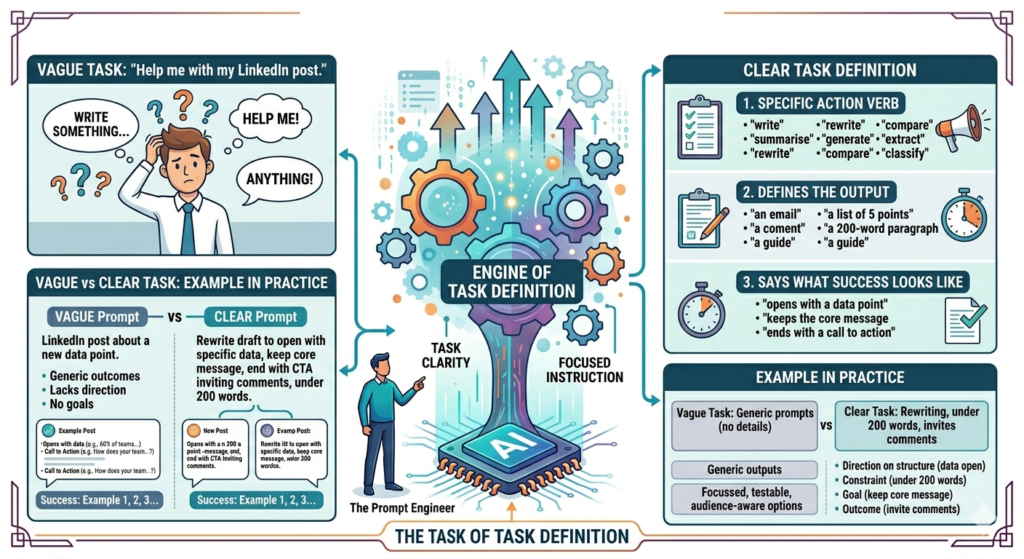
Every prompt has a task: the specific thing you’re asking the model to do. This sounds obvious, but most prompts fail here because the task is either too vague, or it bundles too many sub-tasks without separating them.
A clear task has three qualities:
- It uses a specific action verb (“write”, “summarise”, “rewrite”, “generate”, “compare”, “extract”, “classify”)
- It defines what the output should be (an email, a list of five bullet points, a 200-word paragraph, a step-by-step guide)
- It says what success looks like, even briefly
Vague task: “Help me with my LinkedIn post.”
Clear task: “Rewrite this LinkedIn post draft so it opens with a specific data point rather than a question, keeps the core message, and ends with a call to action that invites comments. Keep it under 200 words.”
The clear version gives the model direction on structure (open with data), constraint (under 200 words), goal (keep the core message), and outcome (invite comments). There’s no ambiguity about what to do or what good looks like.
The Format: Specifying How You Want the Output
The format instruction tells the model how to structure its response. This is where most practitioners get sloppy, then complain that the output “doesn’t look right.”
The model will default to whatever format is statistically common for that type of request. Ask for advice, and you’ll get bullet points. Ask for an explanation, and you’ll get paragraphs with bold headers. These defaults aren’t wrong, but they’re rarely exactly what you need.
Format options you can specify:
- Length (word count, sentence count, number of items)
- Structure (paragraphs, numbered list, table, bullet points, section headers)
- Output type (email, LinkedIn post, JSON, code snippet, slide outline)
- Specifics (“use H2 headers for each section”, “write this as a single unbroken paragraph”, “format this as a table with three columns: Tool, Use Case, Limitation”)
AI prompt writing example:
“Write a comparison of five project management tools. Format the output as a table with four columns: Tool Name, Best For, Key Limitation, Pricing (as of 2026). Keep each cell to one sentence.”
That instruction eliminates the chance of getting a wall of text. The model knows exactly what you want to see.
Format instructions tell an AI model how to structure its response. Without them, the model defaults to statistically common formatting for that task type. Specifying length, structure, output type, and column headers consistently produces output that requires less editing.
Constraints and Guardrails: What Not to Do
Constraints are the instructions that define what the model should avoid. They’re the negative space of the prompt, and they matter more than most people realise.
Without constraints, a model will often include things you don’t want: filler phrases, generic caveats, unnecessary qualifications, assumptions about your audience, or elements that don’t fit your brand voice.
Types of constraints that actually help:
- Tone exclusions: “Do not use exclamation marks. Do not use the phrase ‘unlock your potential’.”
- Content exclusions: “Do not mention competitors by name.”
- Format restrictions: “Do not use bullet points. Write this entirely in prose.”
- Assumption guardrails: “Do not assume the reader has any prior knowledge of machine learning.”
- Length caps: “Keep the entire response under 150 words.”
The best constraints are specific to your use case. Generic constraints (“be professional”) are less useful than pointed ones (“avoid jargon; this reader doesn’t work in tech”).
From what we’ve seen with Hotskill learners, the biggest output quality jump often comes not from adding more to the prompt, but from adding the right constraints. It’s frequently easier to tell a model what not to do than to describe what you want in positive terms.
Examples: The Most Underused Prompt Component
If you’re only going to add one thing to your prompts after reading this, make it examples. This technique is called few-shot prompting, and it’s arguably the most reliable way to get consistent output.
Few-shot prompting means showing the model one or more examples of the output you want before asking it to produce its own. The model uses those examples to calibrate tone, format, structure, and style far more accurately than any written description can.
How to use examples in a prompt:
Step 1: Write your role, context, and task as usual. Step 2: Add a section called “Example:” or “Here are examples of what I’m looking for:” Step 3: Include one or two actual examples of the style, format, or tone you want. Step 4: End with your specific task.
Practical example:
“You are a copywriter writing short product descriptions for an outdoor gear brand. The tone is direct, no fluff, written for experienced hikers.
Example 1: ‘Ultralight trekking pole. Carbon shaft, cork grip. 190g per pair. Built for sustained ridge walks, not just trail days.’
Example 2: ‘Merino base layer. 200gsm. Warm when wet. Machine-washable. The one piece you pack regardless of conditions.’
Now write three product descriptions in this style for: (1) a headlamp, (2) a waterproof jacket, (3) a trail shoe.”
The model now has a precise template for style, length, and tone. No amount of adjective-heavy description would get you there as reliably.
Tone and Audience: Calibrating the Voice
Tone and audience instructions overlap with role and context, but they deserve their own mention because they’re often what makes the difference between output that sounds right and output that technically answers the question but feels off.
Tone instructions go beyond “professional” or “casual.” Those words mean different things in different industries. Be specific about what you mean.
Vague tone: “Write this in a friendly tone.”
Useful tone: “Write this like a knowledgeable colleague explaining something to a peer, not a teacher explaining to a student. Conversational, direct, no hand-holding.”
Audience calibration is about making sure the model writes at the right level of expertise and assumes the right things. A prompt aimed at a CFO should not read the same way as one aimed at a junior marketer. Specifying the audience stops the model from having to guess, and it almost always guesses somewhere in the middle.
AI prompting techniques that combine tone and audience in a single instruction tend to produce the most consistent voice: “Write for a marketing director at a mid-size B2B SaaS company. They’re data-literate but not technical. They care about ROI, not feature lists. Tone should be peer-to-peer, not vendor-to-customer.”
Putting It All Together: A Full Prompt Walkthrough
Here’s what a complete, structured prompt looks like when all components are assembled. This is for a real task: a LinkedIn thought leadership post.
Weak version: “Write me a LinkedIn post about AI tools for marketers.”
Structured version using prompt design principles:
“You are a senior digital marketer who has worked in B2B SaaS for 12 years and now writes regularly on LinkedIn about practical AI use in marketing. [ROLE]
Your audience is marketing managers and heads of marketing at B2B tech companies. They’re interested in practical insights, not hype. They’re skeptical of ‘AI will change everything’ posts. [CONTEXT + AUDIENCE]
Write a LinkedIn post that shares one specific way you used an AI tool this week to save time on a recurring task. Be specific about the tool, the task, and the time saved. [TASK]
Format: 150-200 words. No bullet points. One clear paragraph per idea. End with a single question to invite comments. [FORMAT]
Do not use the word ‘unlock’. Do not open with a generic statement about AI. Do not use exclamation marks. [CONSTRAINTS]
Example of the style I want: ‘Spent 20 minutes this week doing something I used to spend 3 hours on. Ran our monthly competitive review through Claude with a structured prompt and got a formatted summary I could actually send to my team. Not perfect, but 80% there and editable in 15 minutes. That’s the trade-off I’ll take every time. What recurring task would you automate if you could?’ [EXAMPLE]”
That prompt will produce a post that sounds like a real person, not a marketing bot. Every component does specific work. Nothing is redundant.
A fully structured prompt combines role, context, task, format, constraints, examples, and audience into a single instruction. Each component removes a different type of ambiguity. The result is AI output that requires significantly less editing and more closely matches the intended use case on the first attempt.
Want to Master the Anatomy of a Great Prompt?
Understanding prompt components is one thing—using them effectively in real-world scenarios is another. If you want to learn how role, context, task, format, constraints, and examples work together to create high-quality AI outputs, explore Hotskill’s bite-sized video lessons designed for practical learning.
Learn the Anatomy of a Great Prompt through short, easy-to-follow videos on the Hotskill app. Discover proven frameworks, real examples, and hands-on exercises that help you get better AI results faster.
Download the Hotskill app iOS or Android today and start building your AI prompting skills one lesson at a time.
What You Should Do Next
The components covered here aren’t theoretical. They’re directly usable in any AI tool you’re already working with today.
Start with one prompt you use regularly, whether that’s for social media posts, internal summaries, or client-facing copy. Run it through the checklist: does it have a role? Specific context? A clear task with a defined output? Format instructions? Constraints? If any of those are missing, add them and compare the output.
Most Hotskill learners see a measurable improvement in output quality within the first few prompts after applying this structure. Not because the tools changed, but because the instructions did.
FAQ
What is prompting in simple terms?
Prompting is the act of writing an instruction that tells an AI model what to do and how to do it. A prompt can be a single sentence or a multi-paragraph structured brief. The more information and structure you give the model, the more accurately it can produce what you’re looking for.
What is prompt engineering and how is it different from just writing a prompt?
Prompt engineering is the practice of systematically designing and refining prompts to get consistent, high-quality AI output across different use cases. Regular prompting is writing one-off instructions. Prompt engineering involves building reusable templates, testing different structures, and understanding why certain components produce better results. It’s the difference between cooking a meal once and developing a repeatable recipe.
Do I need technical skills to write better prompts?
No coding or technical background is required. Writing better prompts is a communication skill, not a coding skill. The main requirements are clarity about what you want, willingness to be specific, and the habit of reviewing outputs to diagnose what’s missing from your instructions.
What’s the single most common reason AI prompts produce bad output?
Missing context. Most underperforming prompts tell the model what to do but not who it’s for, what the background situation is, or what success looks like. Adding specific context about your audience, your product, and your goal consistently produces stronger output without changing anything else.
How long should a prompt be?
As long as it needs to be to cover role, context, task, format, constraints, and examples where relevant. Some prompts can do all of that in 50 words. Complex tasks might need 300 words or more. Length isn’t the goal; completeness is. A 10-word prompt is fine if it’s fully specific. A 500-word prompt is wasteful if it’s padding.
Why isn’t my AI output consistent between sessions?
AI models don’t remember previous conversations unless you’re using a tool with memory features explicitly enabled. Each new conversation starts fresh. If you want consistent output, save your structured prompts as templates and paste them in at the start of each session rather than rewriting from scratch.
Is there a difference between prompting Claude and prompting ChatGPT?
Yes, meaningfully so. Claude 3.5 Sonnet tends to follow detailed, structured instructions more precisely and handles longer, more nuanced prompts well. GPT-4o is slightly more flexible with ambiguous instructions and has stronger built-in tool integrations. For long, structured prompt design work, Claude generally holds instructions more reliably across a long response. For shorter tasks with plug-ins involved, GPT-4o has an edge.
What is few-shot prompting and when should I use it?
Few-shot prompting means including one or more examples of the output you want inside your prompt before asking the model to generate its own. Use it whenever you need consistent tone, format, or style across multiple outputs, or when your written description of what you want isn’t producing the right result. Examples are faster to write and more reliable than long written descriptions of style.
Can AI prompting techniques work across different tools, or do I need to learn each one separately?
The core structure of role, context, task, format, constraints, and examples works across all major AI models including Claude, ChatGPT, Gemini, and Perplexity. The syntax and specific capabilities differ, but the underlying logic of giving the model complete information is universal. Learning it on one tool transfers directly.
How do I know if my prompt needs improving?
Read the output and ask: is this generic? Does it sound like it could apply to anyone? Did the model make assumptions I didn’t authorise? If yes to any of these, your prompt is missing either context, constraints, or examples. Identify which component is absent and add it before sending the prompt again.