

You’ve got twelve tabs open. One for keyword research, one for rank tracking, one for the content brief, one for the technical audit that’s been sitting half-finished since Tuesday. SEO used to mean learning a handful of tools. Now it means babysitting a stack of them, and most SEO professionals lose hours every week just moving data between platforms instead of acting on it.
That’s the gap an AI Agent for Search Engine Optimization is built to close. Instead of a single-purpose tool that spits out a keyword list or a content score, it plans a sequence of SEO tasks, pulls data from multiple sources, and executes without you manually stitching each step together. It’s not magic, and it’s not a replacement for strategy. But it does remove a huge amount of the manual work that eats into an SEO team’s week.
This guide breaks down what these systems actually do, the specific benefits and use cases that make them worth adopting, and five real tools you can test this month, with an honest look at where each one shines and where it falls short.
What Do We Mean by “Agent”?
An AI Agent is software that can plan a multi-step task, decide which actions or tools to use, and carry those actions out with limited human input, rather than simply generating a single response to a single prompt. That’s the key difference between an agent and a plain chatbot. Ask ChatGPT to “improve my meta descriptions” and you get suggestions in a text box. Give the same instruction to an autonomous SEO tool with the right permissions, and it can crawl your pages, draft new descriptions, and push them live.
Most SEO-focused agents follow a simple loop: observe your site or data, decide what needs fixing, act on it, then learn from the result and repeat. Some stop after the “decide” step and just hand you a prioritized list. Others go all the way to “act” and publish changes without waiting for a human to click approve on every single one. Which type you want depends heavily on how much you trust automated changes to your live site, and that’s a real decision, not a formality.
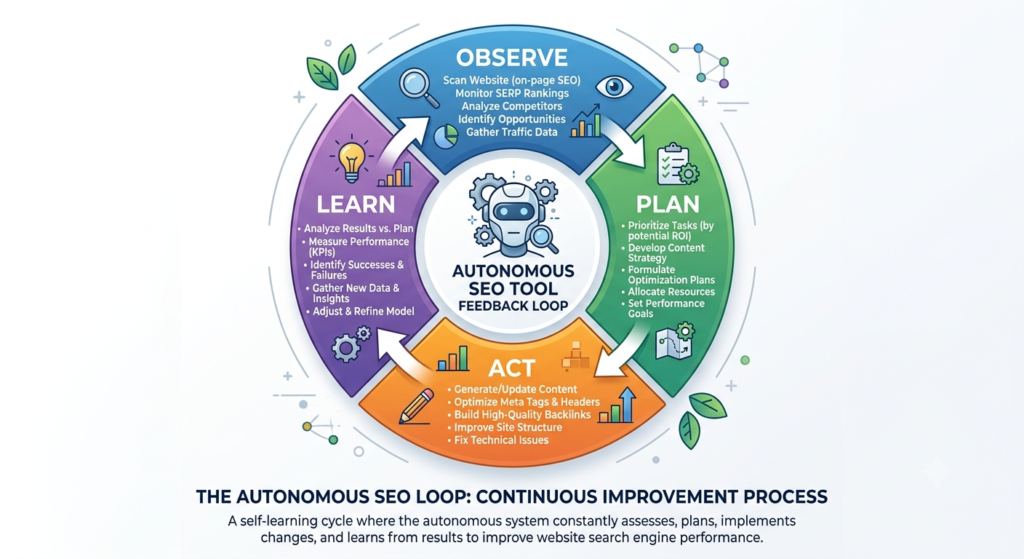
What This Kind of Automation Actually Does for SEO
Search Engine Optimization is the practice of improving a website’s visibility in organic search results by addressing technical structure, content quality, and authority signals. Traditionally, that work gets split across separate tools: one for keyword research, another for technical audits, another for content optimization, another for rank tracking.
An SEO-focused automation platform connects those stages into a single, connected workflow. It might crawl your site to find broken links and duplicate title tags, cross-reference that against your competitors’ rankings, draft a content brief for a page you’re missing, and then track whether the fix actually moved your rankings once it’s live. The best systems in 2026 also monitor a newer signal: whether your content gets cited in AI-generated answers from tools like ChatGPT, Perplexity, and Google’s AI Overviews, since a growing share of searches never reach a traditional results page at all.
Modern SEO automation connects research, technical auditing, content optimization, and rank tracking into one workflow instead of four separate tools. The strongest platforms now also monitor whether content gets cited in AI-generated answers, not just traditional Google rankings. This shift matters because a growing share of searches are answered directly by AI without a click to any website.
Key Benefits of Using SEO Automation
The pitch for agentic SEO tools sounds good on a slide. Here’s what actually holds up once you’ve used one on a real site.
Time saved on repetitive work. Technical audits, meta tag updates, and internal linking are exactly the kind of repetitive, rules-based tasks these tools handle well. Teams using bulk automation report going from weeks of manual page-by-page updates to changes deployed in minutes across an entire site.
Faster reaction to ranking drops. A page that starts sliding on Google usually gets noticed weeks later, if at all, in a manual workflow. Systems that monitor rankings continuously can flag the drop and draft a fix the same day it happens, which matters because ranking recovery gets harder the longer a page sits neglected.
Coverage across more pages than a team can manually manage. For sites with hundreds or thousands of product or category pages, manually optimizing each one isn’t realistic. Bulk-deployment tools make site-wide technical fixes possible at a scale no human team can match one page at a time.
Visibility into AI search, not just Google. Since AI answer engines now handle a meaningful share of informational queries, platforms that track brand mentions across ChatGPT, Claude, Gemini, and Perplexity give you a signal that traditional rank trackers simply don’t capture.
Lower cost than hiring for every specialty. Technical SEO, content strategy, and link building each traditionally require different expertise. A capable automation platform doesn’t replace strategic thinking, but it does let a smaller team cover ground that would otherwise need three separate hires.
None of this means these tools run themselves. Every platform worth using still needs a human reviewing its recommendations, approving the changes that matter, and correcting course when it gets something wrong.
Practical Use Cases for AI-Driven SEO Tools
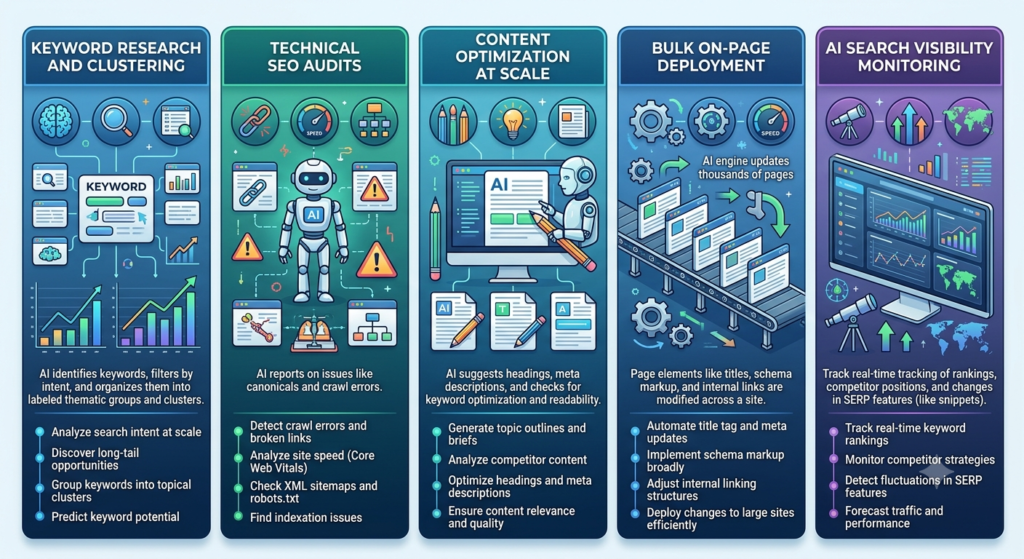
Benefits are one thing. Here’s where teams are actually deploying this kind of automation day to day.
Keyword Research and Clustering
Instead of manually sorting a spreadsheet of keywords by intent and difficulty, these tools can group them into topic clusters, flag which ones your competitors already own, and surface gaps you haven’t covered yet. This turns a task that used to take an afternoon into something you review in fifteen minutes.
Technical SEO Audits
Automated crawlers scan your site on a schedule you set, checking for broken links, missing header tags, duplicate content, and slow-loading pages. Several tools now prioritize the list by potential ranking impact, so you’re not wading through hundreds of minor issues to find the two that actually matter.
Content Optimization at Scale
Rather than manually checking each article against what’s ranking, this kind of software scores your existing content against top-performing competitors and flags exactly which sections are thin or missing entities Google expects to see. For a site publishing ten or more articles a month, this alone can cut research time significantly.
Bulk On-Page Deployment
For e-commerce sites with thousands of product pages, an automated system can push title tag, schema, and internal linking changes across the entire catalog in one operation, something that would take a developer team weeks to implement manually.
AI Search Visibility Monitoring
As more queries get answered inside AI chat interfaces instead of a search results page, tools that track whether your brand gets cited by ChatGPT, Perplexity, and Google AI Overviews are becoming as important as traditional rank tracking.
Platforms built for AI search visibility monitor whether a brand actually gets mentioned inside AI-generated answers, since a portion of these queries never send a click to any website at all. Teams that ignore this signal risk looking healthy in Google Search Console while quietly disappearing from the channel where buyers are increasingly asking questions first.
Best AI-Driven SEO Tools to Try in 2026
Every tool below has genuinely different strengths. Don’t assume the most expensive one is the right one for your site.
Alli AI: Best for Bulk Technical SEO Execution
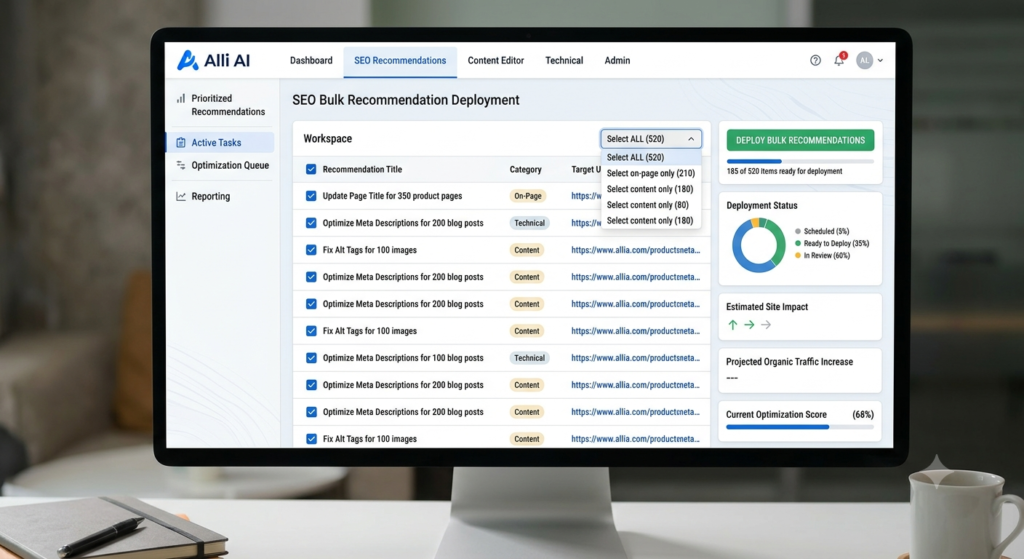
What it does: Alli AI installs as a single code snippet on your site, then crawls it and generates thousands of on-page recommendations covering meta tags, headers, schema markup, and internal links. Once you approve a batch of changes, it deploys them live within seconds, regardless of your CMS.
What it does well: This is genuinely the fastest way to push bulk on-page changes across a large site. Because Alli AI deploys through a JavaScript overlay rather than editing your source code, it works on WordPress, Shopify, Webflow, or a fully custom build without a developer touching anything. Its A/B testing feature, which lets you test different title tags against each other for actual click-through data, is rare among SEO tools that normally just tell you to guess.
Where it falls short: It’s not built for beginners, and the volume of recommendations it generates can overwhelm anyone without a solid technical SEO foundation to judge which changes actually matter. There’s also a real lock-in problem worth knowing before you sign up: because changes deploy through the overlay rather than modifying your site’s actual code, canceling your subscription reverts every optimization instantly.
Best for: Agencies and in-house teams managing large sites or many client properties who need bulk technical fixes live without waiting on a dev queue.
Pricing: Plans start around $169 to $249 per month for a single site, scaling up to $699 or more per month for agency tiers with multiple sites and fuller automation (as of 2026, per Alli AI’s published pricing).
Surfer SEO: Best for Content Optimization
What it does: Surfer’s Content Editor analyzes over 500 on-page signals from the top-ranking pages for any keyword and gives you a real-time score as you write, covering keyword usage, structure, and semantic entities Google expects to see.
What it does well: The real-time scoring is genuinely useful even for writers with no SEO background, since it turns an abstract goal like “rank for this term” into concrete, visible feedback while drafting. Its Grow Flow feature connects to Google Search Console and generates a weekly prioritized task list, which works well as a lightweight project manager for solo operators and small teams.
Where it falls short: Honestly, Surfer is priced well above several close competitors for similar core functionality, and reviewers consistently flag that its recommendations can get repetitive over time, sometimes suggesting edits too minor to move a ranking. It also leans heavily on having good competitor content to analyze, so it struggles on topics without strong existing SERP data.
Best for: Content teams and agencies that need deep, page-level optimization guidance while writing, not full-site technical automation.
Pricing: The Essential plan starts at $99 per month ($79 annually), with the Scale plan around $219 per month and Enterprise custom-priced for larger teams (as of 2026, per Surfer’s pricing page).
Frase: Best for Full-Pipeline Automation
What it does: Frase runs research, brief generation, drafting, on-page optimization, publishing, and AI-visibility tracking as one connected loop rather than separate tools. Its Content Guard feature detects when a live page starts losing rank, drafts a revision automatically, and republishes it the moment you approve.
What it does well: Frase covers more of the SEO pipeline end to end than most competitors at a genuinely lower entry price, and it’s one of the only tools in this category with a read-write MCP server, meaning you can connect it directly into Claude or another AI assistant for connected workflows. Folding AI-visibility tracking across ChatGPT, Perplexity, Gemini, and Claude into every plan, instead of charging extra for it, is a meaningful value difference from Surfer.
Where it falls short: The interface gets cluttered fast, with over 80 automation skills, SERP research, audits, and publishing tools all crammed into one dashboard, and new users report a real learning curve. Its AI writer is functional but tends to produce stiff, formal copy that needs editing before it’s publishable.
Best for: In-house content and SEO teams, or agencies, that want research, writing, optimization, and AI-visibility tracking handled in one connected system instead of stitched-together tools.
Pricing: Plans start at $39 per month billed annually, with most in-house teams landing around $103 per month on the Professional tier (as of 2026, per Frase’s pricing page).
[IMAGE: Frase Content Guard flagging a page losing rank]
Semrush Copilot: Best for Teams Already Inside an All-in-One Suite
What it does: Copilot sits inside Semrush’s existing platform and continuously analyzes data across six core Semrush tools, surfacing a prioritized list of technical issues, keyword opportunities, and competitor movements directly on your dashboard.
What it does well: Because it’s included free with every Semrush subscription, Copilot adds genuinely useful prioritization on top of a database most agencies already pay for, covering 26.8 billion keywords and 43 trillion backlinks. Its natural language interaction lets you ask questions about your own site data instead of digging through separate reports, which saves real time for teams juggling multiple client folders.
Where it falls short: Copilot is advisory, not autonomous. It tells you what to fix; it doesn’t deploy the fix itself the way a full automation platform would. It’s also only as useful as the Semrush subscription underneath it, and that subscription alone runs well above tools built purely around SEO automation.
Best for: Teams already paying for Semrush’s broader suite who want smarter prioritization without adding another separate tool to the stack.
Pricing: Copilot is included free with any Semrush plan, which runs from roughly $117 to $417 per month depending on tier (as of 2026, per Semrush’s published pricing).
NightOwl by Nightwatch: Best for Monitoring and AI Search Attribution
What it does: NightOwl runs inside Nightwatch’s rank-tracking platform, scanning your site around the clock for technical issues while simultaneously tracking your visibility across Google, Bing, and AI engines including ChatGPT, Claude, Gemini, and Perplexity.
What it does well: Its standout feature is Citation Intelligence, which traces an initial AI mention back to the resulting traffic on your site, giving you an attribution picture that most standalone AI-tracking tools don’t offer. Built on years of ranking data across more than 107,000 locations, its tracking accuracy holds up well against larger competitors, and it doesn’t charge per-seat fees, which matters for agencies managing several team members on one account.
Where it falls short: NightOwl isn’t a standalone product. You need an existing Nightwatch subscription to access it, and some of its more advanced features are still in beta, so expect occasional rough edges. It also leans more toward monitoring and diagnosis than full execution, meaning you’ll still want a separate tool for deploying fixes at scale.
Best for: Teams that want unified rank tracking and AI-visibility attribution in one dashboard without paying enterprise prices.
Pricing: Plans start around $32 per month for smaller keyword volumes, scaling to roughly $559 per month for agency-level tracking (as of 2026, per Nightwatch’s published pricing).
How to Choose the Right Tool for Your SEO Workflow
Start by mapping your actual pipeline: research, content, technical fixes, publishing, and measurement. Then be honest about which stage is genuinely your bottleneck. A content team drowning in technical debt doesn’t need a better content editor; it needs something like Alli AI that pushes fixes live without a developer.
The second question is how much autonomy you actually want. Advisory tools like Semrush Copilot keep a human in the loop on every decision, which is safer but slower. Fully automated platforms like Alli AI or Frase’s Content Guard act and then report back, which saves more time but means you need clear guardrails around what the system is allowed to change without sign-off.
And don’t skip the AI search question. If your traffic strategy still assumes every relevant query lands on a traditional results page, you’re planning around a search landscape that’s already shifting under you.
Getting Started With SEO Automation
Rolling out an AI Agent for Search Engine Optimization works best as a gradual process, not a single switch you flip on a Friday afternoon.
- Audit your current bottleneck. Pull your last month of SEO work and note where time actually went, not where you assume it went.
- Pick one tool that addresses that bottleneck, rather than trying to replace your entire stack at once.
- Run a trial with clear guardrails, deciding upfront which changes need your approval and which can deploy automatically.
- Track outcomes for at least four to six weeks, since ranking changes take time to show up regardless of how fast the tool works.
- Expand automation gradually once you trust the system’s judgment on lower-risk pages.
Final Thoughts
The teams getting real value from this kind of automation aren’t the ones running everything at once. They’re the ones that identified their actual bottleneck, whether that’s technical debt, content research, or AI search visibility, and picked a tool built for that specific job. Start narrow, review closely for the first few weeks, and expand automation once the pattern of recommendations earns your trust.
If you want to get comfortable with automated AI tools beyond SEO too, Hotskill has structured lessons that walk through how these systems actually work, not just what they promise. Download the app on iOS or Android, and start your first lesson today.
FAQs
What is an AI-driven SEO tool built to do?
It’s software that plans and carries out multi-step SEO tasks, such as auditing a site, drafting content briefs, or deploying on-page fixes, with limited human input at each step. Unlike a single-purpose SEO tool, it connects research, execution, and monitoring into one workflow.
Agentic SEO tools vs traditional SEO software: what’s the difference?
Traditional SEO software gives you data and recommendations that you act on manually. A more autonomous platform goes a step further by planning the next action itself and, in many cases, executing it directly, whether that’s publishing a content revision or pushing a technical fix live.
How do I use automation for keyword research?
Most platforms let you enter a seed topic or connect your Search Console data, then automatically cluster related keywords by intent and difficulty. Tools like Frase and Semrush Copilot surface gaps against your competitors as part of that same process, so you’re reviewing a prioritized list instead of building one from scratch.
Is this kind of SEO automation worth it for a small business or solo blogger?
For a site publishing a handful of pages a month, a full automation platform is probably overkill. A lighter tool like Frase’s Starter plan or Surfer’s Essential tier can still save real research time without the complexity or cost of enterprise-grade systems built for bulk deployment.
Do I really need this if I already use Google Search Console?
Search Console tells you what happened. It doesn’t cluster keywords, draft content, or fix technical issues for you. These platforms use that same underlying data but turn it into prioritized action, which is the part manual workflows usually get stuck on.
Why isn’t my SEO automation giving me good recommendations?
This usually comes down to thin input data or an underlying technical problem the tool hasn’t been given visibility into, like blocked crawling or missing Search Console access. It’s also worth remembering that these tools generate volume, and not every recommendation is worth acting on; a strong SEO foundation is still needed to judge which ones matter.
Do I need to know how to code to use one of these tools?
No. Platforms like Alli AI and Surfer SEO are built around a single code snippet or a web dashboard, with no ongoing development work required. That said, understanding basic SEO concepts helps you judge which automated recommendations are actually worth approving.
Can this kind of automation replace an SEO specialist?
Not entirely. These tools are strong at repetitive, rules-based execution, technical audits, bulk on-page changes, monitoring, but strategy, prioritization, and judgment calls on brand risk still need a human. Most teams get the best results using automation to remove grunt work, not to replace the strategist.
How much does this kind of SEO tool typically cost?
Pricing varies widely by scope. Content-focused platforms like Frase start around $39 to $49 per month, while bulk technical execution tools like Alli AI run from roughly $169 per month for small sites up to $699 or more per month for agency tiers (as of 2026).
Will automated SEO changes hurt my rankings if something goes wrong?
It’s possible, which is why every reputable platform in this category requires you to approve changes before or shortly after they go live, and why starting with clear guardrails matters. Treat the first few weeks as a trial, review changes closely, and expand autonomy only once you trust the pattern of recommendations you’re seeing.