

If you run marketing at a large company, you already know the problem isn’t a shortage of tools. It’s the opposite. You’ve got a CDP, a marketing automation platform, a content library, three ad channels, and a data warehouse that nobody fully trusts. Stitching all of that into a campaign that actually ships on time takes a small army of people copying data between systems.
That’s the gap AI agents for enterprise marketing are built to close. Unlike a chatbot that answers one question at a time, an AI agent can plan a task, pull data from your CRM or CDP, take action across connected systems, and check its own work before handing it back to a human. For enterprise teams, that means campaign briefs that used to take a week can move in days, and customer journeys that used to run on static rules can now react to real behavior.
This guide walks through what these agents actually do, which platforms are worth your time in 2026, and how to automate campaigns, data work, and customer journeys without losing control of your brand or your data.
What Is an AI Agent in Enterprise Marketing?
An AI agent in marketing is software that can reason through a goal, decide which actions to take, and execute those actions across connected systems with minimal human input at each step. That’s different from generative AI tools like a standalone chatbot, which only produce output when you prompt them directly.
Think of it this way. A generative AI tool writes an email when you ask it to. An AI agent decides an email needs to go out, checks which segment should get it, writes the copy, schedules the send, and reports back on performance, all without you touching five separate tools.
Most enterprise-grade agents are built on top of a company’s existing customer data platform (CDP) or CRM. A CDP is a system that unifies customer data from multiple sources into a single profile. That connection matters because an agent is only as good as the data it can see. An agent with no access to purchase history or engagement data is just a smarter chatbot with extra steps.
An AI agent in enterprise marketing differs from generic generative AI because it can plan multi-step actions, pull live data from a CRM or CDP, and execute across connected systems with limited human input at each step. Agents without access to unified customer data behave like advanced chatbots rather than true automation.
Why Enterprise Marketing Teams Are Investing in AI Agents Now
Marketing teams are being asked to run more campaigns, in more channels, with tighter personalization, and without adding headcount. That pressure is exactly why enterprise marketing automation has shifted from static workflows to agentic systems that can adapt mid-campaign.
The results being reported by early adopters are hard to ignore. Sporting goods brand Rawlings reported 75% faster campaign creation after deploying Agentforce Marketing, according to Salesforce’s 2026 announcement on agentic marketing teams. That’s not a hypothetical efficiency gain. It’s a real team cutting the time between “we have an idea” and “the campaign is live.”
The same Salesforce report noted that 86% of marketers say AI has already changed how they plan and execute campaigns, which tells you this isn’t a niche experiment anymore. It’s becoming the default way large teams operate.
There’s also a governance angle driving adoption. Enterprise teams can’t just plug in any AI tool and hope for the best. They need audit trails, brand guardrails, and the ability to review what an agent did and why. That’s a big part of why the platforms gaining traction in enterprise AI marketing right now are the ones built by vendors who already hold the customer data: Salesforce, Adobe, Microsoft, and HubSpot. They can ground an agent’s decisions in real CRM context instead of guesswork.
The Marketing AI Agent Platforms Worth Knowing at Enterprise Scale
There’s no shortage of vendors claiming to offer AI marketing agents right now. Most of them are wrapping a chatbot in agent branding and calling it done, which is a fast way to disappoint a marketing team that expected real automation. The platforms below are the ones actually running production workloads at large companies, and each one deserves a closer look before you commit budget.
Salesforce Agentforce for Marketing Cloud
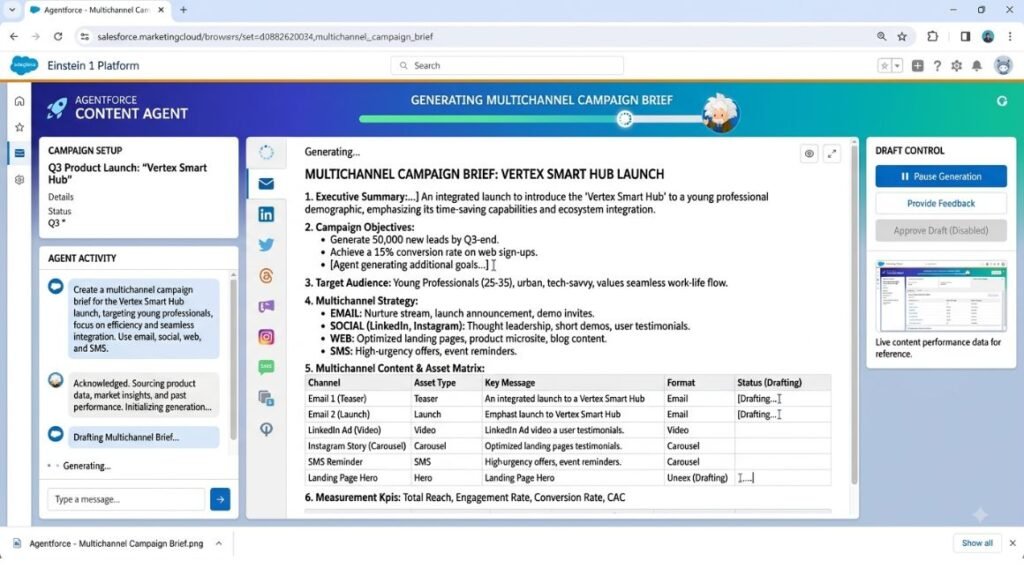
What it does: Agentforce is Salesforce’s autonomous agent framework, and its marketing application connects directly to Data Cloud and Customer 360 so agents can plan, generate, and launch campaigns using real transactional and behavioral data. Content Agent, one of its specialized agents, builds omnichannel assets including email, SMS, and push messaging from a single campaign brief.
What it does well: Because it’s grounded in the same CRM data your sales and service teams use, Agentforce avoids the disconnected-experience problem, like recommending a product a customer already bought. Rawlings’ 75% reduction in campaign build time is a genuinely strong result for a marketing team of any size.
Where it falls short: You get the most value if you’re already deep in the Salesforce ecosystem. If your customer data lives outside Data Cloud, expect a heavier setup lift before the agent has anything useful to work with.
Best for: Enterprise teams already running Salesforce Marketing Cloud who want agents that can act on live CRM data rather than static segments.
Pricing: Agentforce is sold through consumption-based and hybrid pricing models layered on top of existing Marketing Cloud licensing, with exact costs varying by usage volume as of 2026.
Adobe Experience Platform Agent Orchestrator
What it does: AEP Agent Orchestrator is a coordination layer that routes tasks to specialized agents, keeps shared memory across them, and connects to both Adobe and third-party systems. It reached general availability alongside a suite of purpose-built agents for building, delivering, and optimizing customer experiences and campaigns.
What it does well: It’s genuinely built for complexity. Instead of one all-purpose agent, you get specialized agents for tasks like audience refinement and content production, coordinated by a reasoning engine that decides which agent handles what. Brands including Hershey, Lenovo, and Wegmans have been running it ahead of general availability.
Where it falls short: Analysts covering Adobe Summit 2026 noted that a meaningful chunk of the orchestration capability requires a data foundation most organizations haven’t finished building yet. If your Adobe Experience Platform implementation is incomplete, the orchestrator has less to work with.
Best for: Large enterprises already invested in Adobe Experience Platform who need to manage dozens of customer journeys at once rather than a handful.
Pricing: Enterprise licensing, quoted per organization based on data volume and number of agents deployed, as of 2026.
Adobe Experience Platform Agent Orchestrator is not a single AI model but a coordination layer that assigns tasks to specialized agents and manages their shared memory. It works best for enterprises that have already unified their customer data inside Adobe Experience Platform, since the orchestrator’s reasoning depends on that foundation.
HubSpot Breeze Agents
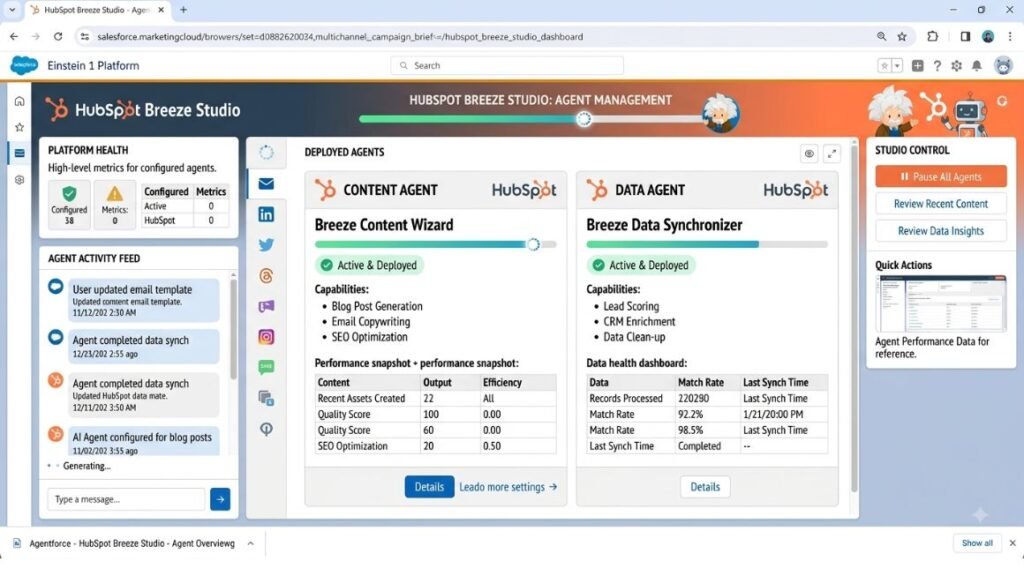
What it does: Breeze is HubSpot’s AI layer, and Breeze Agents are the autonomous piece of it, handling tasks like content creation, prospect research, CRM data enrichment, and customer questions without a human triggering each step. As of mid-2026, the Breeze Marketplace supports more than 20 agents and assistants, with a smaller set of Core Agents built for maximum reliability.
What it does well: Setup speed is the standout here. Most teams get a first agent running in hours rather than months, which is a real advantage over the heavier enterprise platforms. The Breeze Content Agent specifically handles blog posts, landing pages, and social content at a volume a lean team couldn’t hit manually.
Where it falls short: Some marketplace agents run on newer model architecture than the Core Agents, which HubSpot itself flags as less battle-tested for complex reasoning tasks. Worth testing before you lean on them for anything customer-facing.
Best for: Mid-market to enterprise teams already on HubSpot who want to scale content and lead workflows without a long implementation timeline.
Pricing: Full agent access starts around $450 to $800 per month on Professional Hub, with Enterprise plans from roughly $1,500 to $3,600 per month depending on credit allotment, as of 2026.
Microsoft Copilot for Dynamics 365 Customer Insights
What it does: Copilot inside Dynamics 365 Customer Insights uses natural language prompts to build audience segments, draft journey content, and surface next-best-action recommendations pulled from unified customer profiles.
What it does well: If your organization already runs on Microsoft 365 and Azure, integration friction is close to zero. Copilot agents can also tap into the same data governance and compliance controls your IT team already manages, which enterprise security teams tend to appreciate.
Where it falls short: Its marketing-specific agent library is narrower than Salesforce or Adobe’s, and campaign generation capabilities are still catching up to the more marketing-native platforms.
Best for: Enterprises with a Microsoft-first tech stack who want agent capabilities without introducing a new vendor relationship.
Pricing: Bundled into Dynamics 365 Customer Insights licensing, with Copilot capacity billed separately based on usage, as of 2026.
Honestly, if you’re starting from scratch with no existing CRM commitment, Salesforce and Adobe currently offer the deepest agent capability for complex enterprise marketing. HubSpot wins on speed to value for teams that don’t need that depth yet. Whichever you pick, the mistake to avoid is treating AI marketing tools as a plug-and-play upgrade to your existing stack. They’re closer to a new hire than a new feature, and they need the same onboarding.
How AI Agents Automate Campaign Creation and Execution
A campaign agent doesn’t just write copy. It plans the campaign structure, drafts assets across channels, checks them against brand guidelines, and schedules the send, adjusting based on how earlier sends performed.
Here’s what that looks like as an actual workflow:
- Define the campaign goal in plain language. A marketer types something like “Launch a re-engagement campaign for customers who haven’t purchased in 90 days.”
- The agent pulls the relevant segment. It queries the CDP or CRM directly instead of waiting for an analyst to export a list.
- The agent drafts channel-specific content. Email, SMS, and push messaging get generated from the same brief, each formatted for its channel.
- A human reviews and approves. This is the checkpoint that matters most for brand safety, and it should never be skipped for customer-facing sends.
- The agent schedules and monitors. Once approved, it launches the send and tracks open, click, and conversion data in near real time.
This is what AI-powered enterprise marketing actually looks like in practice: not a fully autonomous system running unchecked, but a human setting the goal and reviewing output while the agent handles the repetitive execution in between. Teams using this model report campaign build times dropping from days to hours, largely because the agent removes the back-and-forth between marketing, data, and design teams for routine sends.
How AI Agents Automate Marketing Data and Analytics
Data work is where most marketing teams lose the most time, and it’s also where AI agents deliver some of the least glamorous but most valuable automation. A data agent can pull performance numbers from six different platforms, reconcile them into one report, and flag anomalies without a human building a spreadsheet.
This matters because enterprise teams typically run campaigns across paid social, email, search, and owned channels, each with its own reporting dashboard. Manually reconciling that data is slow and error-prone. An agent connected to those platforms via API can standardize the numbers and surface what actually changed week over week.
A standalone reporting agent can also answer specific questions on demand. Instead of a marketer requesting a custom pull from the analytics team and waiting two days, they can ask the agent directly: “Which email segment had the highest revenue per send last month?” HubSpot’s Breeze Data Agent, for example, is built specifically to research and answer custom questions by combining CRM data, conversation transcripts, and external sources, then writing findings back into the CRM automatically.
This is AI marketing automation doing the unsexy work that used to eat entire days: data cleaning, cross-platform reconciliation, and answering one-off questions that used to sit in an analyst’s queue for a week.
Data-focused AI agents reduce the manual work of reconciling campaign performance across multiple platforms by pulling numbers directly via API and flagging anomalies automatically. This shifts analysts from building reports to reviewing insights, cutting turnaround time from days to minutes for common requests.
How AI Agents Automate Customer Journeys End to End
A customer journey is the full sequence of touchpoints a person has with your brand, from first ad click to post-purchase support. Traditional journey automation runs on fixed rules: if a customer does X, send Y. That works until customer behavior shifts, and then someone has to manually rebuild the rules.
Journey agents work differently. They monitor behavior signals in real time and adjust the next best action based on what’s actually happening, not just what was predicted when the journey was built months ago. If a customer abandons a cart, browses a competitor product page, then returns to your site, a journey agent can recognize that pattern and trigger a different offer than it would for a first-time visitor.
This is where AI-driven marketing shows up most visibly to customers, even though they never see the agent itself. A well-built journey agent feels like the brand is paying attention. A poorly built one feels like the same generic automation with a new name.
The Adobe CX Enterprise Coworker, announced at Adobe Summit 2026, is built specifically for this kind of orchestration, pulling from Real-Time CDP audience data and Customer Journey Analytics to keep decisioning grounded in current behavior rather than static segments. Getting this right depends entirely on data quality. An agent making next-best-action decisions on stale or fragmented customer data will make bad decisions faster than a human would, just with more confidence.
How to Choose and Deploy Marketing AI Agents Without Breaking Things
Picking a platform is the easy part. Deploying it without creating a mess for your data team or your brand takes a bit more discipline.
- Audit your existing data foundation first. If your CDP or CRM has incomplete or duplicate customer records, fix that before adding an agent. Agents amplify whatever data quality you already have, good or bad.
- Start with one narrow use case. Pick a single repetitive task, like reconciling weekly campaign reports, rather than trying to automate an entire customer journey on day one.
- Set explicit guardrails. Define what the agent can do autonomously and what always requires human approval before it goes live. Customer-facing sends should almost always have a review step.
- Assign an owner. Someone on your team needs to monitor agent output regularly, not just during the first week after launch.
- Measure against a baseline. Track how long the task took before the agent and after, the same way Rawlings measured a 75% reduction in campaign build time. Vague satisfaction isn’t a metric.
This is also the point where AI-powered marketing automation earns or loses trust internally. Teams that roll out agents with clear guardrails and visible wins tend to expand usage fast. Teams that skip the guardrails usually end up walking the whole rollout back after one bad customer-facing mistake.
Common Pitfalls When Rolling Out Enterprise Marketing AI Agents
Even strong platforms fail in predictable ways at the enterprise level. The most common one is connecting an agent to a fraction of your customer data and expecting full personalization anyway. An agent with partial context will confidently generate content that’s wrong for the customer it’s targeting.
The second common mistake is skipping the human review step to save time, especially on high-volume channels like SMS. That’s usually where a brand voice mistake or a compliance issue slips through, and it’s the fastest way to lose executive buy-in for the whole program.
The third is treating agent deployment as a one-time project instead of an ongoing practice. Agents need their instructions, guardrails, and connected data sources reviewed regularly as your campaigns and customer base evolve.
Final Takeaway
AI agents for enterprise marketing aren’t replacing marketing teams. They’re removing the repetitive work between having an idea and getting it live, whether that’s a campaign, a data report, or a journey update. The teams seeing real results, like Rawlings’ 75% faster campaign builds, aren’t the ones that bought the flashiest platform. They’re the ones that got their customer data in order first and started with one narrow, measurable use case.
If you’re evaluating platforms, start there. Pick one repetitive task your team dreads, connect an agent to clean data, and measure the time saved before you scale to anything more ambitious.
Hotskill has hands-on lessons for marketers building real skills with tools like these, not just theory. Download the app on iOS or Android and start your first lesson today at hotskill.co/download.
FAQ
What is an AI agent in enterprise marketing?
It’s a system that can plan a task, access connected data sources like a CRM or CDP, and take action across systems with limited human input at each step. It goes beyond a chatbot because it executes multi-step work rather than just answering a single prompt.
How is an AI marketing agent different from marketing automation software?
Traditional marketing automation runs on fixed if-then rules that someone has to build and update manually. An AI agent can adjust its actions based on real-time data and reasoning, without a human rebuilding the workflow every time customer behavior shifts.
How do I start using marketing AI agents for enterprise campaigns?
Start with one repetitive task, like reconciling campaign performance data or drafting first-round email copy, rather than automating an entire customer journey at once. Connect the agent to clean, unified customer data, set clear approval steps, and measure the time saved before expanding.
Is Salesforce Agentforce worth it for a mid-sized marketing team?
It depends on whether your customer data already lives in Salesforce Data Cloud. Teams already on Salesforce Marketing Cloud tend to see fast results, like Rawlings’ 75% faster campaign creation, but teams outside that ecosystem face a heavier setup lift before the agent has useful context to work with.
Do I need a CDP before I can use marketing AI agents?
You don’t strictly need a full customer data platform, but you do need unified, reasonably clean customer data somewhere the agent can access. An agent working from fragmented or outdated records will make confident but wrong decisions, which is worse than no automation at all.
Why isn’t my AI agent producing accurate campaign content?
Usually it’s a data problem, not a model problem. If the agent only has partial visibility into customer history or purchase behavior, it will generate content that’s technically correct but contextually wrong. Check what data sources are actually connected before assuming the platform itself is at fault.
Do I need to know how to code to use enterprise marketing AI agents?
No. Most enterprise platforms, including HubSpot Breeze and Salesforce Agentforce, are built around natural language prompts and visual configuration rather than code. You will need someone comfortable setting clear instructions and guardrails, which is more of a process skill than a technical one.
Can AI agents run customer-facing campaigns without human review?
They can, but it’s not advisable for most enterprise teams, especially for high-volume channels like SMS or paid ads. A human approval checkpoint before customer-facing sends catches brand voice issues and compliance risks before they reach real customers.
How much do these enterprise-grade marketing AI platforms cost?
Pricing varies widely and most platforms use consumption or credit-based models rather than flat fees. As of 2026, HubSpot’s Breeze Agents start around $450 to $800 per month on Professional plans, while Salesforce and Adobe’s enterprise platforms are typically quoted per organization based on data volume and agent count.
Will AI agents replace marketing teams?
Not in any way that’s currently visible in enterprise deployments. The teams reporting the strongest results are using agents to remove repetitive execution work, like campaign builds and data reconciliation, while marketers focus on strategy, brand judgment, and reviewing agent output before it reaches customers.