

Marketing ops teams are stretched thin. One person is pulling campaign reports, another is chasing approvals across four Slack channels, and someone else is manually updating a spreadsheet that should have been automated two years ago. None of this is strategic work. All of it eats the week.
This is where an AI Agent for Marketing Operations actually earns its place. Not as another dashboard, not as a chatbot bolted onto your CRM, but as a system that can take a task, decide how to complete it, and act across your existing tools without someone babysitting every step. If you’ve tried automation before and it fell short, that’s usually because it followed rigid rules instead of making decisions. This article breaks down what’s different now, which tools are worth your time in 2026, and how to actually build a working AI marketing workflow instead of just reading about one.
What an AI Marketing Ops Agent Actually Does
An AI Agent for Marketing Operations is software that can plan and complete a marketing task on its own, using the tools and data connected to it, rather than just responding to a single prompt. Give it a goal like “flag underperforming campaigns and draft a summary for the weekly report” and it works through the steps: pull the data, check it against thresholds, write the summary, and place it where your team expects to find it.
That’s a different animal from a chatbot. A chatbot answers questions in a conversation and stops. An agent has memory of the task, access to tools (your CRM, your ad platform, your spreadsheet), and the ability to take multiple actions in sequence to reach an outcome. It’s also different from a workflow automation rule, which only ever does exactly what it was told, in exactly the order it was told, with no ability to handle anything unexpected.
Marketing ops is a particularly good fit for agents because so much of the job is repetitive but not identical every time. Campaign QA, reporting, list segmentation, approval routing, budget pacing checks. These tasks follow a pattern, but the details shift week to week. That’s exactly the kind of work an agent can handle without a human rebuilding the automation every time something changes.
This kind of marketing ops agent plans and executes multi-step tasks autonomously, using connected tools and data, rather than just answering a single prompt like a chatbot. It differs from traditional rule-based automation because it can adapt to context instead of following one fixed path. This makes it well suited to marketing ops work such as reporting, QA, and campaign coordination, which is repetitive but rarely identical.
Why Marketing Teams Are Adopting Agents for Marketing Ops
Here’s the honest reason: the busywork was never going away on its own, and marketing headcount hasn’t grown to match the number of channels teams now run. Email, paid social, organic social, SEO, lifecycle, events. Someone still has to coordinate all of it, and that coordination work is exactly what AI Agents for Marketing are being built to absorb.
The numbers back this up. According to Salesforce’s 10th State of Marketing report, published in 2026, marketers using AI agents report 75% satisfaction with their ability to connect customer touchpoints, compared to 60% for marketers without agents. The same report found that agentic capability in enterprise applications is projected to jump from under 5% in 2025 to roughly 40% by the end of 2026, which tells you this isn’t a niche experiment anymore. Separately, HubSpot’s 2026 AI Trends research found marketers recover an average of 6.1 hours per week using AI agents, with senior practitioners saving closer to 8 to 10 hours.
That time isn’t going toward more strategy meetings by default. It goes wherever the team decides to point it, which is exactly why a clear rollout plan matters more than the tool subscription itself.
A few concrete reasons teams are moving now:
- Campaign reporting that used to take half a day can run automatically and land in Slack before the Monday standup.
- Lead routing and enrichment happen the moment a form is submitted, not whenever someone checks the queue.
- Content approval bottlenecks shrink because an agent can chase down the right reviewer instead of a person doing it manually.
- Budget pacing gets checked daily instead of at the end of the month, when overspend is already locked in.
None of this replaces a marketing ops person’s judgment. It replaces the parts of the job that never needed judgment in the first place.
How AI Agents Work Inside Marketing Operations
AI in Marketing Operations runs on three components working together: a reasoning model that decides what to do, tool access that lets it actually do it, and memory that keeps track of what’s already happened in a task.
The reasoning model, usually a large language model like GPT-5 or Claude, reads the goal you’ve given it and breaks it into steps. Tool access is what turns that plan into action. Without it, the agent can only talk about what it would do. Connected to your CRM, ad platform, and spreadsheet, it can actually query data, update records, and send messages. Memory matters because most marketing tasks span more than one step, and the agent needs to remember what it found in step one when it gets to step three.
Take a real example. Say you want an agent to handle weekly paid social reporting. The workflow looks like this:
- Trigger: Every Monday at 8am, the agent starts the task.
- Data pull: It queries Meta Ads Manager and Google Ads for the previous week’s spend, CPA, and conversion numbers.
- Analysis: It compares this week’s numbers against the prior four-week average and flags anything more than 20% off pace.
- Output: It drafts a summary in plain language, not just a table, and posts it to the marketing ops Slack channel.
- Escalation: If a campaign is more than 50% over its CPA target, it also tags the paid media lead directly.
That’s five decisions, not five rules. The agent isn’t following “if spend > X then send alert.” It’s interpreting the data against context each time, which is what makes it useful instead of just another cron job.
This is also where Marketing Operations AI Tools differ most from each other, and it’s worth understanding before you pick one: some platforms give you pre-built agents with limited customization, while others give you a blank canvas and expect you to define every step. Neither is wrong. It depends on how much control your team actually needs, and it’s also where AI Marketing Workflows start to look different depending on how much of your stack the tool can actually see.
Marketing Ops Automation vs Traditional Marketing Automation
Marketing Operations Automation and traditional marketing automation solve different problems, and mixing them up is where a lot of teams waste budget on the wrong tool.
What Traditional Automation Handles
Traditional marketing automation is rule-based. Email drip sequences, lead scoring based on fixed point values, and workflow triggers that fire when a specific event happens are all traditional automation. Tools like the original Marketo and HubSpot Workflows built entire categories around this. It’s reliable, predictable, and completely blind to anything outside its rules.
If a lead does something the rule-builder didn’t anticipate, traditional automation just doesn’t respond. It’s not broken, it’s working exactly as designed. The design just didn’t account for that case.
What AI Agents Add On Top
AI agents don’t replace this layer, they sit on top of it and handle the parts that need judgment. Where a rule says “send email A if the lead clicked link B,” an agent can look at a lead’s full behavior pattern, decide the lead is actually a poor fit despite clicking the link, and route it differently, or flag it for a human to review instead of blindly pushing it forward.
The practical difference shows up clearest in QA. A rule-based system can check “does this email have a subject line.” An agent can check “does this email’s tone match brand guidelines” and actually make a judgment call about it. That’s not a small upgrade. It’s a different category of capability, and it’s why Marketing Workflow Automation in 2026 increasingly means agent-assisted, not just rule-based.
Traditional marketing automation runs on fixed rules and cannot respond to situations outside those rules, while AI agents add judgment on top by interpreting context and making decisions in real time. The two aren’t competitors. Most mature marketing ops stacks in 2026 run both, using rules for predictable high-volume tasks and agents for anything requiring interpretation.
Marketing Operations AI Tools Worth Knowing
This is where opinions matter more than feature lists. Anyone can read a vendor’s homepage. What you need to know is which of these tools is actually worth your team’s time, and where each one falls apart in practice.
HubSpot Breeze — Best for Teams Already Living Inside HubSpot
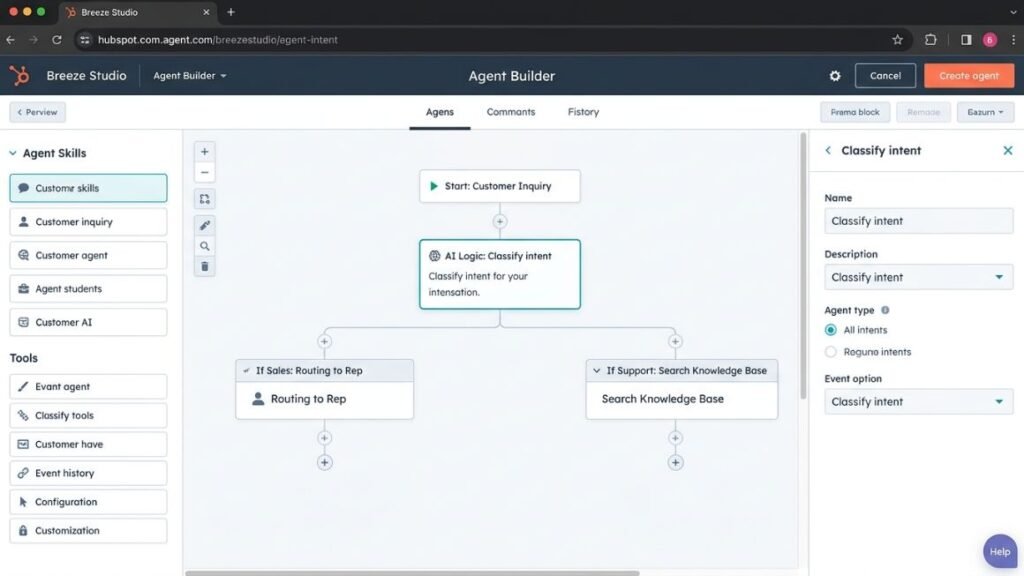
What it does: Breeze is HubSpot’s built-in AI suite, made up of Breeze Copilot, Breeze Agents (Customer, Prospecting, Data, and custom-built agents), and Breeze Intelligence for data enrichment. Breeze Studio is where you actually build and configure the agents.
What it does well: If HubSpot is your single source of truth, Breeze is genuinely good. The Customer Agent resolves a meaningful share of support conversations on its own, and HubSpot’s own reporting puts that figure around 65% across more than 8,000 customers, though independent reviewers tend to see closer to 50% in real deployments, so treat the higher number as the vendor’s best case. For marketing specifically, the Content Agent and answer engine optimization tools inside Content Hub are useful for teams already publishing through HubSpot.
Where it falls short: Breeze works best when HubSpot is your only system of record. If your stack includes Salesforce, a separate ad platform, or enrichment tools outside HubSpot, you’ll spend more time stitching data together than the agent saves you.
Best for: Small to mid-market marketing teams running everything through HubSpot with no fragmented CRM situation to untangle.
Pricing: As of 2026, Breeze features come included across HubSpot plans, but the agents run on outcome-based credit pricing. The Customer Agent costs $0.50 per resolved conversation (down from a flat $1.00 per conversation before HubSpot’s April 2026 pricing change), the Prospecting Agent costs $1.00 per recommended lead, and the Data Agent costs $0.10 per answer. Depending on usage, total Breeze costs can range from effectively $0 to several thousand dollars a month.
Salesforce Agentforce — Best for Salesforce-Native Enterprise Teams
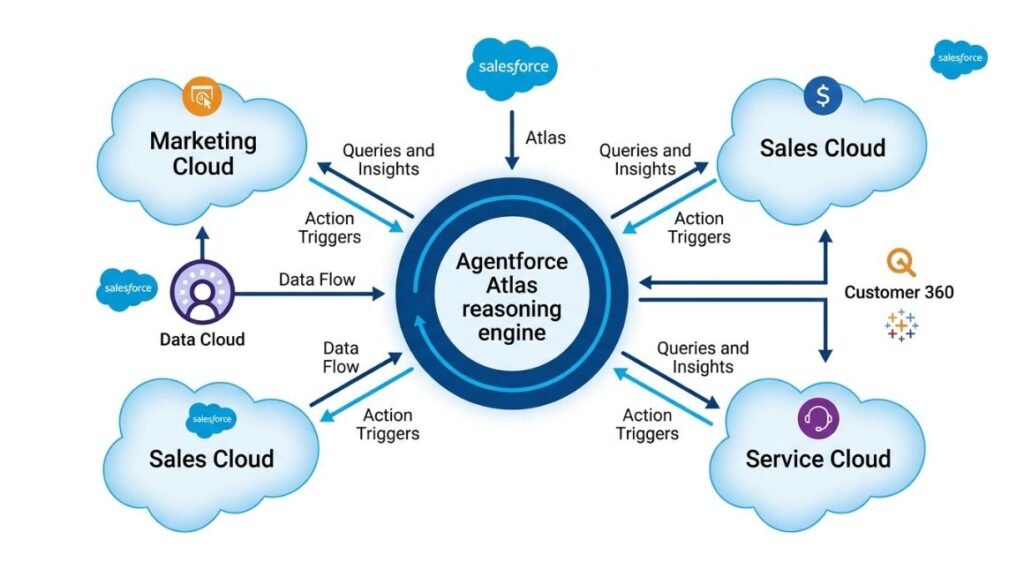
What it does: Agentforce is Salesforce’s agentic AI platform, built around Agentforce Builder and the Atlas reasoning engine. For marketing specifically, it powers Agentforce campaign creation inside Marketing Cloud, coordinating with Sales Cloud and Service Cloud so customer-facing teams work from the same context.
What it does well: If your organization already runs deeply on Salesforce, Agentforce agents have access to genuinely unified customer data, which is the single biggest factor in whether an agent’s decisions are actually good. For enterprise marketing teams coordinating with sales and service, that shared context is hard to replicate with a bolted-on third-party tool.
Where it falls short: This is not a lightweight tool, and it’s not cheap to stand up properly. Full deployments typically require Salesforce’s Data Cloud (rebranded Data 360), and real first-year costs for mid-market teams can land in the $150,000 to $600,000 range once implementation is included. Setup commonly takes five to eleven months, and by some accounts fewer than 10% of Salesforce’s own customers have scaled Agentforce past a pilot. If you’re not already committed to the Salesforce ecosystem, this isn’t where you should start.
Best for: Enterprise marketing teams with an existing Salesforce footprint and budget for a serious implementation.
Pricing: As of 2026, Agentforce pricing runs through Flex Credits at roughly $500 per 100,000 credits (about $0.10 per action), or a per-conversation model around $2. Marketing Cloud’s Growth Edition, which includes Agentforce campaign tools, starts around $1,500 per org per month, with higher tiers reaching $3,250 and up depending on features.
Zapier Agents — Best for Connecting Marketing Ops Across a Fragmented Stack
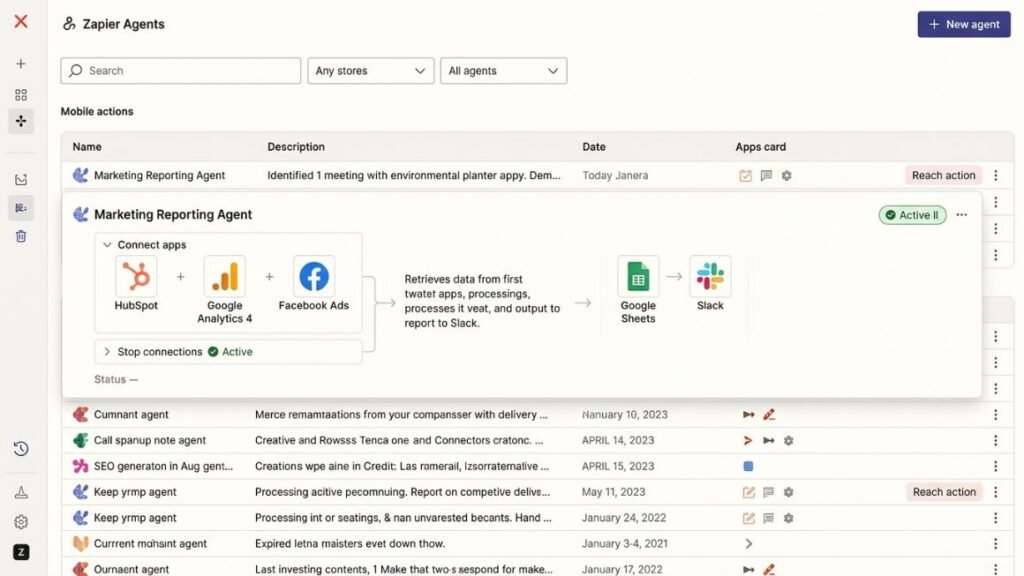
What it does: Zapier Agents are AI-driven assistants that can be given company knowledge and turned loose across Zapier’s network of more than 9,000 connected apps. They can browse the web, read live data sources, and run on a schedule or on command, separate from Zapier’s older trigger-action Zaps.
What it does well: Nothing beats Zapier’s integration breadth. If your marketing stack is a patchwork of tools that don’t talk to each other natively, and there’s no realistic world where you consolidate onto one platform, Zapier Agents are often the fastest way to get an agent working across all of them without custom development. Honestly, this is the tool most solo marketers and small teams should try first, precisely because it doesn’t ask you to migrate anything.
Where it falls short: Zapier restructured its pricing in 2026, and it’s easy to underestimate costs. AI steps inside regular Zaps now consume tasks under the standard plan, while the standalone Agents product is billed separately, at $50 per month for 1,500 activities, and an “activity” burns through faster than most people expect. At high volume, Zapier tends to run more expensive than alternatives like Make or n8n for the same workload.
Best for: Marketing teams running a mixed tech stack who need an agent to bridge tools rather than replace a single platform.
Pricing: As of 2026, standalone Zapier Agents start at $50 per month for 1,500 activities, on top of a standard Zapier plan (Professional starts around $30 per month for 750 tasks).
Claude and ChatGPT as Marketing Ops Agents — Best for Custom, Lightweight Workflows
What it does: Both Anthropic’s Claude and OpenAI’s ChatGPT can be configured as agents through their respective platforms, using tool integrations (like the Model Context Protocol, or MCP, for Claude, and custom GPTs or the API for ChatGPT) to connect to spreadsheets, CRMs, and internal documents.
What it does well: For marketing ops tasks that involve heavy writing, analysis, or reasoning over messy unstructured data, like drafting a campaign brief from a jumble of Slack messages, these general-purpose models are genuinely stronger than most purpose-built marketing agents. From what we’ve seen with Hotskill learners, Claude in particular handles long, structured prompts and multi-document analysis better than most marketers expect, especially for anything involving brand voice consistency.
Where it falls short: You’re building the workflow yourself. There’s no pre-packaged “campaign QA agent” waiting for you. That’s a real time investment upfront, and it’s not the right choice if your team wants something they can turn on this afternoon.
Best for: Marketing ops teams with someone technical enough to build custom workflows, or teams using a no-code layer like Zapier on top to avoid writing code directly.
Pricing: As of 2026, Claude’s consumer plans start free with paid tiers from around $20 per month, with API pricing billed per token for custom builds. ChatGPT follows a similar structure, with Plus around $20 per month and API access billed separately.
The strongest tools in this category split into two groups: platform-native agents like HubSpot Breeze and Salesforce Agentforce that work best inside their own ecosystem, and flexible tools like Zapier Agents or general-purpose models like Claude that bridge fragmented stacks or handle custom reasoning tasks. The right choice depends less on which tool has the most features and more on how unified your existing marketing data already is.
How to Build Your First AI Marketing Workflow
You don’t need to automate your entire marketing operation on day one. Start with one workflow, prove it works, then expand. Here’s how to build a weekly campaign performance reporting agent, a workflow almost every marketing team can use immediately.
- Step 1: Pick a task that’s repetitive but has clear success criteria. Reporting is ideal because “did it pull the right numbers and flag the right anomalies” is easy to check. Avoid starting with anything involving brand-sensitive customer communication.
- Step 2: Map the current manual process before you automate anything. Write down every step a human currently takes, including the judgment calls, like what counts as “underperforming.” If you can’t articulate the judgment call clearly, the agent won’t be able to make it either.
- Step 3: Choose your tool based on your stack, not the tool’s marketing. If everything lives in HubSpot, start with Breeze. If your stack is fragmented across five platforms, start with Zapier Agents or a custom build using Claude or ChatGPT connected through an integration layer.
- Step 4: Connect the data sources the agent needs. For a reporting agent, that typically means your ad platforms and your reporting destination, whether that’s Slack, email, or a shared doc.
- Step 5: Write the instructions like you’re briefing a new hire, not programming a computer. Be specific about thresholds and formats, but don’t try to script every possible scenario. Part of the point of an agent is that it can handle variation.
- Step 6: Run it in parallel with the manual process for two to three cycles. Don’t turn off the human version until you’ve compared outputs and trust the agent’s judgment on edge cases.
- Step 7: Set a review cadence, not a “set and forget” mindset. Campaign structures, KPIs, and tools change. An agent built in January without a check-in by April will quietly start giving worse answers as your context shifts around it.
That sounds like a lot of steps. It isn’t once you’ve done it twice, and the second workflow you build will take a fraction of the time the first one did.
Common Mistakes When Deploying AI Agents in Marketing Ops
Skipping the manual mapping step. Teams that jump straight to tool setup without documenting the current process end up automating confusion instead of a workflow. If three people on your team all do campaign QA slightly differently, the agent needs one clear version to follow, not three.
Giving the agent too much autonomy too soon. An agent that can send customer-facing emails without review is a different risk profile than one that drafts a report for a human to check. Start with agents that assist and escalate, not ones that act fully unsupervised, especially anything touching brand voice or customer communication.
Choosing a tool because of the demo, not the stack fit. This sounds obvious, but it’s the single most common mistake. A Salesforce-native agent looks incredible in a demo and then underdelivers for six months because your customer data lives in three other systems it can’t see cleanly.
Ignoring the cost model until the bill arrives. Outcome-based and credit-based pricing, which is now common across Breeze, Agentforce, and Zapier Agents, can scale unpredictably. Model your expected usage before committing, not after.
Treating the agent as a finished project instead of an ongoing one. The tools, your campaigns, and your KPIs will all keep shifting. An agent needs the same kind of maintenance a dashboard does, just less frequently.
Getting Started With Agentic Marketing Ops
The teams getting real value from AI-Powered Marketing Operations right now aren’t the ones with the biggest budgets. They’re the ones who picked one repetitive, well-defined workflow, mapped it properly, and gave an agent a real shot at it before expanding further. Start with reporting or QA, not customer-facing communication. Match the tool to your actual stack, not the flashiest demo. And build in a review cadence from day one, because an agent you set up in isolation will drift out of sync with your campaigns faster than you’d expect.
If you want to actually get hands-on with these tools instead of just reading about them, Hotskill has structured lessons built around exactly this kind of AI agent workflow, made for marketers who want to build, not just understand. Download the app on iOS or Android at hotskill.co/download.
FAQ
What does an AI marketing ops agent actually do?
It’s a software system that plans and completes multi-step marketing tasks on its own, using connected tools like your CRM, ad platforms, and spreadsheets. Unlike a chatbot, it doesn’t just answer a question, it takes action, checks results, and can escalate or adjust based on what it finds.
How is an AI agent different from marketing automation?
Traditional marketing automation follows fixed rules and only responds to situations it was explicitly programmed to handle. An AI agent can interpret context and make judgment calls, like deciding a lead is a poor fit even though it technically met a scoring threshold. Most mature marketing ops teams use both together.
Which AI agent tool is best for marketing operations?
It depends entirely on your existing stack. HubSpot Breeze is the strongest option if HubSpot is your single source of truth. Salesforce Agentforce fits enterprise teams already deep in the Salesforce ecosystem. Zapier Agents or a custom build using Claude or ChatGPT tend to work better for teams with a fragmented tech stack that doesn’t sit neatly inside one platform.
Do I need to know how to code to build an AI marketing workflow?
No, not for most starting points. Platforms like Zapier Agents and HubSpot Breeze Studio are built for no-code configuration. Building a fully custom agent using Claude or ChatGPT’s API does require more technical setup, but you can often get there using a no-code layer instead of writing code directly.
Is AI marketing automation worth it for a small marketing team?
AI Marketing Automation is often more worth it for small teams, not less, because there’s no dedicated ops headcount to absorb the busywork. A tool like Zapier Agents can start paying for itself quickly on a single reporting or lead-routing workflow, well before you’d need anything as heavy as Salesforce Agentforce.
How much does a marketing ops AI agent cost?
Costs vary widely by tool and usage. HubSpot Breeze agents run on outcome-based pricing starting around $0.10 to $1.00 per action as of 2026. Zapier Agents start at $50 per month for 1,500 activities. Salesforce Agentforce can range from a few hundred dollars a month on Flex Credits to six figures annually for a full enterprise deployment with Data Cloud. Always check current pricing before budgeting, since these models change often.
Can AI agents replace a marketing operations team?
No, and treating them that way is a mistake. Agents are strongest at repetitive tasks with clear success criteria, like reporting, QA, and lead routing. Strategic decisions, brand judgment calls, and anything requiring real accountability still need a human in the loop.
Why isn’t my AI agent giving good results?
The most common cause is unclear instructions, where the agent is asked to make a judgment call that was never clearly defined for it. The second most common cause is fragmented data. An agent making decisions with only half the relevant context will make worse decisions than a human who has the full picture, no matter how good the underlying model is.
What’s the difference between an AI marketing agent and a chatbot?
A chatbot responds within a single conversation and doesn’t take action outside of that exchange. An AI agent has access to tools, can complete multi-step tasks, remembers context across steps, and can act across systems like your CRM or ad platform without a human executing each step manually.
Should I start with a pre-built agent or build a custom one?
Start with a pre-built agent if your marketing stack is already consolidated inside one platform, since tools like Breeze or Agentforce will be faster to deploy. Build a custom agent, using something like Claude or ChatGPT connected through Zapier or MCP, if your stack is fragmented or your workflow needs more flexibility than a pre-built agent offers.