

Most marketing teams aren’t short on tools. They’re short on hours. Between reporting, content approvals, lead routing, and the ten Slack pings asking “where’s the campaign doc,” half the week disappears before any actual strategy work happens.
That gap is exactly where an AI agent for marketing teams earns its place. Unlike a chatbot that answers questions when you ask, an agent can look at a task, decide what needs to happen, take the action, and hand you the result. No back-and-forth prompting required.
This isn’t a listicle of “AI tools you should try.” It’s a breakdown of what these agents actually do, which platforms are worth your time in 2026, and how to wire one into a real marketing workflow without breaking your existing stack. If you’ve tried automating something with Zapier or ChatGPT and hit a wall, this is the next step up.
What Is an AI Agent, and How Is It Different From a Chatbot?
An AI agent is software that can plan a sequence of steps, use tools or APIs to carry them out, and adjust its next move based on what happens, without a human typing instructions at each step. That’s the core distinction from a standard chatbot, which only responds inside a single conversation turn.
Say that out loud and it sounds abstract. In practice, it looks like this: you tell an agent “when a demo request comes in, check if the company fits our ideal customer profile, and if it does, notify sales in Slack with a summary.” A chatbot would need you to paste in the lead details and ask it to summarize them. An agent watches for the trigger, pulls the data itself, makes the judgment call, and posts the message. You never touch it.
An AI agent for marketing teams differs from a chatbot because it acts across multiple steps without needing a prompt at each one. It can watch for triggers, pull data from connected tools, apply logic, and execute actions like sending messages or updating records. This is what separates task automation from simple generative AI assistance.
Most agents you’ll encounter in martech fall into three categories:
- Single-task agents that do one job well, like drafting social captions from a blog post.
- Multi-step agents that chain several actions together, like the lead-routing example above.
- Orchestrator agents that manage other agents, assigning sub-tasks and checking their output before moving forward.
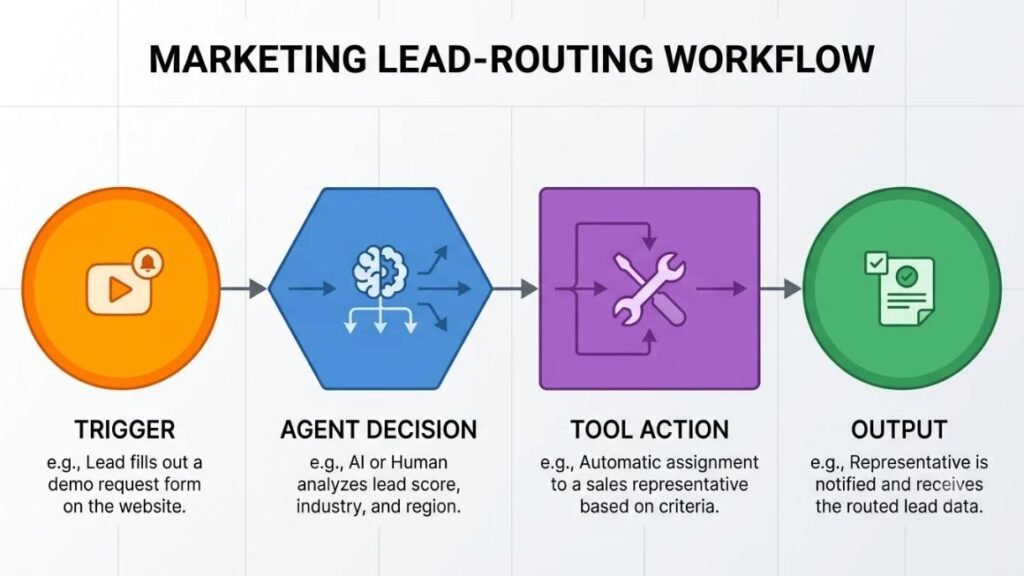
You don’t need the most advanced version to get value. Most marketing teams see the biggest time savings from single-task and multi-step agents applied to boring, repetitive work, not from building some elaborate autonomous system.
Why Marketing Teams Are Adopting AI Agents in 2026
Adoption of generative AI in marketing is no longer the interesting part of the story. It’s near-universal. According to Salesforce’s State of Marketing 2026 report, 87% of marketers now use generative AI in at least one workflow, up from 51% just two years earlier.
What’s changed is where the value is coming from. HubSpot’s AI Trends 2026 report found that marketers using AI tools save an average of 6.1 hours per week, with senior practitioners recovering closer to 8-10 hours. That’s not from writing better tweets. It’s from removing manual steps entirely, which is what agents are built for.
The ROI data backs this up too. McKinsey’s Global AI Survey found that content drafting delivers roughly 3.2x return relative to the effort marketers put in, and personalization work returns about 2.7x. Gartner’s 2025 CMO Spend Survey found that 81% of marketing leaders were already piloting AI agents, even while many admitted confusion about how to scale them properly.
So why now, specifically? A few reasons stack together:
- Martech platforms (HubSpot, Salesforce, Zapier) shipped native agent features in the last 18 months, so teams don’t need custom engineering to try one.
- Budget pressure means fewer headcount additions, and agents are being used to absorb work that would otherwise need a new hire.
- Marketing data is finally centralized enough, thanks to CRM and CDP maturity, for agents to actually pull accurate context instead of working blind.
To be fair, not every team is ready for this. If your lead data lives across four disconnected spreadsheets, an agent won’t fix that. It’ll just automate the mess faster. Get your data connected first.
The AI Agent Tools Powering Marketing Automation Today
There’s no single “best” AI agent tool for marketing. The right one depends on what you’re already running, how technical your team is, and whether you need something that lives inside your CRM or something that connects everything together from the outside. Here’s what’s actually worth using, based on what each one does well and where it struggles.
HubSpot Breeze Agents
What it does: Breeze is HubSpot’s native agent suite, built directly into the CRM. It includes a content agent, a social media agent, and a prospecting agent that can research and qualify leads without leaving the platform.
What it does well: Because Breeze sits inside HubSpot, it already has full context on your contacts, deal stages, and past campaigns. That context means less setup and fewer integration headaches than a third-party tool bolted on from outside.
Where it falls short: You’re locked into HubSpot’s ecosystem. If your team uses Salesforce for sales and a separate tool for email, Breeze’s usefulness drops fast outside the HubSpot walls.
Best for: Marketing teams already running most of their stack inside HubSpot who want agent features without adding new vendors.
Pricing: Breeze agents are bundled into HubSpot’s Marketing Hub Professional and Enterprise tiers, as of 2026. Check current tier pricing directly, since HubSpot revises packaging often.
Salesforce Agentforce
What it does: Agentforce lets marketing and sales teams build custom agents that act on CRM data, ranging from lead scoring agents to campaign performance analysts that can flag underperforming ads automatically.
What it does well: Agentforce is genuinely strong for B2B teams with complex sales cycles, since it can reason across sales and marketing data at once. An agent can look at a lead’s full history, not just their most recent form fill.
Where it falls short: The setup has a real learning curve. You’re not dragging a few blocks together. Building a genuinely useful custom agent usually means involving your RevOps or admin team, not just a marketer with a Saturday afternoon free.
Best for: Larger B2B marketing teams with dedicated Salesforce admins who can build and maintain custom agent logic.
Pricing: Agentforce is sold as an add-on to existing Salesforce licenses, priced per conversation or action credit as of 2026. It’s not cheap at scale, so model your expected usage before committing.
Zapier Agents
What it does: Zapier’s agent product (formerly “Zapier Central”) lets you describe a task in plain language, and the agent figures out which of your 7,000+ connected apps to use and in what order.
What it does well: If your team already lives in Zapier for basic automations, this is the lowest-friction way to add agent behavior. You’re not learning a new platform, just extending one you already trust.
Where it falls short: Zapier’s agents are good at connecting tools together, but they’re not as strong at nuanced judgment calls, like deciding whether a lead is genuinely a good fit versus just matching keywords. Use it for connective tasks, not decisions that need real context.
Best for: Small marketing teams that need to connect existing SaaS tools without hiring an engineer.
Pricing: Zapier’s agent features run on top of its standard plans, with usage-based task pricing. Its free tier is limited, so expect to land on a paid plan for anything production-grade, as of 2026.
Make.com
What it does: Make (formerly Integromat) is a visual automation builder that now includes AI modules for decision-making steps inside a broader workflow, not a standalone chat agent.
What it does well: Make gives you far more granular control over logic branches than Zapier does. If your workflow needs “if this, then this, unless that,” Make handles it without fighting you.
Where it falls short: The learning curve is steeper than Zapier’s. You’ll need someone comfortable thinking in flowcharts, not just plain-English task descriptions.
Best for: Marketing ops teams that want fine-grained control over multi-branch workflows and don’t mind a slightly technical setup.
Pricing: Make’s paid plans scale with operation volume. As of 2026, its free tier is generous enough to prototype a workflow before paying.
Relevance AI
What it does: Relevance AI is built specifically for creating custom multi-agent teams, where different agents handle research, drafting, and quality checks in sequence.
What it does well: It’s genuinely good at multi-step content and research pipelines, like an agent that researches a topic, another that drafts the piece, and a third that checks it against brand guidelines before it reaches a human.
Where it falls short: This is closer to a build platform than a plug-and-play tool. You’ll spend real time configuring agent roles before you see output worth using.
Best for: Teams with someone willing to invest a few weeks in setup for a genuinely custom multi-agent content or research pipeline.
Pricing: Relevance AI uses usage-based pricing tied to agent runs, with a free tier for testing, as of 2026.
Clay
What it does: Clay is a data enrichment and outbound tool with agent-like “Claygent” features that research individual leads across the web and pull back structured data you can act on.
What it does well: For account-based marketing and outbound campaigns, Clay’s ability to research a company or contact automatically and feed that into personalized outreach is genuinely hard to replicate manually at scale.
Where it falls short: Clay is narrow by design. It’s not trying to be a general marketing agent platform, so don’t expect it to handle content or reporting tasks.
Best for: Demand gen and ABM teams doing high-volume, highly personalized outbound.
Pricing: Clay prices on enrichment credits, with plans scaling based on volume, as of 2026.
n8n
What it does: n8n is an open-source automation platform similar to Make, but self-hostable, with growing native support for AI agent nodes that can reason through steps rather than following a rigid path.
What it does well: Full control. If your team has data privacy concerns about sending customer information through a third-party SaaS agent, self-hosting n8n keeps everything on infrastructure you own.
Where it falls short: Self-hosting means someone on your team is responsible for maintaining it. This isn’t a fit for a marketing team without any technical support.
Best for: Companies with an engineering team willing to support the marketing org’s automation, especially in regulated industries.
Pricing: n8n’s core is free and open-source. Its cloud-hosted version runs on tiered pricing as of 2026.
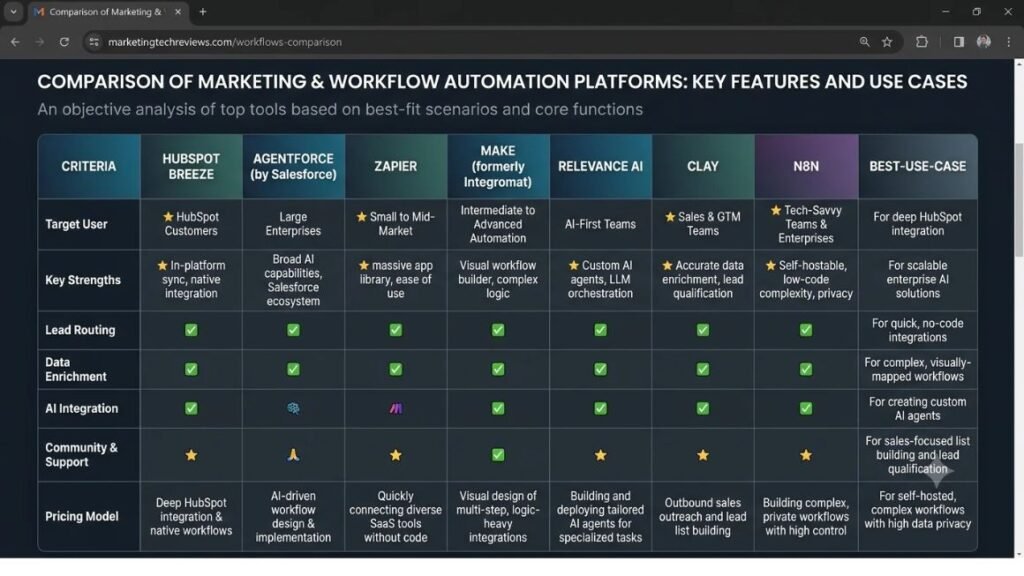
Honestly, most teams don’t need more than two of these running at once. Pick one for connecting your existing tools (Zapier or Make) and, if you have the budget and complexity to justify it, one native platform tied to your CRM.
How Do You Automate a Marketing Workflow With AI Agents?
Automating a workflow with an agent isn’t about picking a tool first. It’s about picking the right process to automate, then matching the tool to it. Skip that order and you’ll end up automating a workflow that shouldn’t exist in the first place.
Step 1: Map the workflow you want to automate. Write out every step of the process exactly as it happens today, including the annoying manual parts, before you touch any software.
Step 2: Identify the decision points. Mark where a human is making a judgment call versus just moving data from one place to another. Agents handle the second type easily. The first type needs clear rules before an agent can touch it.
Step 3: Choose the right agent tool for the job. Match the workflow to the platform: connective tasks go to Zapier or Make, CRM-context-heavy tasks go to a native agent like Breeze or Agentforce, and research-heavy outbound goes to Clay.
Step 4: Connect your data sources and give the agent context. An agent making decisions without accurate context will make confidently wrong decisions. Feed it your actual lead scoring criteria, brand guidelines, or past campaign data before letting it run live.
Step 5: Set guardrails and a human approval checkpoint. For anything customer-facing, like an email send or an ad spend change, keep a human review step in the loop until the agent has a track record you trust.
Step 6: Test on a narrow slice before scaling. Run the agent on 5% of your leads or one email sequence first. Check the output manually. Only widen the rollout once you’ve confirmed it’s making good calls.
The safest way to automate a marketing workflow with AI agents is to start with a narrow, low-risk slice of the process, keep a human approval step for anything customer-facing, and expand only after the agent has proven accurate on real data. Skipping the guardrail step is the most common reason agent rollouts fail.
That sounds like a lot of steps for something that’s supposed to save time. It isn’t, once you’ve set it up once. The mapping and guardrail work happens up front, and after that the workflow runs itself.
Marketing Workflows You Can Automate Right Now
Some workflows are more agent-ready than others. These are the ones that consistently work well, based on what’s actually being deployed by marketing teams right now.
Lead qualification and routing. An agent checks incoming form fills against your ideal customer profile, enriches the record with company data, and routes qualified leads to the right sales rep with a summary attached. This is the single most common use case across HubSpot Breeze, Agentforce, and Clay-based setups.
Content repurposing across channels. Feed a long-form asset like a webinar transcript or blog post to an agent, and have it draft LinkedIn posts, an email snippet, and short video captions from the same source material. A human still edits before publish, but the first draft no longer eats a whole afternoon.
Campaign reporting and analysis. Instead of pulling numbers into a spreadsheet every Monday, an agent can pull performance data across ad platforms, flag anything that’s underperforming against target CPA, and draft a summary for your weekly team sync.
Email sequence personalization. An agent reads a lead’s firmographic data and past engagement, then selects or lightly rewrites the right email variant from a set you’ve pre-approved, rather than sending the same generic sequence to everyone.
Social listening and competitor tracking. An agent monitors mentions and competitor campaign launches, then drops a summary into Slack when something relevant happens, instead of someone manually checking five tools every morning.
Notice what these all have in common. None of them replace strategic thinking. They remove the manual labor sitting in front of it.
Where AI Agents Still Fall Short
It’s worth being straight about this, because a lot of vendor marketing overstates what’s ready today. Agents are genuinely useful, but they’re not the autonomous marketing department some pitch decks imply.
In our testing at Hotskill with learners building their first automation workflows, the most common failure point isn’t the agent itself. It’s missing or messy source data. An agent fed contradictory CRM fields will make a wrong call with total confidence, and won’t flag that it’s unsure.
Judgment-heavy decisions still need a human. Deciding whether a piece of brand messaging is on-tone, or whether a lead’s unusual behavior is a red flag or a good sign, is something agents get wrong often enough that unsupervised use is risky. Konabayev’s 2026 review of marketing AI adoption data found that fewer than a third of marketers using AI at all have moved into genuinely agentic use cases like brand governance or predictive optimization, which tracks with what we’ve seen: most teams are still in the “connect tools together” phase, not the “let it decide” phase.
Integration friction is still real, too. Even with native platform agents, connecting a legacy tool that doesn’t have a modern API can turn a two-hour setup into a two-week one.
None of this means skip agents. It means start narrow, watch the output closely for the first month, and expand only where you’ve confirmed the agent is actually reliable, not just fast.
Closing Thoughts
Start with one workflow, not five. Pick the process that eats the most manual hours in your week, whether that’s lead routing, reporting, or content repurposing, and automate just that one first. Get comfortable with how the agent behaves before you hand it anything customer-facing.
The tools covered here, from HubSpot Breeze to Zapier Agents to n8n, all solve different problems. None of them are magic, and none of them replace the judgment your team brings to strategy. What they do is buy back the hours currently going to work that never needed a human in the first place.
If you want to actually get hands-on with building these workflows instead of just reading about them, Hotskill has structured lessons on AI agents and automation built for marketers, not engineers. Download the app on iOS or Android and start your first lesson today at hotskill.co/download.
FAQs
What is an AI agent in marketing?
An AI agent in marketing is software that can plan and carry out multi-step tasks, like qualifying a lead or drafting a report, without a person prompting it at every step. It differs from a chatbot because it can take action through connected tools, not just generate text in response to a question.
What’s the difference between an AI agent and regular marketing automation?
Traditional marketing automation follows fixed if-this-then-that rules that a human wrote in advance. An AI agent can make judgment calls within a task, like deciding how to phrase a follow-up based on a lead’s specific behavior, rather than just triggering the same pre-written email every time.
Do I need to know how to code to set up a marketing AI agent?
No, not for most common workflows. Tools like Zapier Agents and HubSpot Breeze are built for non-technical marketers with plain-language setup. Platforms like Relevance AI or n8n get more technical if you’re building custom multi-agent pipelines, so factor that in when choosing a tool.
Is HubSpot Breeze better than Salesforce Agentforce?
It depends entirely on which CRM you already run. Breeze is the better choice if your team lives in HubSpot, since it has native access to your existing data with far less setup. Agentforce makes more sense for larger B2B teams already deep in Salesforce with the technical support to build custom agent logic.
How much time can an AI agent actually save a marketing team?
According to HubSpot’s AI Trends 2026 report, marketers using AI tools save an average of 6.1 hours per week, with senior team members saving closer to 8-10 hours. The exact number depends heavily on which workflows you automate and how much manual work those tasks previously required.
Why isn’t my AI agent giving me good results?
The most common cause is bad or incomplete source data, not a flaw in the agent itself. If your CRM fields are inconsistent or your brand guidelines were never documented anywhere the agent can access, it will make confident guesses instead of accurate decisions. Clean up your data and context before blaming the tool.
Do I really need an AI agent if I already use Zapier or ChatGPT?
If you’re only automating simple, single-step tasks, standard Zapier zaps or ChatGPT prompts may already cover it. Agents earn their place when a task needs multiple decisions strung together, like researching a lead, judging fit, and routing it, since that requires reasoning across steps rather than a single trigger-action pair.
Are AI agents safe to use with customer data?
It depends on the platform and how it’s configured. Native CRM agents like Breeze or Agentforce keep data inside your existing platform’s security setup, while third-party tools require checking their data handling policies directly. For sensitive industries, self-hosted options like n8n give you more control over where data actually lives.
What’s the best AI agent tool for a small marketing team?
For most small teams, Zapier Agents or Make.com offer the lowest-friction starting point, since they connect tools you likely already use without requiring a new platform migration. Save the CRM-native or custom multi-agent platforms for once your team has outgrown basic connective automation.
Can AI agents replace a marketing team?
No, and treating them that way is where most rollouts go wrong. Agents remove repetitive manual work like data pulls, routing, and first-draft content, but strategic decisions, brand judgment, and creative direction still need a person. The teams getting the most value are using agents to free up time for that higher-value work, not to eliminate the roles doing it.