

Most growth teams are stuck doing the same thing: chasing leads that go cold, manually qualifying prospects, and stretching a small team across too many channels. If that sounds familiar, you’re not alone. Sales and marketing teams have tried chatbots, CRM automation, and a dozen point tools, and most of it still needs a human to babysit every step.
This is exactly the gap an AI Agent for Customer Acquisition is built to close. Instead of a single-purpose tool, it’s a system that can find prospects, qualify them, follow up, and hand off warm leads without someone manually running each step. This guide breaks down what these systems actually do, the features worth paying for, and real examples of teams using them to bring in new business.
What Problem Is This Technology Actually Solving?
Most teams don’t need another dashboard. They need something that actually does the repetitive work of finding and engaging buyers so people can spend their time closing deals instead of chasing them.
An autonomous system like this is software that can plan and carry out a multi-step task on its own, using rules and machine learning models instead of waiting for a human to click “next” at every stage. That’s a meaningful difference from a chatbot, which mostly answers questions when someone types to it. The system we’re describing here goes out and does the work: researching a prospect, drafting an outreach message, scheduling a follow-up, and updating the CRM, all without someone standing over it.
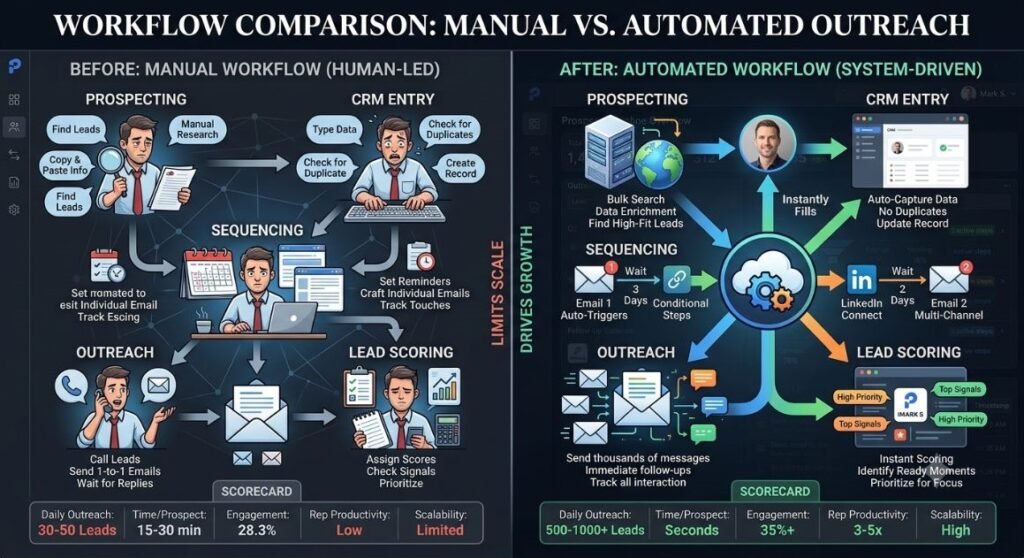
Here’s the problem it solves in practice. A five-person sales team can realistically make maybe 40 to 60 quality outbound touches a day between calls, emails, and LinkedIn messages. Add in research time, and that number drops fast. Software that automates the qualifying and outreach steps doesn’t replace the team, but it does remove the bottleneck that keeps them from doing more of what actually converts.
The core problem this technology solves isn’t lead volume, it’s time. Sales teams already have more prospects than they can properly research and follow up with. Automating research, first-touch outreach, and qualification frees reps to focus on conversations that are already warm.
Read More: AI Agent for Marketing: How Intelligent Automation Is Changing Customer Engagement
Core Features You Should Expect
Not every product marketed this way actually delivers. Here’s what separates a system that works from one that’s just a fancy autoresponder.
Prospect Research and Enrichment
A capable system pulls firmographic and behavioral data (company size, industry, recent funding, hiring activity, website visits) and builds a profile before it ever reaches out. This is the difference between a generic template and a message that references something specific about the prospect’s business.
Multi-Channel Outreach
The strongest platforms work across email, LinkedIn, and sometimes SMS, adjusting tone and timing per channel instead of blasting the same copy everywhere. Personalization at this stage should go beyond inserting a first name.
Lead Scoring and Qualification
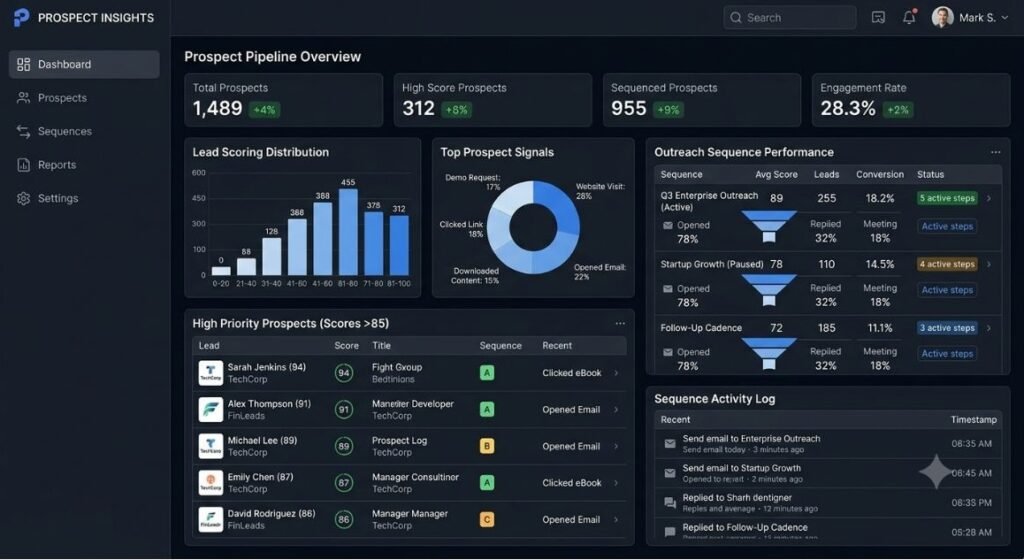
Rather than passing every reply to a rep, the system scores intent based on response content, engagement history, and firmographic fit, then routes only qualified conversations to a human. This step alone is what separates useful automation from noise generation.
CRM and Calendar Integration
Deals and follow-ups should sync automatically into tools like Salesforce, HubSpot, or Pipedrive, and meeting booking should happen without back-and-forth email threads. If a platform doesn’t integrate cleanly with your existing stack, it creates more manual work, not less.
Continuous Learning from Outcomes
Better platforms adjust messaging and targeting based on what’s actually converting, not just what looks good on paper. That feedback loop is what keeps performance from flattening out after the first few weeks.
Read More: AI Agents for Social Media Marketing: Benefits, Use Cases, and Tools (2026)
Human Handoff and Escalation
Even the best systems reach a point where a real person needs to take over, whether that’s a pricing question, a tricky objection, or a prospect who simply wants to talk to a human. Look for a platform that flags these moments clearly and hands the conversation to a rep with full context attached, rather than dropping a cold thread into someone’s inbox with no history. This is often the difference between a tool reps trust and one they quietly stop using.
Key Benefits for Growth Teams
So what does a team actually get out of adopting one of these systems? A few things stand out.
Faster response times. Speed to lead matters more than most teams realize. According to a 2023 study from Vendasta, businesses that responded to a lead within five minutes were significantly more likely to convert it compared to waiting even 30 minutes. Automated first-touch outreach can respond in seconds, not hours.
Lower cost per qualified lead. Because research and first-contact messaging no longer eat rep hours, teams can run more outreach volume without adding headcount. A ten-person SDR team doesn’t need to become a twenty-person team to double its pipeline.
More consistent follow-up. Reps forget to follow up. Software doesn’t. A structured, persistent cadence across email and LinkedIn catches deals that would otherwise fall through the cracks.
Better use of human time. Reps spend their day on calls and closing conversations instead of research and cold first drafts. That’s a better use of a skilled person’s time, and it usually shows up in morale too.
Data that actually improves targeting. Every interaction feeds back into the scoring model, so targeting gets sharper the longer the system runs, instead of staying static like a one-time list purchase.
Scaling without a proportional cost increase. Hiring another SDR to double outbound volume takes months between sourcing, hiring, and ramping. Adding a new channel or raising send volume on an automated platform is a configuration change, not a hiring cycle. That’s a meaningfully different growth curve, especially for smaller companies that can’t front-load hiring costs.
The biggest measurable benefit of this kind of automation is speed to first contact combined with consistent follow-up. Teams that used to lose deals to slow response times or forgotten follow-ups see the clearest improvement, often within the first month of rollout.
Read More: AI Agents for Digital Marketing: The Complete 2026 Guide
How It Works, Step by Step
Here’s what a typical workflow looks like once one of these systems is live.
- Define the ideal buyer profile. Set the firmographic and behavioral criteria (industry, company size, job title, intent signals) that determine who gets targeted.
- Build the target list. The system pulls matching prospects from connected data sources and enriches each record with relevant context.
- Launch personalized outreach. Messages go out across the chosen channels, timed and sequenced based on best-performing patterns from past campaigns.
- Score incoming replies. Every response gets scored for intent and fit, and low-quality replies get filtered out automatically.
- Route qualified conversations to a rep. Warm leads land directly in a rep’s queue or calendar, already scored and summarized.
- Sync everything to the CRM. Activity, notes, and next steps update automatically so nothing has to be logged manually.
- Review performance and adjust. Conversion data feeds back into targeting and messaging so the next cycle performs better than the last.
Most platforms compress this entire sequence into a single setup process, but understanding each step helps you evaluate whether a given tool is actually doing the work or just automating the easy 20 percent.
Real-World Examples and Use Cases
Concepts are only useful if they hold up in practice. Here’s how different teams are actually applying this.
A B2B SaaS Startup Cutting Research Time
A 12-person SaaS company selling to mid-market operations teams used an automated outreach platform to handle prospect research and first-touch email. What used to take an SDR close to three hours a day of manual list-building and personalization dropped to about 40 minutes of review and approval. The team didn’t cut headcount. It redirected that saved time into demo calls, and booked meetings rose by roughly a third within two months.
An Agency Managing Outreach for Multiple Clients
A marketing agency running outbound campaigns for six clients used a multi-channel platform to manage sequencing and reply scoring across every account from one dashboard. Instead of a separate person tracking each client’s inbox, one account manager could oversee all six pipelines because qualified replies surfaced automatically.
A Solo Founder Running Cold Outreach Alone
A single-founder startup with no dedicated sales hire used an automated system to run LinkedIn and email outreach in parallel while the founder focused on product and closing calls. The founder still handled every closing conversation personally, but the earlier research and first-message work happened without a hire.
An eCommerce Brand Re-Engaging Abandoned Leads
A direct-to-consumer brand used an automated system to follow up with wholesale buyers who had requested a catalog but never placed an order. Instead of a generic monthly newsletter, the system sent personalized follow-ups timed to each lead’s original inquiry, referencing the specific product category they’d asked about. Reply rates on this previously ignored list were noticeably higher than the brand’s standard email blasts, and a handful of long-dormant leads turned into repeat wholesale accounts.
Choosing the Right Platform
Not every vendor in this space is built the same, and the marketing tends to blur together. A few things actually matter when you’re comparing options.
Data quality behind the enrichment. A system is only as good as the data it pulls from. Ask where firmographic and intent data actually comes from, not just what the dashboard shows.
How qualification actually works. Some platforms score leads with a simple keyword match. Others use a trained model that weighs multiple signals. The second approach holds up better once volume increases.
Integration depth, not just presence. A platform might technically “integrate” with your CRM but only sync basic fields. Ask specifically what data flows both ways and how often.
Pricing transparency. Several platforms in this category price per seat, others per contact enriched or message sent. As of 2026, most mid-market tools in this space run somewhere between $500 and $3,000 a month depending on volume and channel count, though this changes often enough that you should confirm current pricing directly with any vendor before committing.
Honestly, the demo is where a lot of these platforms look identical. The real test is asking to see performance data from an existing customer in a similar industry, not just the sales team’s own case studies.
Support and onboarding. A platform that hands you a login and a help article isn’t the same as one that assigns a real onboarding contact who helps you set qualification rules for your specific market. The setup phase is where most of the long-term value gets decided, so ask what onboarding actually looks like in week one, not just what the pricing page promises.
Trial length and exit terms. Given how much performance depends on data quality and messaging tuning, a two-week trial rarely tells you much. Look for vendors willing to run a 30-day pilot, and check the contract for how easy it is to leave if the results don’t hold up after that period.
Common Challenges and How to Handle Them
This technology isn’t a plug-and-play fix, and it’s worth being honest about where it falls short.
Messaging can feel generic if the underlying data is thin. If enrichment only pulls a company name and job title, personalization ends up shallow no matter how good the copy generation is. The fix is usually improving data sources before blaming the writing.
Over-automation can hurt reply rates. Sending too many touches too fast reads as spam, and deliverability suffers. Most experienced teams cap sequences at five to seven touches over two to three weeks rather than firing off a dozen messages in ten days.
Reps sometimes distrust scores they don’t understand. If a rep can’t see why a lead was marked high-intent, they’ll ignore the score entirely. Platforms that show the reasoning behind a score tend to get adopted faster internally.
It won’t fix a weak offer or bad targeting. No amount of automation makes up for going after the wrong buyer persona or pitching a product-market fit that isn’t there yet.
Data privacy and compliance need attention too. Outreach at scale across email and LinkedIn touches regulations like CAN-SPAM in the US and GDPR in the EU, and the platform you choose should have opt-out handling and consent tracking built in, not bolted on as an afterthought. This matters more once volume increases, since a compliance gap that seemed minor at 50 messages a week becomes a real liability at 500.
Getting Started: A Practical Rollout Plan
- Audit your current outbound process. Map out exactly where reps spend time today, from research to first message to follow-up.
- Pick one channel to automate first. Email is usually the easiest starting point before adding LinkedIn or SMS.
- Set clear qualification criteria. Define what “qualified” actually means for your team before letting a system score leads on your behalf.
- Run a 30-day pilot with a subset of your list. Compare response rates and booked meetings against your existing baseline.
- Review and adjust messaging weekly. Use the first month to refine tone, timing, and targeting rather than expecting it to be perfect on day one.
- Expand channel by channel. Add a second channel only once the first is performing reliably.
In Hotskill’s own AI skill tracks, we’ve found that learners who understand the qualification logic behind these tools get far better results than those who just turn the automation on and walk away. Knowing how the scoring works matters as much as the tool itself.
Conclusion
The teams getting the most out of this shift aren’t the ones automating everything at once. They’re starting with one channel, defining what a qualified lead actually looks like, and letting the system handle research and first-touch work while reps focus on closing. That’s the practical version of an AI Agent for Customer Acquisition, not a replacement for your sales team, but a way to remove the bottleneck that’s been slowing it down.
If you want to actually understand how the qualification and scoring logic behind these tools works instead of just turning one on and hoping, Hotskill has structured lessons built for exactly that. Download the app on iOS or Android, and start your first lesson today.
FAQ
What Does This Kind of Sales Automation Actually Do?
At its core, this is an AI agent (a system that plans and carries out a multi-step task on its own, rather than just responding when prompted) built specifically for customer acquisition: finding, qualifying, and engaging potential buyers from research through initial outreach to handoff. Unlike a simple chatbot, it plans and executes several linked tasks without a person managing each one individually.
How is this different from a regular chatbot or CRM automation?
A chatbot mostly reacts to messages typed into it, and standard CRM automation runs fixed if-this-then-that rules. This kind of system plans a sequence, adapts based on responses, and makes decisions like scoring a reply or choosing the next best channel on its own.
Is this worth it for a small sales team?
For teams under ten people, it’s often more useful than for large ones, since it fills the research and first-touch gap that small teams can’t staff for. A solo founder or a small SDR team tends to see the clearest time savings.
Do I need to know how to code to set one up?
No. Most platforms in this category are built for sales and marketing users, with setup handled through forms, integrations, and templates rather than code. Technical knowledge helps with advanced customization but isn’t required to get started.
How much does this kind of software typically cost?
As of 2026, most mid-market platforms run between $500 and $3,000 a month depending on contact volume and channel count, though enterprise pricing goes higher. Always confirm current pricing directly with a vendor since these numbers shift often.
Will this replace my sales reps?
No, and platforms that promise this are overselling it. It removes repetitive research and first-touch work so reps can spend more time on calls and closing, but the actual sales conversation still needs a person.
Why isn’t my outreach getting good replies even with automation?
The most common cause is thin enrichment data leading to generic messaging, or too many touches sent too quickly, which hurts deliverability and reads as spam. Check your data sources and sequence pacing before assuming the copy itself is the problem.
Do I still need a CRM if I’m using one of these platforms?
Yes. These platforms are built to sync with a CRM like Salesforce or HubSpot rather than replace it, since your CRM remains the system of record for deals and customer history. Look for a platform with two-way sync, not just one-way data push.
How long does it take to see results after setup?
Most teams start seeing measurable changes in response time and reply rate within the first two to four weeks, though full optimization of targeting and messaging usually takes a full quarter. A 30-day pilot is a reasonable way to judge early performance before scaling up.
Can this work across multiple channels like email and LinkedIn together?
Yes, and the stronger platforms are built specifically to coordinate timing and messaging across email, LinkedIn, and sometimes SMS so a prospect doesn’t get duplicate or conflicting messages. Start with one channel, then expand once performance is stable.