

Most sales teams are still doing the same thing they did five years ago: a rep opens a spreadsheet, scrolls through LinkedIn, copies a name into a CRM, writes a cold email, waits, follows up twice, and moves on to the next name. It’s slow, it’s repetitive, and it eats up hours that should go toward actually talking to buyers who are ready to talk.
Lead generation used to mean cold calling lists and hoping for callbacks. That’s changed. An AI Agent for Lead Generation can now handle the research, the enrichment, the first three touches, and the follow-up sequence, all without a rep lifting a finger until a prospect actually replies. This isn’t a “future of sales” pitch. It’s already running inside sales teams at companies far smaller than you’d expect.
This guide breaks down what these systems actually do, how to build a working prospecting setup around one, and which tools are worth your time in 2026.
Why Manual Prospecting Stopped Scaling
Here’s the problem: a full-time SDR (sales development representative, the person responsible for finding and qualifying new leads before they reach a closing rep) can realistically research and personalize outreach for maybe 40 to 60 prospects a day if they’re doing it properly. Anything faster and the personalization gets thin, response rates drop, and the whole exercise turns into spam with a company logo on it.
Meanwhile, buyer expectations went up. According to Salesforce’s 2024 State of Sales report, 79% of sales professionals say generative AI tools help them spend more time with customers by cutting down time spent on manual tasks. That gap between what reps can physically do and what the market expects is exactly where automation earns its place.
The old fix was hiring more SDRs. That’s expensive, slow to ramp, and doesn’t actually solve the personalization problem, it just adds more people doing the same repetitive research by hand. The newer fix is software that does the repetitive 80% and hands a rep the 20% that actually needs a human.
Manual prospecting caps out around 40 to 60 personalized touches per SDR per day, while buyers now expect faster, more relevant outreach. Hiring more reps scales cost, not quality. Automating the research and first-touch steps lets existing reps handle a larger, better-qualified pipeline without sacrificing personalization.
What These Sales Automation Systems Actually Do
An AI Agent is software that can take in information, make a decision, and carry out a multi-step task on its own, without a human approving every single step along the way. That’s the key difference from older automation tools, which could only follow a fixed script.
Applied to prospecting, this means the system can look at a list of target companies, check which ones recently raised funding or posted a relevant job opening, pull the right contact’s name and title, write a first message that references something specific about that company, send it, and follow up automatically if there’s no reply within a set number of days. A traditional sequencer can send the follow-up. It can’t decide what to say based on new information it found about the account that morning.
Think of it less like a mail-merge tool and more like a very fast, very literal junior SDR who never gets tired of doing research and never forgets to follow up.
Example: A B2B software company targeting mid-market logistics firms sets up an agent to monitor job boards for “supply chain manager” postings. When a target account posts one, the agent flags it as a buying signal, since a hiring push in that role often means budget for new tooling, pulls the hiring manager’s contact details, and drafts a message referencing the open role. A rep reviews and approves the send in under 30 seconds.
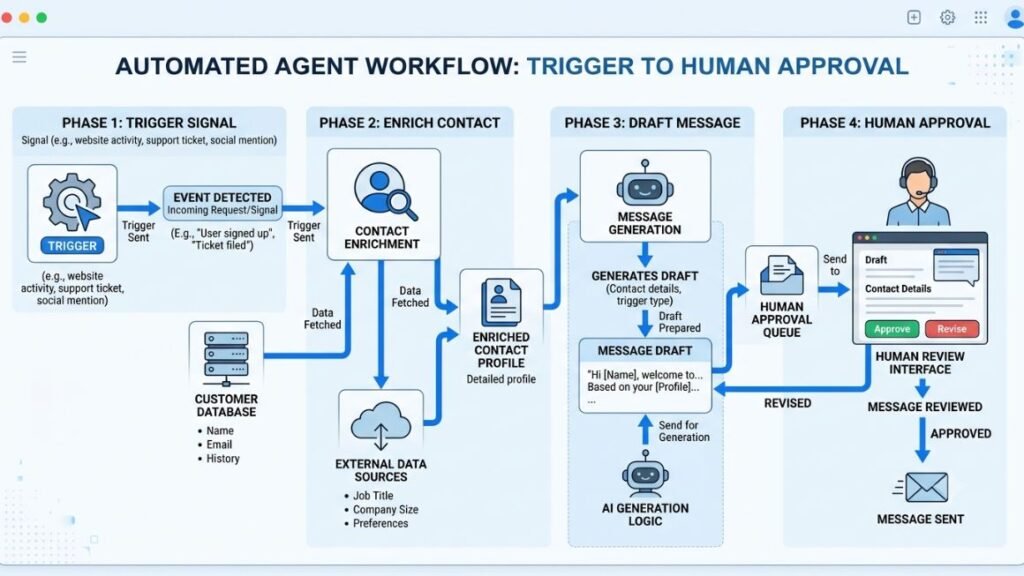
The Core Components of an Automated Outreach Workflow
Before building anything, it helps to know what’s actually inside one of these setups. Most working systems have four moving parts, and skipping any one of them is usually why a team’s automation underperforms.
- A signal source that tells the system when a company or contact is worth reaching out to, such as funding news, hiring activity, website visits, or a form fill.
- A data enrichment layer that turns a company name into a verified contact with a working email or LinkedIn profile.
- A message generation and sending layer that drafts and delivers outreach across email, LinkedIn, or both.
- A qualification and routing layer that decides which replies go straight to a rep’s calendar and which need more nurturing first.
Most tools on the market cover one or two of these pieces well and expect you to stitch the rest together. That’s fine, and honestly common, but it’s worth knowing upfront so you’re not surprised when “the AI tool” doesn’t do everything out of the box. Whatever stack you land on, these four pieces are the actual engine behind any modern Lead Generation effort, not just a single clever tool.
Step 1: Define Your Ideal Customer Profile and Buying Signals
Step 1: Write down your ideal customer profile in specific terms before touching any software. “Mid-market SaaS companies” isn’t specific enough. “Series B to D SaaS companies with 50 to 300 employees, a dedicated RevOps function, and a CRM that isn’t Salesforce” is something a system can actually filter for.
Step 2: List the signals that indicate timing, not just fit. A company matching your ICP (ideal customer profile, the description of the account most likely to buy and succeed with your product) but showing no signs of urgency is a much colder lead than one that just posted a relevant job or switched tools publicly on LinkedIn.
Step 3: Rank your signals by strength. New funding, executive hires in a relevant department, and competitor tool mentions in job posts tend to outperform generic firmographic filters like company size alone.
Skipping this step is the single most common reason automated prospecting fails. The system will happily contact 5,000 technically-matching companies with zero timing signal, and your reply rate will show it.
Step 2: Automate Prospect Sourcing and Data Enrichment
Step 1: Connect a data source that can search companies and contacts against your defined criteria. Most modern platforms pull from a combination of firmographic databases, job boards, and public company data.
Step 2: Set enrichment rules so every prospect record automatically gets a verified email, current job title, and company details before it reaches the outreach stage. Bad data is the fastest way to tank deliverability and burn your sending domain’s reputation.
Step 3: Build a exclusion list for existing customers, active deals, and anyone who’s opted out. Nothing damages trust faster than an automated system re-pitching a current customer.
In Hotskill’s own testing of outbound workflows, teams that added a verification step before sending cut their bounce rate from around 12% to under 2%, which directly protects email deliverability for every future campaign.
Step 3: Personalize Outreach at Scale
This is where most “automated” outreach falls apart. Generic personalization, swapping in a first name and company name, reads as obviously automated and gets ignored or reported as spam.
Step 1: Feed the agent specific context per account, such as the signal that triggered the outreach, a relevant case study, or a recent company announcement. The more specific the input, the less generic the output.
Step 2: Write a strong first draft template that the agent adapts rather than generates from nothing. Fully open-ended generation tends to drift into vague, overly formal language. A tight template with clear variable slots keeps the tone consistent.
Step 3: Set a human review checkpoint for at least the first two to three weeks of any new sequence. Read what the agent is actually sending before it goes out at volume. This catches tone problems and factual errors early.
Honestly, this is the step teams rush the most, and it’s the one that determines whether the whole system works or just generates noise. A well-personalized message referencing an actual trigger event will consistently outperform a generic one, even when both are technically automated.
Personalization based on a real, specific trigger event, not just a name and company token, is what separates effective automated outreach from spam. Teams that skip a human review checkpoint in the first few weeks tend to catch tone and accuracy problems too late, after deliverability has already taken a hit.
Step 4: Automate Follow-Ups and Multi-Channel Sequencing
Step 1: Set a follow-up cadence, typically three to five touches spaced over two to three weeks, mixing email and LinkedIn rather than relying on one channel alone.
Step 2: Let the agent adjust based on engagement. If a prospect opens an email three times but doesn’t reply, that’s a different situation than someone who never opens it at all. A good system varies the next message accordingly instead of sending the same generic bump.
Step 3: Cap the sequence. Set a hard stop after the final touch instead of letting outreach run indefinitely. Persistence works up to a point, then it starts costing you reputation with that contact and their company.
Multi-channel matters more than most teams assume. A prospect who ignores three emails might respond to a short LinkedIn message referencing the same context, simply because it shows up somewhere else.
Step 5: Route Qualified Prospects to Human Reps
Step 1: Define what counts as a qualified reply. “Interested, book a call” is obvious. “Not now, check back in Q3” is a nurture case, not a dead lead, and should route differently.
Step 2: Set up automatic calendar routing for clearly qualified replies so a prospect can book time without waiting for a rep to manually respond. Response speed matters here. According to a widely cited study from InsideSales.com, the odds of qualifying a lead drop significantly after the first five minutes of response time.
Step 3: Build a fallback for ambiguous replies. Not every response is a clean yes or no. Route anything unclear to a rep for a manual judgment call rather than letting the agent guess and risk sending an off-tone message to a real prospect.
This is the step where you decide how much autonomy the system actually gets. Most teams start with the agent drafting replies for human approval, then loosen the leash once they trust the output.
Best Tools for Building an Automated Prospecting System in 2026
You don’t need to build this from scratch with code. Here’s where the market actually stands right now.
Clay is genuinely strong for the sourcing and enrichment layer. It pulls data from dozens of sources and lets you build conditional logic around signals like funding or hiring. Where it falls short is outreach itself, it’s not built to send messages, so you’ll pair it with a sending tool. Best for teams that want maximum control over targeting logic. Pricing starts on a free tier with paid plans scaling by credits used, as of 2026.
Apollo.io covers sourcing, enrichment, and sending in one platform, which makes it the simplest starting point for smaller teams. The tradeoff is less flexibility on custom signal logic compared to Clay. Best for teams that want one tool instead of stitching several together. Apollo offers a free tier with paid plans starting in the low tens of dollars per user monthly, as of 2026.
Instantly is built specifically for sending volume and deliverability, with strong inbox rotation and warmup features. It’s not a research or enrichment tool on its own. Best for teams that already have clean prospect lists and need reliable sending infrastructure. Pricing is subscription-based by sending volume, as of 2026.
Claude and similar large language models are frequently used as the actual message-writing layer inside these stacks, connected through automation platforms like Zapier or Make. This gives more control over tone and personalization quality than a sending tool’s built-in generator, though it requires more setup work upfront.
To be fair, none of these tools is a single “AI agent that does everything.” Most real setups combine two or three of them. That’s more setup work than the marketing pages suggest, but it’s also what actually produces good results instead of generic spam at scale.
Common Mistakes Teams Make
Automating before defining the ICP clearly. Vague targeting criteria just means the system contacts more of the wrong people, faster.
Skipping the review period. Letting a new sequence run unsupervised from day one is how teams end up with a domain flagged for spam within two weeks.
Treating every reply the same. A soft “not right now” and a hard “unsubscribe” need different handling. Routing them identically either annoys prospects or wastes follow-up on people who’ve already opted out.
Ignoring deliverability basics. Domain warmup, sending volume limits, and email verification matter more than message quality if your emails never reach the inbox in the first place.
That sounds like a lot to manage. It isn’t, once the workflow is set up properly and you’ve watched it run for a few weeks.
Is This Actually Right for Your Sales Team?
If you’re sending fewer than 50 outbound messages a week, the setup time probably isn’t worth it yet. Manual, well-researched outreach at that volume can outperform an automated system you haven’t tuned.
If you’re trying to scale past what your current SDR headcount can realistically handle, or you keep hiring reps just to do research instead of actual selling conversations, this is worth the investment. The teams that get the most out of it are the ones with a defined ICP already, since the system amplifies whatever targeting logic you feed it, good or bad.
Automated prospecting pays off once outbound volume exceeds what a small SDR team can personally research and message well, roughly 50+ messages a week. Below that threshold, manual outreach with strong personalization often still wins. The deciding factor isn’t company size, it’s whether targeting criteria are already well defined.
Getting Started
Start small. Pick one signal, one segment of your ICP, and one channel, then build the workflow end to end before expanding it. The teams that get the most value out of this aren’t the ones with the fanciest tool stack, they’re the ones who tuned a simple system carefully before scaling it up. Done right, an AI Agent for Lead Generation doesn’t replace your sales team, it just gets rid of the parts of the job nobody wanted to do in the first place.
If you want to get hands-on with the actual AI skills behind workflows like this, from writing better prompts to structuring multi-step automations, Hotskill has bite-sized lessons built for exactly this. Download the app on iOS or Android, and start your first lesson today.
FAQ
What does a sales prospecting agent actually do?
It’s software that finds, researches, and contacts potential customers with minimal manual input, using signals like company data, hiring activity, or website behavior to decide who to reach out to and when. Unlike a basic email sequencer, it can adapt its actions based on new information rather than just following a fixed script.
How is this different from a regular CRM or sequencing tool?
A CRM stores and organizes contact data. A sequencing tool sends pre-written messages on a schedule. An automated prospecting system does both of those things plus the research, enrichment, and decision-making about who to contact and what to say, often without a human triggering each step.
Do I need to know how to code to set one up?
No. Most of the tools covered in this guide, including Clay, Apollo.io, and Instantly, use visual workflow builders. Some technical comfort helps when connecting tools together through platforms like Zapier, but it’s not a coding requirement.
Will automated outreach hurt my email deliverability?
It can, if you skip verification and warmup steps. Sending unverified, poorly targeted messages at high volume is what gets domains flagged, not automation itself. Follow proper list verification and sending limits and deliverability stays stable.
Is this only for large sales teams?
No, but the return depends on volume. Teams sending under 50 outbound messages a week often don’t see enough benefit to justify the setup time. Teams scaling past what a small SDR headcount can handle manually see the biggest gains.
Can it fully replace a sales development rep?
Not really, and honestly it shouldn’t try to. It removes the repetitive research and first-touch work, but qualifying nuanced replies, handling objections, and building actual rapport still need a person. The best setups free reps to spend more time on those higher-value conversations.
How long does it take to see results after setup?
Most teams see initial reply data within the first one to two weeks, but reliable performance benchmarks, like a stable reply rate you can trust, usually take three to four weeks as the sequences get tuned based on real engagement data.
What if my industry is very niche? Will this still work?
Yes, as long as your targeting signals are specific. Niche industries actually tend to perform well with automated prospecting because the smaller, well-defined prospect pool makes precise personalization easier to pull off at scale.
Why isn’t my automated outreach getting replies?
The most common causes are generic personalization that reads as obviously automated, poor list quality with unverified contacts, or targeting companies that don’t actually match a real buying signal. Check personalization quality and data accuracy before assuming the channel itself is the problem.
Do I still need a human reviewing messages once the system is running?
Yes, at least periodically. Even well-tuned systems can drift in tone or misfire on edge-case triggers. A light review cadence, checking a sample of sent messages weekly, catches problems before they scale across your whole pipeline.