

You can run a dozen A/B tests a month, rewrite your landing page copy five times, and still watch your conversion rate sit exactly where it was six months ago. That’s the reality for most growth and marketing teams right now. Manual CRO doesn’t scale with the amount of traffic, segments, and variables modern sites need to test.
This is where an AI Agents for Conversion Rate Optimization changes the math. Instead of a human running one test at a time and waiting weeks for statistical significance, an AI agent can analyze behavior, generate hypotheses, launch variants, and adjust in near real time, often across thousands of visitor segments at once.
In this article, you’ll get a clear picture of what these agents actually do, the strategies worth using them for, the specific tools worth trying in 2026, and real use cases from teams already running them. No fluff, no “AI is changing everything” talk. Just what works and what doesn’t.
What Does an AI Agents for Conversion Rate Optimization Actually Do?
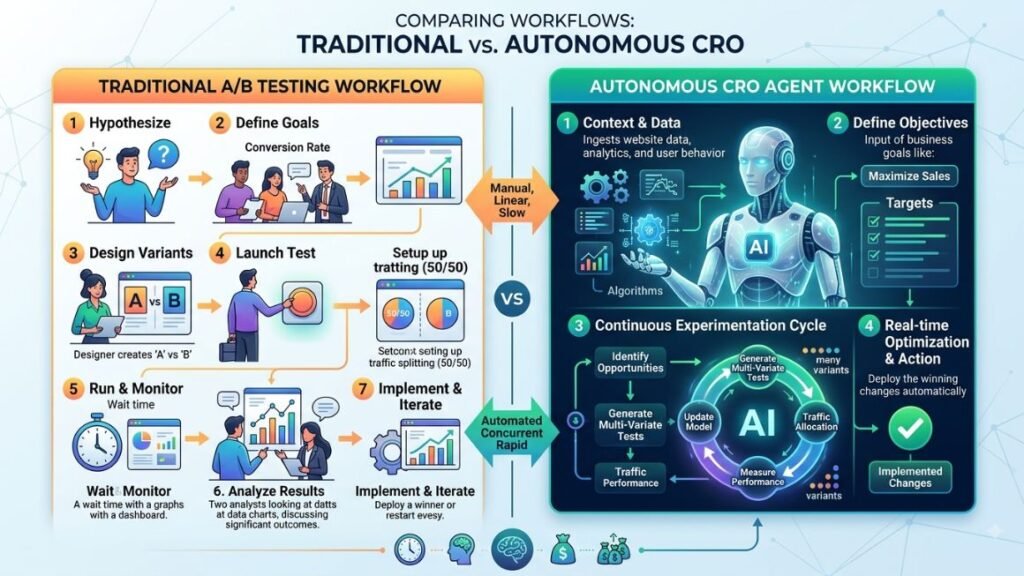
An AI agent for conversion rate optimization is software that autonomously analyzes visitor behavior, generates and tests page variations, and adjusts the experience for different audience segments without a human manually building each test. Unlike a standard A/B testing tool, which only reports results after you set up the test yourself, an agent can decide what to test, run it, and act on the outcome on its own.
That distinction matters. A/B testing platform: you pick the variant, you launch it, you wait, you read the report. AI agent: it watches real-time behavior, forms a hypothesis (“mobile users from paid search are dropping off at the pricing table”), builds a variant, serves it to a slice of traffic, and scales the winner automatically.
Conversion rate optimization (CRO) is the practice of increasing the percentage of website visitors who complete a desired action, like a purchase, signup, or form fill. Most teams have been doing CRO manually for over a decade. What’s changed is the tooling underneath it.
An AI agent for CRO is software that autonomously observes visitor behavior, forms testing hypotheses, and adjusts website experiences in real time, without requiring a human to manually configure each test. This differs from traditional A/B testing tools, which still depend on a person to design and launch every variant.
Why Manual CRO Is Hitting a Ceiling
Here’s the problem most teams run into. Traditional CRO needs traffic volume to reach statistical significance, and most pages simply don’t get enough visitors to test more than one or two variables at a time. That means testing a headline this month, a button color next month, and a whole quarter passes before you’ve learned anything meaningful about your funnel.
It gets worse once you add segments. A B2B SaaS site might have five distinct visitor types: cold organic traffic, retargeted visitors, trial users, enterprise leads, and mobile browsers. Running a separate manual test for each segment isn’t realistic for most teams. There aren’t enough hours, and there usually isn’t enough traffic per segment to hit significance anyway.
AI conversion optimization solves this by running many smaller, segment-specific tests in parallel instead of one large test at a time, using machine learning models to detect patterns faster than a human analyzing a dashboard ever could. Instead of waiting for one big test to “win,” the system continuously reallocates traffic toward whatever variant is performing best for each specific segment, in real time.
That doesn’t mean manual testing is dead. It means it’s no longer enough on its own for teams competing on speed.
Core Strategies for Using AI Agents in CRO
An AI agent is only as useful as the strategy behind it. Here’s where teams are actually seeing results.
1. Behavioral Segmentation and Real-Time Personalization
Instead of showing every visitor the same homepage, an agent segments traffic by intent signals like source, device, past behavior, and scroll depth, then serves a tailored experience to each group. A first-time visitor from a Google ad sees a different hero section than a returning visitor who abandoned checkout last week.
According to Omnisend’s 2026 ecommerce marketing analysis, <cite index=”5-1″>AI-driven personalization can increase revenue by as much as 41% and lift click-through rates by more than 13%</cite>. That’s not a small edge. It’s the difference between a campaign that breaks even and one that actually funds itself.
2. Automated Hypothesis Generation
This is the part that separates an agent from a basic testing tool. Rather than a CRO manager guessing what to test next, the agent scans session recordings, heatmaps, and funnel drop-off data to surface its own hypotheses, ranked by likely impact. You still approve what ships, but you’re no longer starting from a blank page every sprint.
3. Dynamic Landing Page Assembly
Some agents don’t run fixed A/B variants at all. They assemble a landing page from modular blocks (different headlines, hero images, CTAs, social proof sections) and continuously recombine them based on what’s converting for each visitor segment. This is sometimes called multivariate optimization at scale, and it’s genuinely hard to replicate manually once you’re testing more than three elements at once.
4. Predictive Lead Scoring and Prioritization
For B2B sites, an agent can score incoming leads based on behavior patterns that historically correlate with closed deals, then route the highest-intent visitors to a faster path (live chat, a calendar link) while lower-intent visitors get more nurturing content. This isn’t classic CRO in the traditional sense, but it directly moves the conversion needle for sales-assisted funnels.
5. Conversational AI for Objection Handling
An AI chat agent embedded on a pricing or checkout page can answer the exact objections that make people bounce, things like refund policy, security, or plan differences, without the visitor needing to search a help center. This is one of the most underrated CRO strategies right now because it addresses friction at the exact moment it happens.
The most effective AI CRO strategies combine behavioral segmentation, automated hypothesis generation, and real-time personalization rather than relying on a single tactic. Teams that layer these approaches see compounding gains because each strategy addresses a different point of friction in the funnel.
Top AI Agents and Platforms for CRO in 2026
There’s no shortage of AI CRO tools on the market, but most of them fall into one of two camps: platforms built specifically as autonomous optimization agents, and traditional testing tools that have bolted AI features onto an existing product. Both can work. Here’s an honest breakdown of what each one is actually good at.
Intellimize (by Webflow): Best for Autonomous Landing Page Optimization
What it does: Intellimize continuously personalizes and optimizes landing pages by automatically testing combinations of headlines, images, and CTAs against real-time visitor data, without you manually configuring each variant.
What it does well: It’s genuinely hands-off once it’s set up. You define the elements you want tested and the platform handles hypothesis generation and traffic allocation on its own. It’s particularly strong for high-traffic marketing sites where speed to insight matters more than granular control.
Where it falls short: The learning curve for setup is steeper than a basic A/B testing tool, and it needs a decent volume of traffic to make its personalization genuinely useful. Smaller sites won’t see the same lift.
Best for: Marketing teams running paid acquisition at scale who need landing pages that adapt without constant manual rebuilds.
Pricing: Custom, quote-based, generally positioned for mid-market and enterprise budgets as of 2026.
Mutiny: Best for B2B Account-Based Personalization
What it does: Mutiny personalizes website experiences for specific accounts or audience segments, most commonly used by B2B teams running account-based marketing campaigns.
What it does well: It integrates with intent data providers and CRM tools so you can show a different homepage to a target enterprise account than to a self-serve trial visitor. The no-code editor is genuinely usable by marketers, not just developers.
Where it falls short: It’s built for B2B personalization specifically, so ecommerce teams or high-volume consumer sites won’t get much value from it. It also depends heavily on having clean firmographic and intent data feeding in.
Best for: B2B SaaS teams running ABM campaigns who want their website to match the personalization already happening in ads and email.
Pricing: Custom pricing, typically starting in the low five figures annually as of 2026.
Evolv AI: Best for Enterprise-Scale Experimentation
What it does: Evolv AI uses reinforcement learning to run continuous, always-on experimentation across a site rather than discrete, time-boxed A/B tests.
What it does well: Because it treats optimization as an ongoing process instead of a series of isolated tests, it adapts faster to seasonal shifts and changing visitor behavior. It’s well suited for enterprise sites with high traffic and frequent content changes.
Where it falls short: This is not a tool for small teams. It requires enterprise-level implementation support and traffic volume to justify the investment.
Best for: Large enterprise sites with dedicated CRO teams and consistently high traffic.
Pricing: Enterprise, custom quote as of 2026.
VWO (Visual Website Optimizer): Best All-Around Platform with AI Features Layered In
What it does: VWO is a long-standing testing and personalization platform that has added AI-assisted features, including AI-generated test hypotheses, heatmap-based insight summaries, and AI copy suggestions for variants.
What it does well: It’s a strong middle ground if you want AI assistance without going fully autonomous. The insights engine flags friction points from session recordings automatically, which saves real analysis time.
Where it falls short: It’s still fundamentally a testing platform where you approve and launch variants yourself. If you want a fully autonomous agent, VWO’s AI features are assistive rather than independent.
Best for: Teams that want AI-assisted insight generation but aren’t ready to hand over full control of testing decisions.
Pricing: Plans start free for basic testing, with paid tiers scaling based on monthly tracked users, as of 2026.
Optimizely (Opal AI): Best for Teams Already Standardized on Optimizely
What it does: Optimizely’s Opal AI layer adds automated experiment analysis, content generation for variants, and predictive audience targeting on top of its existing experimentation platform.
What it does well: If your team already runs on Optimizely for feature flagging or experimentation, Opal adds meaningful AI capability without switching platforms. The predictive targeting is solid for identifying which segments respond to which variant fastest.
Where it falls short: It’s an add-on layer, not a purpose-built agent, so it inherits some of the complexity of the broader Optimizely platform. Smaller teams sometimes find it overbuilt for their needs.
Best for: Enterprises already invested in the Optimizely ecosystem who want to add AI without a platform migration.
Pricing: Enterprise, custom quote as of 2026.
Albert.ai: Best for Cross-Channel Optimization Beyond the Website
What it does: Albert.ai is an autonomous marketing agent that optimizes paid media spend, audience targeting, and creative rotation across channels, with conversion data feeding back into campaign decisions.
What it does well: It’s less about the on-site experience and more about making sure the traffic arriving on your site is already higher-intent, which indirectly lifts your conversion rate without touching a single landing page element.
Where it falls short: It’s not a website testing tool. If your bottleneck is on-page friction rather than traffic quality, Albert.ai won’t fix it on its own.
Best for: Performance marketing teams who suspect their conversion problem is actually a traffic quality problem.
Pricing: Custom, enterprise-focused as of 2026.
No single AI CRO tool covers every layer of the funnel. Intellimize and Evolv AI focus on autonomous on-page testing, Mutiny targets B2B account personalization, VWO and Optimizely add AI assistance to established testing platforms, and Albert.ai optimizes the traffic quality feeding into the funnel rather than the page itself. Most mature teams end up combining at least two of these categories.
Benefits of Using AI to Automate CRO
So why go through the setup effort at all? A few reasons stand out once you’ve actually run one alongside a manual process.
Speed to insight. A human analyzing a heatmap might take a day to spot a pattern. An AI CRO agent processes thousands of sessions continuously and surfaces friction points within hours of them starting to trend.
Segment-level personalization at scale. You genuinely cannot manually manage forty different page variants for forty different segments. An agent can, and it reallocates traffic toward winners automatically as patterns shift.
Reduced time-to-significance. Because agents test smaller, targeted changes across multiple segments simultaneously rather than one large change across your whole audience, you often reach a confident result faster.
Lower operational overhead. Once configured, an agent doesn’t need someone manually building each new variant in code. Marketing teams can move faster without waiting on a developer queue for every test.
Continuous adaptation. Traditional tests end when they hit significance. An agent keeps learning as visitor behavior shifts with seasonality, new traffic sources, or pricing changes, instead of running on assumptions from a test you ran three months ago.
Per McKinsey Digital’s analysis, <cite index=”8-1″>companies using AI for marketing report an average ROI improvement of 35%</cite>, and gains concentrate heavily in areas like ad optimization and conversion-focused personalization. That’s a meaningful signal that the investment tends to pay for itself once implementation is done properly.
To be fair, none of this replaces good judgment. An agent can tell you what’s converting. It can’t tell you whether that variant actually aligns with your brand or long-term positioning. That part still needs a human in the loop.
Real-World Use Cases
Theory is one thing. Here’s how teams are actually applying AI for conversion rate optimization across different business types.
Ecommerce product pages. A mid-size online retailer used an AI agent to test product page layouts by traffic source. Visitors from Instagram ads saw lifestyle imagery first, while visitors from Google Shopping saw pricing and specs above the fold. The segmented approach outperformed a single “best” layout tested against all traffic combined.
SaaS trial signup flows. A B2B software company used behavioral segmentation to shorten its signup form for returning visitors who had already filled out fields in a previous session, while keeping the full form for first-time visitors who needed more context before committing. Fewer abandoned signups resulted from removing friction only where it was safe to remove.
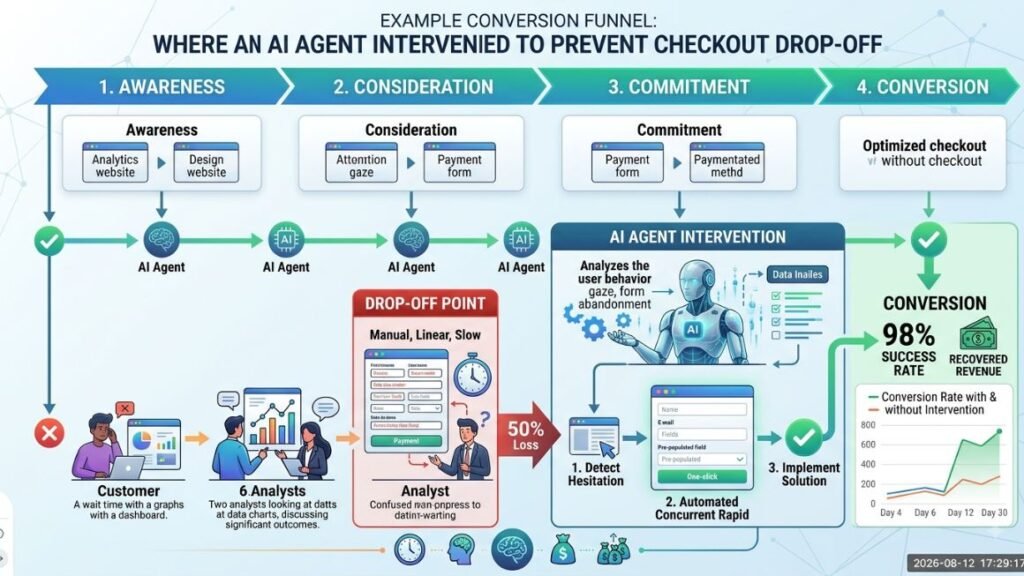
Checkout abandonment recovery. An agent monitoring checkout behavior flagged that mobile users were dropping off specifically at the shipping cost reveal step. The fix wasn’t a redesign, it was surfacing estimated shipping costs earlier in the flow for mobile traffic specifically, based on what the agent detected as segment-specific friction.
Chat-based objection handling. A subscription business deployed a conversational AI agent on its pricing page that answered plan comparison questions in real time. Visitors who engaged with the chat converted at a noticeably higher rate than those who didn’t, because their specific hesitation got addressed before they left the page.
How to Build Your First AI-Driven CRO Workflow
If you’re starting from zero, don’t try to automate everything at once. Build it in stages.
Step 1: Audit your current funnel data. Pull session recordings, heatmaps, and drop-off points from your existing analytics before adding any AI tool on top. You need a baseline to measure against.
Step 2: Pick one high-traffic page to start. Don’t roll an agent out site-wide on day one. Choose the page with the most traffic and the clearest conversion goal, usually a pricing page, product page, or signup form.
Step 3: Define your segments. Decide which visitor groups actually matter for your business, such as traffic source, device type, or new versus returning visitor, before letting the tool auto-segment for you.
Step 4: Set guardrails, not just goals. Tell the agent what it can and can’t change. Brand voice, legal disclaimers, and pricing display should usually stay outside the agent’s testing scope.
Step 5: Let it run for a full traffic cycle before judging results. Most agents need at least two to four weeks of real traffic to build reliable patterns, especially if your site has weekday and weekend behavior differences.
Step 6: Review and expand. Once the first page shows consistent lift, expand the agent’s scope to a second page or a new segment, rather than turning everything on simultaneously.
An AI-powered CRO rollout that starts narrow and expands based on evidence will almost always outperform one that tries to automate the entire site from week one.
Common Mistakes to Avoid
Turning on full automation before trusting the data. Give the agent a supervised period where you approve changes before letting it act independently. Skipping this step is how teams end up with a variant that technically converts better but damages trust or brand perception.
Ignoring qualitative context. An agent can tell you a headline converts better. It can’t tell you why, and sometimes the “why” matters for your broader positioning. Pair agent output with occasional user interviews or survey feedback.
Testing on too little traffic. If your page gets a few hundred visitors a month, an AI agent won’t magically solve the statistical significance problem. Some pages genuinely need more traffic before automated testing makes sense.
Treating it as set-and-forget. Even the best agent needs periodic review. Business goals shift, pricing changes, and a testing framework built around last year’s priorities can quietly work against this year’s strategy if nobody checks in.
Final Thoughts
The teams seeing real gains from AI-driven CRO aren’t the ones who bought the most expensive tool. They’re the ones who started with one high-traffic page, defined clear guardrails, and let the data build trust before expanding scope. Start narrow, measure honestly, and let the agent earn more autonomy over time.
If you want to actually get hands-on with how these tools work instead of just reading about them, Hotskill has structured lessons on AI tools marketers use every day, built for people who want to apply what they learn immediately. Download the app on iOS or Android at hotskill.co/download.
FAQ
What’s the basic definition of an AI-based CRO agent?
It’s software that autonomously analyzes visitor behavior, generates testing hypotheses, and adjusts website experiences in real time to improve the percentage of visitors who convert. Unlike standard A/B testing tools, it doesn’t require a human to manually configure every variant before it runs.
How is an AI CRO setup different from a regular A/B testing tool?
A standard A/B testing tool waits for a human to design, launch, and interpret every test. An AI agent can generate its own hypotheses from behavioral data, launch variants automatically, and reallocate traffic toward winners without waiting for manual intervention at each step.
Do I need coding skills to use an AI CRO tool?
Most modern platforms, including Intellimize, Mutiny, and VWO, offer no-code editors built for marketers. You’ll still get more flexibility with some development support for advanced customizations, but you don’t need to code to launch a basic AI-driven test.
Is AI-based CRO worth it for a small business with low traffic?
It depends on your volume. If your site gets under a few thousand monthly visitors, you likely won’t generate enough data for the agent’s segmentation to be statistically meaningful. Smaller sites usually get more value starting with simpler AI-assisted tools like VWO before moving to a fully autonomous agent.
Do I still need manual A/B testing if I use an AI agent?
Yes, for certain decisions. Brand positioning, legal language, and major redesign choices still benefit from deliberate, human-led testing. Use the agent for high-frequency, data-heavy optimization and reserve manual testing for strategic, lower-frequency decisions.
How long before I start seeing CRO results with AI?
Most teams start seeing directional signals within two to four weeks, though full confidence in results usually takes a complete traffic cycle, including both weekday and weekend behavior. Sites with lower traffic volumes will take longer to reach statistical reliability.
Can AI-driven testing hurt my conversion rate instead of helping it?
Yes, if deployed without guardrails. An agent optimizing purely for short-term conversion could push toward manipulative patterns like misleading urgency messaging, which can convert in the short term but damage trust and long-term retention. Set clear boundaries on what the agent can test.
Which AI CRO tool is best for ecommerce specifically?
Intellimize tends to be the strongest fit for high-traffic ecommerce landing pages because of its autonomous personalization across product and category pages. For smaller ecommerce sites, VWO’s AI-assisted features offer a lower-effort starting point.
Does using an AI agent for CRO replace my marketing or growth team?
No. It removes the manual grunt work of building and monitoring individual tests, but strategy, brand judgment, and interpreting why something worked still need a human. Think of it as a force multiplier for a CRO team, not a replacement for one.
What’s the biggest mistake teams make when adopting CRO automation?
Turning on full automation before establishing trust in the data. Most experienced teams run a supervised period first, reviewing and approving agent-suggested changes before letting the system act independently across the full site.