

You type a prompt. The AI gives you something generic. You tweak it. Still not quite right. You try again.
Most people assume the problem is the AI. Nine times out of ten, the problem is the prompt.
Getting great outputs from AI tools isn’t about luck or magic phrasing. It’s a learnable skill that follows a consistent logic. The people who consistently get sharp, usable results from ChatGPT, Claude, or Gemini aren’t using special tricks. They think differently about how to frame a request before they ever start typing.
This guide is about how to think like a great prompter. Not just syntax, but mental models. The underlying logic that separates a mediocre prompt from one that actually works. By the end, you’ll have a clear framework you can use today across any AI tool.
What Makes a Prompt Actually Work?
A good prompt is not a long prompt. It’s not a perfectly worded prompt. It’s a prompt that gives the model the right information to produce the right output for your specific situation.
That sounds obvious. But most people write prompts the way they search Google: short, keyword-based, vague. “Write a marketing email.” “Summarise this document.” “Give me ideas for a blog post.”
Those prompts work on Google because the algorithm is built to interpret ambiguity. AI language models work differently. They don’t guess your intent. They generate the most statistically likely continuation based on everything you gave them. If you give them a vague input, they produce a confident-sounding but generic output.
AI Prompting is the practice of structuring your inputs to language models in a way that narrows the range of plausible outputs toward what you actually need. Think of it as writing a very precise brief, not a casual request.
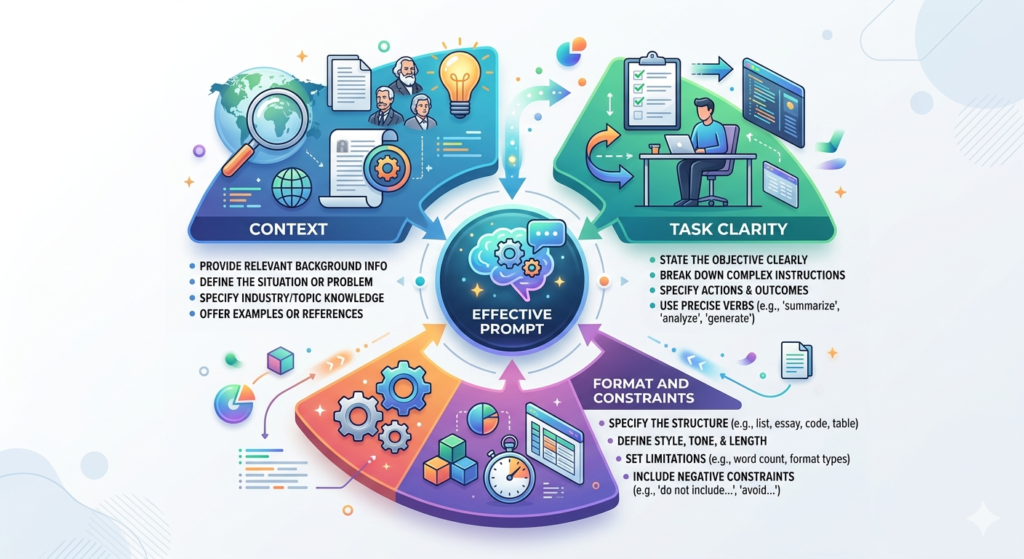
Three things determine output quality:
- Context – What does the model need to know about your situation?
- Task clarity – What exactly do you want it to produce?
- Format and constraints – What does the output need to look like?
Most bad prompts fail on at least two of these. Most great prompts nail all three before they even hit send.
AI prompting quality is determined by three factors: the context you provide, how clearly you define the task, and the constraints you set on the output. Most weak prompts fail on at least two of these dimensions. Strengthening all three in a single prompt consistently produces better AI outputs than any amount of rewording or retrying.
Mental Model 1: Think in Roles, Not Requests
Here’s the shift that changes everything for most people.
Instead of asking “Write me a product description for my fitness app,” ask: “You are a direct-response copywriter with 10 years of experience writing app store listings for fitness products. Write a product description for a fitness habit tracker called SnapFit…”
The difference isn’t just tone. You’ve changed who the model is simulating. And because language models are trained on enormous amounts of human-written text, they can simulate different expertise levels, voices, and professional contexts extremely well.
This is why Prompt Engineering Skills consistently put role assignment at the top of the list. When you give the model a role, you’re not just being fancy. You’re activating a very specific slice of its training data.
The role prompt has three parts:
- Who the person is – “You are a senior UX writer…”
- Their relevant experience – “…with 8 years writing onboarding flows for SaaS products…”
- Their context right now – “…working with a startup that needs to reduce friction in their sign-up flow.”
You can also assign the reader a role. “You are advising a founder who has never run paid ads before” changes the complexity level, vocabulary, and assumptions the model makes about who it’s talking to.
Mental Model 2: Constraints Are Your Best Friend
The second biggest shift great prompters make is realising that limits improve output, not reduce it.
Most people write open-ended prompts because they want options. “Give me some ideas for…” “Write a few different versions of…” “Come up with some ways to…”
Open-ended prompts produce open-ended outputs. Broad. Average. Safe. Usable but not impressive.
The counterintuitive truth: the more specific the constraint, the more creative and useful the output. This is one of the core principles behind effective AI Prompt Writing.
Constraints to use:
- Length: “Write this in under 80 words” forces the model to prioritise. The output is crisper.
- Format: “Give me this as a 3-column table: tactic / time required / expected outcome”
- Tone: “Write this the way a direct, slightly sceptical editor would”
- Exclusions: “Don’t use any jargon. Assume the reader has never used AI tools before.”
- Perspective: “Make the argument purely from a cost-saving angle, not a productivity angle”
Try this test. Take any prompt you’ve used this week. Add three constraints to it. Then compare the outputs. The constrained version will almost always be better.
Constraints in AI prompts narrow the model’s output distribution toward more specific, useful results. Adding length limits, format requirements, tone instructions, and exclusions consistently improves output quality. The common belief that open-ended prompts produce more creative results is false: specific constraints tend to produce sharper, more distinctive outputs.
Mental Model 3: Output First, Then Input
Most people think about prompts from the input side: “What should I tell the AI?” Great prompters think from the output side: “What exactly do I want to get back, and what does the model need to know to produce it?”
This is the single mental shift that has the most immediate impact on Prompt Design quality.
Start with a blank page. Write down: what does a perfect output look like for this task? Be specific.
- What format is it in?
- What length?
- What voice or tone?
- What information does it include or exclude?
- Who is it for?
- What would make you reject it?
Once you’ve described your ideal output, write the prompt backward from there. Every element of the prompt should exist to help the model produce what you just described.
This sounds like more work. It’s actually faster. You’ll spend less time re-prompting and editing because the first output is closer to what you actually needed.
Mental Model 4: Iteration Is the Skill, Not the Failure
Here’s something most people get wrong about AI tools.
They expect a single prompt to produce a finished, usable output. When it doesn’t, they conclude the tool isn’t good enough, or they weren’t clever enough, or they need to find a better prompt template somewhere.
This is the wrong mental model. Great prompters treat the first output as a draft. Always. The conversation that follows is where the real work happens.
This is at the core of ChatGPT Prompting as a skill. You’re not writing a command. You’re running a dialogue.
Techniques for productive iteration:
- Redirect, don’t restart. “That’s close. The tone is right, but it’s too long and focuses too much on features. Cut it by a third and lead with the outcome instead.”
- Ask for alternatives. “Give me three completely different approaches to the opening paragraph.”
- Push on specifics. “The second point is vague. Can you give me a concrete example of what that looks like in practice?”
- Explain what didn’t work. Don’t just say “make it better.” Say “the previous version felt too formal for our audience. This needs to sound more like advice from a trusted colleague.”
In Hotskill’s AI skill tracks, we’ve found that learners who master follow-up prompting see the sharpest improvements in output quality, often more than those who spend weeks perfecting their opening prompts.
The Core Prompt Engineering Toolkit
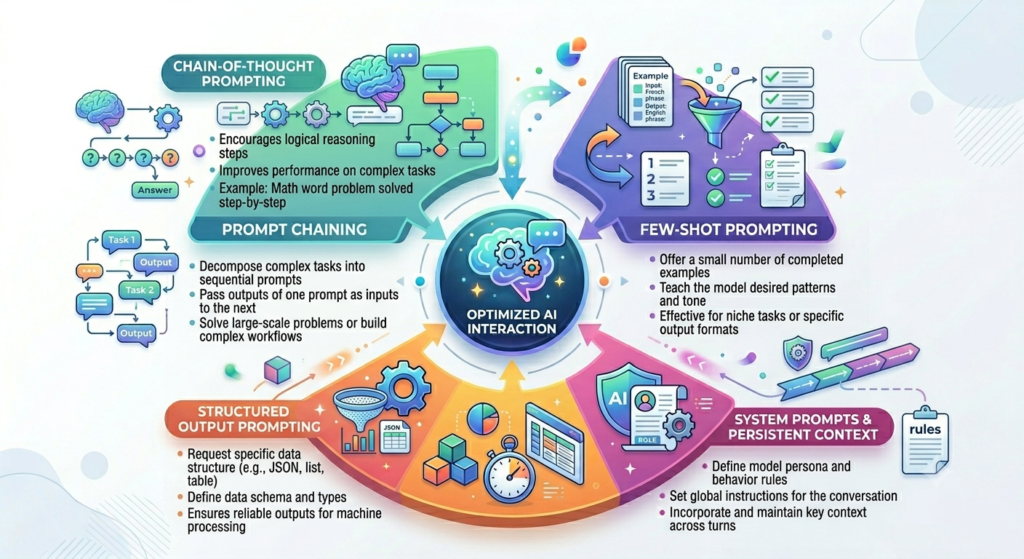
These are the specific techniques that consistently produce better outputs across ChatGPT, Claude 3.5 Sonnet, Gemini 1.5 Pro, and most other large language models. This is what applied Prompt Engineering looks like in practice.
Chain-of-Thought Prompting
Chain-of-thought (CoT) prompting asks the model to reason through a problem step by step before giving a final answer. It’s particularly useful for complex decisions, analysis tasks, and anything where you need the model to show its logic rather than just state a conclusion.
How to use it: Add “Think through this step by step before giving your final answer” to any analytical prompt. Or: “Before you answer, list the key factors you’re weighing.”
Real example: “You’re evaluating whether a B2B SaaS company should prioritise SEO or paid search for their growth stage. Think through the relevant factors step by step, then give a recommendation.”
The outputs are significantly more reasoned and specific than if you just ask “should we do SEO or paid search?”
Few-Shot Prompting
Few-shot prompting means showing the model examples of the kind of output you want before asking it to produce one. It’s one of the most consistently underused techniques in AI Prompting Skills development.
Format: Show 2-3 examples, clearly labeled, then ask for a new one in the same format.
Example:
Here are three LinkedIn post hooks I've written that performed well:
[Example 1]
[Example 2]
[Example 3]

Write 5 more hooks in exactly the same style for the following topics: [list topics]
The model reverse-engineers your style from the examples rather than guessing what you mean by “engaging” or “conversational.”
System Prompts and Persistent Context
System prompts are instructions that sit above the conversation and govern how the model behaves throughout. If you’re using the API or a tool with a system prompt field, this is where you put your role, constraints, and persistent rules.
If you’re using ChatGPT via the web interface, the equivalent is a Custom Instruction. If you’re using Claude, Projects serve the same purpose.
A good system prompt includes:
- The model’s role and expertise
- The audience it’s writing for
- Consistent constraints (tone, length, formatting preferences)
- Anything the model should always or never do
Doing this once, well, means you don’t have to repeat your context in every single conversation.
Structured Output Prompting
Structured output prompting tells the model exactly what format to return information in. This is critical if you’re feeding outputs into a workflow, a template, or another tool.
Formats you can request: JSON, markdown tables, numbered lists with specific fields, headers and subheaders, XML. You can also define a custom template and ask the model to fill it in.
Example: “Return this as a JSON object with these fields: title, target_audience, primary_message, call_to_action, word_count.”
This saves significant post-processing time and prevents the model from deciding on a format that doesn’t fit your workflow.
Prompt Chaining
Prompt chaining is the practice of breaking a complex task into a sequence of smaller prompts, where each output feeds into the next. Rather than asking one prompt to do ten things, you ask ten prompts to each do one thing well.
This is one of the Prompt Engineering Techniques that scales well for complex creative and analytical work. A content research process might look like:
- Prompt 1: Generate a list of reader questions on the topic
- Prompt 2: Cluster those questions into themes
- Prompt 3: Draft a content outline based on the clusters
- Prompt 4: Write each section using the outline
Each step is constrained and specific. The final output is better than anything a single-prompt approach would produce.
The five most effective prompt engineering techniques for professional use are chain-of-thought prompting, few-shot examples, system prompts, structured output formatting, and prompt chaining. Used together, these techniques reliably close the gap between what AI tools can theoretically produce and what most users actually get from them in practice.
The Most Common Prompting Mistakes (And How to Fix Them)
Knowing How to Write Better Prompts is partly about adding the right things. It’s equally about stopping the things that consistently hurt output quality.
Mistake 1: Vague task definition “Write something about our product launch” gives the model almost nothing to work with. What type of content? For whom? Which channel? What outcome? Fix: be specific about the deliverable.
Mistake 2: No format instruction When you don’t specify a format, the model chooses one. It often chooses the most generic format for that type of content. Fix: always describe the output structure, even if it’s just “write this as a single flowing paragraph.”
Mistake 3: Prompting for everything at once Asking one prompt to “write a full email sequence, suggest a subject line, create a follow-up strategy, and summarise the campaign goals” produces watered-down results on every point. Fix: use prompt chaining. One task per prompt.
Mistake 4: Accepting the first output The first output is a starting point. Always. Fix: develop the habit of running at least one follow-up prompt before you copy anything into your actual work.
Mistake 5: Not providing source material If you’re summarising, analysing, or repurposing content, paste the actual source material into the prompt. Don’t describe it. Don’t paraphrase it. Include it. The model can only work with what you give it.
How to Think Like a Great Prompter in Practice
This is what separates people who get great outputs from people who get average ones, and it’s not a list of techniques.
Effective Prompting is a thinking discipline. Before you type anything, you’re asking:
- What do I actually want back?
- Who should the model be when it produces this?
- What would make me reject a version of this output?
- What does the model not know that it needs to know?
- Am I writing a command or starting a conversation?
This five-question pre-prompt check takes about thirty seconds. It consistently improves your starting point more than any template or technique.
The second habit of great prompters is building a personal prompt library. Every time you write a prompt that produces a genuinely good output, save it. Strip out the specifics. Turn it into a reusable template. Over time, you build a library of prompts that work for your specific use cases, your audience, your voice, your tools.
This compounds. The best Prompt Design comes from iteration across weeks and months, not from getting lucky on a single prompt.
Third: get specific about the model you’re using. GPT-4o handles conversational, branching tasks well. Claude 3.5 Sonnet is stronger on long-form structured output and follows complex instructions more reliably. Gemini 1.5 Pro has strong multimodal capability. These differences are real and they affect your prompting approach. A prompt that works brilliantly in Claude may need adjustment in ChatGPT.
Conclusion
The gap between average AI outputs and genuinely useful ones isn’t a matter of tool quality. It’s a matter of how you think before you type.
Four things matter most: assigning a clear role, using constraints intentionally, designing from the output backward, and treating every first response as a draft to build on. These aren’t advanced techniques. They’re a different way of approaching the conversation.
If you take one thing from this article, make it the output-first habit. Before your next prompt, describe the perfect output first. Then write the prompt to get there. It takes sixty seconds and it works every time.
The more you practise this thinking, the faster it becomes automatic. That’s when prompting stops being something you do and starts being something you’re good at.
If you want to keep building on this, Hotskill has structured AI skill tracks built specifically for professionals who want to get better at using tools like these in their day-to-day work. Not theory. Hands-on lessons with real tasks and real outputs. Download the app on iOS or Android, and start your first lesson today.
FAQ
What is prompt engineering and why does it matter?
Prompt engineering is the practice of designing inputs to AI language models in order to get specific, high-quality outputs. It matters because the same AI model can produce dramatically different results depending on how you frame a request. Learning this skill is arguably the highest-leverage thing you can do with AI tools right now, since it improves results across every tool you already use.
Do I need coding skills to get better at AI prompting?
No. The core of AI Prompting Skills is about clear thinking and structured communication, not code. Techniques like role assignment, few-shot examples, and chain-of-thought prompting require no technical background. Coding knowledge becomes useful if you’re building automated workflows or working with the API, but for daily use of ChatGPT, Claude, or Gemini, it’s entirely optional.
What’s the difference between a prompt and a system prompt?
A prompt is the individual message you send in a conversation. A system prompt is a set of persistent instructions that frames the entire conversation, including the model’s role, tone, and constraints. System prompts are available in the API and in tools like Claude Projects and ChatGPT’s Custom Instructions. For anything you do regularly, a well-built system prompt saves you from repeating context in every session.
Why does ChatGPT give me generic answers even when I ask detailed questions?
The most common reason is that the task definition is clear but the context is missing. ChatGPT generates the most likely output for your input. If your prompt describes what to write but not who it’s for, what the outcome should be, or what constraints apply, the model fills those gaps with generic defaults. Adding audience context, a specific outcome, and at least one format constraint will immediately improve results.
How many times should I re-prompt before giving up?
There’s no fixed number, but “giving up” is rarely the right response. If two or three follow-up prompts aren’t moving the output in the right direction, the issue is usually in the original brief, not the model. Step back, apply the output-first mental model, and rewrite the prompt from scratch with a clearer description of the ideal output. A bad output is diagnostic information, not a dead end.
Is prompt engineering still a useful skill with newer AI models in 2026?
Yes. More capable models still respond dramatically better to well-structured prompts. The gap between a basic and a well-structured prompt may narrow slightly as models improve, but it doesn’t disappear. What changes is that newer models handle ambiguity better, which means you can be more conversational. But for professional output quality, structured prompting still produces consistently better results.
What’s the fastest way to improve my prompting right now?
Start with one technique: output-first thinking. Before you write your next prompt, spend 60 seconds describing exactly what a great output looks like. Format, length, tone, what it includes, what it excludes, who it’s for. Then write the prompt backward from that description. This one change produces noticeable improvement on the very first try.
How is prompting different across ChatGPT, Claude, and Gemini?
The core principles apply across all three. The differences are in where each model is strongest. GPT-4o handles conversational tasks and multi-turn reasoning well. Claude 3.5 Sonnet follows long, complex instructions more reliably and produces stronger structured outputs for professional writing. Gemini 1.5 Pro has strong multimodal reasoning. Knowing these differences helps you route tasks to the right tool and adjust your prompting style accordingly.
Can I use the same prompt template for different types of tasks?
The role, constraints, and output description framework transfers across task types, but specific templates don’t. A prompt template for writing marketing copy won’t work well for data analysis. Build task-specific templates for your most repeated use cases, and treat the three-part framework as your transferable structure rather than the specific wording.
What is few-shot prompting and when should I use it?
Few-shot prompting means giving the model 2-3 examples of the output you want before asking it to produce a new one. Use it whenever tone, style, or format is difficult to describe in words. Instead of writing “write in my voice,” paste three examples of your writing. Instead of “format this like our usual report,” paste a previous version. The model infers the pattern from examples far more accurately than from descriptions.