

Paid advertising has become increasingly data-driven. Campaign managers now have to monitor search terms, conversion rates, budgets, bids, audiences, creative performance, landing pages, attribution, and dozens of other signals at the same time. As accounts grow, manually reviewing every change becomes slow and difficult.
AI-powered automation changes this workflow. Instead of relying only on fixed rules such as “increase the bid by 10% when conversions exceed five,” modern systems can analyze large amounts of campaign data, identify patterns, generate recommendations, trigger workflows, and—in carefully controlled setups—execute approved actions.
This is where an AI Agent for Google Ads becomes valuable. It can act as an intelligent layer between campaign data and marketing operations, helping teams discover optimization opportunities faster while reducing repetitive work.
However, automation should not mean handing complete control of an advertising account to software. The strongest approach combines machine-driven analysis and execution with human oversight for strategy, budget, brand safety, and major account decisions.
This guide explains how intelligent automation works, which tools can be used, how to build an automated workflow, what should and should not be automated, and how to measure whether automation is actually improving ROI.
What Is an AI Agent for Google Ads?
An AI agent is a software system that can observe data, interpret a goal, make decisions, use connected tools, and perform actions according to predefined rules or permissions.
Traditional automation normally follows a fixed sequence:
Trigger → Rule → Action
For example:
If cost per conversion exceeds $50, reduce the campaign budget by 10%.
An intelligent workflow can be more flexible:
Data → Analysis → Context → Recommendation → Approval → Action → Measurement
For example, the system could detect that cost per conversion increased, investigate whether the change came from a specific search term, device, location, landing page, or time period, and then recommend a specific action.
The key difference is that an intelligent system can evaluate multiple signals instead of relying exclusively on one condition.
How the workflow works
A typical setup has five layers:
- Data layer – campaign, conversion, analytics, CRM, and revenue data.
- Analysis layer – identifies trends, anomalies, opportunities, and problems.
- Decision layer – compares findings against campaign goals and guardrails.
- Action layer – makes approved changes through APIs, scripts, or automation platforms.
- Feedback layer – measures the result and feeds the outcome back into the next decision.
This creates a continuous optimization loop rather than a collection of isolated automated tasks.
How AI Agents Automate Advertising Campaigns
Automation can cover a large part of campaign operations, but different tasks require different levels of control.
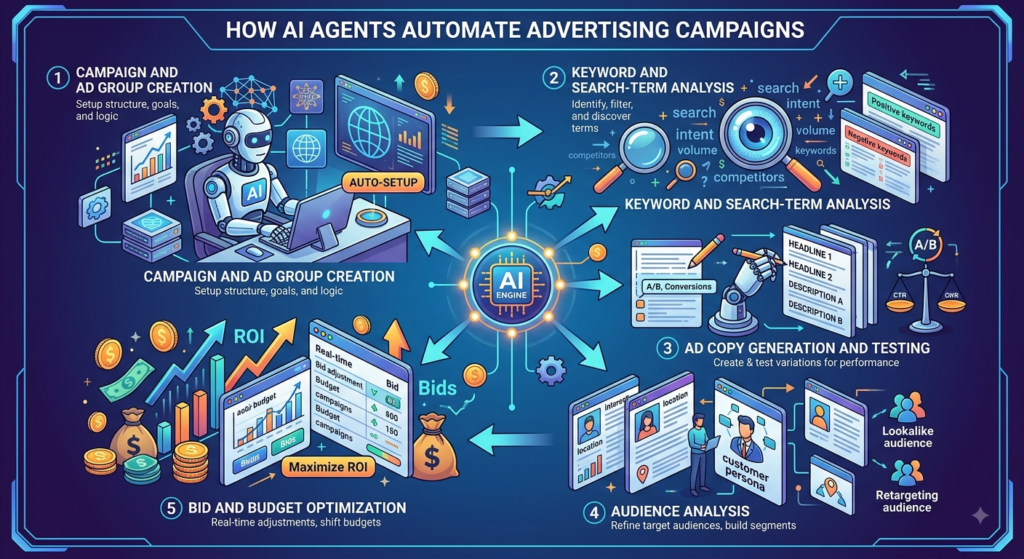
1. Campaign and Ad Group Creation
Creating campaigns manually requires repetitive work:
- Naming campaigns
- Creating ad groups
- Adding keywords
- Adding negative keywords
- Setting budgets
- Creating targeting rules
- Adding landing pages
- Preparing ad assets
- Applying labels
An intelligent workflow can take a campaign brief and convert it into a structured implementation plan.
For example, a marketer could provide:
Product: B2B CRM software
Goal: Generate qualified demo requests
Target: Indian businesses
Monthly budget: ₹5 lakh
Primary conversion: Completed demo form
The system could generate:
- Campaign structure
- Ad group themes
- Keyword clusters
- Negative keyword suggestions
- Ad messaging variations
- Landing-page recommendations
- Tracking requirements
The important point is that the AI should initially recommend or prepare changes rather than immediately publish them.
A human can review the structure before anything goes live.
2. Keyword and Search-Term Analysis
Search-term analysis is one of the most repetitive optimization tasks.
A system can classify queries into categories such as:
- High-intent commercial
- Informational
- Brand
- Competitor
- Irrelevant
- Existing customer
- Research-oriented
- Product-specific
It can then identify patterns.
For example:
| Search-term pattern | Possible action |
|---|---|
| High conversion + efficient CPA | Protect and investigate |
| High spend + no conversions | Review or exclude |
| High conversion + low impression share | Consider expansion |
| Irrelevant intent | Add negative keyword |
| New commercial theme | Create keyword opportunity |
| Competitor traffic | Review separately |
This is more useful than simply looking at keyword-level averages because search queries often reveal new intent patterns.
3. Ad Copy Generation and Testing
AI can accelerate creative production by generating multiple variations based on:
- Search intent
- Product benefits
- Customer pain points
- Offers
- Brand messaging
- Landing-page content
- Existing performance data
For example, instead of creating every headline manually, a marketer can ask an AI system to generate variations around:
Problem → Benefit → Proof → CTA
The resulting copy should still be checked for:
- Accuracy
- Brand consistency
- Policy compliance
- Claims
- Grammar
- Landing-page alignment
The best workflow is therefore not “generate and publish.”
It is:
Generate → Review → Test → Measure → Improve
4. Audience Analysis
Automation can analyze audience performance across dimensions such as:
- New vs returning visitors
- Customer lists
- Geographic segments
- Device groups
- Demographic signals
- Remarketing audiences
- High-value customer groups
An intelligent system can identify groups that consistently generate stronger conversion value and recommend budget or targeting changes.
This becomes particularly powerful when advertising data is combined with CRM or first-party customer data.
5. Bid and Budget Optimization
Bid management is already heavily automated inside Google’s advertising ecosystem.
Smart Bidding uses machine learning to optimize bids at auction time using contextual signals. Available strategies include Target CPA, Target ROAS, Maximize conversions, and Maximize conversion value. Google also updated the naming of some bidding strategies beginning in June 2026, while keeping their underlying bidding behavior unchanged.
This means marketers do not necessarily need an external AI system to calculate every individual bid.
Instead, an external intelligent workflow can focus on the management layer around bidding.
It can monitor:
- Whether conversion volume is sufficient
- Whether targets are realistic
- Whether spending is pacing correctly
- Whether conversion value is changing
- Whether budget constraints are limiting growth
- Whether performance has deviated significantly
The system can then recommend actions such as:
“Campaign A is consistently limited by budget while maintaining the target efficiency. Consider reallocating budget from Campaign C.”
This is generally safer than creating a system that attempts to replace the platform’s auction-time bidding technology.
Tools for Automating Advertising Workflows
No single tool handles everything. A strong automation stack usually combines native advertising features, APIs, analytics, automation platforms, and AI models.
1. Google Ads AI Features
The platform itself includes several forms of machine-learning automation.
Smart Bidding
Smart Bidding uses Google’s AI to optimize bids toward conversions or conversion value. It evaluates signals such as device, location, time, language, browser, and other contextual information at auction time.
Best for:
- Conversion-focused campaigns
- E-commerce revenue optimization
- Lead generation
- Automated bid decisions
- Scaling campaigns with sufficient conversion data
Performance Max
Performance Max uses Google’s AI across multiple Google channels and automatically optimizes bidding, audiences, and creative inputs. Google describes it as a cross-channel campaign type designed to maximize conversions or conversion value.
An external AI workflow can complement this by analyzing results, monitoring business goals, and identifying areas requiring human attention.
Automated Recommendations
Recommendations can help identify potential changes involving:
- Bidding
- Keywords
- Budgets
- Ads
- Targeting
- Account setup
These suggestions should be treated as inputs to decision-making, not automatic approval.
2. Google Ads API
The Google Ads API is one of the most important technologies for building custom automation.
It allows developers to programmatically retrieve and manage advertising data.
The API can provide reporting data ranging from campaign-level information to keyword-level performance and search-term data.
What can developers build?
A custom application can:
- Retrieve campaign data.
- Calculate performance metrics.
- Send data to an AI model.
- Ask the model to identify opportunities.
- Apply predefined business rules.
- Send recommendations to a marketer.
- Execute approved changes.
- Store the change history.
- Monitor the results.
Example
Imagine a retailer has 500 campaigns.
Every morning, an automation system could retrieve:
- Spend
- Conversions
- Conversion value
- CPA
- ROAS
- Clicks
- Impressions
- Search terms
- Campaign status
The AI layer can identify the campaigns that need attention rather than forcing a marketer to manually inspect all 500.
The API is particularly useful for companies managing large accounts, multiple clients, or custom internal marketing platforms.
3. Google Ads Scripts
Google Ads Scripts are a practical option for marketers who want automation without building a complete software application.
Google describes Scripts as a way to programmatically manage and query account data using JavaScript. They can run scheduled tasks and work across multiple accounts through manager scripts.
Scripts can interact with:
- Campaigns
- Ad groups
- Ads
- Keywords
- Budgets
- Bidding strategies
- Negative keyword lists
- Labels
- Audiences
- Targeting settings
They can also retrieve reporting data through GAQL-based queries.
Practical automation examples
A script can:
- Flag campaigns spending above a threshold
- Find broken URLs
- Pause specific ads
- Detect unusual spending
- Generate daily reports
- Monitor budget pacing
- Identify campaigns with zero conversions
- Label high-performing campaigns
- Export performance data
Google’s current documentation also supports preview mode and execution history, making it possible to test scripts before applying changes.
Why Scripts are useful
They sit between manual management and full software development.
A marketer with basic JavaScript knowledge can automate repetitive operations without maintaining a complete server-side application.
4. Google Analytics 4
Advertising data tells you what happened inside the advertising platform.
Analytics data helps explain what users did after the click.
Connecting GA4 with the advertising account allows marketers to share conversion and audience information and analyze website or app activity alongside advertising data.
An intelligent workflow can use this information to investigate:
- Landing-page engagement
- Conversion paths
- New vs returning users
- Key events
- Audience behavior
- Revenue
- Funnel performance
Example
Suppose a campaign generates many conversions but those conversions have poor downstream revenue.
A click-focused optimization system might consider the campaign successful.
A business-focused system can go deeper and ask:
Are these leads becoming qualified opportunities?
This distinction is critical for B2B businesses.
5. Looker Studio
Looker Studio can turn advertising and analytics data into dashboards.
Its connector architecture allows reports to access underlying data sources and create data sources that can be shared with viewers.
A dashboard can display:
- Spend
- Revenue
- ROAS
- CPA
- Conversion rate
- Click-through rate
- Impression share
- Budget pacing
- Campaign trends
- Geographic performance
How AI fits in
The dashboard provides the data layer.
The AI layer provides interpretation.
For example:
Dashboard:
Campaign A CPA increased 28%.
AI analysis:
CPA increased mainly after a new search-term cluster started receiving spend. Those queries have lower conversion rates than the historical account average.
Recommended action:
Review the search-term cluster and consider adding exclusions.
This combination turns dashboards from passive reporting systems into decision-support systems.
6. Zapier
Zapier can connect advertising workflows with other business applications.
Its current advertising integration supports workflows such as campaign triggers, lead-form events, customer-list actions, offline conversion actions, and campaign status changes.
Example workflow
New lead → CRM → qualification → offline conversion → advertising platform
Another workflow could be:
Campaign anomaly → Zapier → Slack/email → marketer review
This is useful when the advertising account needs to communicate with:
- CRM systems
- Slack
- Spreadsheets
- Project-management tools
- Lead-management platforms
The advantage is that marketers can create workflows without developing every integration from scratch.
7. Make
Make is another visual automation platform suitable for multi-step workflows.
It becomes useful when the process requires several conditions.
For example:
Advertising data → filter campaigns → calculate efficiency → send data to AI → classify issue → create task → notify manager
Instead of having one automation rule, marketers can create a branching workflow.
For example:
- If CPA is healthy → monitor.
- If CPA is moderately high → investigate.
- If CPA is extremely high → send alert.
- If spending is high but conversions are zero → request review.
This makes Make useful for teams that want more complex automation logic without building a complete custom application.
8. ChatGPT
ChatGPT can be used as an analysis and reasoning layer for campaign workflows.
OpenAI’s current marketing guidance highlights use cases such as campaign planning, creative variations, performance analysis, and turning campaign results into actionable recommendations.
It can analyze structured campaign exports and help marketers:
- Find performance trends
- Compare time periods
- Classify search terms
- Identify anomalies
- Summarize reports
- Generate creative variations
- Create testing ideas
- Develop optimization recommendations
ChatGPT can also analyze uploaded spreadsheets and CSV files, making it useful for teams that want to investigate campaign data without building custom analytics code.
Example prompt
Analyze the attached campaign report. Identify the five biggest drivers of CPA changes, separate problems from opportunities, and recommend actions. Do not recommend budget changes unless the campaign has sufficient conversion volume.
The quality of the output depends heavily on the quality of the data and instructions.
9. Claude
Claude can serve a similar role as an AI analysis layer.
It can be useful when marketers need to work with:
- Large campaign exports
- Long strategy documents
- Complex account structures
- Detailed analysis instructions
- Multiple datasets
For example, a marketing team could provide:
- Campaign performance
- Search-term reports
- Landing-page information
- Product positioning
- Customer research
The model can then help create a structured diagnosis.
The important principle is to use the model for analysis and recommendation, while keeping account-changing actions behind controlled automation.
10. Google Gemini
Gemini can be useful for marketers already operating heavily within Google’s ecosystem.
Potential applications include:
- Campaign research
- Keyword-theme exploration
- Creative ideation
- Performance analysis
- Content summarization
- Workflow assistance
- Data interpretation
Its strongest role depends on the specific Google products and integrations available to the account and region.
For larger teams, it can be valuable to compare the output of different models rather than assuming one model will always produce the best recommendation.
How to Build an AI-Driven Advertising Optimization Workflow
A practical implementation does not need to start with full autonomous campaign management.
Start small.
Step 1: Define the Business Goal
First decide what the system should optimize.
Possible goals include:
- Lead volume
- Qualified leads
- Sales
- Revenue
- ROAS
- CPA
- Profit
- Customer lifetime value
Do not simply tell the system:
“Get more conversions.”
Define what a valuable conversion means.
Step 2: Clean Conversion Tracking
Automation is only as good as the data it receives.
Check:
- Primary conversion actions
- Duplicate conversions
- Attribution settings
- Revenue values
- Lead quality
- CRM integration
- Offline conversion imports
- Tracking consistency
If conversion tracking is wrong, an automated system can optimize efficiently toward the wrong outcome.
Step 3: Connect Data Sources
A useful stack could look like:
Advertising platform → API/Scripts → Database/Spreadsheet → AI analysis → Automation platform → Approval → Account action
Additional sources can include:
- GA4
- CRM
- Ecommerce platform
- Call tracking
- Sales data
- Product database
The more closely advertising data reflects actual business outcomes, the more useful optimization becomes.
Step 4: Establish Guardrails
Guardrails are essential.
For example:
Budget guardrail
Never increase a daily budget by more than 15% without approval.
Bid guardrail
Never change a campaign’s bidding strategy automatically.
Performance guardrail
Do not recommend major changes based on fewer than 20 conversions.
Brand guardrail
Never create ad copy containing unverified claims.
These restrictions prevent an automation system from making risky decisions.
Step 5: Create an Analysis Schedule
A simple schedule could be:
Daily
- Spend monitoring
- Conversion anomalies
- Budget pacing
- Tracking problems
Weekly
- Search-term analysis
- Campaign performance
- Ad performance
- Audience performance
- Landing-page trends
Monthly
- Budget allocation
- Campaign structure
- Strategic testing
- Revenue quality
- Customer acquisition efficiency
Different tasks require different frequencies.
Step 6: Generate Recommendations
The system should produce recommendations in a consistent format.
For example:
| Campaign | Problem | Evidence | Recommendation | Confidence |
|---|---|---|---|---|
| Campaign A | CPA rising | +32% over 14 days | Review search terms | High |
| Campaign B | Under-spending | 68% budget utilization | Investigate volume | Medium |
| Campaign C | Strong ROAS | Above target | Consider scale test | High |
This makes AI output easier for marketers to review.
Step 7: Add Human Approval
Not every recommendation should be automatically executed.
Use three levels:
Level 1: Automatic
Low-risk actions such as:
- Alerts
- Reports
- Labels
- Data classification
Level 2: Approval required
Medium-risk actions such as:
- Budget adjustments
- Keyword exclusions
- Audience changes
- Ad updates
Level 3: Human only
High-impact actions such as:
- Major account restructuring
- Large budget increases
- Conversion tracking changes
- Brand strategy changes
- Major bidding strategy changes
This creates a safer automation model.
What Tasks Should You Automate First?
If you are starting from zero, prioritize tasks based on frequency × time required × risk.
| Task | Automation priority | Risk |
|---|---|---|
| Daily reporting | Very high | Low |
| Anomaly alerts | Very high | Low |
| Search-term classification | High | Low |
| Budget monitoring | High | Medium |
| Ad-copy drafts | High | Low |
| Keyword opportunity detection | High | Medium |
| Negative-keyword recommendations | High | Medium |
| Budget changes | Medium | High |
| Bid strategy changes | Medium | High |
| Account restructuring | Low | Very high |
The best first automation is usually not “let AI run everything.”
It is:
Automate the repetitive analysis that prevents marketers from spending time on strategy.
How AI Automation Can Improve ROI
Automation does not automatically increase profitability. It creates the possibility of making better decisions faster and more consistently.
1. Reduce Wasted Spend
Automated search-term monitoring can identify irrelevant queries faster.
That can help marketers reduce spending on traffic that does not match their business intent.
2. Improve Budget Allocation
Instead of distributing budgets based purely on historical assumptions, marketers can analyze:
- Conversion efficiency
- Revenue
- Margins
- Growth potential
- Budget constraints
This helps identify where additional spending may have the greatest potential.
3. Detect Problems Earlier
A campaign may not suddenly fail.
Performance often deteriorates gradually.
An automated monitoring system can detect:
- CPA spikes
- Conversion drops
- Spend anomalies
- CTR changes
- Landing-page problems
- Tracking failures
Earlier detection means faster intervention.
4. Increase Testing Velocity
AI can create multiple creative concepts and testing hypotheses.
Instead of spending several hours preparing ideas, marketers can spend that time deciding which experiments deserve investment.
5. Save Management Time
Consider a manager overseeing 30 accounts.
If manual reporting takes 20 minutes per account every day:
30 × 20 minutes = 600 minutes
That’s 10 hours per day.
Automated reporting can dramatically reduce that repetitive workload.
The resulting time can be redirected toward:
- Strategy
- Client communication
- Creative planning
- Landing-page optimization
- Sales alignment
- Experiment design
What Should You NOT Automate Completely?
Automation has limits.
1. Business Strategy
AI can analyze performance, but it may not understand strategic changes such as:
- New competitors
- Product launches
- Pricing changes
- Sales capacity
- Inventory limitations
- Seasonal promotions
Humans should provide that context.
2. Large Budget Changes
A system should not suddenly double spending because one campaign had a strong week.
Require approval for significant changes.
3. Conversion Tracking
Never allow an automated workflow to casually change conversion definitions.
Changing the primary conversion can completely alter optimization behavior.
4. Brand Messaging
AI-generated copy needs human review for:
- Claims
- Tone
- Accuracy
- Legal considerations
- Brand positioning
5. Strategic Account Restructuring
Campaign restructuring can create volatility.
An AI recommendation can be valuable, but an experienced marketer should determine whether the change is appropriate.
Common Mistakes When Automating Paid Search
Mistake 1: Automating Before Fixing Tracking
Bad data produces bad decisions.
Fix measurement first.
Mistake 2: Optimizing for Clicks
More clicks do not necessarily mean more revenue.
Tie optimization to meaningful business outcomes.
Mistake 3: Making Changes Too Frequently
Campaigns need enough data to evaluate changes.
Constantly changing bids, budgets, keywords, and ads can make performance difficult to interpret.
Mistake 4: Giving Unlimited Permissions
Use the minimum permissions required.
Separate:
- Read access
- Recommendation access
- Execution access
Mistake 5: Ignoring Human Context
AI sees the data you provide.
It may not know that:
- A product is temporarily out of stock.
- A sales team cannot handle more leads.
- A competitor launched a major promotion.
- A seasonal offer ended yesterday.
Business context remains essential.
Mistake 6: Failing to Log Changes
Every automated change should ideally record:
- Date
- Account
- Campaign
- Previous value
- New value
- Reason
- Source
- Approval status
This creates accountability and makes debugging easier.
AI Agent vs Traditional Advertising Automation
| Feature | Rule-based automation | Native AI automation | Intelligent workflow |
|---|---|---|---|
| Fixed rules | Excellent | Limited | Excellent |
| Pattern analysis | Limited | Strong | Strong |
| Data interpretation | Low | Medium | High |
| Custom business logic | Strong | Limited | Strong |
| Reporting | Strong | Medium | Strong |
| Creative generation | No | Some | Strong |
| Human approval | Optional | Limited | Strong |
| Cross-tool workflows | Limited | Limited | Excellent |
| Strategic recommendations | Low | Medium | High |
The three approaches are complementary.
Use native automation for auction-level optimization.
Use scripts and APIs for account operations.
Use AI models for analysis, interpretation, and recommendation.
Use automation platforms to connect everything.
How to Measure Whether Automation Is Working
Do not judge automation simply by the number of tasks it completes.
Measure business impact.
Core Performance Metrics
Return on Ad Spend
ROAS = Conversion Value ÷ Advertising Spend
If you spend ₹1,00,000 and generate ₹4,00,000 in attributed revenue:
ROAS = 4
Cost Per Acquisition
CPA = Advertising Spend ÷ Conversions
If ₹1,00,000 generates 200 conversions:
CPA = ₹500
Conversion Rate
Conversion Rate = Conversions ÷ Clicks × 100
If 1000 clicks generate 50 conversions:
Conversion rate = 5%
Additional Metrics
Monitor:
- Click-through rate
- Cost per click
- Impression share
- Conversion value
- Revenue per customer
- Lead-to-sale rate
- Qualified lead rate
- Budget utilization
- Time saved
The final metric is particularly important for automation.
If a workflow saves 15 hours per week while maintaining or improving performance, that productivity gain has real business value.
A Practical Automation Example
Imagine a B2B software company spending ₹10 lakh per month.
The marketing team currently spends significant time manually reviewing campaign reports.
The company builds the following workflow:
Stage 1: Data Collection
The API collects:
- Campaign performance
- Search terms
- Conversion data
- Budget information
Stage 2: Analytics
GA4 adds:
- Website behavior
- Key events
- Audience data
Stage 3: AI Analysis
The AI system identifies:
- CPA changes
- Search-term opportunities
- Wasted spend
- Budget constraints
- Anomalies
Stage 4: Recommendation
It produces:
Campaign A: CPA increased 24%.
Main driver: new low-converting search-term cluster.
Recommended action: review and potentially exclude those queries.
Confidence: High.
Stage 5: Human Review
The campaign manager approves the recommendation.
Stage 6: Execution
A script or API workflow applies the approved change.
Stage 7: Measurement
The system compares the next 7–14 days against the previous baseline.
Now the workflow is not simply automated.
It is measurable and feedback-driven.
Is AI Automation Worth It for Small Businesses?
Yes—but the level of automation should match account complexity.
A small advertiser does not necessarily need a custom API application.
A simpler stack may be enough:
Native automation + Scripts + Analytics + Dashboard + AI analysis
Start with:
- Automated reporting
- Performance alerts
- Search-term analysis
- Creative generation
- Budget monitoring
As account complexity increases, introduce APIs and more sophisticated workflows.
The objective is not to use the most advanced technology.
The objective is to remove repetitive work while improving decision quality.
Best Practices for Safe AI-Powered Campaign Automation
Follow these principles:
Start with read-only analysis
Let the system observe before allowing it to change anything.
Use clear thresholds
Define what counts as an anomaly or significant performance change.
Require approval for high-impact changes
Do not give every workflow unrestricted execution permissions.
Keep humans responsible for strategy
AI should support marketers, not replace business judgment.
Test before scaling
Start with one campaign or account.
Maintain an audit trail
Record every recommendation and action.
Evaluate business outcomes
Look beyond clicks and impressions.
Reassess automation regularly
A workflow that works today may need adjustment as campaigns, products, customers, and platform features change.
The Future of AI-Powered Advertising Automation
The next stage of advertising automation is likely to move from isolated features toward connected workflows.
Instead of having separate systems for:
- Reporting
- Analytics
- Keyword research
- Creative
- Budget monitoring
- CRM data
- Campaign management
marketers can increasingly connect these systems into a single operational workflow.
For example:
Customer data → Campaign data → AI analysis → Opportunity detection → Recommendation → Approval → Execution → Measurement
The important development is not simply that AI can generate text or analyze spreadsheets.
It is that AI can increasingly connect data, reasoning, tools, and actions.
That makes workflow design just as important as model selection.
Conclusion
AI-powered campaign automation is not about replacing marketers with a button.
It is about building a system where machines handle repetitive monitoring, analysis, classification, reporting, and controlled execution while marketers focus on strategy and decisions that require business judgment.
The most effective implementation starts with clean conversion tracking, reliable data, clear goals, and strict guardrails. From there, businesses can connect native automation, APIs, scripts, analytics, dashboards, AI models, and workflow platforms.
For smaller accounts, simple automation may be enough. For larger organizations, an API-driven system can create a continuous optimization loop that monitors performance, identifies opportunities, routes recommendations for approval, and measures the results.
The biggest opportunity is therefore not simply automating individual tasks. It is creating a closed-loop marketing workflow:
Collect data → Understand performance → Identify opportunities → Recommend action → Approve → Execute → Measure → Learn
When implemented carefully, this approach can reduce repetitive work, improve optimization speed, protect advertising budgets, and give marketers more time to focus on the decisions that have the greatest impact on growth.
For marketers who want to build these workflows themselves, the next step is to start with one campaign, automate one repetitive task, establish measurable guardrails, and expand only after the workflow proves reliable.
Frequently Asked Questions
What is an AI agent for Google Ads?
It is an intelligent automation system that analyzes campaign data, identifies opportunities or problems, recommends actions, and can execute approved tasks through APIs, scripts, or connected automation tools.
Can AI automate advertising campaigns completely?
Not safely in every situation. Many repetitive activities can be automated, but major budget, tracking, targeting, brand, and strategic decisions should generally have human oversight.
Which advertising tasks should you automate first?
Start with low-risk repetitive activities such as reporting, anomaly detection, search-term classification, performance alerts, and creative ideation.
Can AI optimize bids?
Yes, but native Smart Bidding is already designed to optimize bids at auction time. External AI is often more valuable for monitoring performance, interpreting trends, and recommending broader account-level actions.
Is automated campaign management better than manual management?
The strongest approach is usually hybrid. Automation handles repetitive analysis and execution, while marketers provide strategy, business context, and approval.
Can ChatGPT manage advertising campaigns?
ChatGPT can analyze campaign data, generate recommendations, create creative variations, and support marketing workflows. Direct account changes require appropriate integrations and permissions, so businesses should implement controlled workflows rather than unrestricted access. OpenAI’s current marketing resources specifically describe campaign analysis, creative generation, and performance recommendations as marketing use cases.
Do you need coding skills?
Not necessarily. Tools such as Zapier and Make can handle many no-code workflows. Scripts require some JavaScript familiarity, while custom API integrations generally require development skills.
How can AI reduce wasted advertising spend?
It can continuously analyze search terms, campaign performance, budget pacing, conversion trends, and anomalies to identify areas where spending may be inefficient.
What are the risks of campaign automation?
The biggest risks include incorrect conversion data, excessive permissions, poor AI recommendations, rapid unnecessary changes, budget overspending, and optimizing toward the wrong business objective.
How do you measure the ROI of automation?
Measure both advertising performance and operational efficiency. Track CPA, ROAS, conversion rate, revenue, qualified leads, wasted spend, and the amount of human time saved.