

Most sales teams lose leads not because the product is wrong or the pricing is off, but because nobody followed up in time. A prospect fills out a form, gets one email, maybe a second, and then falls off everyone’s radar because the rep is buried in fifteen other deals. That gap between “interested” and “ignored” is where most revenue quietly disappears.
An AI Agent for Lead Nurturing closes that gap by handling the follow-up work a human team can’t realistically keep up with: timing, personalization, and consistency across hundreds or thousands of leads at once. This isn’t about replacing your sales team. It’s about giving every lead the same attentive, well-timed follow-up your best rep would give their top three accounts, applied across your entire pipeline.
This guide covers what this kind of system actually does, how to build a working follow-up workflow, which platforms are worth your budget in 2026, and where teams typically get it wrong.
What Is an Agent, and How Is It Different From a Chatbot?
An AI Agent is software that can plan and carry out a multi-step task on its own, using context and outside tools, rather than just responding to a single prompt. That’s the standalone definition worth remembering: an agent doesn’t just generate text, it decides what to do next and acts on it.
A chatbot answers the message in front of it. An agent looks at the whole picture: this lead viewed the pricing page twice, didn’t open the last two emails, and downloaded a case study three days ago. It then decides on its own that the next move is a shorter, more direct email instead of another generic check-in, and it sends it without a human queuing it up.
That distinction matters because most “automation” marketers already use is really just a workflow tool. A workflow tool follows a fixed if-this-then-that path. An agent adjusts the path based on what the lead actually does. Honestly, this is the part most vendors gloss over in their demos, because a rigid workflow is much easier to build than a system that genuinely reasons about next steps.
An agent differs from a standard marketing workflow because it plans and adapts its own next action based on live lead behavior, instead of following a fixed sequence set up in advance. This is what allows it to personalize timing and content at a scale no human team can match.
Read More: 15 Best AI Agents for Email Marketing to Boost Engagement in 2026
What Does It Mean to Nurture a Lead, and Why Do Most Programs Fail at It?
Lead Nurturing is the process of building a relationship with a prospect who isn’t ready to buy yet, through relevant, timed communication, until they are. It sounds simple. In practice, most teams do it badly.
Here’s the problem: 65% of marketers haven’t implemented any structured process for nurturing leads at all, according to Cirrus Insight’s 2025 lead generation report, even though nurtured prospects go on to make purchases roughly 47% larger than those left alone. Most teams either abandon a lead after one or two touches, or they blast the same generic email sequence to everyone regardless of what that person actually did on the website.
The result is predictable. A 2026 Forrester study on B2B nurture-program effectiveness, which surveyed 3,800 demand generation leaders across 24 industries, found that static, time-based drip sequences convert at just 2.1%. Programs that adapt email timing, format, and offer type based on real engagement signals convert at 14.3%, nearly seven times higher.
That gap is not a small optimization. It’s the difference between a follow-up program that pays for itself and one that quietly wastes your ad spend.
Why Follow-Up Speed and Personalization Decide the Deal
This part gets skipped in a lot of marketing content, but it’s the whole reason speed-based automation exists: leads contacted within five minutes of an inquiry are 9 times more likely to convert than leads contacted an hour later, according to InsideSales.com research cited by Salesgenie. And 35 to 50% of sales go to whichever vendor responds first, not necessarily the better product.
No human sales team can guarantee a five-minute response across every hour, every lead, every day. Someone is always in a meeting, asleep, or already on another call. That’s the actual business case here. It’s not about doing something a human couldn’t do at all. It’s about doing something at a speed and consistency humans structurally can’t sustain.
Personalization compounds this. Salesforce’s 2026 State of Sales report found that companies using real-time behavioral data with AI-driven personalization reached an average lead-to-customer conversion rate of 7.1%, up from a 5% baseline the year before, with B2B tech companies leading at 8.4%. The lift isn’t from sending more emails. It’s from sending the right email to the right person at the moment they’re actually paying attention.
Response speed and personalized timing are the two biggest levers in keeping a pipeline warm. Leads contacted within five minutes convert up to 9 times more often, and AI-driven personalization pushed average conversion rates from 5% to 7.1% in Salesforce’s 2026 State of Sales report. Neither improvement is achievable at scale through manual follow-up alone.
How Automated Follow-Up Actually Works
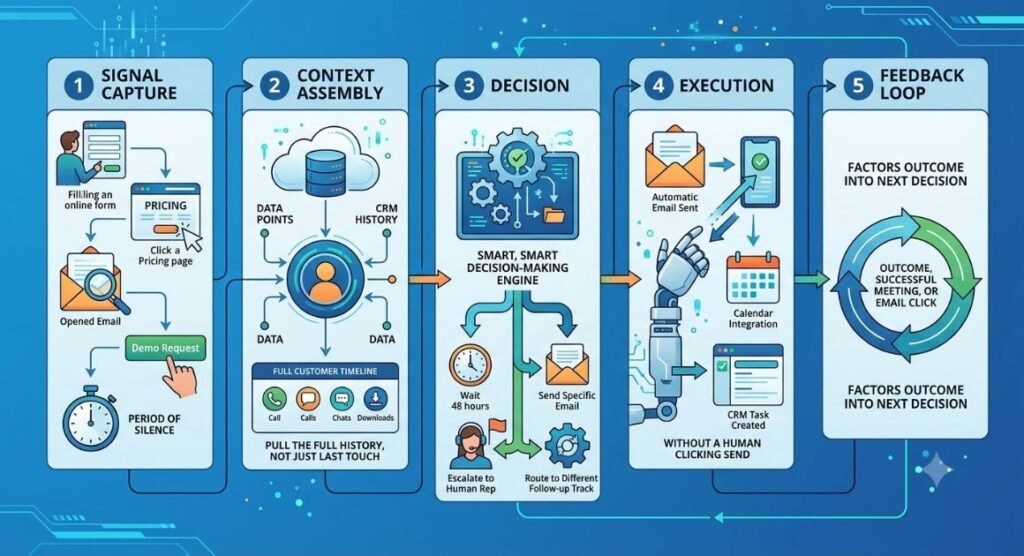
An AI Agent for Lead Nurturing typically runs on three layers working together: a data layer that pulls in behavior and CRM history, a reasoning layer that decides what should happen next, and an action layer that actually sends the email, updates the record, or books the meeting.
Here’s what that looks like in a live sequence:
- Signal capture. The system watches for events: a form fill, a pricing page visit, an email open, a demo request, a period of silence.
- Context assembly. It pulls the lead’s full history from your CRM, not just the last touch, so the next message reflects everything known about that person.
- Decision. Based on that context, it decides the next best action: send a specific email, wait 48 hours, escalate to a human rep, or route to a different follow-up track entirely.
- Execution. It carries out the action through your email tool, CRM, or calendar integration, without a human clicking send.
- Feedback loop. It logs the outcome and factors it into the next decision for that lead, and often across the wider segment too.
That last step is what separates this from a scripted sequence. A drip campaign runs the same five emails regardless of what happens. This kind of system notices that people who click the pricing link respond better to a shorter, price-anchored follow-up, and starts applying that pattern going forward.
Read More: AI Agent for Sales Outreach: Benefits, Use Cases & Best Tools (2026)
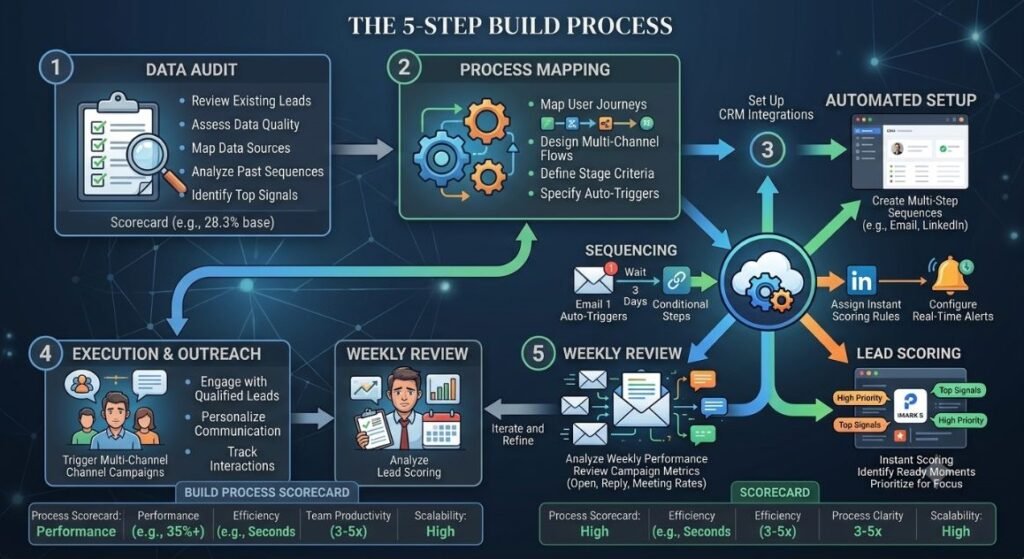
How to Build a Follow-Up Automation in 5 Steps
You don’t need a data science team to get this running. Most modern CRM platforms have this built in now. Here’s the practical build order.
Step 1: Audit your current lead sources and CRM data. Before you automate anything, check whether your CRM actually captures the signals the system needs: form fills, page visits, email engagement, and deal stage. If this data is messy or missing, fix that first. A system making decisions on bad data is worse than no automation at all.
Step 2: Define your follow-up segments. Group leads by intent level, not just by industry or company size. A visitor who read one blog post and a visitor who requested a demo need completely different follow-up cadences.
Step 3: Set clear guardrails. Decide what the system can do on its own (send emails, update lead scores, schedule follow-ups) and what needs a human sign-off (anything involving pricing exceptions or contract terms). Most platforms let you configure this per workflow.
Step 4: Launch on one segment first. Don’t automate your entire pipeline in week one. Pick your highest-volume, lowest-risk segment, usually inbound content downloads, and run it there for two to three weeks before expanding.
Step 5: Review the decisions weekly, not just the outcomes. Look at what’s actually being sent and why, not just whether conversion went up. This is where most teams catch bad patterns early, like a workflow that keeps escalating cold leads to sales reps because it’s misreading a signal.
The Best Platforms for Automating Follow-Ups in 2026
We’ve tested and researched a fair number of these. Here’s an honest breakdown of where each one actually fits.
Salesforce Agentforce
Agentforce is Salesforce’s autonomous agent platform, built on its Atlas Reasoning Engine and Data Cloud, and it’s grown fast. As of 2026, Salesforce reports over 18,500 customers running Agentforce, processing more than 3 billion monthly workflows. It includes a dedicated follow-up agent that automatically picks up a prospect from an inbound capture agent if no meeting gets scheduled.
What it does well: Deep, multi-step reasoning across your entire Salesforce ecosystem, plus model flexibility that now includes Google Gemini alongside OpenAI and Anthropic models through Amazon Bedrock. Where it falls short: It requires real Data Cloud setup and usually a dedicated admin. This is not a weekend project. Best for: Enterprise teams with complex, multi-stage sales processes and existing Salesforce infrastructure. Pricing: Einstein features start around $25 per user monthly, with Agentforce usage priced separately based on implementation (as of 2026).
HubSpot Breeze
Breeze is HubSpot’s AI suite, split into Breeze Assistant for in-app tasks, Breeze Agents for autonomous workflows, and Breeze Intelligence for data enrichment. It’s embedded across every HubSpot hub, including the free CRM tier, which is the real advantage here.
What it does well: Fast to deploy. Breeze Assistant is free, and its agents are grounded directly on HubSpot’s Smart CRM, so there’s minimal setup lag. Where it falls short: Less deep customization than Agentforce for genuinely complex, cross-system enterprise workflows. Best for: SMBs and mid-market teams that want automation running this quarter, not next year. Pricing: Breeze Assistant is free; the Prospecting Agent runs on outcome-based pricing around $1.00 per recommended lead (as of 2026).
Clay
Clay isn’t a full follow-up platform, it’s an enrichment and personalization layer that often feeds data into whichever system handles the actual outreach. It pulls signals from dozens of sources to build a genuinely specific first line in an email, not a mail-merge token.
What it does well: Personalization depth. If your emails still read like templates with a name swapped in, this is usually the fix. Where it falls short: It’s not a standalone follow-up system on its own. You’ll still need Agentforce, Breeze, or a similar tool to execute the sequence. Best for: Teams that already have automation running but need better inputs going into it.
Read More: AI Agent for Lead Generation: How to Automate Prospecting and Sales Outreach
What to Check Before You Commit to a Platform
Every vendor demo looks impressive. The real test happens after you’ve been live for a month. Before you sign a contract, check for these things specifically.
- Native CRM grounding. Does the workflow read and write directly to your existing CRM, or does it need a separate database synced on a delay? A delay of even an hour undercuts the whole speed advantage.
- Configurable guardrails. Can you set hard limits on what it’s allowed to do without approval, like discounting or contract language, before you ever turn it on?
- Visibility into decisions. Can you see why a specific email went to a specific lead at a specific time, or does it operate as a black box? Salesforce’s Agentforce Command Center and HubSpot’s Audit Cards both exist because enterprise buyers demanded this kind of logging.
- A real free tier or trial. You want to test this on a live segment of your own data before committing budget, not just watch a sandbox demo with fake leads.
If a vendor can’t answer these clearly, that’s usually a sign the platform is earlier-stage than the marketing suggests.
A Real Example: What This Looks Like in Practice
A 40-person support and sales team at a SaaS company deployed a Breeze-based workflow across their pipeline in Q3 2025, according to a case study published by HubSpot partner syncbricks.com in 2026. Before rollout, every ticket and lead touch went through a human first.
Within 90 days: 34% of tier-1 tickets were resolved without any human involvement, first-response time dropped from 38 minutes to under 2 minutes, and the freed-up human capacity was redirected to higher-value, complex cases. Monthly platform spend was recovered from staffing savings within the first 45 days.
The pattern holds across most successful rollouts we’ve seen: the automation doesn’t replace the team, it clears the repetitive volume so the humans can focus where judgment actually matters. In our own testing at Hotskill with learners building similar workflows, the teams that saw the fastest wins were the ones that started with one narrow segment, exactly like the syncbricks case study, instead of trying to automate the entire funnel on day one.
Common Mistakes Teams Make With Follow-Up Automation
Automating before the data is clean. If your CRM has duplicate records, missing lead sources, or inconsistent stage names, the system inherits all of that mess and makes decisions on top of it.
Treating it as set-and-forget. These workflows need weekly review, especially in the first month. Skipping this is how teams end up with a system quietly sending the wrong tone to enterprise leads for six weeks before anyone notices.
No escalation path to a human. The moment a lead asks a pricing question that needs judgment, or shows real buying urgency, the workflow should hand off immediately. Teams that skip this step lose hot leads to slow automated sequences.
Copying one follow-up track for every segment. A content download and a demo request are not the same intent level. Running them through identical timing wastes the system’s biggest advantage, which is adapting to context.
Judging success on open rates alone. Open rates are easy to track and easy to game with a catchy subject line. What actually matters is whether a lead moves to the next pipeline stage. Set up your reporting around stage movement and meeting bookings before you launch, not after.
Getting Started
The teams winning with this right now aren’t the ones with the biggest budget. They’re the ones who picked one messy part of their funnel, cleaned the data feeding it, and let the system run there before expanding. Start with your highest-volume, lowest-risk segment, set clear guardrails, and review what it’s actually doing every week for the first month.
If you want to get hands-on with how these workflows are actually built instead of just reading about them, Hotskill has structured lessons on automation and agent-based tools designed for exactly this kind of practical, day-to-day use. Download the app on iOS or Android at hotskill.co/download and start your first lesson today.
FAQ
What does an automated follow-up system actually do?
It monitors a prospect’s behavior, decides the right next action on its own, and executes it, whether that’s an email, a call task, or a meeting invite. Unlike a fixed drip sequence, it adjusts its decisions based on what each person actually does.
How is this different from regular marketing automation?
Standard marketing automation follows a fixed path you build in advance: send email one, wait three days, send email two. This kind of system reasons about context in real time and can change the sequence, timing, or content based on live engagement signals, without a human editing the workflow.
Do I need a large sales team to use one?
No. Smaller teams often see the biggest relative benefit, since they don’t have the headcount to manually follow up on every prospect within minutes. HubSpot’s Breeze Assistant, for example, is available on the free CRM tier specifically for teams without a dedicated ops function.
Is this worth it if I already have a CRM with basic automation?
If your current automation is a fixed drip sequence, yes. A 2026 Forrester study found adaptive, behavior-driven programs converting at 14.3% versus 2.1% for static sequences. The upgrade isn’t cosmetic, it’s a fundamentally different approach to timing and personalization.
How much does this kind of system cost?
It varies widely by platform and scale. HubSpot’s Breeze Assistant starts free, with agent usage priced per action from there. Salesforce Agentforce starts around $25 per user monthly for base Einstein features, with usage-based pricing on top for automated workflows, as of 2026. Always confirm current pricing directly with the vendor since these numbers shift often.
Can this replace my sales reps?
No, and platforms that market it that way are overselling it. The system handles volume and consistency. Reps still need to close, negotiate, and handle anything requiring genuine judgment. The realistic outcome is freeing reps from repetitive follow-up so they spend more time on qualified conversations.
Why isn’t my automation converting well even with AI involved?
Usually it’s a data problem, not a tooling problem. If lead source, stage, and engagement data in your CRM are inconsistent, the system is making decisions on incomplete information. Audit your data before blaming the platform.
Do I need to know how to code to set this up?
No. Platforms like HubSpot Breeze and Salesforce Agentforce are built for marketing and sales teams to configure through a visual interface, not engineers. Clay involves slightly more setup for advanced enrichment workflows, but still doesn’t require coding.
How long before I see results?
Most teams running a focused pilot on one segment see measurable engagement changes within two to three weeks, based on the build timeline outlined earlier in this guide. Full pipeline-wide impact on conversion rate typically takes a full sales cycle to confirm.
What’s the biggest risk of getting this wrong?
Letting the system run unreviewed on your full pipeline too early. A misconfigured workflow can send the wrong tone or timing to hundreds of prospects before anyone catches it. Starting small and reviewing weekly, as covered in the build steps above, is the safeguard most teams skip.