

Most support teams are stuck between two bad options. Hire more people and watch costs climb, or keep customers waiting longer for answers that used to take minutes. Neither one scales well, and both show up in your churn numbers eventually.
That’s the gap an AI Agent for Customer Engagement is built to close. Unlike a scripted chatbot that follows a decision tree, an AI agent can pull data from your CRM, reason through a customer’s actual problem, take multi-step action, and hand off to a human only when it genuinely needs to. It’s the difference between a tool that answers questions and one that can actually resolve them.
This guide covers what these agents do differently from older automation, where they’re already producing measurable results, and how to roll one out without turning your support experience into a frustrating maze of “I’m sorry, I didn’t understand that.
What Is an AI Agent, and How Is It Different From a Chatbot?
An AI agent is software that can perceive a situation, decide on a course of action, and carry out multi-step tasks with limited human oversight, instead of just generating a single response. That’s the core distinction from a traditional chatbot, and it’s worth sitting with for a second because the terms get used interchangeably way too often.
A chatbot answers within a fixed script or a single-turn language model call. Ask it something outside its training and you get a canned “I’m not sure how to help with that.” An agent, on the other hand, can check your order status in Shopify, see that a refund is already in progress, cross-reference your loyalty tier, and then decide whether to issue a discount code, escalate to a human, or simply confirm the refund timeline. It’s reasoning through a workflow, not matching keywords.
Most modern agents run on a large language model (an AI system trained on huge amounts of text to understand and generate natural language) connected to tools through something like function calling or MCP, a protocol that lets an AI model call external systems and APIs directly. That tool access is what turns a conversational model into something that can actually do things.
To be fair, not every business needs full agentic automation on day one. If your support volume is low and repetitive, a simpler chatbot might genuinely be enough. But once you’re dealing with real complexity, order lookups, account changes, multi-step troubleshooting, agents start to earn their keep fast.
An AI agent differs from a chatbot because it can reason across multiple steps and take real action inside connected systems, rather than returning a single scripted or generated response. This makes agents better suited to complex customer requests that involve account data, order history, or multi-step resolution.
Why Businesses Are Turning to Agentic AI for Customer Relationships
Customers expect fast answers around the clock, and they’ve gotten a lot less patient about waiting for them. According to Salesforce’s State of the Connected Customer research, most customers now expect companies to respond to their needs immediately, and that bar keeps rising every year, not falling.
Hiring your way to 24/7 coverage is expensive, and it doesn’t actually fix the underlying problem: a huge share of support volume is repetitive. Password resets, shipping updates, plan changes, refund status. None of that requires human judgment, but all of it still requires someone to log in, check a system, and type a reply. That’s exactly the kind of work an agent can absorb.
There’s also a quieter shift happening. Customer engagement used to mean reacting to inbound questions. Now it increasingly means proactively reaching out before a customer even has to ask, flagging a failed payment before it cancels a subscription, or nudging a user who abandoned checkout with the exact item still in their cart. Agents make that proactive layer realistic to run at scale, because a human team simply can’t monitor every account in real time.
None of this means headcount disappears. What tends to happen in practice is that support teams shift toward handling the harder, higher-value conversations, the ones where empathy and judgment actually matter, while the agent clears the queue of routine requests. That’s a better use of a skilled support rep’s time, and it usually shows up in job satisfaction as much as it does in resolution speed.
Read More: AI Agent for Marketing: How Intelligent Automation Is Changing Customer Engagement
Top Use Cases: Where AI Agents Actually Improve the Customer Experience
This is where things get concrete. Here’s where an AI Agent for Customer Engagement earns its budget, based on where teams are actually seeing results right now, not just where vendors say it should work.
Order and Account Support
An agent connected to your order management system can look up tracking numbers, process straightforward returns, and update shipping addresses without a human touching the ticket. For an ecommerce brand, this is usually the first and easiest place to start, because the data is structured and the outcomes are binary.
Proactive Retention Outreach
Instead of waiting for a cancellation request, an agent can flag usage drop-off or a failed billing attempt and reach out with a relevant offer or a fix, before the customer decides to leave. This is fundamentally different from a support ticket queue. It’s the agent initiating contact based on a signal, not responding to one.
Personalized Product Recommendations
By pulling purchase history and browsing behavior, an agent can suggest the next product a customer is actually likely to want, in the same conversation where they’re already asking a question. This works especially well inside a chat widget, where the recommendation feels like a natural extension of the conversation rather than a separate marketing email.
Multi-Step Troubleshooting
For SaaS products, an agent can walk a user through diagnostic steps, check their account configuration against known issues, and only escalate to a human engineer once it has ruled out the common causes. That pre-qualification alone can cut resolution time significantly, because the human who picks it up isn’t starting from zero.
Post-Purchase Follow-Up and Feedback Collection
Agents can time follow-up messages based on actual delivery or usage data instead of a fixed day-3 email blast, and route negative feedback straight to a human before it turns into a public review.
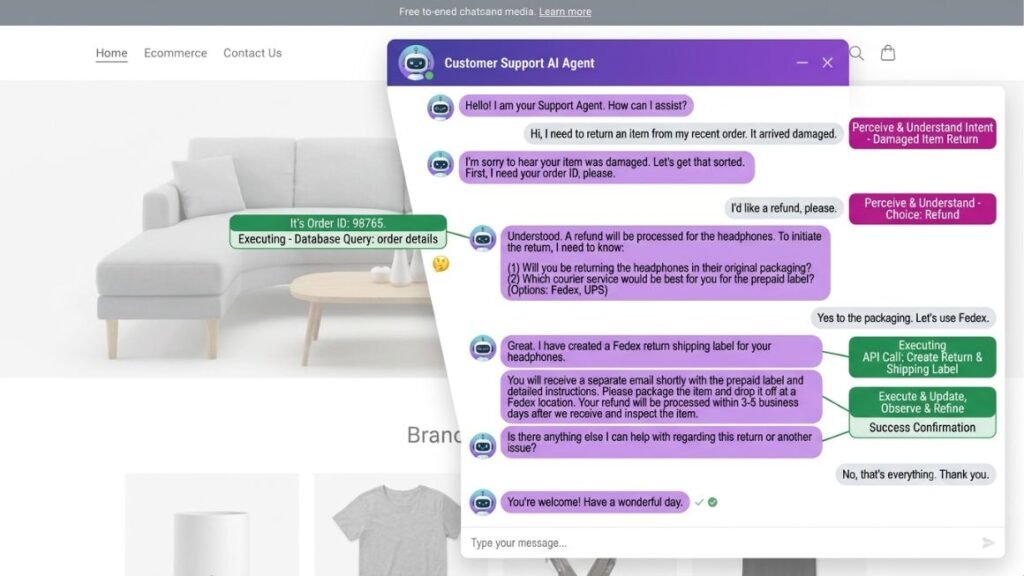
The strongest current use cases for AI agents in customer engagement are order and account support, proactive retention outreach, and multi-step troubleshooting, because each involves structured data the agent can act on directly. Businesses that start with these narrow, high-volume workflows tend to see faster, more measurable results than those attempting broad automation from day one.
Read More: 15 Best AI Agents for Email Marketing to Boost Engagement in 2026
How to Choose the Right AI Agent Platform for Your Business
Picking a platform mostly comes down to how well it connects to the systems you already run, not how impressive its demo looks. A great demo means very little if the tool can’t actually read your CRM or your order database.
Step 1: Map your existing tech stack. List every system a support conversation might need to touch, your CRM, your helpdesk, your billing platform, your inventory system. If the agent can’t connect to these, it can’t act on them.
Step 2: Check for native integrations versus custom builds. Platforms like Intercom’s Fin, Zendesk’s AI agents, and Salesforce’s Agentforce ship with pre-built connectors for common tools. If your stack is unusual, ask specifically how much custom development a working integration will take, and get that in writing before you sign anything.
Step 3: Test escalation handling, not just answer quality. Feed the agent a genuinely ambiguous, emotionally charged support scenario, not a softball question. Watch what it does when it doesn’t know the answer. A good agent recognizes its limits and hands off cleanly. A bad one either guesses with false confidence or loops the customer in circles.
Step 4: Evaluate reporting and human-in-the-loop controls. You need visibility into what the agent decided and why, and the ability to review or override its actions, especially for anything involving refunds, discounts, or account changes.
Honestly, most vendors will tell you their platform handles all of this well. It rarely does out of the box for every use case. Ask for a pilot on your actual, messiest workflow before committing to a contract.
Read More: AI Agents for Digital Marketing: The Complete 2026 Guide
Best Practices for Deploying AI Agents Without Losing the Human Touch
1. Start narrow, then expand. Pick one workflow, order status lookups, say, and get it working reliably before adding a second. Trying to automate everything at once is the fastest way to end up with an agent that’s mediocre at ten things instead of excellent at one.
2. Give it a clear escalation threshold. Define exactly which situations require a human, refund amounts above a certain value, any mention of legal action, repeated frustration signals in the conversation, and hard-code those boundaries. Don’t leave it to the model’s judgment alone.
3. Write the agent’s voice deliberately. It shouldn’t sound like a legal disclaimer, and it shouldn’t try too hard to sound human either. Match your brand’s actual tone, and be transparent that the customer is talking to an AI agent. Most customers are fine with that as long as the resolution is fast and the handoff to a human is smooth when needed.
4. Monitor real conversations weekly, not just dashboards. Metrics like resolution rate can look great while the actual transcripts show customers getting mildly annoyed. Read the transcripts. It’s the only way to catch tone problems before they show up in reviews.
5. Keep a fast, visible path to a human. Nothing damages trust faster than a customer stuck in an automated loop with no obvious way out. A simple “talk to a person” option, always available, fixes most of the frustration on its own.
In Hotskill’s own testing across support-focused AI workflows, teams that started with a single well-scoped use case saw meaningfully cleaner rollouts than teams that tried to automate their entire support queue in one go. Narrow scope, expanded gradually, consistently beat broad scope from day one.
Read More: AI Agents for Performance Marketing: Automate, Optimize, and Scale
Common Mistakes to Avoid When Implementing AI Agents
Automating everything at once. This is the single most common failure mode. It overwhelms both the model’s reliability and your team’s ability to catch problems before customers notice them.
Skipping the escalation design. If you don’t explicitly define when the agent should hand off, it will eventually try to resolve something it shouldn’t, and that’s usually the interaction a frustrated customer screenshots and posts publicly.
Treating it as a one-time setup. An agent needs ongoing tuning as your products, policies, and edge cases change. Treat it like a team member who needs regular feedback, not a static tool you configure once and forget.
Ignoring tone entirely. A technically correct answer delivered with the wrong tone still damages the relationship. This matters more than most teams realize going in.
Not testing for hallucination on policy questions. Agents can generate confident, wrong answers about refund windows or warranty terms if they’re not grounded in your actual current policy documents. Test this specifically before launch, and re-test it after every policy change.
Conclusion
An AI agent built for customer conversations isn’t a replacement for your support team. It’s a way to clear the repetitive work off their plate so the humans can focus on the conversations that actually need a person. Start with one narrow, high-volume workflow, define clear escalation rules from the beginning, and read real transcripts every week instead of relying on dashboards alone.
The businesses getting the most out of this right now aren’t the ones that automated everything on day one. They’re the ones that picked a single use case, made it genuinely reliable, and expanded from there.
If you want to get better at building and evaluating AI agent workflows like this one, Hotskill has structured lessons built around exactly this kind of practical, hands-on skill. Download the app on iOS or Android, and start your first lesson today.
FAQ
What does an AI agent do in customer engagement?
It’s an AI system that can hold a conversation with a customer, access relevant data from your business tools, and take multi-step action, like processing a return or updating an account, instead of just answering a single question. It goes beyond a scripted chatbot because it can reason through a workflow and complete tasks on its own.
How is an AI agent different from a regular chatbot?
A chatbot typically follows a fixed script or generates a single response with no ability to act on external systems. An AI agent can call tools, check real data like order status or account history, and make a decision about what to do next based on that data. The agent is doing a job, not just answering a prompt.
How do I set up an AI agent for my support team?
Start by mapping which systems the agent needs to connect to, like your CRM and helpdesk. Then pick one narrow, high-volume workflow to automate first, define clear rules for when it should escalate to a human, and test it against your messiest real scenarios before rolling it out to all customers.
Is an AI agent worth it for a small business?
If your support volume is low and mostly repetitive, a simpler chatbot might cover your needs without the added complexity. Once you’re handling order lookups, account changes, or any multi-step troubleshooting regularly, an agent usually pays for itself quickly in time saved.
Do I still need human support staff if I use an AI agent?
Yes. Agents are best at absorbing repetitive, structured requests, not replacing judgment-heavy conversations. Most teams that deploy agents well end up shifting their human staff toward higher-value conversations rather than eliminating roles.
Why isn’t my AI agent giving accurate answers?
This usually comes down to the agent not being properly connected to your current policy documents or product data, so it’s generating a plausible-sounding but wrong answer instead of pulling a real fact. Re-check your data sources and test the agent specifically on policy and pricing questions after every update.
Can an AI agent handle refunds and account changes on its own?
It can, but most businesses set a threshold, refund amounts under a certain value, for example, where the agent can act independently, and require human approval above that line. This keeps risk low while still automating the bulk of routine requests.
Do I need coding skills to use an AI agent platform?
Not for most modern platforms. Tools like Intercom’s Fin or Zendesk’s AI agents are built for support teams to configure through a visual interface. Custom integrations with unusual internal systems may still need developer help.
How do I know if my AI agent is actually working well?
Don’t rely only on resolution rate dashboards. Read a sample of real conversation transcripts every week to catch tone problems, confused customers, or incorrect answers that the metrics alone won’t show you.
What’s the biggest mistake businesses make when adopting AI agents?
Trying to automate every workflow at once instead of starting with one narrow, well-defined use case. Broad rollouts tend to produce inconsistent results and make it much harder to catch and fix problems before customers notice them.