

You’ve probably got a content calendar full of video ideas and not nearly enough hours to shoot, edit, and publish them all. That’s the gap an AI agent for video marketing is built to close. Unlike a basic editing tool that waits for you to click every button, this kind of system can plan a script, generate a voiceover, cut a rough edit, and queue it for posting with far less hand-holding.
That said, “AI agent” gets thrown around loosely right now. Some tools slap the label on a chatbot with a video export button. Others genuinely act on multi-step tasks without you babysitting each one. This article breaks down what actually separates the two, where these systems fit into a real content workflow, and which tools are worth your time in 2026.
How Do AI Agents Work in Video Content Creation?
A basic agent can carry out a multi-step task on its own, checking its progress and adjusting along the way, instead of stopping after every single instruction. Feed it a goal like “turn this blog post into a 60-second product explainer” and it will draft the script, pick visuals, generate a voice track, and assemble a rough cut without you approving each micro-step.
That’s different from how most people still use generative tools. The typical workflow looks like this: type a prompt, get one output, copy it somewhere else, type another prompt for the next piece, and stitch everything together by hand. An agent collapses that chain. It holds the goal, breaks it into sub-tasks, and moves through them itself, only pausing when it genuinely needs your input or hits a decision it isn’t confident about.
Three things make this possible under the hood:
- Planning: the system breaks a broad request into ordered steps instead of guessing at the whole task in one pass.
- Tool use: it can call other software, such as a text-to-speech engine, a stock footage library, or a scheduling app, rather than just generating text.
- Memory: it retains context from earlier steps, so the voiceover tone matches the script it wrote two steps earlier.
Most of today’s video-focused agents specialize in one or two parts of the pipeline rather than the whole thing. A script agent won’t necessarily edit the footage. A clipping agent won’t necessarily write ad copy. Knowing this saves you from expecting one tool to do a full production team’s job.
An agent differs from a standard generative tool because it can plan, act on multiple steps, and use other software without constant prompting. In video production, this typically covers scripting, voice generation, rough editing, and publishing, though most current tools still specialize in one part of that chain rather than owning it end to end.
Key Benefits of Bringing Agents Into Your Video Workflow
Video marketing used to mean hiring an agency or spending weeks in a timeline for even a short clip. That’s no longer the baseline cost of entry. The honest pitch here isn’t “replace your editor.” It’s “cut the parts of production that eat time without adding creative value.”
1. Faster turnaround on repeatable formats. Weekly recap videos, product update clips, testimonial edits, these follow a template most of the time. An agent that already knows your brand’s format can produce a draft in minutes instead of the half day a junior editor might spend on it.
2. Lower cost per video. Hiring a freelance editor for every short-form clip adds up fast, especially if you’re posting daily across TikTok, Instagram Reels, and YouTube Shorts. A subscription-based agent tool typically runs cheaper per output once you’re producing more than a handful of videos a month.
3. Consistency across a growing library. Manual editing means style drift; one person cuts fast-paced, another prefers longer holds. An agent applies the same template and pacing rules every time, which matters once your video library hits the hundreds.
4. Faster testing of variations. Want five different hooks for the same ad? An agent can generate all five in the time it takes to brief one human editor, letting you actually A/B test instead of guessing which opening line performs best.
5. Frees your team for the work that still needs a person. Strategy, brand voice, and creative direction still need a human. Offloading rough cuts and repurposing to an agent gives your team more hours for that higher-value work.
None of this means quality drops automatically. It means the baseline production speed goes up, and where you spend your remaining time shifts toward judgment calls a machine still can’t make well.
Top Use Cases for AI Agents in Marketing Videos
Here’s where this actually shows up in a real content calendar, not just in a demo.
Repurposing Long-Form Content Into Shorts
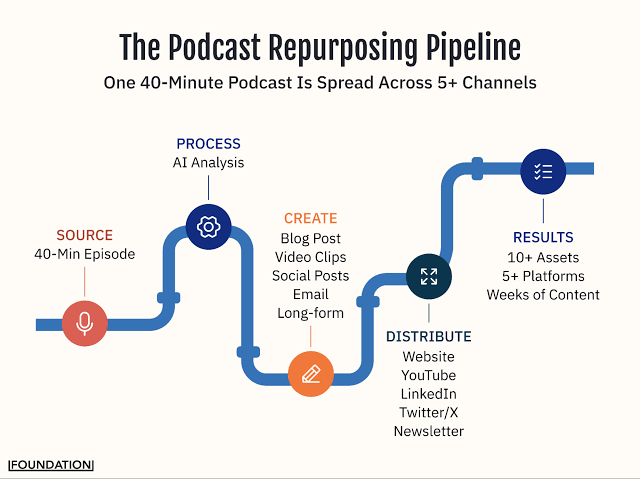
Feed an agent a 40-minute webinar or podcast recording, and it can find the strongest moments, cut them into vertical clips, add captions, and hand you five to ten ready-to-post short videos. This is probably the single most common use case right now because it turns one recording session into a week of content.
Scripting and Storyboarding Product Videos
Give it a product page or a set of bullet points, and an agent can draft a script with scene-by-scene notes, suggested b-roll, and a rough shot list. It won’t nail your brand voice on the first try, but it gets you from a blank page to a workable draft fast.
Automated Localization
Running the same product video across five markets used to mean five separate voiceover sessions and five rounds of subtitle work. An agent can translate the script, generate a localized voice track, and resync captions, cutting a process that took days down to a few hours.
Ad Variant Generation for Paid Campaigns
Performance marketers running Meta or Google video ads need constant creative refreshes to fight ad fatigue. An agent can take one hero video and spin out multiple hook variations, aspect ratios, and CTA overlays for testing without a full reshoot.
Scheduled Publishing and Cross-Platform Formatting
Some agents go beyond editing and handle the last mile too, resizing a single edit for YouTube, Instagram, and LinkedIn, then queuing each version at the right time for each platform’s posting patterns.
Best AI Agents for Video Marketers in 2026
We’ve tested most of these directly with Hotskill’s own content workflows. Here’s the honest breakdown, not a marketing summary.
HeyGen – Best for AI Avatar Videos
What it does: HeyGen generates talking-head videos using AI avatars and cloned voices, so you can produce a spokesperson-style video without a camera or a presenter.
What it does well: The lip-sync quality is genuinely strong, and localization into other languages while keeping the same avatar is one of its best features. It’s fast for product walkthroughs and internal training clips.
Where it falls short: Avatars still read as slightly synthetic in close-up shots, and it’s a poor fit for anything that needs real emotional nuance, like a founder story or a customer testimonial.
Best for: Explainer videos, onboarding content, and localized product demos.
Pricing: Paid plans start around $29/month as of 2026, with a limited free trial.
Synthesia – Best for Corporate Training and Explainer Videos
What it does: Similar space to HeyGen, Synthesia focuses more heavily on enterprise training content with a large library of stock avatars and templates.
What it does well: Team collaboration features and brand kit controls are more mature here, which matters if multiple people are producing training material under one brand.
Where it falls short: It’s priced for enterprise teams, and the free tier is too limited to properly test before committing.
Best for: L&D teams and companies producing high volumes of internal training video.
Pricing: Plans start around $29/month for individuals, with custom enterprise pricing, as of 2026.
Pictory – Best for Turning Blog Posts into Videos
What it does: Pictory takes a blog post or script and automatically matches it with stock footage, captions, and background music to produce a finished video.
What it does well: If you already have a content library of blog posts, this is one of the fastest ways to repurpose it into video without starting from scratch.
Where it falls short: Stock footage matching can feel generic if you don’t manually swap clips, and it’s not built for highly branded or custom visual styles.
Best for: Content teams repurposing written content at scale.
Pricing: Paid plans start around $19/month as of 2026.
Opus Clip – Best for Repurposing Long Videos into Shorts
What it does: Opus Clip analyzes long recordings like podcasts or webinars and automatically identifies and cuts the strongest short-form moments, complete with captions and virality scoring.
What it does well: The clip-selection logic is honestly better than most competitors we’ve tried. It surfaces moments a human editor might scroll past.
Where it falls short: The automated captions occasionally need manual cleanup, and the free tier watermarks your clips.
Best for: Creators and brands repurposing podcasts or livestreams into short clips.
Pricing: Free tier available; paid plans start around $15/month as of 2026.
Runway – Best for Creative and Generative Video Editing
What it does: Runway combines traditional editing tools with generative features like text-to-video, green screen removal, and motion tracking.
What it does well: It’s the most flexible option here for teams that want creative control alongside automation, especially for ads that need a distinct visual style.
Where it falls short: It has a steeper learning curve than the other tools on this list, and it’s overkill if all you need is quick captions and cuts.
Best for: Brands producing stylized ads or experimental creative that needs more than a template.
Pricing: Paid plans start around $15/month as of 2026, with credit-based limits on generative features.
No single tool currently covers the full video production pipeline end to end. HeyGen and Synthesia lead on AI avatars, Pictory is strongest for text-to-video repurposing, Opus Clip leads on long-to-short clipping, and Runway offers the most creative control for teams that need custom visual styles.
How to Get Started With Agents in Your Video Process
The real value of an AI agent for video marketing shows up once you stop treating it like a single tool and start building it into your weekly content process. Here’s a practical way to do that.
- Pick one repeatable format first. Don’t try to automate your entire video output on day one. Start with something you already produce weekly, like a recap clip or a testimonial cutdown.
- Feed the agent a real brief, not a vague prompt. Give it your brand voice guidelines, target length, and a reference video if you have one. Vague prompts produce generic output.
- Review the first five outputs manually. Don’t auto-publish anything until you’ve checked several drafts and adjusted your brief based on what’s off.
- Build a template once it’s working. Most tools let you save a format so future videos follow the same structure automatically.
- Expand to a second use case. Once one workflow runs reliably, layer in the next, like localization or ad variant generation.
In Hotskill’s own testing across a few different content teams, this staged rollout cut the time to a usable weekly recap video from roughly three hours of manual editing down to under 45 minutes once the template was dialed in.
Common Mistakes to Avoid
Skipping the brief. The agent isn’t reading your mind. A one-line prompt produces a one-line-quality result.
Publishing without a human check. Even a strong agent will occasionally misjudge pacing or pick an odd clip. Someone still needs to hit approve.
Expecting one tool to do everything. As covered above, most agents specialize. Trying to force a captioning tool into full ad production usually disappoints.
Ignoring brand voice drift. Over time, output can start to feel templated if you never update the brief or swap reference examples.
Final Thoughts
The teams getting real value from this right now aren’t the ones chasing every new tool. They’re the ones who picked one repeatable video format, gave the tool a proper brief, and built a template that keeps working week after week. Start there before you try to automate everything at once.
If you want to get hands-on with tools like these instead of just reading about them, Hotskill has structured AI skill tracks built for exactly this kind of workflow. Download the app on iOS or Android, and start your first lesson today.
FAQs
What is an automated agent for video content?
An automated video agent is software that can plan and carry out multiple steps of production, such as scripting, editing, and publishing, with minimal manual input at each stage. It differs from a standard editing tool because it can work toward a goal rather than waiting for a command at every step.
How is an automated agent different from a regular AI video generator?
A regular generator produces one output from one prompt, like a single clip from a text description. An agent chains several actions together, planning steps, using other tools, and adjusting based on earlier results, to complete a broader task with less back-and-forth from you.
Do I need coding skills to use these tools?
No. Nearly every tool covered here, including HeyGen, Pictory, and Opus Clip, runs through a standard web dashboard with no coding required. Some advanced automation setups use no-code platforms, but the core tools are built for marketers, not developers.
Which tool is best for repurposing podcasts into short clips?
Opus Clip is generally the strongest option for this specific job because its clip-selection model consistently surfaces stronger moments than competitors, based on our own testing at Hotskill.
Is it worth paying for one of these tools if I only post a few videos a month?
If you’re producing fewer than five videos a month, a free tier or a low-cost plan like Opus Clip’s is usually enough. The cost only pays for itself once you’re producing enough volume that manual editing becomes the bottleneck.
Can these tools fully replace a human video editor?
Not for anything that needs strong creative judgment or brand nuance, like a hero campaign ad or a founder-led story. They’re strongest on repeatable, template-driven formats, which frees a human editor for the higher-stakes work instead.
Why isn’t the agent producing good output even after I set it up?
The most common reason is a weak or vague brief. Give the tool specific guidelines on tone, length, and reference examples, and review the first several drafts closely before trusting it to run unsupervised.
Do I still have access to my existing footage, or does the agent generate everything from scratch?
Most tools let you upload and use your own footage alongside AI-generated elements. Pictory and Runway, for example, both support working from your own source clips rather than forcing fully synthetic output.
How much time can automation actually save on video production?
Based on Hotskill’s own workflow testing, teams that build a reliable template can cut the time on a repeatable format like a weekly recap video from around three hours down to under 45 minutes.
What’s the easiest first step for a marketer who has never used one of these tools?
Start with a single repeatable format, like turning an existing webinar recording into short clips using a tool like Opus Clip, and review the output manually before building it into a regular weekly process.