

You run a campaign across six channels, check the numbers a week later, and every platform is taking credit for the same conversion. Meta says it drove the sale. Google Ads says it drove the sale. Your email tool says the same thing. Nobody’s lying exactly, they’re just each measuring in their own silo, and you’re the one stuck reconciling three different “truths” in a spreadsheet at 9pm.
This is the part of marketing that eats the most time for the least glory. Attribution modeling used to mean picking a rule (first-touch, last-touch, maybe a weighted model if you were feeling ambitious) and hoping it held up under scrutiny. It rarely did. That gap between what dashboards report and what actually moved a customer to buy is exactly what an AI Agent for Marketing Attribution is built to close.
This article breaks down what these agents actually do, the features worth checking for before you buy one, the real benefits teams are seeing, and a few concrete examples of how they’re used day to day. No hype, just what’s actually working and where it still falls short.
What Is Marketing Attribution, and Why Is It So Hard to Get Right?
Marketing attribution is the practice of assigning credit for a conversion to the specific touchpoints, ads, emails, or channels that influenced a customer along the way. In theory it tells you which spend is working. In practice, most teams are stuck choosing between models that are either too simple to be accurate or too complex for anyone to actually explain to a CFO.
Last-touch attribution gives all the credit to whatever happened right before the sale, usually a branded search or a direct visit. That flatters channels that catch people at the end of the journey and starves the channels that actually created the demand in the first place. First-touch does the opposite. Multi-touch models split credit more fairly on paper, but building one by hand means stitching together data from ad platforms, your CRM, your website analytics, and your email tool, all of which use different identifiers for the same person.
According to Nielsen’s 2023 marketing effectiveness research, most brands still misattribute a meaningful share of their marketing-driven revenue because they rely on single-channel, platform-reported numbers rather than a unified view. That’s not a tooling problem you can fix with another dashboard. It’s a data-stitching and reasoning problem, and that’s exactly the kind of problem an agent is good at.
Traditional attribution models fail because they rely on incomplete, single-platform data and rigid rules that can’t adapt to how customers actually move across channels. Marketers end up choosing between attribution models that are too simple to be accurate or too complex to explain, and both leave real budget decisions resting on guesswork.
Read More: 15 Best AI Agents for Email Marketing to Boost Engagement in 2026
What Is an AI Agent, and How Is It Different From a Dashboard?
An AI Agent is a system that can plan a task, take actions across multiple tools, check its own results, and adjust its next step, largely without a human directing every move. That’s the key difference from a dashboard. A dashboard shows you data you already collected. An agent goes and gets the data, cleans it, connects it, and tells you what it means.
For attribution specifically, this matters because the job was never really a reporting job. It’s a data-pulling, data-matching, and pattern-recognition job that happens to end in a report. A static dashboard can show you that conversions went up 12% last month. It can’t tell you, on its own, that the increase tracks almost exactly with a retargeting campaign that launched nine days earlier and a pricing page redesign that shipped in the same window.
The agent’s job is to notice that kind of overlap, pull the supporting data from your ad platforms and your CRM, and hand you a conclusion instead of a chart you have to interpret yourself. That’s a meaningfully different deliverable, and it’s why teams are starting to treat attribution agents less like reporting tools and more like a junior analyst that never sleeps.
How These Agents Actually Track and Assign Credit
Most attribution agents follow a similar sequence, whether they’re built on top of a platform like HubSpot or run as a standalone layer that connects to your existing stack.
- Connect the data sources. The agent pulls from ad platforms (Meta Ads Manager, Google Ads, LinkedIn Campaign Manager), your CRM, website analytics, and email or SMS tools, matching activity to individual users through cookies, device IDs, or a customer data platform.
- Deduplicate and unify identities. It resolves the same person showing up as three different IDs across three different tools, so a click on Instagram and a purchase on your website three days later get correctly linked to one customer journey.
- Apply a weighted or algorithmic model. Instead of a fixed rule like last-touch, most agents use data-driven attribution, which distributes credit across touchpoints based on how much each one statistically correlated with conversion in your specific historical data, not a generic industry assumption.
- Surface anomalies and explain them. When a channel’s performance shifts, the agent flags it and pulls context, a creative change, a bid adjustment, a seasonal pattern, rather than leaving you to notice the drop three weeks later.
- Recommend a next action. The better agents don’t stop at reporting. They’ll suggest a budget shift, flag an underperforming ad set, or draft a summary for a stakeholder meeting.
That last step is where these tools start to earn their keep. A report tells you what happened. A recommendation tells you what to do about it, and that’s the difference between a tool you check and a tool that actually changes your Monday.
Read More: AI Agents for Performance Marketing: Automate, Optimize, and Scale
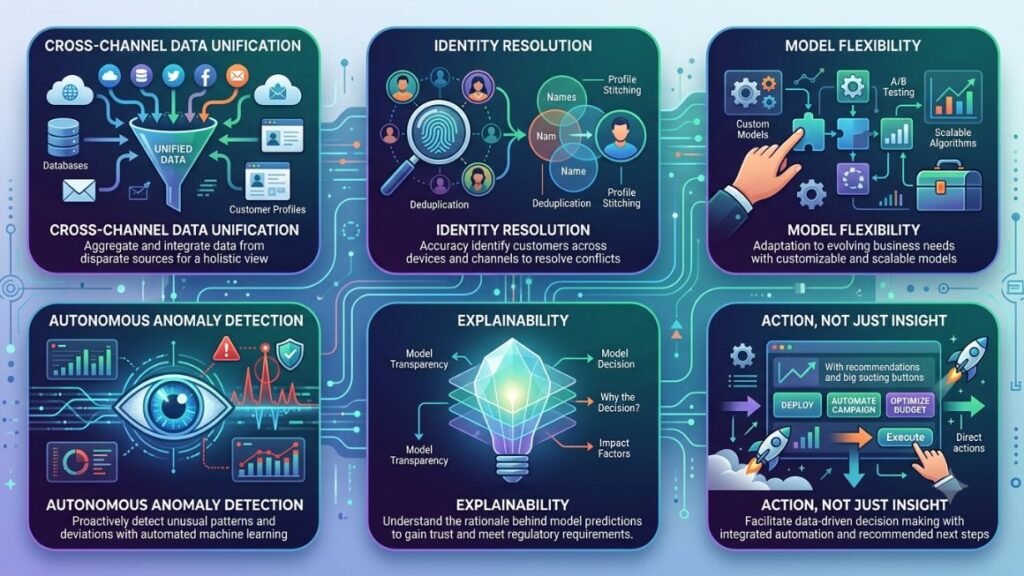
Core Features Worth Evaluating
Not every product marketed as an attribution agent actually behaves like one. Some are attribution dashboards with a chatbot bolted on. Here’s what separates a genuinely useful one from a repackaged reporting tool.
Cross-channel data unification
The agent should natively connect to your ad platforms, CRM, and analytics stack without you exporting CSVs by hand. If you’re still manually uploading files for it to “analyze,” it’s not really agentic, it’s a chatbot reading a spreadsheet.
Identity resolution
Look for stitching that works across devices and sessions, not just within a single platform’s cookie. Weak identity resolution is the single biggest reason attribution numbers don’t match reality.
Model flexibility
You should be able to compare last-touch, linear, and data-driven models side by side, and the agent should be able to explain why one differs from another for your specific data, not just display three numbers with no context.
Autonomous anomaly detection
The agent should flag unusual shifts on its own, before you go looking for them. Waiting for a human to notice a conversion drop defeats the point of having an agent in the first place.
Explainability
Every conclusion should come with a reason you can actually check. “Conversions from paid social dropped 18% week over week, coinciding with a creative refresh on March 3rd” is useful. “Attribution shifted” is not.
Action, not just insight
The strongest tools can draft budget reallocation recommendations, trigger alerts in Slack, or update a report automatically, closing the loop instead of leaving the analysis for you to act on.
Read More: AI Agent for Lead Generation: How to Automate Prospecting and Sales Outreach
Benefits: What Changes When You Hand Attribution to an Agent
The honest answer is that the biggest benefit isn’t better numbers, it’s getting the numbers faster and trusting them more. Here’s what typically changes for a team that adopts one.
Hours back every week. Manually pulling and reconciling data across five or six platforms is a recurring task, not a one-time setup. Teams running this process by hand often lose several hours a week to it. An agent that handles the pull, match, and reconcile steps automatically returns that time directly.
Faster reaction to underperformance. When a channel starts underperforming, the gap between “it happened” and “someone noticed” is where budget gets wasted. Agents that flag anomalies in real time shrink that gap from weeks to hours.
Decisions based on your actual data, not platform-reported bias. Every ad platform has an incentive to overstate its own contribution. A well-built AI Agent for Marketing Attribution pulls from all your sources and applies a model based on your data, not each platform’s self-reported numbers, which tends to shift budget away from channels that were getting more credit than they earned.
Better stakeholder conversations. Instead of walking into a leadership meeting with three conflicting numbers from three platforms, you walk in with one reconciled view and a documented reason for what changed. That’s a very different conversation.
Lower reporting overhead as you scale. Attribution complexity grows with every new channel you add. Agents scale that complexity without adding proportional headcount, which matters a lot for lean teams running six or seven channels at once.
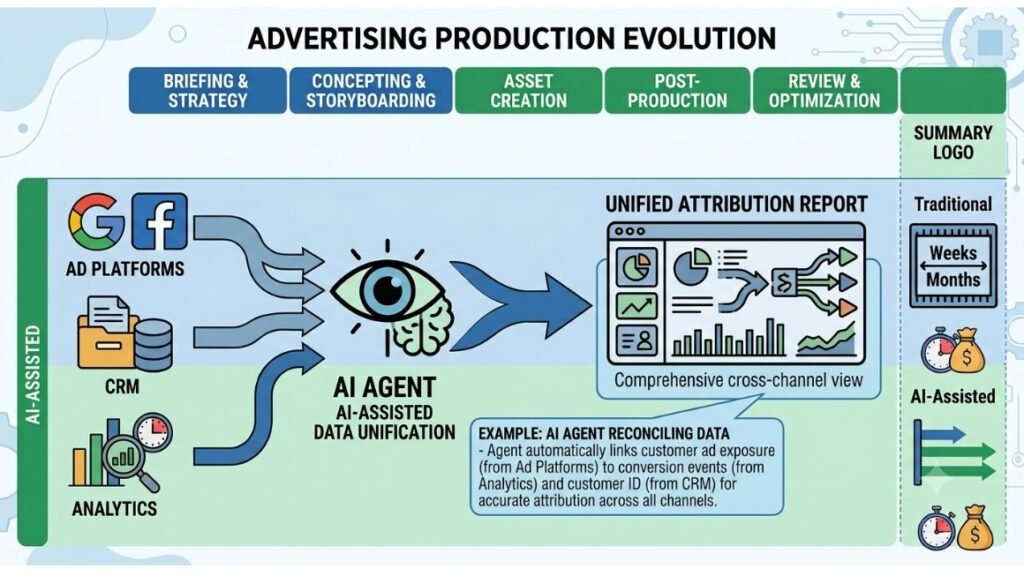
Real-World Examples: Attribution Agents in Action
An eCommerce brand catching a broken funnel early. A mid-sized DTC brand running Meta, Google Ads, and email saw last-touch attribution suggest email was underperforming, so a manager nearly cut the budget. An attribution agent pulling from the full funnel showed email was actually the primary influencer earlier in the journey for over a third of conversions that last-touch was crediting entirely to paid search. The budget cut was reversed before it happened.
A B2B SaaS team shortening its sales cycle analysis. A SaaS company connected its CRM and ad platforms to an attribution agent and had it flag which content touchpoints correlated most strongly with demo bookings. It surfaced that a specific comparison page, not the homepage or the pricing page, was the strongest predictor of a booked demo, prompting the team to invest more in that content format.
A lean agency managing attribution across client accounts. Agencies juggling attribution for ten or more clients at once used to spend a full day each month building reconciled reports by hand. With an agent handling the pull and reconcile steps automatically and drafting a first version of each client report, that day’s work dropped to roughly an hour of review and edits per account, according to internal workflow notes shared by several Hotskill learners running small agencies.
Real teams are using attribution agents to catch misleading last-touch data before it causes a bad budget decision, identify which content actually drives pipeline in B2B funnels, and cut hours of manual monthly reporting down to a quick review. The common thread is speed: the agent surfaces the insight before a human would have caught it manually.
Read More: AI Agent for Sales Outreach: Benefits, Use Cases & Best Tools (2026)
Where These Agents Still Fall Short
It’s worth being honest here, because most of the marketing around these tools isn’t. Attribution agents are only as good as the data connections they have. If a channel isn’t integrated, it’s invisible to the model, and the agent will confidently give you a conclusion built on a partial picture without flagging that anything’s missing.
Offline and word-of-mouth influence is still largely a blind spot. If a customer heard about you from a friend and then searched your brand name, most agents will credit the branded search, not the actual source. And smaller teams with thin historical data will get less accurate data-driven models than larger teams with years of conversion history to train on. An agent isn’t a substitute for a genuinely unified data foundation, it’s a much faster way to work with the data you actually have.
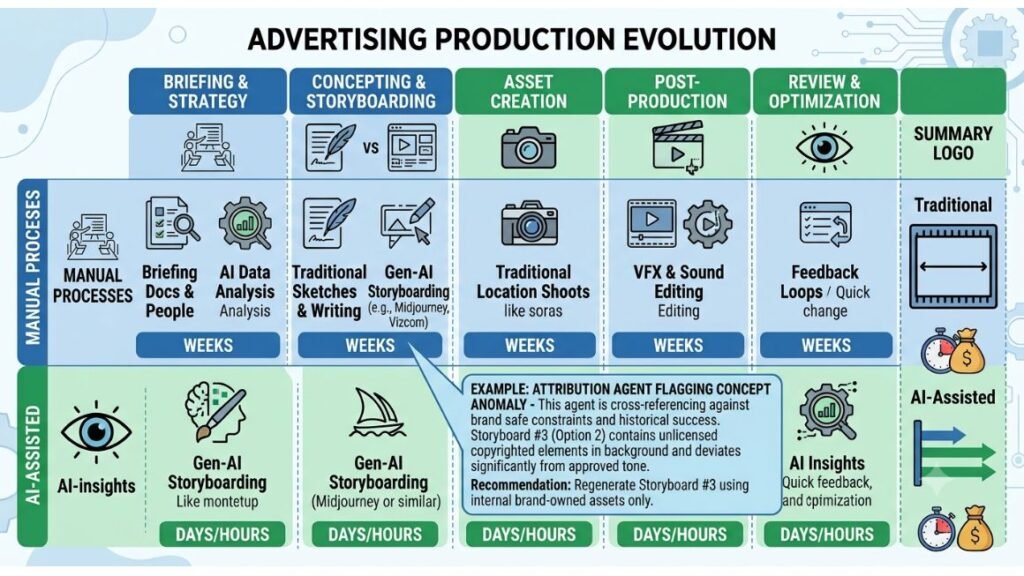
How to Get Started
Step 1: Audit your current data connections. List every platform where a conversion or touchpoint gets recorded, and note which ones are already integrated with each other.
Step 2: Pick a tool that connects natively to your stack. Don’t buy an agent that requires manual CSV uploads for half your channels. That defeats the purpose.
Step 3: Run it alongside your existing model for at least one full sales cycle. Compare the agent’s output to your current reporting before you make it the source of truth for budget decisions.
Step 4: Set up one automated action. Start small, a Slack alert for anomalies or a weekly summary draft, before handing over full budget reallocation authority.
The Bottom Line
Attribution was never really a reporting problem, it was a data-stitching problem wearing a reporting problem’s clothes. That’s exactly the kind of work an agent handles better than a person clicking between six browser tabs. Start by auditing your data connections, pick a tool that integrates natively rather than one that needs manual uploads, and run it alongside your current process for one full cycle before trusting it with budget decisions.
If you want to get better at actually using tools like this instead of just reading about them, Hotskill has hands-on lessons built for exactly this kind of workflow. Download the app on iOS or Android and start your first lesson at hotskill.co/download.
FAQ
What does an AI agent actually do for marketing attribution?
It’s a software system that automatically connects to your ad platforms, CRM, and analytics tools, unifies customer touchpoint data, and applies an attribution model to tell you which channels actually drove conversions. Unlike a static dashboard, it can also flag anomalies and recommend next steps without a human prompting it.
How is an attribution agent different from Google Analytics or a standard attribution dashboard?
Google Analytics and most dashboards show you data you have to interpret yourself, usually limited to the channels that platform tracks directly. An attribution agent pulls from multiple platforms at once, resolves customer identity across them, and generates a conclusion rather than just a chart.
Do I need a large marketing team to benefit from one of these tools?
No. Smaller teams often get more relative benefit because they don’t have a dedicated analyst to do this reconciliation manually. Solo marketers and small agencies use these agents specifically to replace the hours a full-time analyst role would otherwise take.
Is data-driven attribution more accurate than last-touch or first-touch models?
For most businesses with enough conversion volume, yes. Data-driven models distribute credit based on statistical correlation across your actual customer journeys rather than a fixed rule, which tends to reflect reality more closely than crediting a single touchpoint.
Can an AI agent handle attribution if my data isn’t fully clean?
It can work with imperfect data, but the output quality drops with the input quality. Messy UTM tagging, missing CRM fields, or unconnected offline sales data will all show up as gaps or inaccuracies in the agent’s conclusions, so some upfront data hygiene pays off.
Do I still need a human analyst if I use an attribution agent?
For most teams, yes, at least for now. The agent handles the pulling, matching, and first-pass analysis, but decisions about budget shifts, strategic tradeoffs, and how to present findings to leadership still benefit from human judgment and context the agent doesn’t have.
How long does it take to set up an attribution agent?
Initial integration with your core platforms usually takes anywhere from a few hours to a couple of weeks, depending on how many channels you’re connecting and how clean your existing tracking is. Running it in parallel with your current reporting for a full sales cycle before fully switching over is the safer approach.
Will an attribution agent tell me exactly how much budget to shift?
The better tools will suggest a reallocation based on the data, but treat it as a starting recommendation rather than a final answer. Seasonality, brand-building spend that doesn’t show up in short-term conversion data, and business context the agent can’t see should still factor into the final call.
What happens if a channel isn’t connected to the agent?
It becomes invisible to the model. The agent will still generate a confident-looking report, but any touchpoints from that unconnected channel won’t be factored in, which can quietly skew the whole picture. Always confirm every active channel is integrated before trusting the output.
Are these tools only useful for eCommerce brands?
No. B2B and SaaS companies use them just as often, typically to connect CRM pipeline data with content and ad touchpoints to see what actually influences a demo booking or a closed deal, not just an online purchase.